 NexBrowser指纹浏览器-官方博客Blog
The main multi-account browsers often used as AdsPower alternatives are five: Multilogin, GoLogin, Dolphin{anty}, Incogniton, and NexBrowser. All of them can provide one isolated environment per account. The differences lie mainly in pricing model, openness of automation, supported operating systems, and how teams can assign permissions.
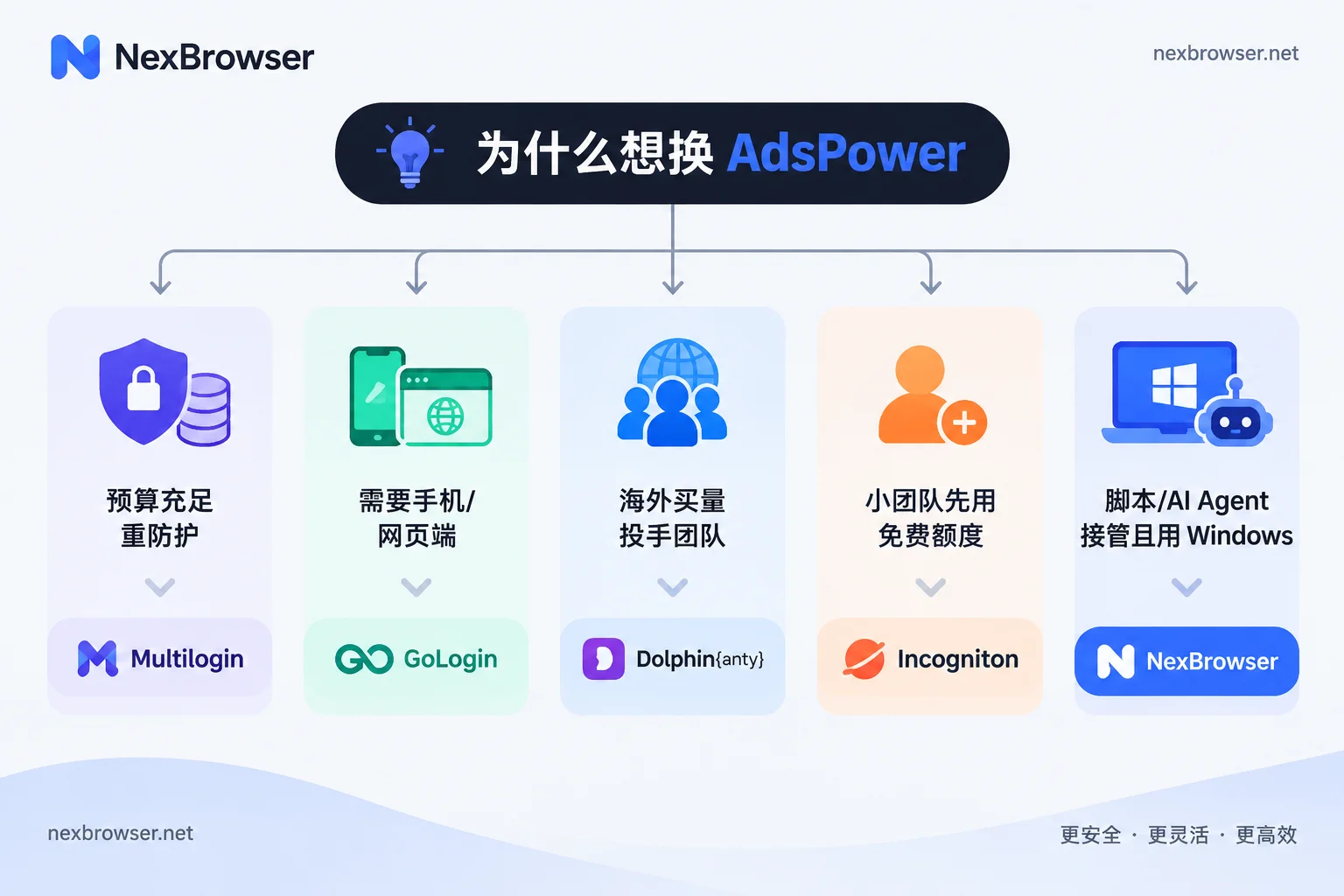
Which one to choose depends on why you want to switch:
- Ample budget, high business load, and you value mature fingerprint protection most: prioritize Multilogin.
- Need to manage environments on mobile or web, and don't want too much local configuration: consider GoLogin.
- Doing overseas media buying or affiliate marketing, and the team is mainly media buyers: consider Dolphin{anty}.
- Small team, few accounts, and want to start with a free tier: consider Incogniton.
- Want to connect scripts or AI agents to the browser, don't want to pay separately for API calls, and the team uses Windows: consider NexBrowser.
Below, we explain the suitable scenarios and caveats for each, and finally provide a trial and migration method.
First, clarify exactly what you want to replace
Before switching tools, articulate what you are dissatisfied with. Most reasons fall into four areas:
- Cost structure: Is it tiered by features, or charged only by number of profiles and members? How much free quota is there, and does it expire?
- Openness of automation: Is the Local API free? Are there call frequency limits? Can you use your existing frameworks (Selenium, Puppeteer, Playwright, etc.) to control environments?
- Operating system: How many people on the team use macOS? Do you need Android or web access?
- Team collaboration: Can permissions be assigned by role? Can members log into environments without seeing account passwords?
Note that each vendor's free quota and paid thresholds differ and may change. One vendor offering "a few free environments" or "API requires a higher-tier plan" is just that vendor's rule, not an industry standard. Before ordering, refer to the current statements on each vendor's official website.
Who each of the five alternatives suits
Multilogin: medium-to-large teams with ample budget and stability requirements
Multilogin is an early entrant in this field, with deep technical accumulation and relatively mature fingerprint protection mechanisms. The trade-off is that overall pricing is on the higher side, making it more suitable for well-funded medium-to-large overseas enterprises, or scenarios with many accounts and high business load. For teams with few accounts just starting out, the trial-and-error cost at its price point may be relatively high.
GoLogin: cross-platform management needed
GoLogin's strengths are cross-platform support and ease of use. Besides a desktop client, it also supports Android mobile and cloud web management, and has built-in proxy options. If your team often handles accounts on phones, or doesn't want to do complex local configuration on every computer, it's worth trying first.
Dolphin{anty}: overseas media buying and affiliate marketing
Dolphin{anty} is widely used in overseas media buying and affiliate marketing circles. Its interface is designed around the habits of ad buyers, and it offers batch tags, campaign status labels, and a certain free environment quota. Note that large-scale automation API calls require a paid plan. If you plan to run scripts heavily, check the API-related plan conditions first.
Incogniton: e-commerce and social media multi-accounting for small-to-medium teams
Incogniton targets small-to-medium teams and suits basic e-commerce and social media multi-accounting. According to public reviews, its free plan usually includes 10 profiles (subject to the current official website terms), and its features are fairly standard. Its weakness is advanced automation and large-scale high-concurrency script execution, where its capabilities are relatively limited. Teams with few accounts and mainly manual operations will find it relatively hassle-free.
NexBrowser: Windows teams focused on automation and team collaboration
NexBrowser's pricing model is no feature tiers; paying only buys window and member capacity. The free tier opens all features, requires no credit card, and the quota does not expire (tied to a limited-time free campaign page; subject to that page's current terms). The Local API is free with unlimited calls, and you can use Selenium, Puppeteer, Playwright, browser-use, and Playwright MCP to control environments. It also provides no-code RPA and AI agents.
At the environment level, each environment's cookies, cache, local storage, and proxy are independent, and fingerprint parameters are configured per environment and kept consistent. Proxies support batch import and one-click detection for HTTP/HTTPS/SOCKS5. Configuration is synced encrypted via the cloud, so logging in on another computer restores it. Teams can assign permissions by role and share environments without passwords.
The limitation is the operating system: currently only a Windows client, and the macOS version is still in development. If macOS users are the majority on your team, you'll need to choose another tool for now, or wait for the macOS version before evaluating.
Don't just look at rankings: run these things through on free tiers before deciding
Review rankings can help narrow the field, but which one suits you should be verified with your own real workflow. We suggest picking two or three candidates and trying the following with a few non-core accounts each:
- Create an environment: Create a new environment and confirm cookies and local storage are not shared.
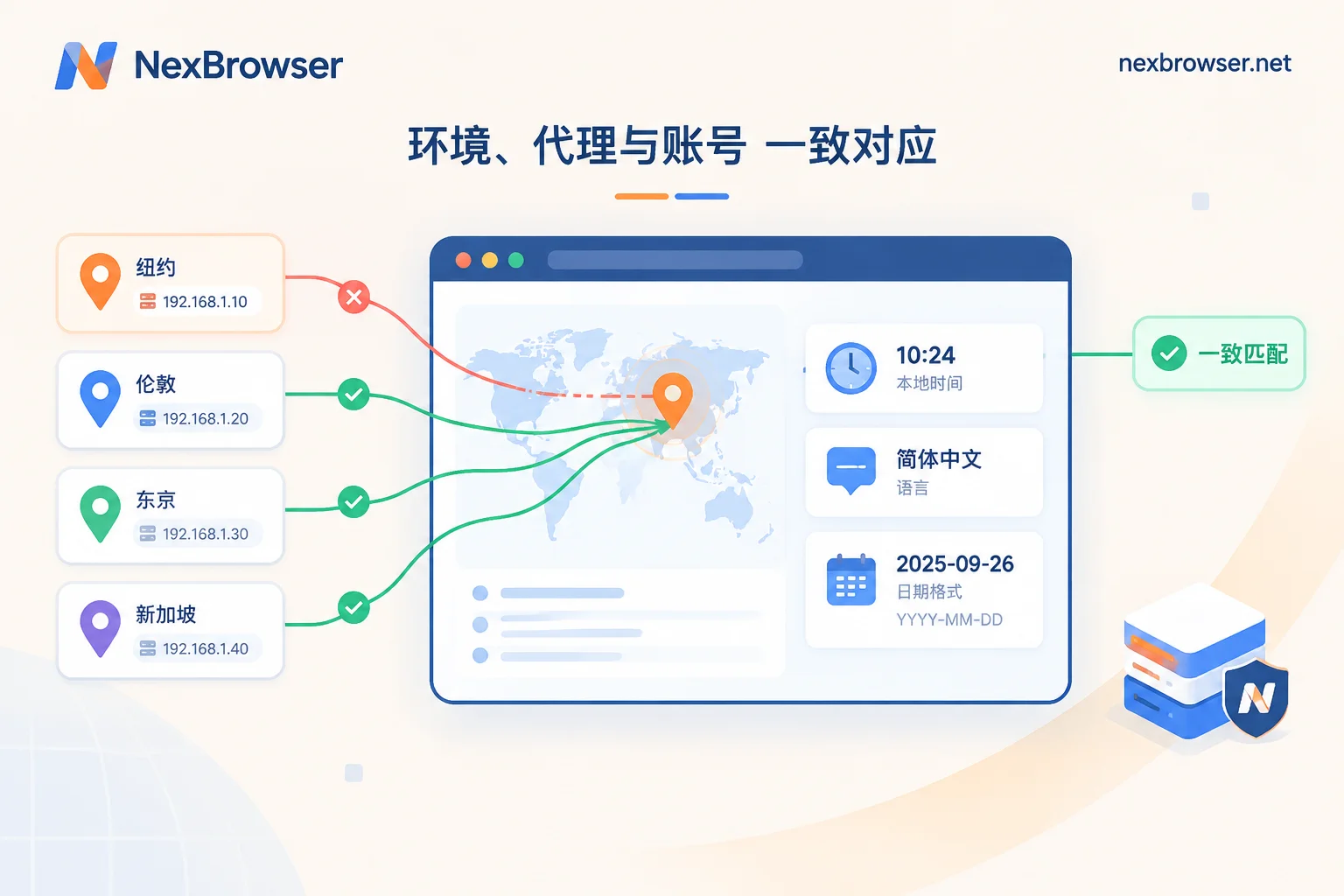
- Bind a proxy and confirm the exit: Bind a proxy to the environment, open an IP detection page inside it, and check whether the exit IP, time zone, and language are consistent. For troubleshooting when they are not, see How to troubleshoot IP and browser time zone/language mismatches.
- Check fingerprint consistency: Use detection tools to see if there are spoofing leaks. You can refer to the Antidetect browser environment authenticity detection checklist.
- Connect your automation: Use the framework you currently use to connect to a launched environment, run a real script, and see if it is limited by call counts or plan restrictions.
- Switch machines and handover: Log in on another computer and see if the environment can be restored; assign permissions to a colleague and see if they can use the environment without seeing the password.
These can all be run through on free tiers before deciding how many windows and members to pay for. For a more complete selection approach, see How to choose an antidetect browser; for when to scale up from a free tier, see How far can a free antidetect browser go.
Migrating from AdsPower with lower risk
Environment formats are not interchangeable between tools. A safer approach is to migrate in batches and rebuild one by one:
- Migrate unimportant accounts first: Observe for a while to confirm logins and daily operations work, then migrate core accounts.
- Reuse the original exit: For new environments, try to bind the same proxy as the original environment, and check the exit, time zone, and language as in step 2 above. An account suddenly changing exit region is more likely to trigger platform login verification.
- One account per environment, no mixing: During migration, do not log into multiple accounts in one environment.
- Keep old environments for now: After the new environments have been stable for a while, then clean up the old ones.
- Reassign team permissions: Reauthorize by role in the new tool. Don't send account passwords directly to members; for methods, see Let members log into environments without seeing account passwords.
It should be noted that no tool or configuration can guarantee accounts won't be associated. The above practices can only reduce anomalies caused by sudden environment changes, provided the accounts themselves are used compliantly.
If you decide to try NexBrowser
NexBrowser is suitable when: your team works on Windows, you want to fully validate on the free tier first, and you plan to have scripts or AI agents control environments next. You can install the client from the download page, create two or three environments first, batch import proxies and verify exits with one-click detection, then verify each item on the checklist above.
To connect scripts, first use the Local API to launch an environment and get the debugging port, then use Puppeteer or Playwright to connect to that launched environment, rather than letting the framework start its own browser. For specific parameters, see the Local API feature page and How to launch an environment via Local API and get the debugging port.


Comments(0)