 NexBrowser指纹浏览器-官方博客Blog
Both can meet the basic need of "isolating and managing multiple own accounts on one computer," but they differ in three things: whether you need a Firefox kernel, whether automation relies on ready-made RPA templates or on scripts and AI agents, and how granular team permission management needs to be.
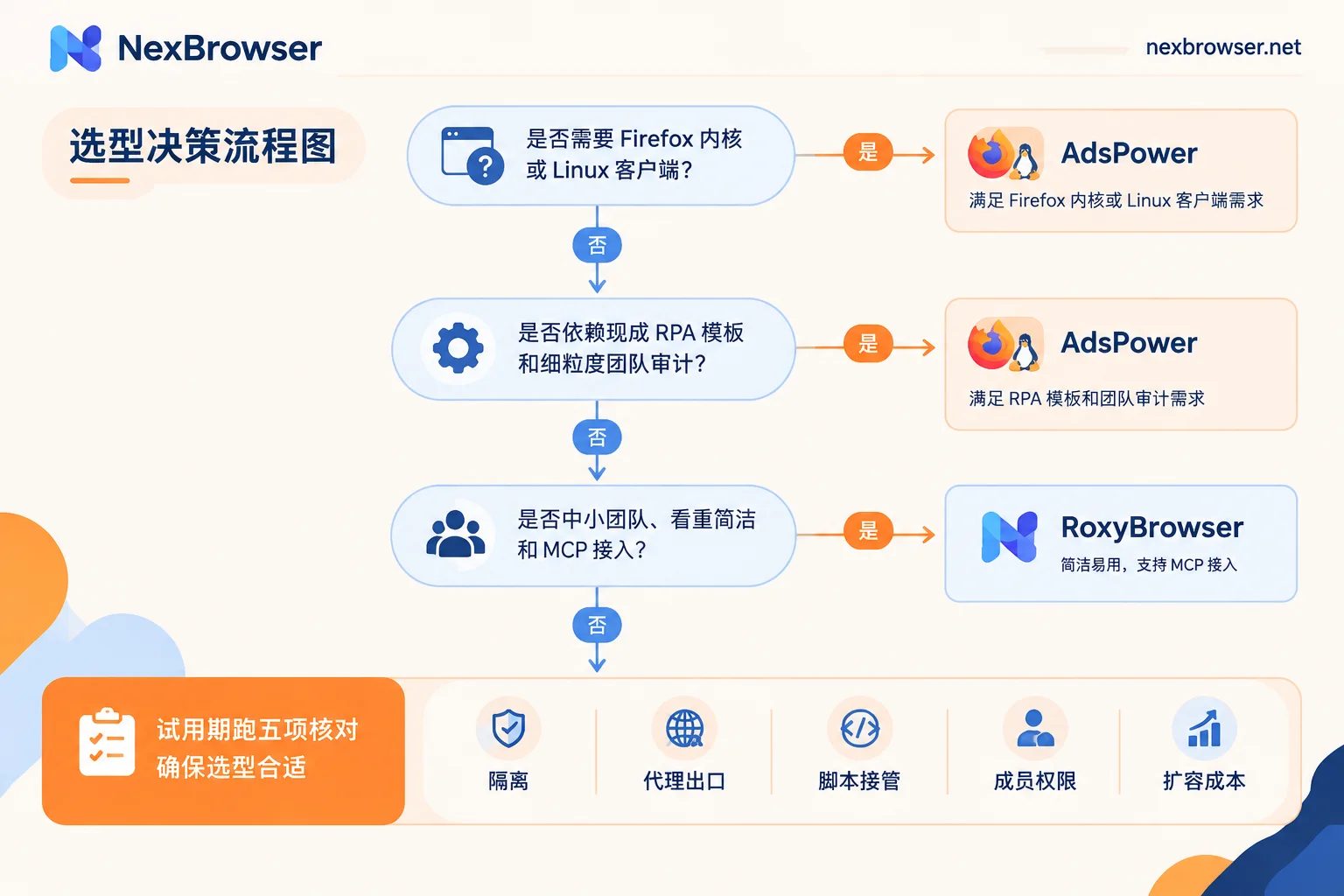
- When AdsPower is a better fit: You need to distribute traffic between Chromium and Firefox kernels; you rely on ready-made RPA templates; your team is large and needs fine-grained role permissions and operation logs; someone uses Linux.
- When RoxyBrowser is a better fit: You are an individual or a small-to-medium team; Chromium alone is enough; you want a simple interface and quick onboarding; you plan to connect an AI agent via MCP; you are budget-sensitive.
Most public comparison articles come from vendor blogs, including those of these two and other antidetect browser vendors, and inevitably carry bias. Pricing tiers and free quotas for both are frequently adjusted, so before ordering, refer to the current pricing pages on their respective official websites. Also, no matter which one you choose, the tool only handles local environment isolation and cannot guarantee that accounts "won't be linked."
Item-by-Item Comparison by Requirement
| Dimension | AdsPower | RoxyBrowser |
|---|---|---|
| Kernel | SunBrowser (Chromium) + FlowerBrowser (Firefox), switchable within the same client | Chromium-based, with 200+ fingerprint parameters such as WebGL, Canvas, timezone, and fonts independently configurable |
| No-code RPA | Built-in workflow orchestrator, with official and community template marketplace | Relatively fewer ready-made templates |
| Local API | Supported, can integrate with Selenium, Puppeteer, etc. | Supports script takeover |
| AI control | Not highlighted in available materials | Has added AI control support such as the MCP protocol |
| Window sync | Yes | Yes |
| Team collaboration | More granular role-based access, environment grouping, and operation log auditing | Simple interface, low configuration barrier, aimed at small-to-medium teams |
| Client | Windows, macOS (including Apple Silicon), Linux | Windows, macOS |
| Configuration sync | Supports cloud sync and import/export | Supports cloud sync and import/export |
Kernel: First Confirm Whether You Need Firefox
If your business only runs on Chromium-based browsers, the number of kernels does not matter much to you. Focus on whether fingerprint parameters can be configured per environment and whether all parameters are consistent with each other. If you indeed need to run some environments on the Firefox kernel depending on the platform, currently only AdsPower can do this within the same client.
Automation: First Determine Whether You Rely on Templates or Code
- No coding, want to directly apply ready-made workflows: AdsPower's RPA template marketplace is more mature, saving you a lot of workflow building.
- Have developers using Playwright or Puppeteer scripts: Both provide Local API, so the difference is small. When evaluating, check whether the chain from starting an environment to obtaining a debug port to script connection is stable, and whether there are call limits.
- Want an AI agent to operate the browser directly: RoxyBrowser has followed up with the MCP protocol. For details, you can refer to How to connect browser-use and Playwright MCP to an antidetect browser. The principle is to connect to an already launched environment via CDP, which applies to most tools that provide a Local API.
Team: How Granular Permissions Need to Be and How Seat Costs Rise
AdsPower's role-based access and operation auditing are better suited for multi-person, multi-department scenarios. However, its pricing rises stepwise with the number of windows and member seats; the larger the team, the more you need to calculate operational costs in advance. RoxyBrowser targets small-to-medium teams and independent operators with simple configuration, but if you need capabilities like audit logs, first confirm whether they are provided in its help center.
System Platform: If Anyone on the Team Uses Linux, Rule It Out First
If someone on the team uses Linux, currently only AdsPower covers it. If members only use Windows and Mac, both work.
Before Ordering, Run These Five Checks During a Trial
You cannot judge good or bad just from a comparison table. It is recommended to run the following sequence during the free tier or trial period. Use the same steps for both so the results can be compared directly.
- Environment isolation: Create two environments and log into two accounts on the same test site. Close and reopen them to confirm that cookies and login states on both sides do not affect each other.
- Proxy exit: Bind different proxies to each environment. After launching, open an IP detection page and check item by item the exit IP, DNS, geolocation, and whether the browser's timezone and language match the proxy location. If direct connection or DNS leaks occur, the configuration is wrong. For how to check specifically, refer to How to detect the authenticity of an antidetect browser environment and disguise leaks; when timezone or language does not match, refer to How to align IP with browser timezone and language mismatch.
- Script takeover: Call the Local API to launch an environment, obtain the debug port, then use Playwright to connect and open a page. Also confirm whether the free tier has limits on calls or concurrency.
- Member permissions: Create a new member account and grant permission only for one group. After logging in, confirm that this member cannot see environments in other groups, then try revoking the permission.
- Scaling cost: Based on your expected number of windows and members six months from now, calculate costs according to the current pricing pages of both, rather than just comparing entry tiers.
If Neither Fits Perfectly
There are two common reasons: first, high script call volume and concern about API call or tier limits; second, wanting to run all features through before deciding how much capacity to pay for. In such cases, NexBrowser can be added as a third candidate to the same set of tests.
Its Local API is free and has unlimited calls, and it supports takeover by Selenium, Puppeteer, Playwright, browser-use, and Playwright MCP. The free tier opens all features, and paid purchases only cover window and member capacity. Note that it currently only has a Windows client, and the macOS version is still in development, so if someone on your team uses a Mac, it is not suitable for now.
If you decide to test it together, you can install the client from the download page and go through the five items above. For the call method in step 3, see the Local API documentation. If you want to learn about more candidate tools, see What alternatives does AdsPower have.


Comments(0)