NexBrowser指纹浏览器-官方博客Blog
Let's start with the conclusion: the free tier is not for "trying it out for a few days." Its correct use is to fully run through five things—environment isolation, per-environment proxy binding, fingerprint and exit consistency, script or Agent takeover, and machine migration restore. Tools that cannot validate these five things on the free tier will most likely not get better after you pay.
The real moment to spend money on adding windows is not when your account count grows, but when you start doing one of these: deleting old environments to make room, needing multiple windows online simultaneously for batch actions, handing environments to colleagues, or moving scripts from running one by one to running in parallel.
Step 1: Distinguish whether the free tier cuts features or capacity
There are roughly two designs for free tiers on the market. You must see clearly before choosing, because it directly determines whether you can validate the five things above without paying.
One cuts features: the free version only gives basic browser isolation, while proxy protocol support, API access, cloud sync, and team permissions are locked behind paid tiers. The problem with this kind of free tier is not that it gives little, but that you cannot validate key steps—for example, you want to confirm whether a script can take over, but the interface itself requires payment.
The other cuts capacity: all features are open, only the number of environments and members is limited. NexBrowser takes the latter approach: the free tier opens all features, no credit card required, and quota does not expire (specific terms are on the limited-time free activity page, subject to the current description on that page). What you pay for is window and member capacity; Local API calls are free and unlimited.
A reminder here: free quotas, whether a card is required, and whether quotas expire vary greatly between providers. Don't treat one provider's threshold as an industry norm when estimating your budget.
Five things the free tier should run through
Do these five things in order. Each step has a clear "how to confirm it really works." If you can't get through, don't rush ahead, and certainly don't rush to pay for more capacity.
1. Is environment isolation truly independent? Create two environments, log into two of your own accounts on the same platform in each, and keep both logged in and operating for over ten minutes. If they kick each other offline, then cookies, cache, and local storage are not separated. True isolation means each environment has its own independent storage directory, with no cross-reading or writing.
2. Can proxies be bound individually per environment, and can you confirm they take effect? After importing a proxy (HTTP/HTTPS/SOCKS5 are the three common types), first run the built-in detection tool, then actually open an IP-checking page inside the environment and verify whether the country, city, and ISP match what you purchased. Just seeing "connected successfully" in the software is not enough; the exit location must be judged by what the browser itself sees.
3. Do fingerprint parameters match the exit? A common misconception is pursuing the "rarest" parameters. What actually matters is consistency: whether timezone, language, and system platform match the proxy exit region. An environment showing a German exit but reporting UTC+8 timezone and Simplified Chinese is more likely to be noticed than a plain but fully consistent environment.
4. Can the automation interface connect? If you plan to write scripts later, this step must be validated on the free tier. A typical approach is to use the local API to launch a specified environment and get the debug port, then have Selenium, Puppeteer, Playwright, or browser-use, Playwright MCP connect to that already-launched environment via CDP—note it's connecting to an existing environment, not letting the framework launch a clean browser itself, which would bypass your configured fingerprint and proxy.
5. Machine migration restore. Do a cloud sync of the configuration, then log in on another computer and check whether the environment list, groups, and proxy bindings all come back. This step is easy to forget in daily use, but you only realize how important it is when you switch computers or your hard drive fails.
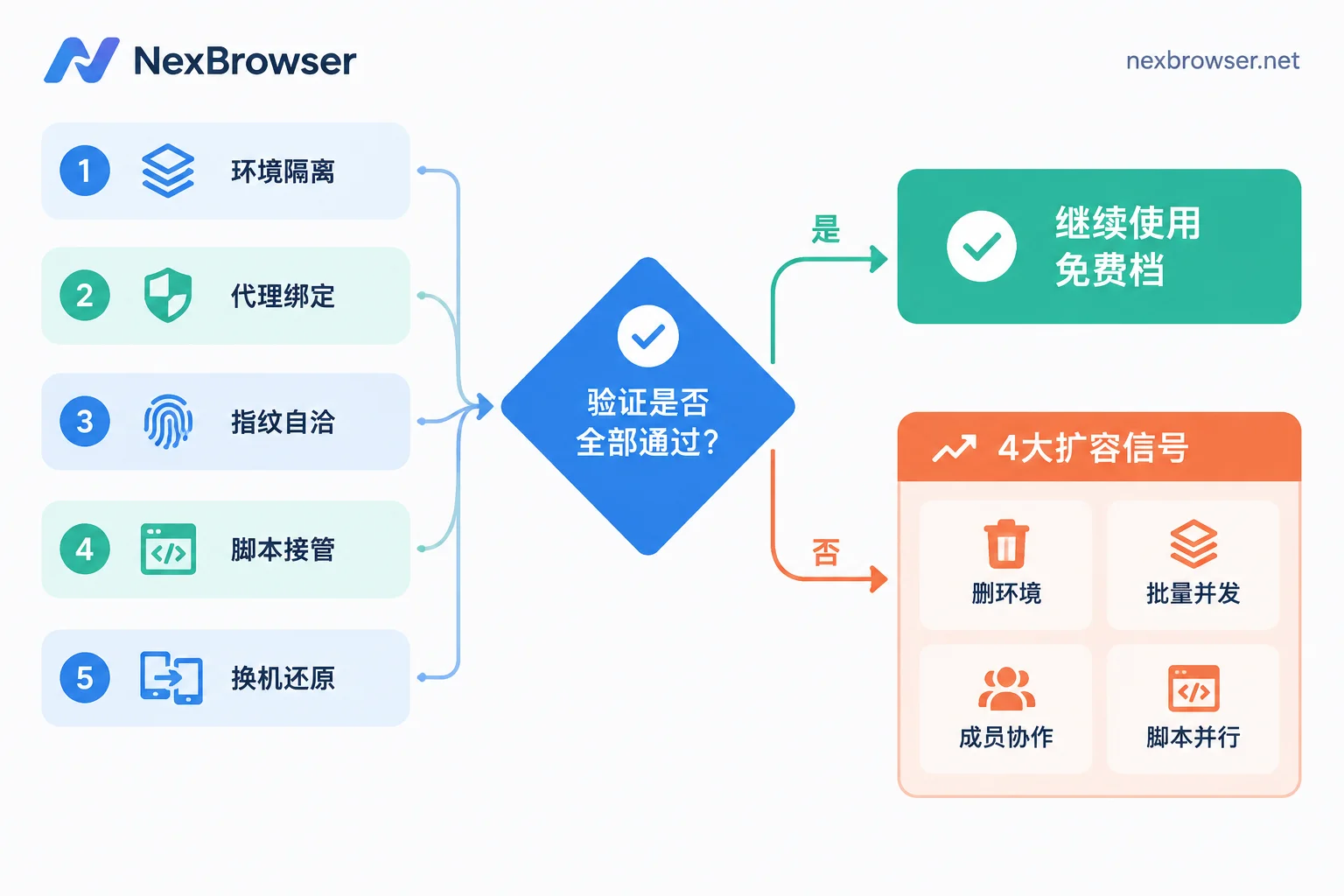
After running through these five things, your judgment of the tool will be basically accurate. As for basic concepts like what fingerprints are and whether multi-opening will be associated, the official user guide has already covered them, so I won't repeat them here. For horizontal criteria for choosing tools, see How to choose a fingerprint browser: Don't stare at ranking lists, first see if these four things can run through on a free tier.
Four signals that you should add windows
Signal 1: You start deleting old environments to make room
This is the hardest signal, and also the most easily overlooked cost.
The basic logic of a fingerprint browser is one account, one environment, one proxy, maintaining login state and environment consistency long-term. Deleting an environment is equivalent to clearing that account's local login state, cookies, and site authorizations. Next time you need it, you have to log in again, and re-logging in often triggers additional identity verification—captchas, email confirmations, device confirmations, even manual review.
So the criterion is not "how many accounts do I have," but "how many accounts do I need to keep ready to open at any time long-term." Once you start deleting old environments for new accounts, capacity is truly insufficient, and expanding is more cost-effective than repeatedly re-logging in.
Signal 2: Manually switching windows one by one starts slowing you down
For one person managing a dozen or so accounts, opening and handling them one by one is still acceptable. As the number grows, switching itself becomes the main time cost. What you need then is a multi-window synchronizer or RPA to distribute the same set of actions across multiple environments, and such batch operations require a corresponding number of environments to be open and scheduled simultaneously.
In other words: the total number of environments determines how many accounts you can store, while the number of simultaneous online environments determines how many you can operate at once. When you need batch efficiency, the latter is often what blocks you. For how to avoid mistakes, see How to operate multiple accounts at once with window synchronization without mistakes.
Signal 3: Environments need to be handed to colleagues
Moving from one person to several people working together requires member seats. The core need is not "one more person can log in," but authorizing environments in different groups to the right people, letting them directly open environments to work, without getting the platform's native account passwords or seeing groups not under their management.
This cannot be done by sharing account passwords: once credentials are spread out, they cannot be taken back, and when personnel changes occur, there is no clean recovery. For distributing sessions instead of credentials, and how to recover in order upon departure, see Let members log into environments but not see account passwords and How to recover browser environments and permissions after an employee leaves.
Signal 4: Scripts move from serial to parallel
For developers, the trigger is clear: initially scripts run in a queue, one task finishes and closes before the next opens, so one or two environments are enough. When you want multiple sessions to execute simultaneously—for example, multiple Agents each managing a group of accounts in parallel—each parallel session needs a resident independent environment as its carrier, so the number of environments must keep up with concurrency.
API calls themselves are unlimited on NexBrowser's free tier; the bottleneck is the number of environments that can reside simultaneously. For the connection method, see How Local API launches environments and gets debug ports.
Don't rush to add: three cases where expansion won't help
The bottleneck is the machine, not the quota. Each environment is an independent browser instance, consuming memory and CPU. Adding window quota won't make the machine faster. Before expanding, do a rough test: run five environments simultaneously on daily tasks, check memory usage and response speed, and estimate your machine's actual concurrency limit. If it starts lagging at 8, buying 50 windows only means running them in batches.
There are zombie environments in the list. Long-unused accounts, abandoned test environments, duplicate environments—these occupy quota but produce nothing. Before expanding, take inventory and archive or delete what you no longer use. Before archiving, confirm that these accounts really don't need to keep login state later.
The problem is actually the proxy. One type of situation is easy to misjudge: accounts frequently go offline and require repeated logins, so you think it's insufficient environments. The actual cause may be unstable proxies or frequently changing exits. First troubleshoot with How to confirm exit location and timezone/language consistency after binding a proxy, confirm it's not a network-layer issue, then discuss expansion.
How much to buy: environments by accounts, members by actual handlers
A usable estimation method:
- Number of environments ≈ number of accounts that need long-term login state + about 20% buffer (for new account trial runs, temporary environments, template tests). Don't buy based on "how many accounts I might do in the future."
- Simultaneous opens are determined by machine hardware, which is separate from how many windows you buy. Window quota governs how many you can store; hardware governs how many can run at once.
- Member seats are counted by the number of people who actually need to independently log in and operate environments, not by total team size. People who only view reports and don't touch environments don't need seats.
When batch-creating environments, fix common groups, proxy policies, and launch parameters into templates for replication, which saves a lot of repetitive configuration. See How to save browser environments as templates for batch replication.
Also note: the client is currently Windows only; macOS is still in development. If your team has Mac colleagues, factor this in before purchasing member seats.
Next steps
If you're still in the evaluation stage, run through the five things above on the free tier, focusing on step 2 (proxy exit verification) and step 5 (machine migration restore)—these two expose problems best and are most often skipped. The current capacity and conditions of the free tier are subject to the free activity page.
If you've already hit any of the four signals above, especially starting to delete environments for space or needing to grant permissions to colleagues, then look at window and member capacity based on actual account count and number of handlers, rather than buying a big package first and then figuring out how to use it up.
Finally, a note: the above is all about isolation and collaboration configuration for your own accounts. No environment isolation, proxy binding, or fingerprint setting constitutes a guarantee against platform association; platform detection logic looks beyond just the browser layer.