NexBrowser指纹浏览器-官方博客Blog
The wrong order means redoing everything later. The correct sequence is: create an isolated environment → bind a proxy to it and verify exit location → get a number based on the exit region → return to this environment's page to submit the number → receive the SMS within the time limit and fill in the code.
The most common mistake is getting a number first, then configuring the network. The country code of the number must match the exit IP's region. Getting the number first locks in the most unchangeable factor—either the SMS won't be sent at all, or the submission will be blocked.
Why this step must be done in an isolated environment
Registration and verification are the most heavily checked steps in an account's lifecycle: the page reads cookies, local storage, timezone, language, and a bunch of fingerprint parameters, while also checking your exit IP. If multiple accounts share the same browser data, traces left at this step can easily implicate each other.
So before getting a number, confirm the environment is clean and isolated: cookies, cache, local storage, and proxy belong only to it; fingerprint parameters are consistent (e.g., timezone, language, and IP region shouldn't conflict). Each NexBrowser environment is isolated at this granularity, and proxies are bound per environment, not set globally.
To be clear: environment isolation and number services only separate traces of different accounts' operations. They are not a guarantee against any platform's risk control. Use only for compliant management of your own accounts.
Alignment: environment, exit IP, and number's country code
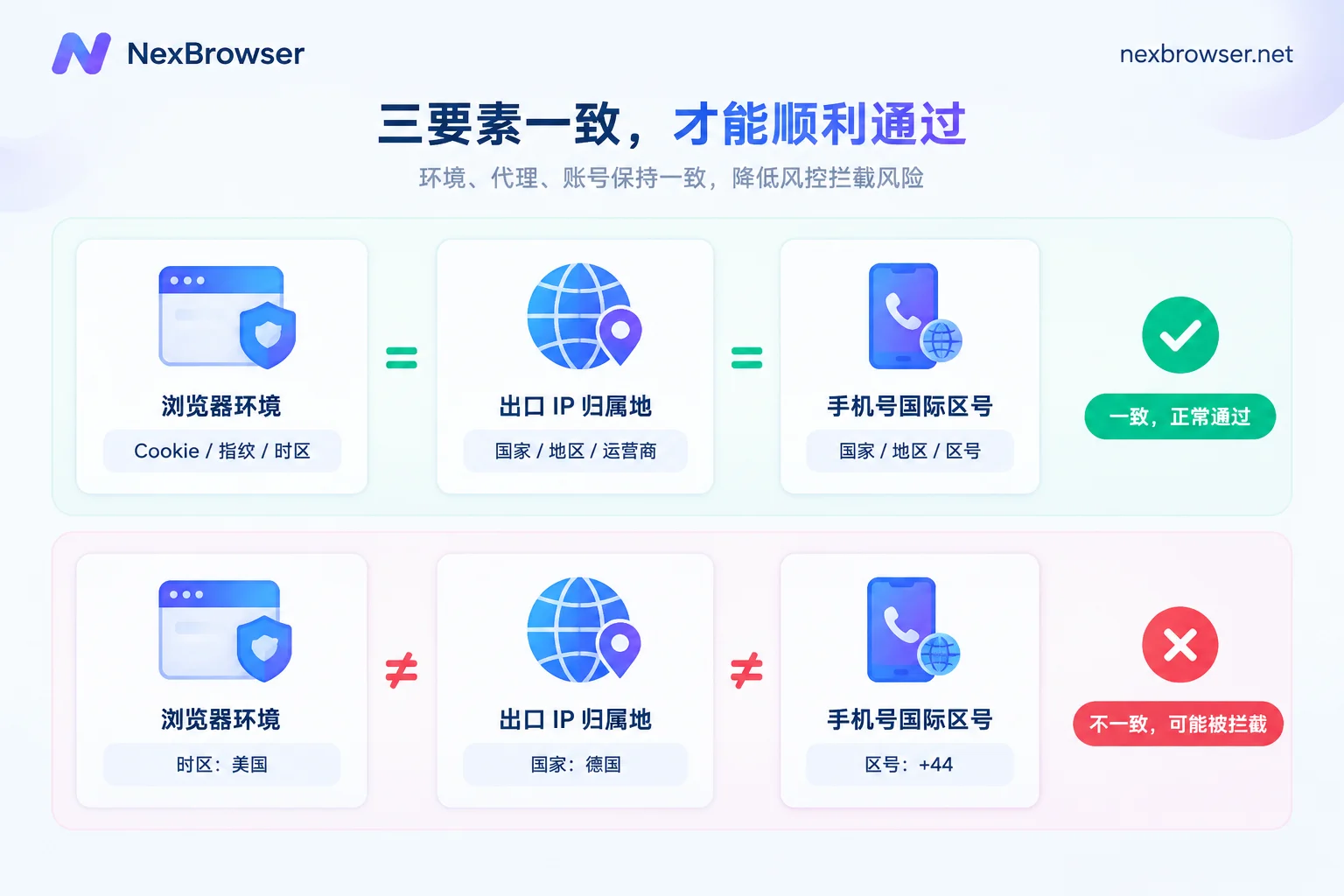
The platform's check logic is straightforward: the country of your IP should match the country code of the phone number you enter. If these three don't align, at best the SMS won't be sent; at worst the form submission is blocked.
The fixed action is: decide the region first, then the number. For example, if this account is for the US, first bind a US exit proxy to the environment. After it passes the check, then go to the number platform and filter for US numbers—not the other way around.
You can import your own HTTP/HTTPS/SOCKS5 proxies or bind residential IPs directly. After binding, always run a connectivity test; don't assume "can open a webpage" means it passed. For details on verifying exit location, see bind proxy and verify exit, and these two articles: How to confirm exit location and timezone/language match after binding a proxy, Troubleshooting one-click detection failure after proxy import.
Five actions from getting a number to filling in the code
- Open the target environment and visit an IP-checking page to confirm the exit country and timezone match the region you want to register. This takes ten seconds and can save half the failures later.
- Get a number by platform and region. Number platforms usually price and supply numbers by target service (social media, e-commerce, AI platforms, etc.) and country. Choosing the wrong service item could mean "you get a number but can't receive this platform's SMS."
- Enter the full number, including the international country code. Many forms auto-fill the country code—don't paste it again. Double-check before clicking send.
- Don't switch away after sending; return to the number panel and refresh to wait for the SMS. Verification codes are usually 4-6 digits, valid from 60 seconds to a few minutes. Expiration means starting over (most number platforms charge again).
- Enter and submit within the time limit, then record the number, region, and proxy exit in the environment's notes. For future two-factor authentication, you'll need to know which number you used.
If you use NexBrowser, you don't need to switch between browser and number backend for getting a number and reading SMS—it can be done directly in the environment. For specific entry points and supported regions, see Receive verification codes in the environment. The numbers themselves are provided by NexSMS; the browser handles environment isolation, proxy binding, and retrieving and filling in the code.
If you don't receive the code, check in this order
Don't switch numbers immediately; most issues aren't the number:
- First check exit location: Is the proxy offline or switched to a node in another country? If the IP changes, the same number may no longer match.
- Then check number region and service item: Does the number's country match the exit country? Was the service item you selected exactly the platform you're registering?
- Check if rate-limited: Repeated send requests on the same number or exit within a short time will cause the platform to silently not send. Waiting a few minutes is more effective than clicking send five times in a row.
- Only then switch numbers: Confirm the first two points before switching, otherwise switching ten numbers gives the same result.
Temporary vs long-term numbers: choose based on how long the account will live
One-time temporary numbers are cheap, but the number is released after use. Later, if a login from a different location triggers two-factor authentication or the platform performs a security check, you can't get the number back—the account is likely lost.
The rule is simple: if the account is only for trial, testing, or one-time use, a temporary number is fine; if it will be logged into continuously, bound to payment, or operated long-term, use a long-term rental or dedicated number from the start. Saving a few cents by using a temporary number for a long-term account usually costs the entire account.
Two extra actions for batch operations
When opening a dozen environments at once, fix the stable parts: group environments by region, save baseline configurations for the same region as templates to copy, and keep fingerprints independent. After bulk-importing proxies, run a unified test before getting numbers. For getting numbers and filling in codes, do them one by one—verification codes have time limits, and having five environments waiting for SMS often means five simultaneous expirations.
For environment templates and grouping, see How to save browser environments as templates for batch copying.
Conclusion
Just remember the order: isolate the environment first, confirm the proxy first, get a number matching the exit region, fill in the code within the time limit, and record the number info back in the environment notes. Any remaining failures will likely fall under the troubleshooting order above.
Before your first success, it's recommended to run through the entire process with an unimportant account to confirm that getting a number, receiving the code, and filling it in works under your network conditions—then proceed with official accounts.