 NexBrowser指纹浏览器-官方博客Blog
In the automation and data scraping engineering of 2026, many developers and business teams have encountered the same anomaly: the code logic has no errors, expensive dynamic residential proxy pools are integrated, and even Playwright or Puppeteer have been patched to remove automation features. Yet after running a few hundred pages or continuously for a few days, the target platform still precisely pops up captchas, or even directly bans accounts and blocks requests.
This is not only true for traditional crawlers, but also for the currently popular AI browser agents (such as those built on browser-use, Claude Code, or various open-source frameworks). They are omnipotent in demo presentations, but once they enter real production sites that require login states or high-frequency interactions, they often completely stall at the first risk control wall.
Where exactly is the problem? The answer is not that the disguise of a single request is not smart enough, but that you are still using a "stateless" approach to fight against the platform's "cross-session correlation" risk control engine. This is why more and more engineering teams and cross-border operators are beginning to introduce anti-detection browsers as underlying infrastructure into data scraping and AI automation pipelines.
I. Why does "IP switching + stealth patches" frequently fail in 2026?
Early anti-bot detection mainly focused on explicit automation markers like navigator.webdriver, or simply relied on IP access frequency blacklists. But today, the risk control systems of mainstream e-commerce, social media, and content platforms have evolved into multi-dimensional reputation scoring and cross-time-window signal correlation:
- "Blank sessions" are themselves high-risk features: Real internet users' browsers inevitably accumulate historical cookies, LocalStorage caches, and complex IndexedDB local database states. Traditional headless browsers or cloud temporary containers start as a clean "blank state" every time. When a large number of requests carrying brand-new blank states密集访问 high-value pages, even if the IP changes each time, the risk control model can easily assign extremely low reputation scores to such sessions without historical accumulation.
- "Statistical distortion" of hardware fingerprints and network environment: Many scraping scripts are accustomed to casually piecing together User-Agents, or running across the entire web with fixed default parameters. If the request header claims to be macOS, but the underlying WebGL renderer, Canvas noise, Audio features, or font list expose the Linux container's底色, or the hardware concurrency (CPU core count) severely deviates from the statistical distribution of real human devices, it will be directly exposed in millisecond-level JS environment checks. (Further reading: How to Read Browser Fingerprint Detection? Debunking the Green Light Illusion and 2026 Multi-Account Environment Self-Check List)
- Identity drift triggers collateral bans: For AI Agents that need to log in to accounts to scrape data or execute tasks, the device used to log in on Monday afternoon and the device used to execute tasks on Thursday morning must maintain high continuity in fingerprints, network egress, and local storage. If each script run randomly generates a new fingerprint, or proxy IPs jump across regions causing time zone, language, and egress geolocation conflicts, the account will soon be forcibly logged out or banned due to "abnormal environment changes."
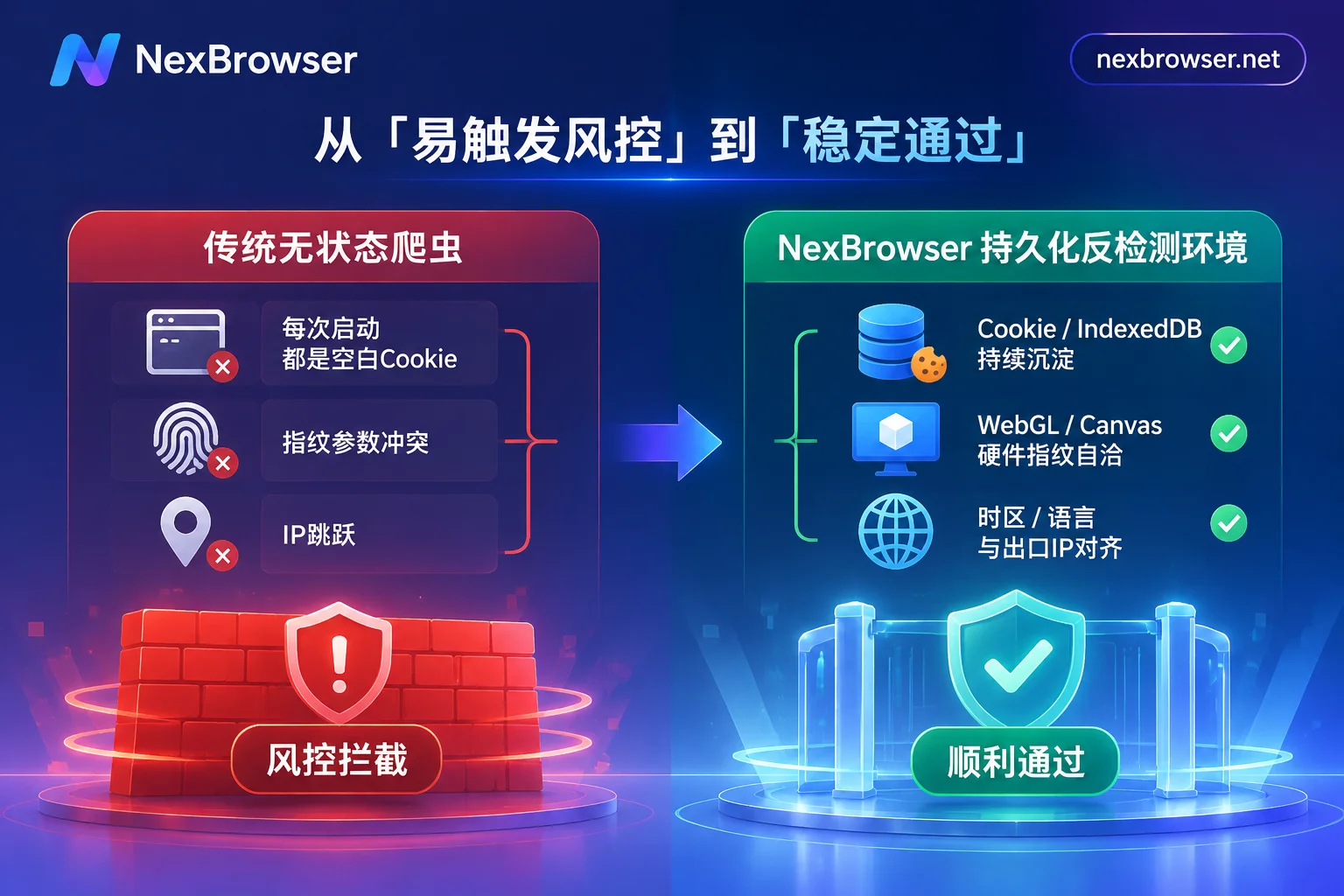
To break this deadlock, the key is to upgrade the automation foundation from "disposable temporary windows" to an anti-detection browser workbench with persistent identity, parameter consistency, and complete environment isolation.
II. Breakthrough approach: Build a "persistent digital avatar" with an anti-detection browser
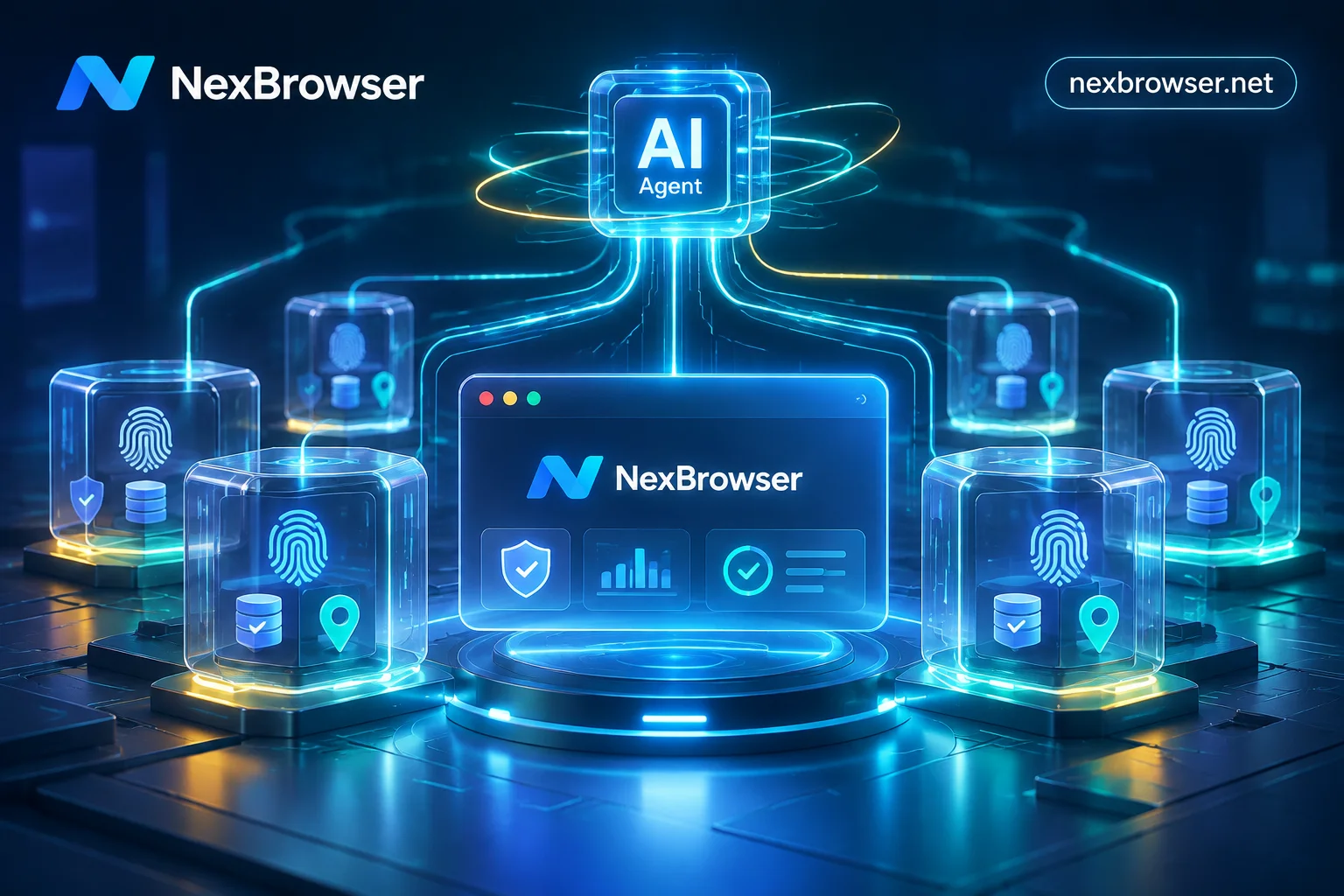
In data scraping, competitor monitoring, and multi-account automation scenarios, NexBrowser (a multi-account fingerprint browser workbench based on the Chrome kernel) provides not a disguise technique for a single request, but a complete lifecycle management of real browser environments that can be reused long-term.
1. Deep environment isolation and state persistence, say goodbye to "blank startup"
In NexBrowser, each task or account corresponds to an independent browser environment. Through the multi-account environment isolation mechanism, each environment's cookies, cache, local storage (including IndexedDB), and proxy settings are completely independent, and environments do not read each other. To learn the specific details of underlying isolation, you can refer to the previous technical breakdown: How to Achieve Thorough Browser Environment Isolation? From IndexedDB Anti-Leakage to AI Agent Multi-Account Sandbox Practice.
More importantly is state continuity. When an automation task ends and the environment is closed, data such as cookies and local storage are encrypted and synced to the cloud according to the selected scope; the next time the task wakes up that environment (even if logged in on a different computer), the historical login state and browsing traces are restored exactly as they were. The AI Agent or scraping script can directly continue from the last progress, truly cultivating a naturally aging high-reputation session.
2. Cloud-synced kernel templates and full-dimensional fingerprint consistency
To avoid "synthetic illusions" caused by manual parameter piecing, NexBrowser's fingerprint parameter protection system supports generating Canvas, WebGL, fonts, Audio, screen resolution, hardware parameters, time zone, language, WebRTC policy, and User-Agent independently per environment. These parameters are not blindly random, but generated based on built-in Windows, macOS, Android, and iOS parameter templates, ensuring that hardware and software metrics are consistent with each other, and the templates are continuously updated in the cloud with Chrome kernel versions.
3. Proxy pre-check and automatic alignment of network signals
Many scraping or account nurturing tasks fail because the proxy node unexpectedly goes offline, causing the real local IP to be exposed instantly; or after switching proxies, the system time zone remains unchanged.
In NexBrowser's proxy and residential IP management, you can import HTTP / HTTPS / SOCKS5 proxies individually or in batches (you can also link NexIP accounts to bind residential IPs by country/region with one click). After a proxy is bound to a single environment, the environment's WebRTC, time zone, language, and geolocation automatically match and align with the proxy egress IP. Crucially, before the environment starts, it first detects the connectivity, latency, and attribution of the proxy egress. If the detection fails, the environment refuses to start, and daily proxy changes do not clear existing cookies and local storage, eliminating signal gaps from the source (for detailed configuration methods, see: How to Configure Proxy IP Binding to Browser Without Pitfalls? A Practical Guide from Pre-Start Pre-Check, Parameter Alignment to Batch API Scheduling).
For scraping sites that require registering new accounts or triggering SMS secondary verification midway, operators can also directly use the built-in cloud phone number (NexSMS Number Center) in the environment sidebar to get numbers by country/region and target platform, receive SMS, and fill in verification codes. Important accounts can also be converted to long-term rental, without leaving the current browser window to piece together third-party SMS receiving tools.
III. Four automation takeover solutions: Let scripts and AI Agents run in a secure sandbox
Once the underlying anti-detection environment is ready, how to smoothly run data scraping tasks, daily inspections, and AI Agents? NexBrowser provides four layers of capabilities, covering all needs from developer code engineering to operator no-code implementation.
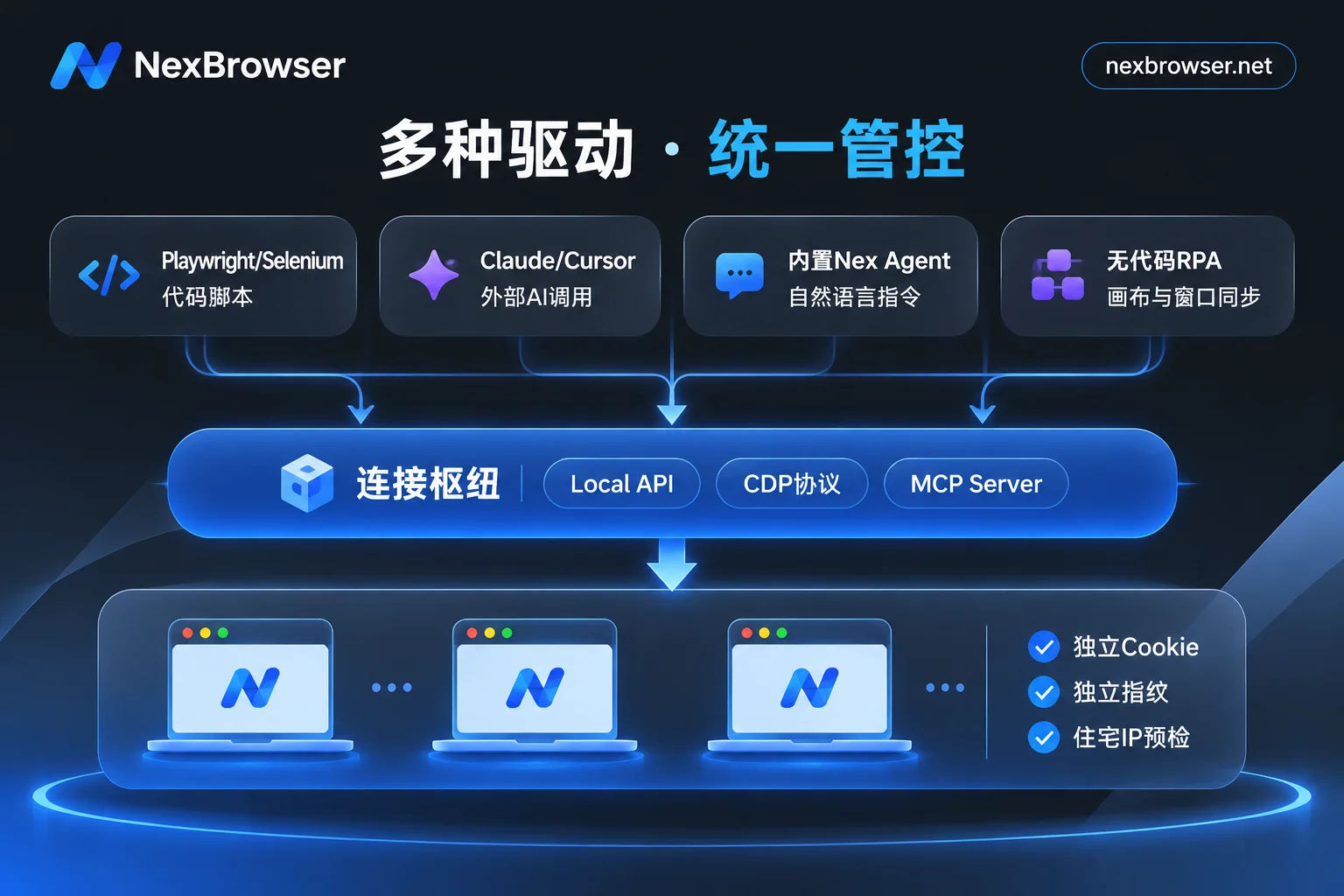
| Automation method | Core applicable scenarios | Access/operation threshold | Identity and state management |
|---|---|---|---|
| Local API (CDP takeover) | Large-scale customized data scraping, existing Playwright/Puppeteer/Selenium engineering teams | Developers (provides HTTP interface and access key) | Scripts schedule environments via API, each environment independently retains cookies and fingerprints |
| MCP Server direct connection | Use external AI coding assistants like Claude Code, Cursor, or Agent frameworks to directly control the browser | Developers / AI enthusiasts (standard MCP protocol) | External AI directly lists, opens specified isolated environments, and performs page interactions |
| Client built-in AI Agent | Natural language-driven web information extraction, dynamic form filling, cross-page screenshots, and multi-window parallel tasks | Zero code (describe tasks in natural language dialogue) | Login state automatically saved and resumed per environment, supports requesting manual approval before high-risk operations |
| No-code RPA + window synchronization | Batch inspections with fixed processes, form submissions, and temporary multi-window collaboration requiring human judgment | Operators (drag-and-drop canvas / master-slave window synchronization) | One script bound to a batch of environments for concurrent execution, with per-environment per-step error troubleshooting logs |
1. Developer's first choice: Local API and MCP protocol with zero downgrades
For developers who have already written a lot of Python / Node.js scraping scripts, there is no need to overturn the original code. After enabling OpenAPI in the NexBrowser Windows client, you can dynamically create, open, and close environments through local HTTP interfaces (with access keys), bind proxies in batches, and directly read CDP (Chrome DevTools Protocol) connection information.
This means your existing Selenium, Puppeteer, Playwright, WebDriver, or even open-source browser-use frameworks can directly take over NexBrowser environments that already have fingerprint isolation and proxy alignment (see Local API and automation feature description and OpenAPI interface documentation).
More aligned with 2026 AI workflows, NexBrowser natively provides NexBrowser MCP Server. If you are using clients that support MCP (Model Context Protocol) such as Claude Code, Codex, or Cursor, you only need to complete the configuration according to the MCP integration manual, and then external large models can directly list your anti-detection environments, wake up specified windows on demand, and complete data retrieval and operations in real isolated pages.
It is worth mentioning that many similar tools lock API calls into expensive high-tier enterprise plans, but in NexBrowser, Local API and MCP interfaces are free and unlimited in calls, and even free-tier users have full access with the client (for the cost calculation of interface selection, see: Fingerprint Browser API Selection Guide: Calculate Plan Thresholds and Interface Limits, Build a Zero-Downgrade Automation Foundation).
2. Out-of-the-box intelligent agent: Client built-in Nex Agent
If you don't want to set up an environment and write code yourself, but face complex web pages with frequently adjusted structures, you can directly wake up the client's built-in AI Agent (Nex Agent). You only need to describe the task goal in natural language, and Nex Agent will automatically open the target environment, operate the page, fill forms or take screenshots, and even break down large tasks into multiple windows for parallel execution.
Since it runs directly on the persistent environment, account login states are properly saved per environment and directly resumed next time. To prevent business risks caused by AI hallucinations, you can set it to "request approval before executing irreversible operations," and the whole process supports review and replay (the built-in Agent's model calls are billed by token, directly purchased on-demand with account balance).
3. Efficiency tool for operations teams: No-code RPA and window synchronization
For daily data export, product listing, or account inspections with fixed processes, handing them to large model loops is often time-consuming and consumes tokens. In this case, using RPA scripts (Beta) is more cost-effective. Operators can drag and drop to orchestrate variables, conditional judgments, loops, and waits on a no-code canvas, and set failure retries for each step. When one script is bound to a batch of environments for batch execution, each environment still strictly uses its own cookies, fingerprints, and proxies; once a webpage gets stuck, the execution log records per-environment and per-step, instantly locating the failure node.
When encountering temporary batch tasks with complex captchas or requiring real-time human comparison and judgment, enable the window synchronization function, select a master window, and your clicks, inputs, scrolls, and address jumps will be synchronized to the selected slave windows according to the set operation interval and throttling strategy, achieving one-to-many human control while maintaining independent fingerprints and proxies for each. (Further reading: How to Implement Multi-Account Business with AI Browser Automation: Practical Division of Labor among Built-in AI Agent, RPA, and Window Synchronization)
IV. Team collaboration and asset security: Manage scraping and operations environments
When data scraping or matrix business moves from solo to team operation, the biggest hidden danger often comes from internal management chaos: for example, multiple engineers or operators simultaneously open the same account environment, causing sessions to overwrite each other and concurrency anomalies, or account passwords circulating in plain text in spreadsheets.
Under NexBrowser's team collaboration architecture, team founders can create their own roles and finely allocate the groups and tags that members can see and operate in the role and permission matrix:
- Password-free environment sharing: After binding a platform account to an environment, the login is automatically filled when the window starts, and members do not need and cannot access the underlying password (and passwords stored in the window only remain on the local machine and are not migrated with cloud sync).
- Anti-concurrency conflict lock: The same environment can only be opened by one member at a time, completely eliminating risk control alarms caused by multiple people operating the same environment from different locations simultaneously.
- Full-chain traceability: All data is encrypted during transmission and storage, permission changes and member operations are traceable, and with the ability to save as templates, batch create, and batch bind proxies after configuration, engineering handovers for hundreds of teams are well organized.
Conclusion: Use a deterministic foundation to cope with uncertain risk control
Whether you are a crawler engineer who needs to break through JA4/TLS and behavioral risk control defenses, an independent developer looking for a stable persistent sandbox for AI Agents, or a business leader managing dozens of cross-border stores and social media matrices, the focus of confrontation in 2026 has shifted from "single-point stealth techniques" to "full-chain environment consistency and automation collaboration".
Rather than repeatedly struggling among tools with high payment thresholds and layer-by-layer feature downgrades, it is better to directly experience a workbench with a purer architecture. NexBrowser adheres to the design philosophy of no feature tiers—go to the limited-time free event page to start experiencing with zero threshold. The free tier also opens the full set of core features (including Local API, MCP, RPA, etc.), no credit card required, and quotas never expire; when your business scales up and needs to pay, you only need to purchase according to the actual required window and member capacity (see pricing plans for details, supporting Alipay and USDT).
Visit the client download page now to get the Windows 10/11 (64-bit) installer, or combine with the official beginner tutorial and troubleshooting guide to run your first anti-detection persistent automation environment in 5 minutes.