 NexBrowser指纹浏览器-官方博客Blog
The log audit feature of a multi-user collaborative anti-detection browser can capture three types of records: when an environment was started or stopped and by whom, when member and permission changes occurred, and which configuration operations were modified and by whom. What it cannot capture is what members did to page content inside the window. In the admin panel, you can filter by member and time under the "Operation Logs" section. In August 2026, RoxyBrowser released version 4.0.3, adding window open and close records to operation logs, and AdsPower also enhanced the precision of operation log descriptions, indicating that log audit has become a core dimension of team collaboration tools.
First Type of Record: Can Fingerprint Browsers Record Window Open and Close Times?
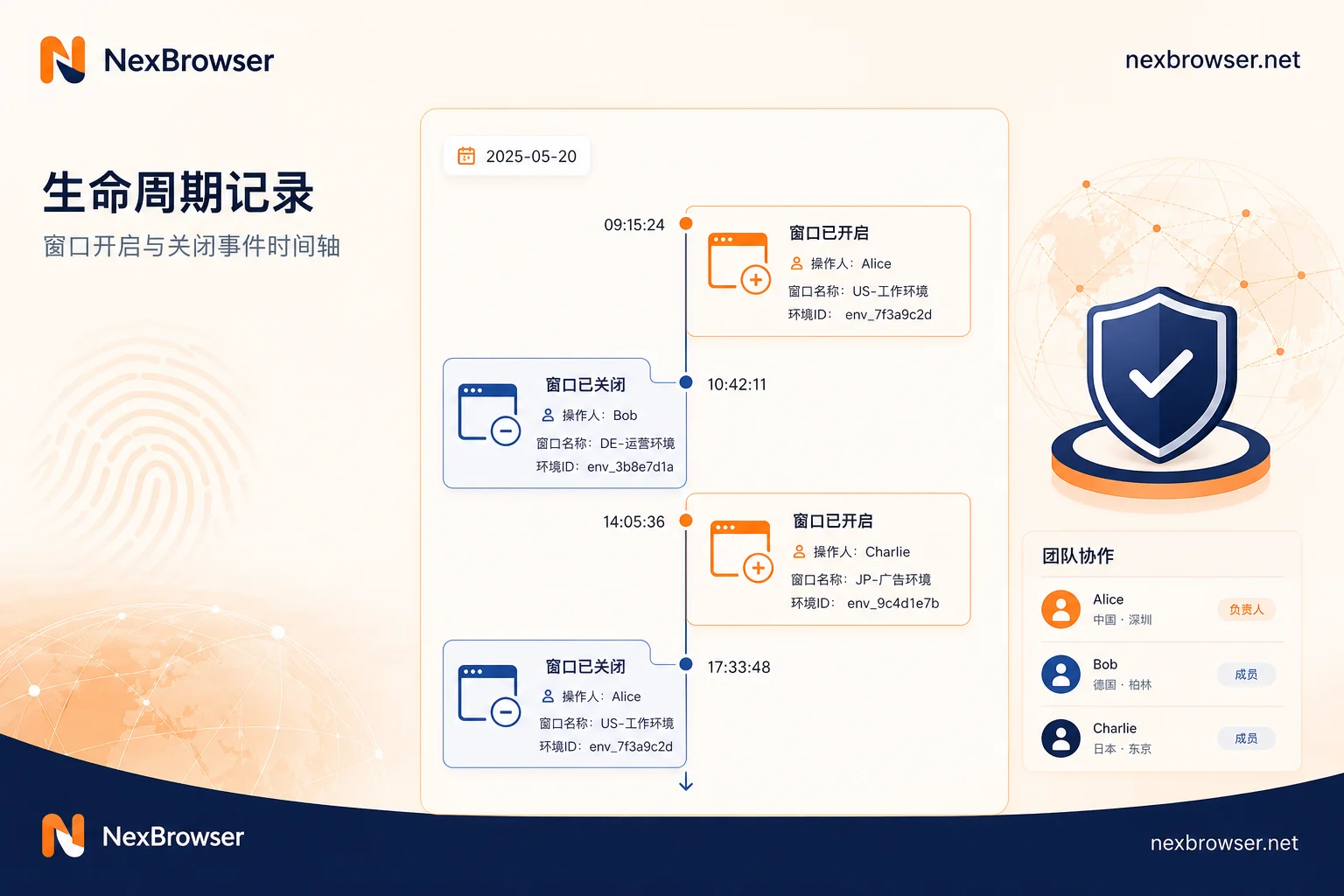
Environment lifecycle records bind "a certain account was active during a certain period" with "a certain member," serving as primary material for pinpointing time windows post-incident. For example, if a store account shows abnormal login at 3 AM, you can directly check whether that environment was opened by a member during that timeframe. Closing times are equally important: if an environment remains open for an extended period, it might indicate idling or abnormal operations. In the August 2026 update, RoxyBrowser 4.0.3 included window open and close in operation logs, a practice now common across the industry. Such records typically include operator, operation time, environment ID, and action type (open/close). Regarding the exact fields included in logs, disclosure varies by vendor; you need to check the log page in your specific client to confirm.
Second Type of Record: Member and Permission Changes—The Audit Value of Additions, Removals, and Visibility Adjustments
Permission change logs address the question, "Who had access to this environment?" especially during offboarding and temporary authorizations. When a member is removed or an environment's visibility is adjusted, the log records who did it and when, allowing you to verify that permissions were promptly revoked. RoxyBrowser supports quick removal of member permissions in the member list, but convenience must be paired with change logs; otherwise, the revocation time cannot be traced. It's recommended to audit the environment permission list monthly, cross-referencing with offboarding lists to ensure removed members have no residual access. For secure employee offboarding account handover, refer to Employee Offboarding Account Security Handover and Browser Environment Migration to manage permission revocation and environment migration.
Third Type of Record: Credential and Proxy-Related Operations—Which Actions Leave Traces and Which Don't
Modifying proxy configurations, changing IPs, adjusting UA, and similar operations within the client are typically recorded. However, copying credentials out or exporting local caches usually leaves no trace. A common misconception is that enabling a proxy prevents internal leaks—without configuring master-slave permission isolation and proxy data hiding, sub-members can still view and copy proxy information. When deploying, prioritize environment visibility management, minimize credential distribution, and enable proxy information hiding. For fine-grained defenses like copying cookies in the client, vendor disclosures vary; you need to validate with actual configurations.
What the August 2026 Competitor Log Updates Indicate and Don't Indicate
On August 13, 2026, RoxyBrowser released version 4.0.3, updating operation logs and adding window start/stop records, and followed up with Chromium 151 kernel on August 18. AdsPower also enhanced operation log descriptions and a global security access protocol in its official update. This shows that enterprise customers' audit requirements for operation logs have become a competitive dimension for fingerprint browsers. It indicates that log capabilities are being prioritized, but it doesn't mean logs equate to account security. When selecting a tool, still assess whether the log coverage includes permission changes and configuration modifications, and whether logs can be searched by member and time—these two factors directly determine if you can trace actions to individuals afterward.
What Logs Cannot Capture: In-Window Page Behavior, Local Cache Copying, Screenshots, and Offline Transfer
The log audit feature of multi-user collaborative anti-detection browsers naturally cannot cover the following behaviors: specific page operations within the window (e.g., clicks, inputs), information transfer via screenshots or photos, copying of local cache files, and offline verbal sharing of credentials. Therefore, log audit is not a panacea. Compensatory measures include: ① Set environment visibility to the minimum so members only see the environments assigned to them; ② Do not distribute credentials to the client, using proxy hiding or hosting; ③ Assign by environment rather than by account to reduce the risk of a single member accessing multiple accounts. For multi-store management, refer to Shopify Multi-Backend Management Anti-Detection Isolation Solution to implement environment isolation. Understanding these boundaries prevents over-expectation of logs.
How to Hold Employees Accountable for Account Anomalies Caused by Misoperation: First Pinpoint the Time Window, Then the Person, Then the Environment
When an account anomaly occurs, use the log audit feature of a multi-user collaborative anti-detection browser in three steps:
- Determine the anomaly time window: Based on platform notifications or abnormal behavior records, lock in the approximate timeframe of the issue.
- Review environment start/stop and permission changes: Within that time window, which members opened the environment? Were any members temporarily added or removed?
- Verify configuration modifications for that environment: Check if proxy or UA settings were changed, or if someone switched IPs.
Don't attribute to a specific member at the outset. Use logs to narrow down the scope, then confirm responsibility with corroborating evidence.
Making Log Audit a Routine Check in NexBrowser
NexBrowser's team environment collaboration feature supports environment visibility management, allowing you to turn "who opened which environment and when" into a weekly check item. For example, at a fixed time each week, filter and review environment start/stop records in the team environment collaboration backend by member and time, focusing on: whether there were environment starts during non-working hours, and whether permission changes align with personnel changes. Additionally, use the Local API for batch verification of multi-environment configurations, reducing manual clicking and improving audit efficiency. This embeds the daily value of log audit while avoiding management blind spots.
Capability Boundary Statement: Internal Audit Tool vs. Platform Risk Control Are Different
The operation log is an internal management and post-incident traceability tool. It cannot alter the anti-crawler or risk control algorithms of target platforms, nor should it be considered valid evidence for appeals to platforms. In other words, log audit helps with internal accountability but cannot prevent account bans—platform risk control is based on independent algorithms, and logs cannot intervene. Teams need to understand this boundary to avoid treating log audit as a means to counter platform risk control.
A One-Page Log Audit Checklist You Can Copy
| Category | Operations Needing Audit Trails | Audit Frequency | Responsible Person |
|---|---|---|---|
| Environment Lifecycle | Window open/close time, operator | Weekly | Operations Supervisor |
| Permission Changes | Member addition, removal, visibility adjustments | Monthly | Administrator |
| Configuration Modifications | Proxy, UA, fingerprint parameter changes | Weekly | Technical Staff |
| Credential Operations | Proxy information viewing, copying | Event-driven | Administrator |
| Departing Employees | Permission removal, environment reauthorization | Immediate | HR/IT |
Store the above table as a shared team document, conduct weekly checks and manually record audit conclusions. The retrievable time range for logs varies by vendor; confirm it in your client before setting the audit frequency.
FAQ
What can fingerprint browser operation logs see?
The log audit feature of multi-user collaborative anti-detection browsers typically records environment start/stop, member login/logout, permission changes, and critical configuration modifications. Specific fields vary by product, but generally you can filter by member and time. In-window clicks and inputs are not within log scope.
How can I check which accounts team members logged into?
In the operation logs, filter by member to see the environment IDs and corresponding accounts they logged into. Ensure that the environment had a start record when the member logged in; otherwise, association is not possible. Confirm the mapping between environments and accounts first.
Can fingerprint browsers record window open and close times?
Factually, it is confirmed that RoxyBrowser added window open and close records in version 4.0.3 in August 2026; whether other products support this needs to be verified in their respective clients' operation logs.
How do I hold an employee accountable for account anomalies caused by misoperation?
Use logs to pinpoint the anomaly time window and the operator, then combine with platform feedback to determine if it was due to misoperation. If logs show human activity, handle according to internal policies. Note that logs cannot prove intent; combine with chat records, etc.
Can log audit prevent account bans?
No. Operation logs are for internal traceability and do not alter platform risk control decisions. Whether an account gets banned is determined by platform algorithms, independent of logs. Teams should focus on compliant operations rather than relying on logs to evade risk controls.


Comments(0)