 NexBrowser指纹浏览器-官方博客Blog
The conclusion for self-hosted VPS vs professional anti-detection browser cost comparison: they isolate different layers, and VPS cannot replace anti-detection browsers. VPS isolates the operating system and network layer; anti-detection browsers isolate application and identity layer fingerprints. Once account numbers reach double digits, the resource overhead and exposure surface of the VPS route become unsustainable. Below, we break it down into four accounts, comparing item by item. If you are evaluating, first list your account count, monthly VPS bills, and maintenance hours in a table.
What Layer Do the Two Routes Isolate?
VPS isolates the operating system and basic network: each instance has an independent system and public IP, essentially placing accounts into different "rooms" separated by firewalls. Anti-detection browsers isolate browser sessions: on the same machine, each environment has independent cookies, cache, and fingerprint parameters, giving each account a different "face." The architecture comparison released by Incogniton in April 2026 clarified this layering: VPS defaults expose data center virtualized GPU drivers (like VirtIO/SVGA) and lack Canvas/audio masking; anti-detection browsers use application-level sandboxing and hardware fingerprint masking. So, VPS cannot solve application-layer fingerprint consistency.
Account One: Per-Instance Resource Overhead
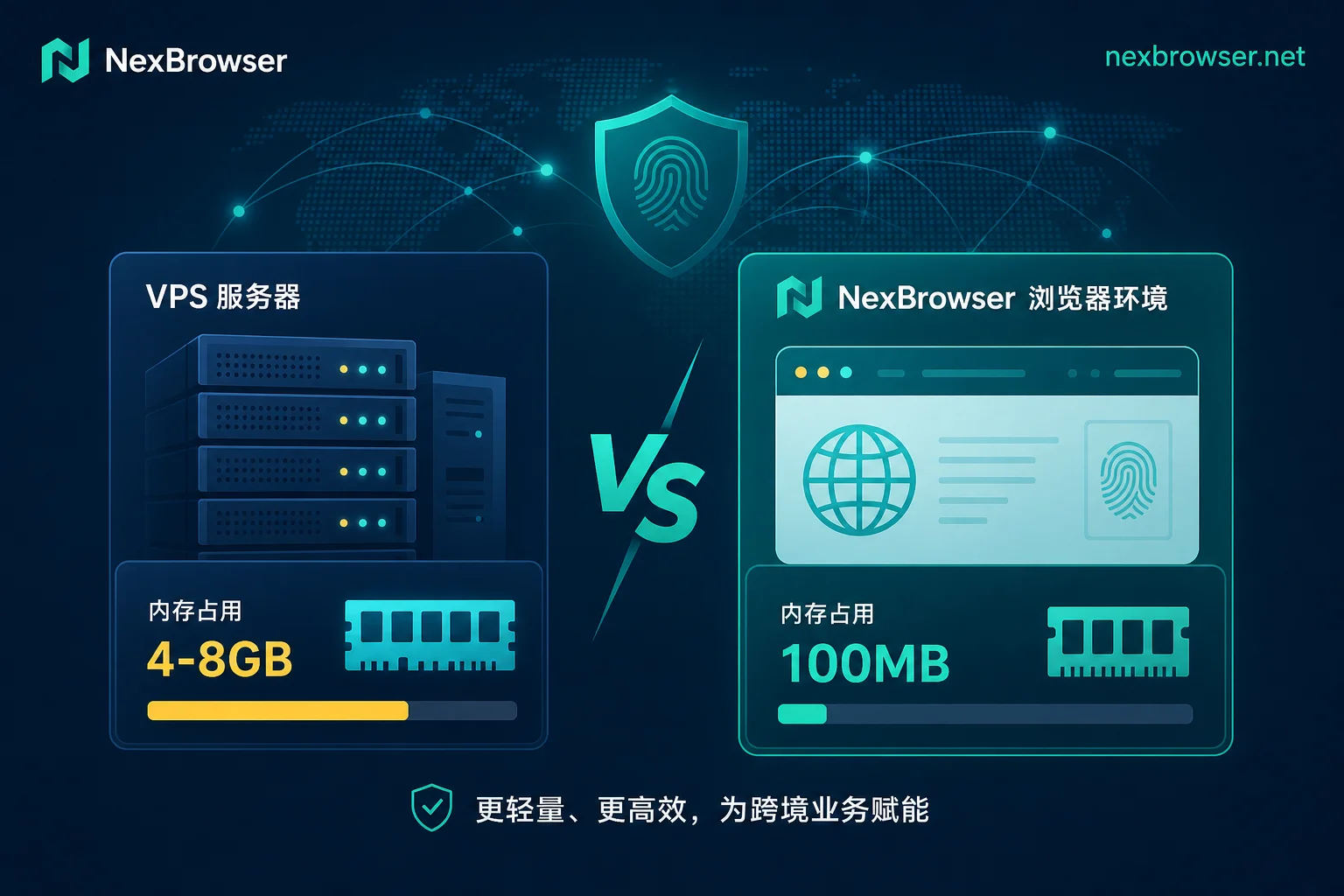
In the cost comparison between self-hosted VPS and anti-detection browsers, the most intuitive account is memory overhead. Converting roughly 4-8GB vs about 100MB, the number of anti-detection browser environments that can run on the same machine is tens of times that of VPS instances. The actual count also deducts the host system and browser processes; here we only compare orders of magnitude.
| Metric | Self-hosted VPS/VM | Professional Anti-Detection Browser |
|---|---|---|
| Isolation Layer | OS and network | Application and identity |
| Per-instance memory | 4-8GB | ~100MB |
| Accounts per machine (16GB) | Tens of times (estimate) | Tens of times (estimate) |
| GPU driver characteristics | Data center virtualization (VirtIO/SVGA) | Maskable |
| Audio/Canvas masking | Usually missing | Supported |
How many accounts can one VPS handle? The answer is clear: ideally one instance per account, because multiple accounts on the same instance share system-level fingerprints. But instance count is limited by memory, so as accounts grow, hardware costs multiply.
Account Two: Scaling Approach
When scaling, the VPS route requires creating machines → installing systems → configuring IPs → patching → setting snapshot policies → integrating monitoring; the anti-detection browser route only requires creating environments → binding proxies → assigning visibility. The real hidden cost for teams is maintenance manpower—VPS manpower grows with the number of machines, not accounts. When account numbers double, machine count, IP count, and system maintenance manpower all increase linearly. The anti-detection browser side mainly adds environment entries and proxy entries, completed in minutes. This article only compares resource volume and maintenance workload, not specific prices and packages.
Account Three: Exposure Surface
WebGL is the interface through which browsers expose GPU information to web pages; detection scripts use it to read GPU model and driver strings. VPS default GPU drivers are VirtIO or SVGA, models almost nonexistent in real consumer devices. After reading WebGL parameters, browsers will see driver strings significantly different from real consumer devices, which are identifiable environmental features. Modern fingerprint detection tools cross-check GPU driver, Canvas fingerprint, and audio fingerprint. Unmasked VPS environments show clear differences from real devices in these parameters. In August 2026, RoxyBrowser released RoxyChrome 151 kernel update, aligning WebGL output with native Chrome by hiding driver suffix versions to fix abnormal flags in third-party detection tools. This shows that "aligning with real device parameters" is already an kernel-level engineering problem, not something that can be solved by simply installing a system.
Why "Dedicated Public IP Is Enough" Doesn't Hold
Core correction: a dedicated IP only covers the egress; if the browser-side GPU driver, Canvas, and audio are uniform or inconsistent with the device profile, a dedicated IP cannot prevent same-source detection. Network-layer fingerprints (like TLS and JA3 fingerprinting in cross-border risk control) and browser-layer fingerprints are parallel verification lines. Can a VPS with a dedicated IP still be flagged? Yes, because the IP only represents egress, not browser identity.
Account Four: Maintenance and Handover
VPS relies on snapshots and remote desktop; account ownership is tied to the machine, and when personnel change, the machine must be handed over together. Anti-detection browsers transfer ownership and visibility per environment. For team handovers, VPS either requires whole-machine transfer or snapshot recovery; anti-detection browsers transfer ownership and visibility per single environment and can track operations through log audit features of multi-user anti-detection browsers. Will remote desktop login to store backend be detected? Detection is based on whether environment parameters are consistent, not the remote desktop protocol itself. If the IP and fingerprint don't match, even remote desktop can be identified.
When VPS Is More Suitable
VPS is not without merit. When tasks require a full independent OS, long-running services, scheduled tasks, or a fixed data center egress for background programs, VPS is a reasonable choice. Examples include crawler tasks and data processing services. A common practical choice is division of labor: VPS runs heavy services, anti-detection browsers manage account isolation.
What Both Routes Can't Change
Neither VPS nor anti-detection browsers can cover overlapping entity information, shared payment accounts, or abnormal business behavior. No architecture can guarantee accounts won't be banned; platform risk control also relies on entity info, payment methods, business behavior, etc. Technical solutions can only reduce linkage risk at the environment layer.
Implementing in NexBrowser: One Account, One Environment
NexBrowser falls under the "application and identity" isolation method. Public capabilities include isolated browser environments, fingerprint/cookie/cache isolation, Chrome fingerprint simulation, per-environment HTTP/HTTPS/SOCKS5 proxy binding, and team environment collaboration. When migrating from VPS, verify each environment: whether egress ownership matches the account's usual location (see Static Residential IP vs Dynamic Proxy in Anti-Detection Browsers), whether fingerprint parameters are consistent, whether cookies and cache are completely separated, and whether team visibility and environment ownership are clearly transferred. First test with three to five accounts, confirm parameter consistency, then batch migrate.
One-Page Selection Comparison Table
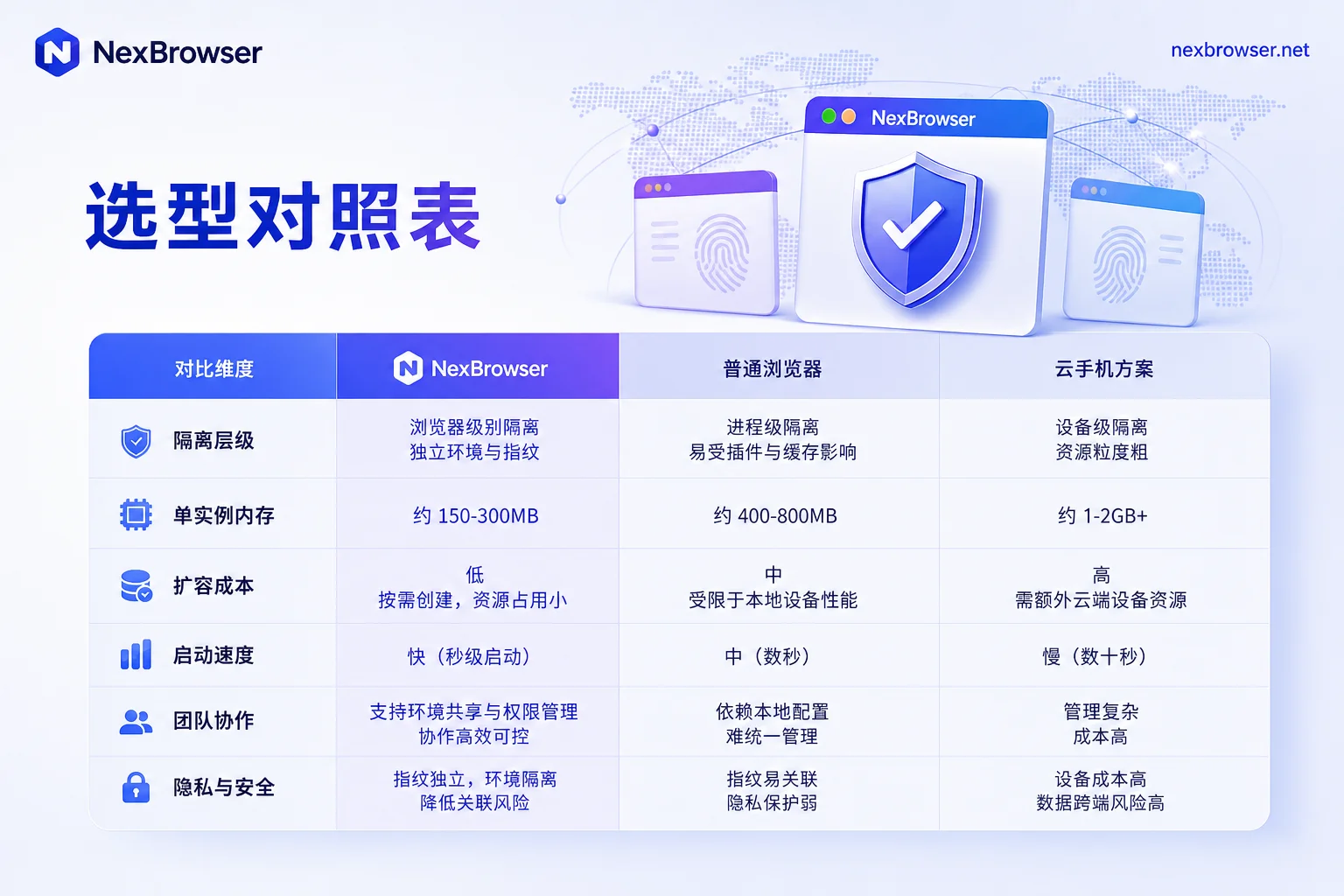
The table below condenses the cost-effectiveness comparison of self-hosted VPS and professional anti-detection browsers into six dimensions.
| Dimension | Self-hosted VPS/VM | Professional Anti-Detection Browser |
|---|---|---|
| Isolation Layer | OS and network | Application and identity |
| Per-instance memory | 4-8GB | ~100MB |
| Scaling Cost | Machine, IP, manpower all increase | Environment entries, proxy entries |
| Exposure Surface | Data center GPU driver, no audio masking | Maskable, requires kernel-level alignment |
| Maintenance & Handover | Snapshots, remote desktop, machine transfer | Environment transfer, permission control |
| Suitable Scenarios | Independent systems, long-running services | Multi-account operations, anti-detection |
Based on publicly available architecture comparisons from 2026 and the August 2026 kernel update announcement; internal risk control weights are non-public information and not inferred here.
FAQ
Is self-hosted VPS reliable for anti-detection?
The conclusion from the cost comparison is: reliability depends on account scale. For few accounts needing independent systems, VPS is viable; beyond double digits, resource and exposure costs rise, making anti-detection browsers more advantageous.
Can a VPS with a dedicated IP still be flagged?
Yes. An IP only represents egress; if browser fingerprints are inconsistent with the device profile, linkage remains possible.
Which is cheaper: VPS or anti-detection browser?
In terms of resource usage, per VPS instance 4-8GB vs per anti-detection environment ~100MB, the gap in hardware and maintenance investment widens with more accounts. Specific costs depend on your chosen machine configuration and software plan; this article does not compare prices.
Will the VPS GPU driver expose that it's a virtual machine?
Yes. VirtIO/SVGA are common data center models, detectable by detection tools, and lack audio/Canvas masking.
Will remote desktop login to store backends be detected?
Possibly. Detection is based on environment consistency, not the protocol. If IP and browser fingerprint don't match, it may still be recognized.
How many accounts can one VPS handle?
It's recommended to run one account per instance; instance count is limited by memory, roughly 2-4 on 16GB.


Comments(0)