 NexBrowser指纹浏览器-官方博客Blog
Clarify Two Things First: Connectivity and Cleanliness Are Not the Same
The cause and detection of account risk control due to proxy IP pollution boil down to one core: repeated verification usually isn't about broken links but about the exit IP already having attribution flags, proxy detection flags, or abuse history in third-party risk intelligence databases. Detection starts with these four signals. According to public documentation from MaxMind, IPQualityScore, and AbuseIPDB, such contamination is now a verifiable norm. To test, check these four signals from the exit side.
Signal 1: ASN and Provider Attribution—Does the Exit Belong to a Data Center or Real Residential Network?
Risk engines first check the exit IP's ASN attribution: whether it belongs to hosting (data center) or a real ISP (residential broadband). If an account claims to be at home but the exit is a data center segment, risk immediately rises. Attribution is the easiest to self-check and the first layer to verify. Based on public docs from mainstream risk intelligence vendors, their GeoIP databases break down ASN and network types, so a basic lookup shows which ISP the exit belongs to.
Signal 2: Proxy Type Flag—Why Being Identified as a Proxy Already Affects Judgment
Some resellers claim "residential proxies 100% simulate real networks and won't be detected," but per MaxMind's minFraud update in July 2026, a dedicated residential proxy detection module now outputs confidence, last observation date, and provider name. So even proxies routed via real ISPs can be flagged as "residential proxy" in intelligence databases. If a proxy IP lookup shows "proxy" or similar fields, even with normal connectivity, risk engines raise alerts.
Signal 3: Historical Abuse Records—What First/Last Seen Time and Report Counts Mean
Third-party intelligence data shows that IP contamination is a historical reputation attribute. AbuseIPDB calculates an abuse confidence score (0-100%) based on global gateways and admin-submitted reports, tracking report count, last report time, and attack types. The IP you just got may carry records of previous misuse like brushing orders, credential stuffing, or scraping. These historical fields are maintained by public databases and cannot be cleared by users.
Signal 4: How to Read Risk Scores—Why There's No Unified Threshold
Risk scores aggregate multiple signals. Per public docs from mainstream vendors, IPQualityScore uses honeypots, fraud behavior analysis, and proxy protocol detection to output a 0-100 fraud risk score; another vendor's IP risk score ranges from 0.01 to 99 (per its public docs). Different vendors use different scales, so don't fixate on a single number. Better: check if the IP hits public blacklists, has recent reports, and whether multiple sources agree.
| Signal Dimension | Primary Intelligence Source | Typical Output Fields | Impact on Risk Control |
|---|---|---|---|
| ASN Attribution | Third-party databases (GeoIP-like) | Network type (Hosting/ISP) | Mismatch with scenario = anomaly |
| Proxy Flag | Proxy detection modules (minFraud-like) | Confidence, provider_name | Identifies residential proxies |
| Historical Abuse | AbuseIPDB | Abuse confidence, report count | Records cannot be erased |
| Risk Score | IPQS etc. | Fraud Score | High risk triggers verification |
Four-Step Self-Check Sequence: Attribution First, Then Flags, Then History, Finally Score
Before going live, follow this fixed order to avoid being misled by a single metric. This is the most skipped step in the cause and detection of proxy IP pollution:
- Check Attribution: Use IP lookup tools to see ASN and network type. If it's a data center segment and the account scenario is residential, discard the node.
- Check Flags: See if proxy detection reports suggest "proxy" or high residential proxy confidence. If high, risk increases.
- Check History: Go to AbuseIPDB, input the IP, and check abuse confidence and last report time. If high confidence and recent reports, discard immediately.
- Check Score: Aggregate risk scores from multiple sources. If all are high or blacklist hits, discard; if only one is high, cross-check.
When buying in bulk, always do spot checks—never fully trust provider claims. To understand the differences between proxy types, see Static Residential IP vs. Dynamic Proxies in Fingerprinting Browsers.
What Fingerprint Masking Can't Solve: The Exit IP's Historical Attributes Don't Change with Environment Config
Client-side fingerprint spoofing (UA, Canvas, timezone, etc.) works at the browser parameter level, while IP reputation is decided at the network exit level—they don't overlap. So when "fingerprints pass but verification still appears," the answer often lies at the exit side. This is also why switching to a residential IP still triggers verification—if the new IP has a history, it will still trigger risk control. At a deeper level, TLS and JA3 fingerprints are also collected by target platforms; consider reading The Role of TLS and JA3 Fingerprints in Cross-Border Risk Control for a full picture.
After Changing IPs: Three Mandatory Acceptance Checks—Exit Attribution, Timezone/Language Alignment, and Login State Continuity
Switching IPs isn't just clicking and moving on; verify with this checklist:
- Is the new exit's ASN attribution consistent with the environment config (e.g., if the account region is US, exit IP should be a US ISP)?
- Have timezone and language been adjusted to match the IP to avoid conflicts.
- Did the existing login state interrupt due to the IP jump? If so, log in again and observe if verification triggers; if still verified, refer to AliExpress Fingerprint Detection.
If using IPv6 proxies, also confirm target platform compatibility; see IPv6 Proxies in Cross-Border Multi-Account Isolation.
In NexBrowser: Bind Proxies Per Environment and Do Exit Spot Checks
NexBrowser supports binding HTTP/HTTPS/SOCKS5 proxies independently per environment, with isolated fingerprints and cookie caches between environments. You can configure exit IPs separately for each environment and verify attribution and parameter consistency one by one. Combined with Local API/WebDriver, you can automate spot checks into your go-live process: after each IP change, automatically verify exit attribution to reduce manual oversight.
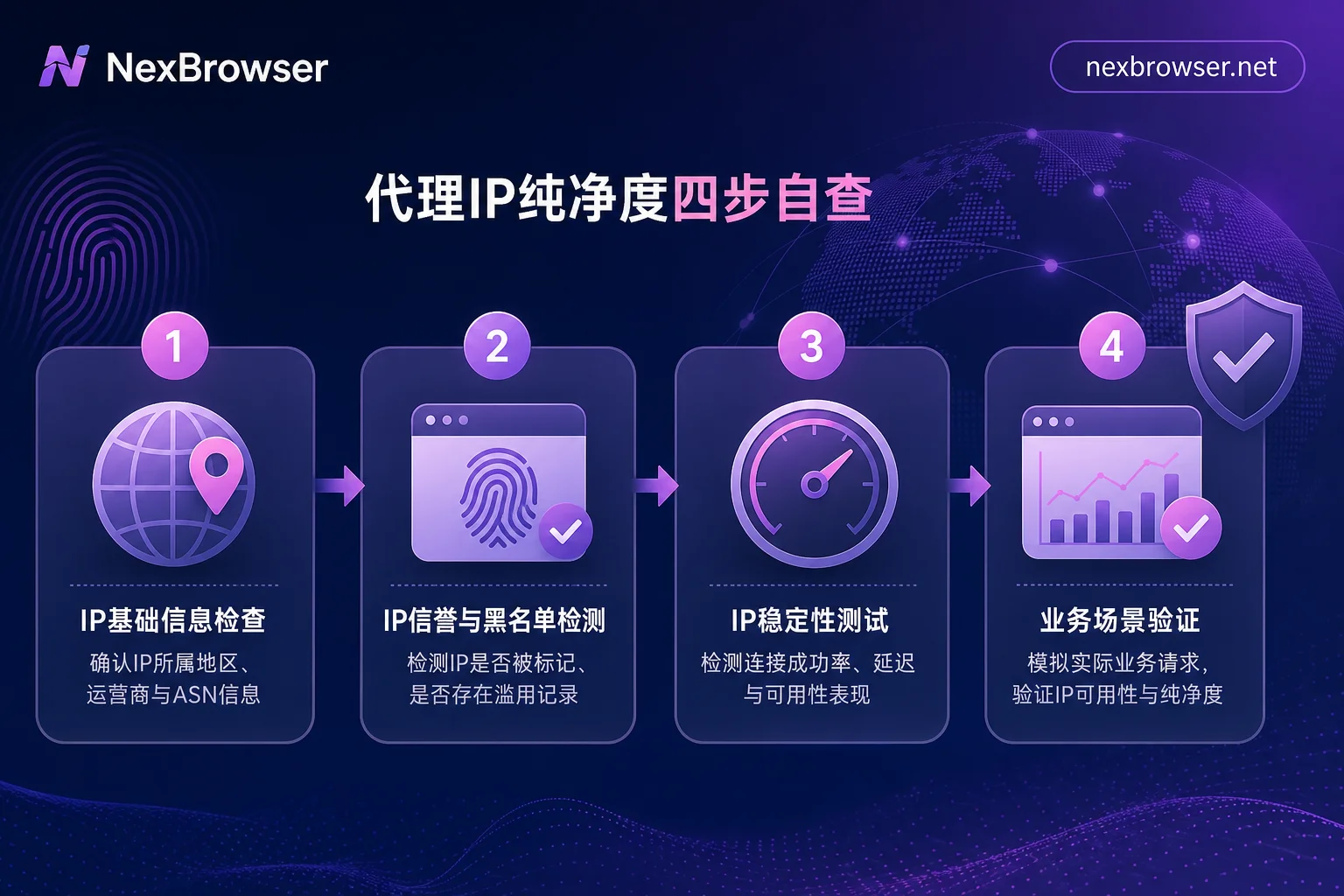
Proxy IP Cleanliness Checklist: Tick Off Before Go-Live
| Check Item | Action | Pass Criteria |
|---|---|---|
| ASN Attribution | Look up network type | Matches account scenario |
| Proxy Flag | View proxy detection fields | No proxy flag or low confidence |
| Historical Abuse | Query report records | No recent reports, low confidence |
| Risk Score | Cross-verify multiple sources | No blacklist hits |
Three limitations to note: First, third-party intelligence judgments don't equal the platform's official risk metrics; second, no tool can erase an IP's recorded history; third, self-checks are for filtering high-risk nodes, not bypassing risk control. Only with these can the cause and detection of proxy IP pollution be fully operationalized.
FAQ
How to Check if a Proxy IP Is Contaminated?
Follow four steps: First check ASN attribution—use IP lookup tools to see if it's a data center. Then check proxy detection reports for "proxy" flags. Next, check history on AbuseIPDB. Finally, aggregate multiple risk scores. If any step shows high risk, discard the node.
What's a High Residential Proxy IP Risk Score?
Different vendors use different scales and methodologies, so there's no unified threshold. Better to check whether the IP hits public blacklists, has recent reports, and whether multiple sources agree.
What If I've Switched to a Residential IP but Still Get Verification?
Don't doubt your fingerprint config first. Use the four-step method to check the new IP's attribution, flags, and history—likely the new IP itself is contaminated. Also check if timezone and language match the IP, and confirm login state didn't break due to the IP jump. If the new IP is clean but verification persists, check other behavioral traits in AliExpress Fingerprint Detection.
Can I Continue Using a Flagged Proxy IP?
Not recommended for important accounts. A flagged IP means it has a historical stain in intelligence databases; even if connectivity is normal, risk engines may raise risk based on history. If you must use it, consider low-risk tasks but monitor account status continuously.
Why Isn't My Purchased Residential Proxy Clean?
Residential proxies route via real ISPs, but risk intelligence vendors have built residential proxy detection databases, recording provider attribution and historical reports per public docs. Thus, "clean" is a promise, not a verifiable fact—you must self-check after purchase, not rely on provider claims.


Comments(0)