 NexBrowser指纹浏览器-官方博客Blog
Developers new to multi-account automation often ask when searching for 'fingerprint browser API': Must the fingerprint browser client be running on the computer when calling the interface? Can I just send a request from a Linux server like with a regular SaaS API?
Let's give the conclusion first: Most desktop fingerprint browsers (including NexBrowser) provide standard APIs as local HTTP interfaces (Local API). When calling, the client must be running and logged in on the local machine or Windows host; you cannot send requests directly to the cloud without the client.
Understanding this prerequisite will prevent you from getting stuck at Connection Refused right from the start. Below, in the order of actual implementation, we break down why the Local API is designed this way, how a backend without a graphical interface can connect to it, and the four most common pitfalls in batch concurrent calls.
1. Why is the fingerprint browser API a "local HTTP" rather than a direct cloud call?
Many people confuse fingerprint browser interfaces with regular cloud OpenAPIs, but they solve completely different problems. A regular cloud API only needs to read and write records in a remote database; a fingerprint browser, however, must actually launch independent Chrome kernel processes locally and complete fingerprint parameter consistency (Canvas, WebGL, fonts, Audio, screen, hardware and WebRTC policies, etc.) at the kernel level, establish independent proxy tunnels, and isolate Cookie / local storage (including IndexedDB) reads and writes.
Therefore, modern fingerprint browsers generally adopt a three-layer collaborative architecture:
- Control plane (Local API / OpenAPI): The local desktop client listens on the loopback address (
127.0.0.1) and authenticates with an access key. Your script notifies the client via HTTP requests to create environments, bind proxies, start or close specified windows. - Execution plane (CDP WebSocket / WebDriver): After the environment is launched, the client returns the debugging connection information of the corresponding kernel to the caller. Playwright, Puppeteer, Selenium, or
browser-usethen connect directly to take over page operations (for takeover examples, see "Puppeteer / Playwright Takeover of Fingerprint Browser Environment: Connect Instead of Launch"). - AI direct connection plane (MCP Server): For large model clients such as Claude Code, Codex, and Cursor, standardized MCP (Model Context Protocol) exposes browser environment capabilities directly to the model, eliminating the need for handwritten glue scripts.
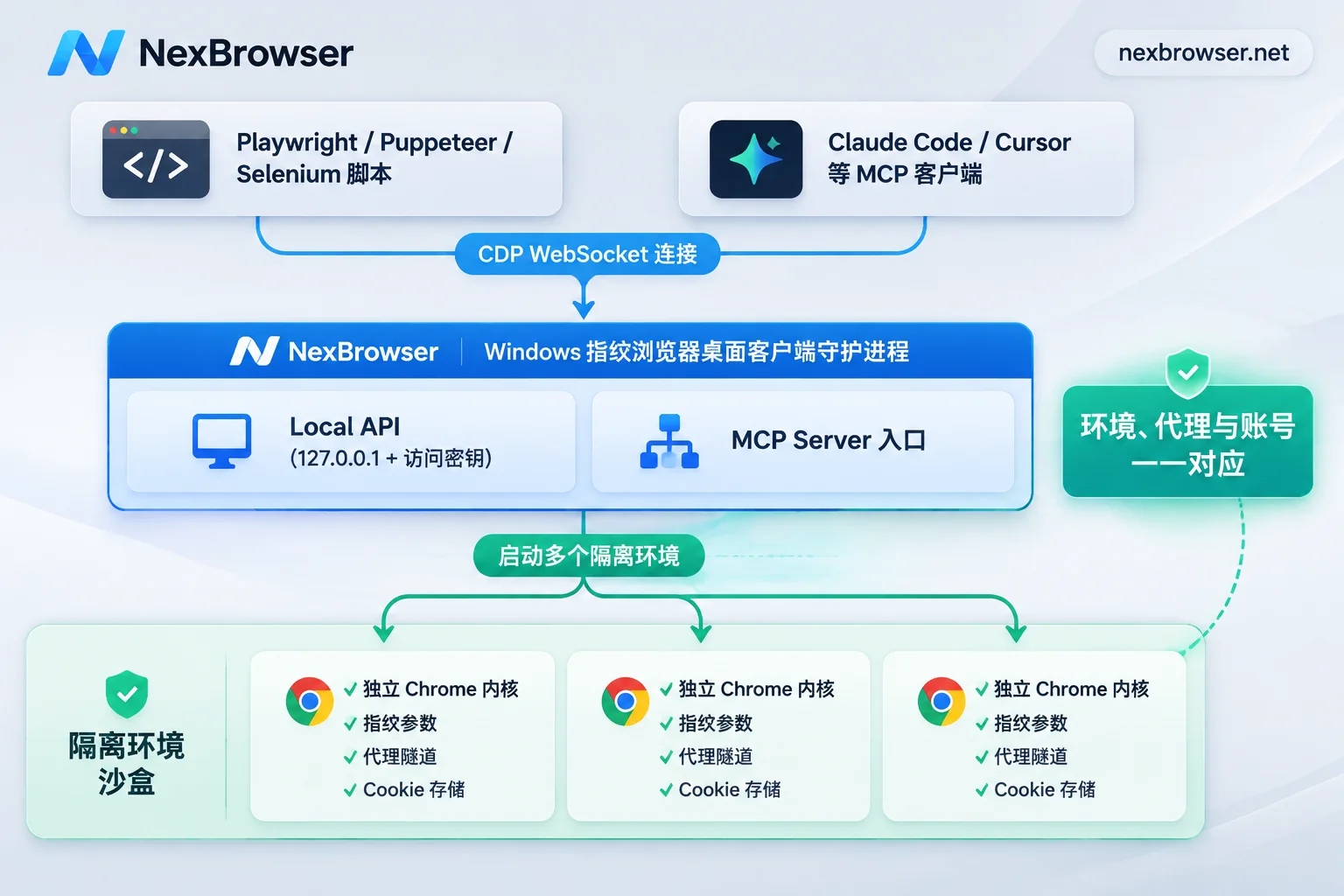
The benefits of this "local daemon + standard protocol takeover" are straightforward: all page rendering is done locally, with no additional cloud screen relay latency; meanwhile, sensitive data such as Cookies and session caches remain in a controlled environment, reducing exposure because scripts run on third-party platforms. However, when selecting a product, pay attention to the API access thresholds—many products lock APIs behind professional or enterprise plans, or impose call frequency limits (e.g., at most 1 request per second per interface). For more selection criteria, see "Fingerprint Browser API Selection Guide".
If you need a development foundation without artificial rate limiting, you can directly check NexBrowser's fingerprint browser API capabilities: after enabling OpenAPI and configuring an access key in the client, you can call it, and the API is completely free, with unlimited calls, and available even on the free tier, directly available with the Windows client.
2. The client must be running—so how to achieve "server unattended" and cross-machine triggering?
After understanding "the client must be running", the next question is: "My business backend runs in Linux Docker or a scheduled task system; I can't rely on someone watching a personal computer every day, right?"
To incorporate the local client into a 24/7 automation system, there are three reliable engineering approaches:
1. Standard approach: Windows 64-bit cloud host with resident client + local script scheduling
Currently, NexBrowser provides a Windows 10/11 (64-bit) client (the macOS client is still under development and not yet available for download, and Windows 7 and 32-bit systems are not supported). If you need 7×24 stable operation for scheduled collection, store inspections, or social media account farming, the most reliable way is to prepare a dedicated 64-bit Windows 10/11 host or Windows cloud host:
- Keep the NexBrowser client logged in on the host and enable OpenAPI and access key in settings;
- Deploy Python / Node.js automation scripts directly on the same Windows host, and use the system task scheduler or process management tools to start them periodically, directly requesting the local Local API and CDP ports.
2. Cross-machine trigger approach: use lightweight task workers instead of "public port exposure"
If your main control scheduling center is on another Linux server, never expose the local OpenAPI port or Chrome CDP debugging port directly to the public internet through routers/firewalls—once the port and key are accidentally leaked, external scripts can directly take over logged-in account windows.
A safer architecture is to "decouple control instructions from local execution":
- Run a very lightweight task consumption process (Worker) on the Windows host running the fingerprint browser client, which actively pulls tasks from your business queue or intranet message middleware;
- After receiving a task, the local Worker calls
127.0.0.1's Local API to start the environment and execute Playwright operations, then returns results to the backend.
3. Maintenance-free approach: use built-in RPA or AI Agent for fixed workflows
If the business is not complex—just scheduled login state keep-alive, form filling, or simple data collection for a batch of accounts every day—maintaining an external script + daemon process can be more costly. For such scenarios, you can directly use NexBrowser's built-in RPA scripts (no-code drag-and-drop canvas orchestration, supporting variables, conditionals, loops, and step-by-step failure localization) or the built-in agent Nex Agent (natural language task assignment, supporting multi-window parallelism and approval before irreversible operations), without running an external scheduling service.
3. Besides opening windows, how far can the API manage the process?
Many teams initially treat the API as just "automatically clicking an open button," but a complete automation loop should cover four stages: environment preparation → proxy calibration → takeover execution → close synchronization (for specific fields and request structures, refer to the NexBrowser OpenAPI official documentation):
- Programmatic creation and environment group preparation: When the business needs to frequently add account environments, there is no need to manually click to create one by one; directly create independent environments via OpenAPI, or first tune fingerprint templates in the client and then batch copy (copying automatically generates distinct fingerprint parameters).
- Bind independent proxies per environment; changing proxies does not lose login state: Supports binding HTTP / HTTPS / SOCKS5 proxies to specified environments via the interface. In NexBrowser, proxies are bound directly to individual environments, and timezone, language, and geolocation automatically match the exit IP, and changing proxies does not clear the environment's original Cookies and local storage (for proxy format and exit consistency verification, see "How to Configure Proxy IP Binding for Browsers Without Pitfalls").
- Start environment to get CDP information, or directly mount MCP: After calling the start environment interface, pass the returned CDP connection information to Playwright, Puppeteer, Selenium, or
browser-usefor takeover; if you want Claude Code, Codex, or Cursor to directly drive the environment for web interaction, simply configure the NexBrowser MCP Server according to the MCP integration documentation, and the AI client can directly list, open, and operate specified environments. - Explicitly call the close interface when the task ends: This is the most easily overlooked point. Closing the environment is not just for freeing memory; in NexBrowser, only when closing the environment will Cookies, local storage, and other data be encrypted and synchronized to the cloud according to the selected scope, ensuring lossless restoration when logging in on another machine later (Note: passwords saved by the browser within the window remain only on the local machine and are not migrated with synchronization; for cross-machine handover precautions, see "Will Anti-Association Browsers Get Banned When Switching Computers?").
4. Why do batch concurrent API calls always freeze or disconnect? 4 production-level scheduling rules
After a single window works, the real headache for teams is stability when scheduling dozens or hundreds of environments simultaneously. To keep scripts from freezing or accidentally harming accounts in the long run, it is recommended to incorporate the following four rules into your scheduling code:
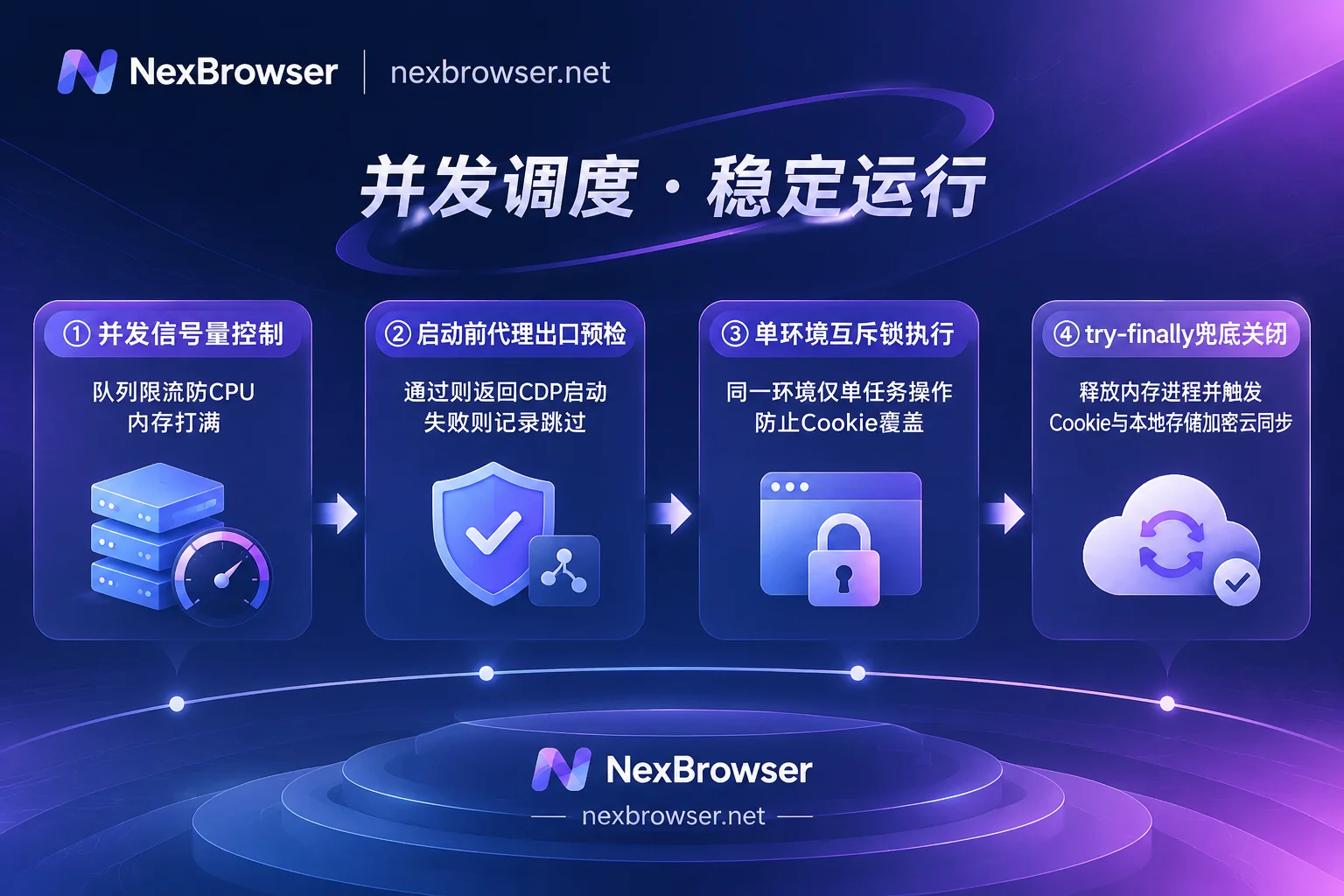
1. Use concurrency semaphores to "stagger start/stop"; don't launch everything at once
Each fingerprint environment is an independent Chrome process and independent data directory, and CPU, memory, and disk I/O overhead increase linearly with the number of concurrent windows. If you use Promise.all or asyncio.gather to request starting 50 environments at once, system resources and the proxy handshake queue will be saturated simultaneously, followed by port timeouts and browser freezes.
The correct approach is to add a semaphore or a fixed-size Worker pool at the scheduling layer (e.g., limit concurrent windows to 5–15 based on available host memory), closing one before starting the next to maintain a stable resource level.
2. Handle the "proxy pre-check failure before startup" exception branch
Many environment startup freezes are actually caused by invalid bound proxies. NexBrowser checks the proxy exit before starting the environment, and if the check fails, the environment will not start—this prevents windows from forcibly opening when the proxy is disconnected, which could expose the real network environment or cause scripts to wait indefinitely on a blank page.
Therefore, your API calling code must implement exception handling: when the start interface returns a proxy check failure or timeout error, do not retry in an endless high-frequency loop; instead, log the environment ID, trigger an alert, or switch to a backup proxy according to rules with exponential backoff, and first finish other normal environments in the queue.
3. Lock by environment ID; never open the same environment concurrently from multiple threads
If scheduled tasks and manual operations run at the same time, it is easy for "Task A to still be running while Task B tries to start the same environment." To avoid exceptions caused by Cookie and IndexedDB data overwriting each other, NexBrowser's mechanism restricts the same environment to be opened by only one member at a time.
On the automation scheduling side, you also need to maintain a local mutex or task state machine keyed by envId: only after confirming that the previous task has called the close interface and completed state cleanup, allow the next task to wake up that environment.
4. Use try...finally to ensure environment closure and eliminate zombie processes
Automation scripts inevitably encounter exceptions during execution due to website redesigns, element location timeouts, or CAPTCHA blocks. If the script crashes and exits without calling the close environment interface, the corresponding Chrome process becomes a "zombie window" occupying memory, and the latest Cookies cannot be synchronized to the cloud.
The standard practice is to put environment startup and task execution inside try...finally (or the corresponding context manager): regardless of whether the business logic succeeds or fails, the final step must execute the close environment request; also periodically inspect the active environment list to clean up residual windows that have not exited within the timeout.
5. Run your first API automation chain at zero cost
Before moving this mechanism to production, it is recommended to do a minimal end-to-end verification in four steps:
- Go to the NexBrowser download page to install the 64-bit Windows client, and register directly to use the free tier (full functionality available, no credit card required, quota does not expire; specific window and member counts are subject to the official website's current promotion);
- Create a test environment in the client and bind a working proxy, enable OpenAPI in settings, and copy the access key;
- Follow the OpenAPI documentation to run through "start environment → get CDP endpoint → Playwright takeover to visit detection page → ensure environment closure"; for complete integration details, see "How to Use Fingerprint Browser API Without Pitfalls";
- After confirming the single chain and concurrent queue are stable, go to the pricing page to scale capacity as needed based on the number of windows and members your team actually needs online simultaneously.