 NexBrowser指纹浏览器-官方博客Blog
In the minds of most cross-border sellers, overseas social media operators, or ad placement teams, when it comes to browser environment isolation, the first reaction is often "anti-association"—that is, preventing platforms from detecting that multiple stores or accounts are operated from the same computer. However, in the security and risk control landscape of 2026, environment isolation is taking on another equally critical mission: controlling the "security blast radius" of account assets.
Threat intelligence disclosed by security firms Menlo Security and NordVPN in 2026 shows that stolen browser cookies appearing in infostealer logs have exceeded 52.4 billion, appearing 4.6 times more frequently than traditional passwords, files, and payment cards combined. Meanwhile, Palo Alto Networks Unit 42 also disclosed attack campaigns that use malicious JavaScript and sideloaded extensions to directly steal session cookies and communication data within the browser context.
This means that if your team still habitually logs into multiple high-value stores, ad backends, and enterprise SaaS in the same ordinary browser window (or a shallow user profile), you will face not only platform "association bans" but also the risk of session hijacking (Session Hijacking) where "one point compromised, all lost".
I. Why "Incognito Window + IP Change" Completely Fails in 2026
Many fledgling matrix teams or agency organizations still rely on "multiple Chrome user profiles" or "incognito windows with proxy plugins" to handle daily multi-account operations. This approach has obvious underlying vulnerabilities under today's dual inspection:
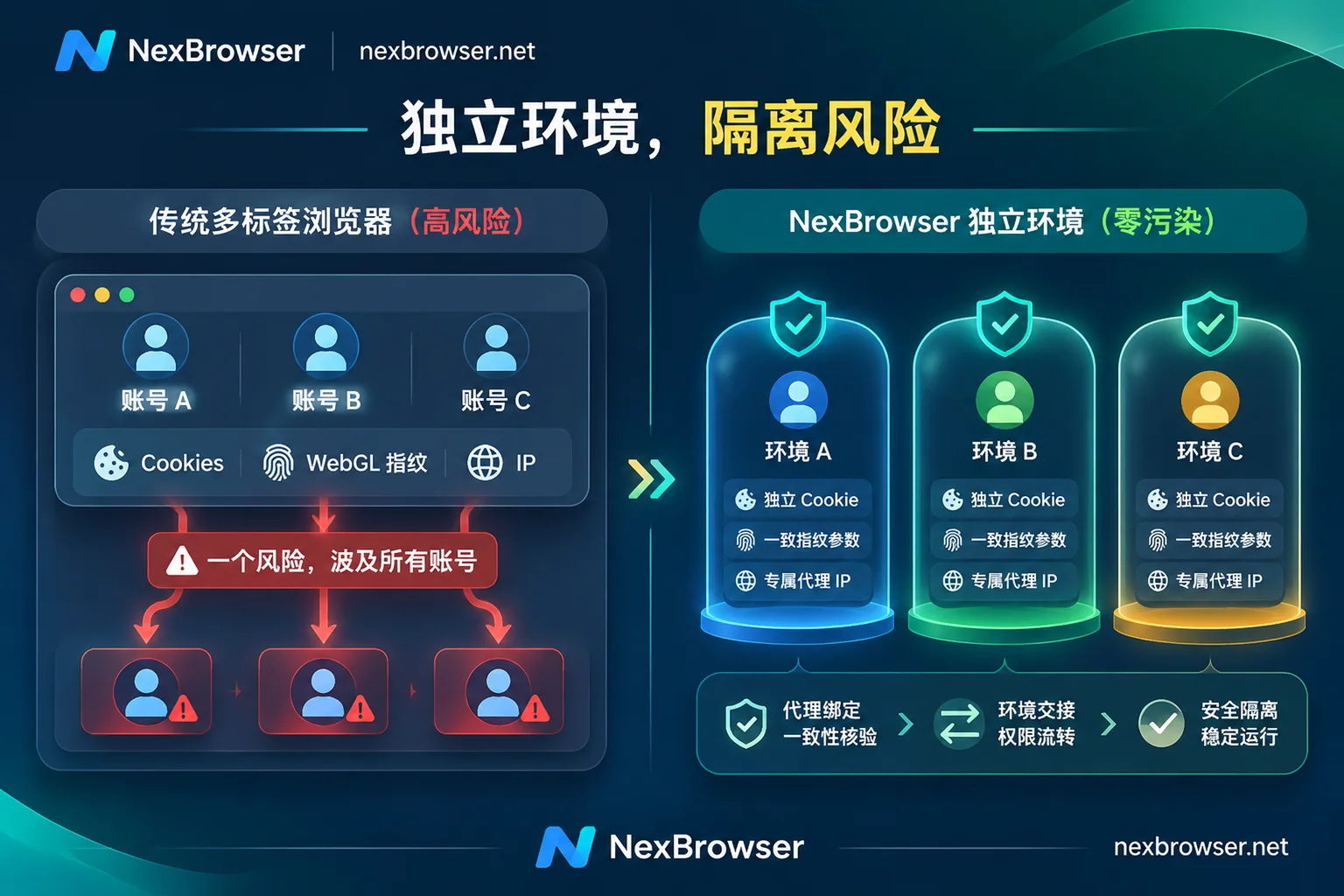
1. The "Contagion Crisis" Across Customer Groups and Stores
For marketing agencies or multi-brand sellers, an operator must frequently switch between dozens of client homepages, ad management backends, and e-commerce seller centers every day. In traditional browsers, even if tabs are separated, the underlying storage directories and extension permissions are often interconnected or lack strict boundaries. Once an employee triggers a malicious script while browsing an unknown external site, or installs an over-privileged third-party plugin, the attacker does not need to crack passwords or two-factor authentication (MFA); they can directly extract session tokens from local storage to take over all active backend sessions.
2. The "Three-Dimensional Cross-Comparison" of Platform Risk Control
From the perspective of platform risk control, mainstream e-commerce and social media platforms in 2026 no longer rely on a single IP address for judgment. If two incognito windows only switch proxy IPs but the underlying Canvas rendering hash, WebGL graphics renderer information, and AudioContext audio features are completely identical, the risk control system can determine with a single feature comparison that these requests come from the same physical device (for details on underlying storage isolation, please refer to our previous article "How to Achieve Thorough Browser Environment Isolation? From IndexedDB Anti-Leakage to AI Agent Multi-Account Sandbox Practice").
To simultaneously solve "external session theft spread" and "platform internal association detection", teams need a multi-account environment isolation workstation that truly closes the loop from kernel, storage, network to personnel permissions.
II. Four-Dimensional Deep Isolation: How NexBrowser Builds an Account Security Firewall
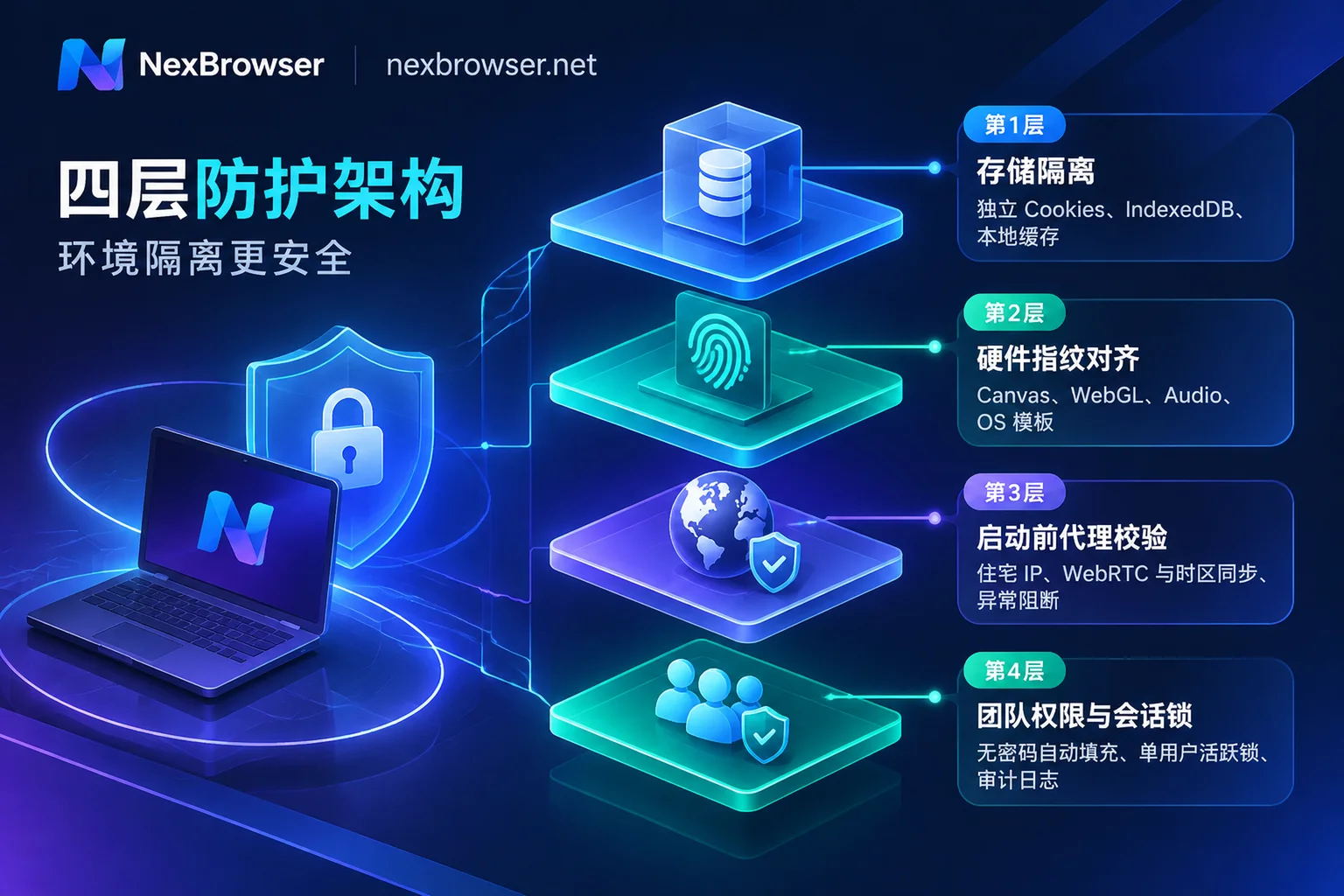
Built on deep Chrome kernel customization, NexBrowser implements the concept of "one account, one sandbox" into every aspect of daily operations, transforming complex underlying isolation into visual standard configurations:
1. Independent Storage and Cache, Shrinking the Security Blast Radius
In NexBrowser, each newly created browser environment has its own independent Cookie, cache, and local storage (including IndexedDB) space, and different environments cannot read each other's data.
- Group and Tag Management: Operations teams can group and tag environments by platform, store, or specific customer. Even if a test environment encounters an abnormal page, its session impact is strictly confined within that independent container and will not laterally affect core asset stores.
- Cloud Encryption and Local Privacy Separation: When an environment is closed, state data such as cookies and local storage are encrypted and synced to the cloud according to the selected scope, making it easy to seamlessly restore login status when logging in from another device; while plaintext passwords stored locally within the window are strictly kept on the local machine and are not migrated with cloud sync, mechanically reducing the risk of credential exposure during transmission.
2. Self-Consistent Hardware Fingerprints, Rejecting "Parameter Mismatch" Alerts
Simply randomizing fingerprints often creates畸形 profiles like "Windows system with iOS fonts", which actually triggers risk control warnings faster (for specific detection logic, see "How to Interpret Browser Fingerprint Detection? Unraveling the Green Light Illusion and 2026 Multi-Account Environment Self-Check List").
In NexBrowser's fingerprint parameter protection mechanism, parameters such as Canvas, WebGL, fonts, Audio, screen resolution, hardware concurrency, and User-Agent are independently generated per environment and logically consistent with each other. The system includes built-in parameter templates for Windows, macOS, Android, and iOS, and the template library is dynamically updated in the cloud with Chrome kernel versions. Well-tuned high-trust environments can be saved as templates with one click, and when batch-copied, new differentiated fingerprint parameters are automatically generated.
3. Strict Network Exit Verification, Blocking "Naked" Startup
No matter how perfect the fingerprint isolation is, it will instantly fail if the proxy suddenly drops or WebRTC leaks the real IP. NexBrowser has designed rigorous fail-safe protection in proxy and residential IP management:
- Pre-start Check (Fail-Safe): Before an environment starts, it first checks the connectivity, latency, and geolocation of the bound proxy exit; if the check fails, the environment will refuse to start, completely eliminating accidents where proxy failure causes the local real network to directly connect to the platform.
- Dynamic Parameter Alignment: Supports single addition or batch import of HTTP / HTTPS / SOCKS5 proxies, and can also link NexIP accounts to bind residential IPs by country/region with one click. After binding a proxy, the WebRTC policy, system timezone, interface language, and geolocation within the environment automatically align with the exit IP.
- Seamless Proxy Switching: When an IP node needs routine replacement, directly changing the proxy within the environment will not clear existing cookies and local storage, maintaining account session continuity.
4. Passwordless Collaboration and Operation Trails, Blocking Human Errors
When a team expands to multi-person collaboration, "sending account passwords via chat apps" and "multiple people simultaneously logging into the same account from different locations" are the most frequent risk control triggers.
Through NexBrowser's team collaboration features, team founders can create roles and finely allocate the visible and operable environment scope for each member in the role and permission matrix. After platform accounts are bound to environments, when members start a window, the system automatically fills in the login credentials, and they never touch plaintext passwords throughout the process; meanwhile, the system follows a mutual exclusion lock mechanism—"the same environment can only be opened by one member at a time"—avoiding behavioral track conflicts caused by two people operating simultaneously. All permission changes and member operations are traceable, and data is encrypted throughout transmission and storage.
III. Efficiency Leap Beyond Isolation: Safely Running Automation in Independent Sandboxes
Many people worry that completely isolating dozens or hundreds of accounts means manually repeating clicks in each window and having to juggle dozens of physical phones for verification codes.
A true modern browser workstation achieves efficient distribution of top-level commands without breaking the underlying isolation boundaries:
- Sidebar Verification Code Loop: When encountering platform two-factor verification or new account registration, there is no need to switch out of the window to copy and paste from external platforms. The environment sidebar has a built-in cloud phone number (NexSMS number center), which can obtain numbers, receive SMS, and fill in verification codes by country/region and target platform; key stores that require long-term maintenance can also be converted to long-term rental.
Multi-Channel Automation Parallelism (Window Synchronization / RPA / AI Agent):
- For temporary batch operations that require real-time human judgment, enable window synchronization to sync clicks, inputs, and scrolls from the master window to multiple slave windows, with configurable operation intervals and throttling;
- For routine inspections and product listings with fixed processes, you can drag and drop to orchestrate RPA scripts (Beta) on a no-code canvas, bind environments in batches for execution, and each step supports failure retry and independent log tracing;
- For complex cross-page tasks, the built-in AI Agent (Nex Agent) supports natural language commands to automatically open the corresponding environment to complete forms, screenshots, or parallel processing, and can be set to "request human approval before executing irreversible operations".
- Developer Barrier-Free Takeover: If you have custom scripts or are using tools like Claude Code or Cursor, NexBrowser provides a completely free, unlimited-call Local API and MCP service, supporting Playwright, Puppeteer, Selenium, and mainstream MCP clients to directly take over isolated environments, with no additional subscription threshold for API interfaces.
Regardless of the automation method used, every slave window or taken-over environment involved in execution still strictly runs in its own independent fingerprint, cookie, and proxy channel, achieving "unified command scheduling, complete identity isolation".
IV. Conclusion: Start Zero-Compromise Environment Isolation with a Standardized Foundation
In 2026, as platform algorithms and cyber threats evolve in tandem, browser environment isolation is no longer a question of "whether to do it" but an infrastructure that determines the lifecycle of multi-account businesses. Rather than spending weeks appealing after accounts are banned due to contagion or sessions are hijacked, it's better to equip each digital asset with an independent explosion-proof sandbox from the moment the account is created.
NexBrowser adopts a transparent strategy of "no feature tiering"—the free tier allows you to experience all core features including multi-account isolation, window synchronization, RPA, Local API, and MCP, with no credit card required and quotas that never expire; when your business scales up, you can simply flexibly expand capacity based on actual window and member needs.
Visit the NexBrowser Download Center now to get the Windows client (supporting Windows 10/11 64-bit systems) and build a truly secure and controllable multi-account isolation workstation for your team.