 NexBrowser指纹浏览器-官方博客Blog
Teams doing cross-border e-commerce, social media matrices, ad placements, or data scraping often encounter a thorny problem: they have changed proxy IPs for different accounts, or even used the browser's "incognito mode" or "multi-user profiles," yet platforms can still accurately identify that these accounts originate from the same device, triggering a chain ban.
Entering 2026, mainstream platforms' risk control detection and daily operations tools are undergoing profound changes. On one hand, risk control systems' detection tentacles have long surpassed surface-level cookies and delved into structured local storage such as IndexedDB and LocalStorage, as well as underlying hardware rendering characteristics; on the other hand, more and more teams are introducing AI Agents, MCP clients, and automation scripts to take over web operations. Running scripts directly in a non-isolated browser can easily cause session cross-contamination and login state pollution.
To truly protect account assets, we must re-examine the technical boundaries of browser environment isolation. If you are not yet familiar with the basic concepts, you can first read the official guide to learn what a fingerprint browser is and why use a fingerprint browser. This article will break down how to use NexBrowser to build a truly "zero cross-contamination" isolation workbench from four dimensions: underlying storage, fingerprint and network alignment, AI automation takeover, and team workflow.
1. Why are "Incognito Mode" and "Ordinary Browser Profiles" Not True Browser Environment Isolation?
Many beginners habitually use Chrome's built-in multi-user profiles with proxy plugins, or simply open an incognito window each time to log into accounts. But in the face of modern risk control algorithms, this approach has three fatal flaws:
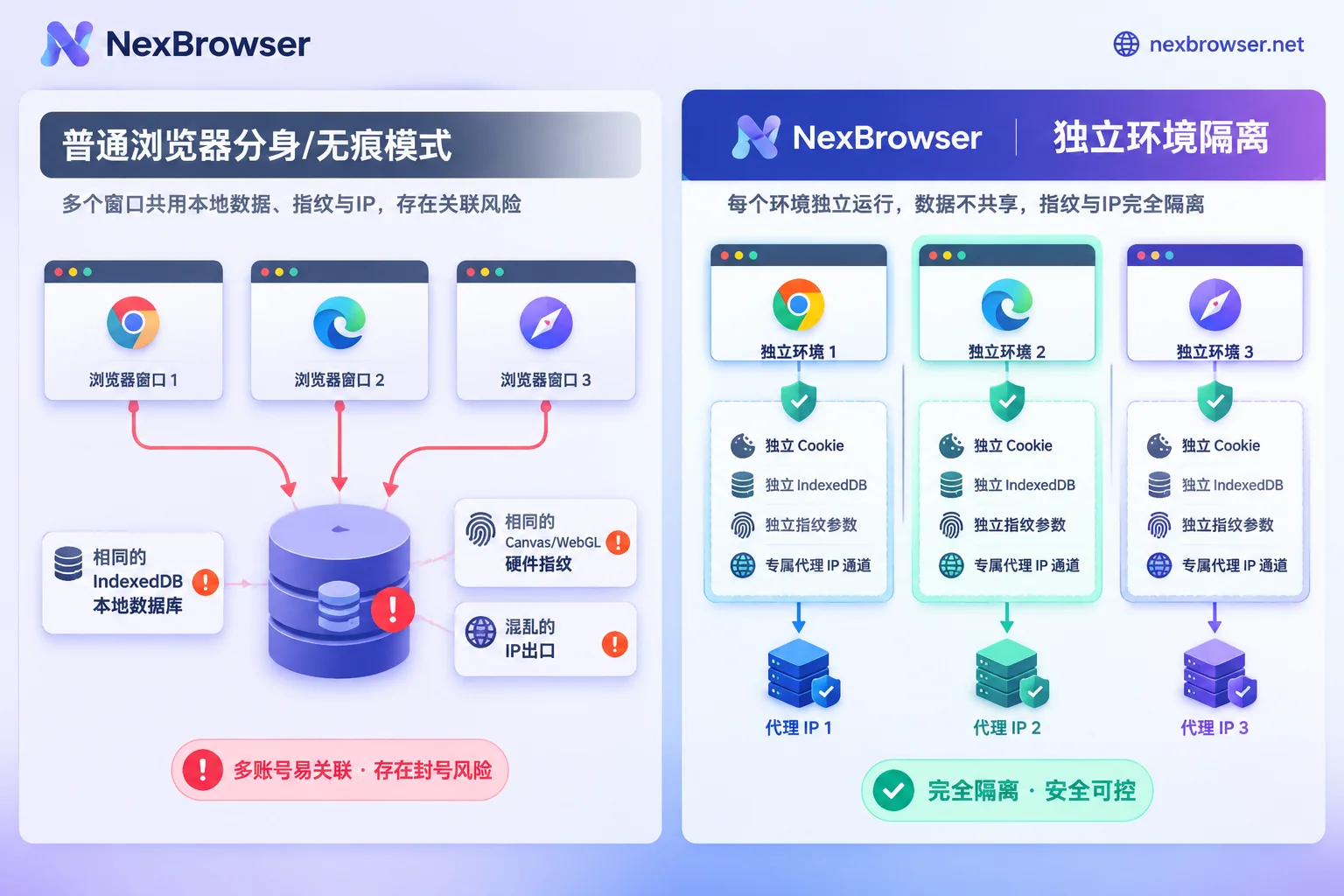
- Hidden Residue and Cross-Contamination of Local Storage (IndexedDB / Cache)
Modern web applications no longer rely solely on a few KB of cookies to record identity; instead, they extensively use larger-capacity and more complexIndexedDBandLocalStorageto store device state and client databases. Ordinary browser incognito mode mainly performs temporary cleanup of history, but in complex cross-session scenarios or when mixing profiles, as long as you accidentally log into a public email, payment backend, or third-party authorization page in the same environment, the persistent identifiers in local storage will tightly bind multiple accounts together. - Underlying Hardware Fingerprints Are Completely Transparent
No matter how many ordinary Chrome profiles you open, the Canvas drawing hash, WebGL graphics renderer, Audio audio context, system font list, and CPU hardware parameters read by web pages via JavaScript are completely identical. In the eyes of the platform, this is still the same physical computer operating in bulk. - Network Exit and Environment Characteristics Are "Each Doing Their Own Thing"
When switching proxies with browser plugins, it often happens that all profiles share the same system proxy port, or the proxy switches to the US while the browser's timezone, system language, and the local IP exposed by WebRTC are still in China, directly triggering "environment anomaly" risk control.
2. What 4 Defenses Must Be Held for Thorough Browser Environment Isolation?
To turn one computer into dozens or even hundreds of non-interfering "independent terminals," browser environment isolation must take effect simultaneously at the following four levels:
1. Storage Layer Isolation: Cookies, Cache, and IndexedDB Completely "Islandized"
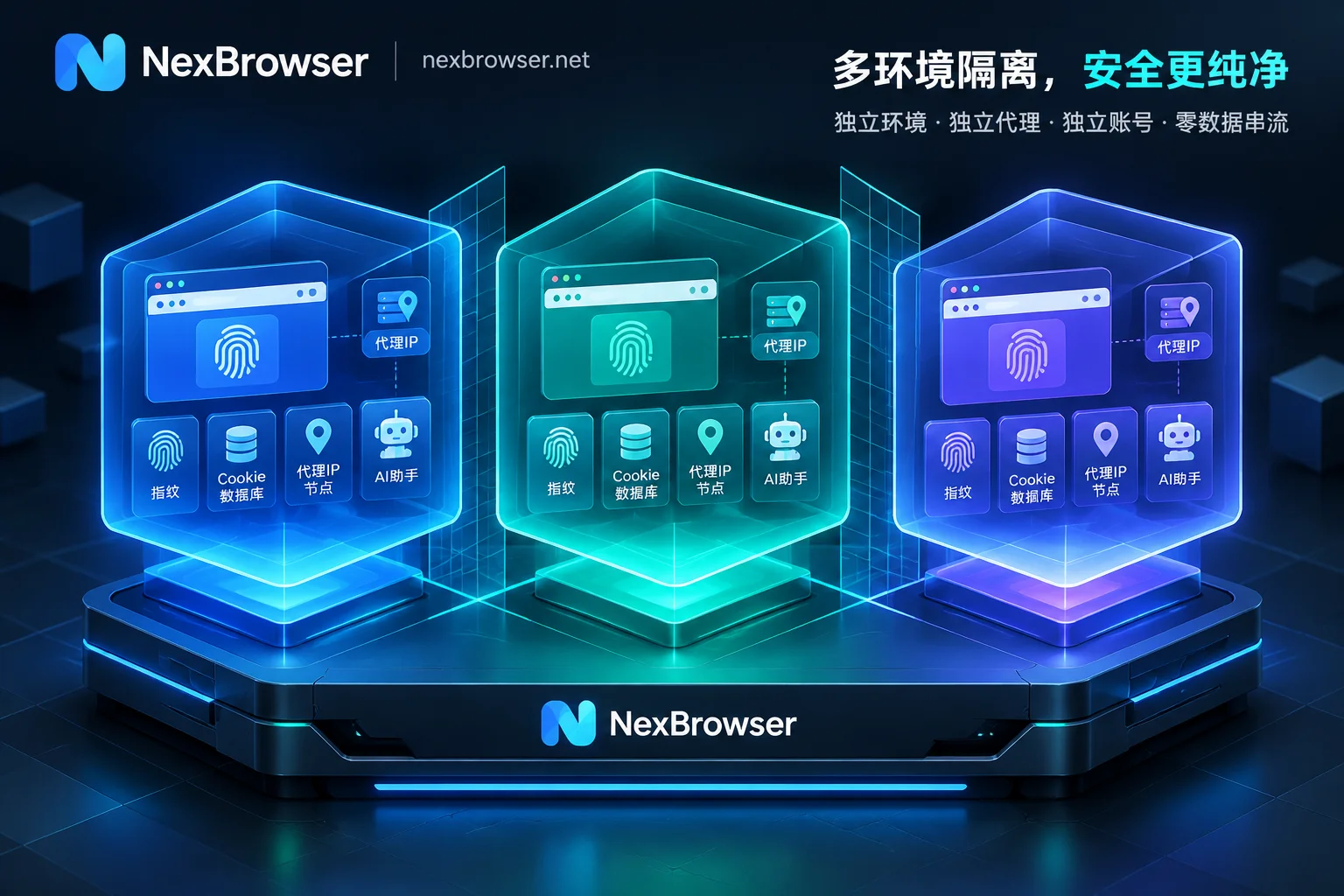
Under the NexBrowser multi-account environment isolation architecture, each browser environment you create is an independent sandbox container:
- Local Data Completely Independent: Cookies, cache, local storage (including
IndexedDB), and proxy configurations of each environment are stored independently; environments do not read each other, cutting off cross-window data contamination from the root. - Changing Proxy Does Not Lose Login State: When a proxy node for an environment needs maintenance or replacement, replacing the proxy on the environment will not clear existing cookies and local storage, eliminating the need to go through tedious login verification every time you change IP.
- Cloud Encrypted Sync and Cross-Machine Restore: When you close an environment window, data such as cookies and local storage will be encrypted and synced to the cloud according to the scope you choose; after logging into NexBrowser on another computer, you can directly restore the business state. Meanwhile, to balance local privacy and security, passwords saved locally in the window remain only on the local machine and are not migrated with cloud sync.
2. Fingerprint and Network Layer Isolation: Parameters Self-Consistent, Exit Forcibly Aligned
Storage isolation alone is not enough; the "digital identity" presented externally by each environment must resemble a real and reasonable independent device. Through the NexBrowser fingerprint parameters and online privacy protection features:
- Independent and Self-Consistent Fingerprint Generation: Parameters such as Canvas, WebGL, fonts, Audio, screen, hardware, timezone, language, WebRTC policy, and User-Agent are generated independently per environment and are self-consistent. You can generate them with one click or manually specify each item.
- Cloud Continuously Updated System Templates: Built-in parameter templates for Windows, macOS, Android, and iOS, and templates are updated in the cloud with Chrome kernel versions, avoiding detection due to kernel and UA version mismatch.
- Deep Binding of Proxy and Environment: In proxy and residential IP management, support adding single or batch importing HTTP / HTTPS / SOCKS5 proxies (you can also link NexIP accounts to bind residential IPs by country/region with one click). Proxies are directly bound to individual environments, and timezone, language, geolocation, and WebRTC will automatically align with the proxy exit.
- Pre-Launch Connectivity Interception: Before an environment starts, the connectivity, latency, and attribution of the proxy exit are detected. If detection fails, the environment will not start, completely eliminating accidents where the real local IP is exposed due to proxy failure. For details easily overlooked in daily operations, you can also refer to "Still Triggering Risk Control Even with an Anti-Detect Browser? Troubleshoot These 5 High-Frequency Operational Mistakes and Anti-Ban Strategies".
| Isolation Dimension | Ordinary Browser Profiles / Incognito Mode | NexBrowser Independent Browser Environment |
|---|---|---|
| Cookie / IndexedDB / Cache | Prone to cross-session residue due to plugins or mixed logins | Completely isolated per environment, no mutual reading, supports encrypted cloud sync by scope |
| Canvas / WebGL / Hardware Fingerprint | All windows expose the same real local hardware characteristics | Independently generated per environment and self-consistent, with four built-in system templates |
| Proxy and Timezone / WebRTC | Requires manual verification, highly prone to exit and timezone mismatch | Proxy bound per environment, timezone, language, and WebRTC automatically align with exit |
| Network Disconnection / Proxy Failure Protection | Proxy offline may directly fall back to local network | Forcibly detects proxy exit before launch, intercepts startup if not passed |
3. New Mandatory Requirement in 2026: How to Achieve Execution Isolation When AI Agents and Automation Scripts Are Integrated?
In 2026, more and more developers and operations teams are using browser-use, Playwright, or AI tools supporting the MCP protocol such as Claude Code and Cursor to automate web operations. But a high-risk pain point follows: CDP (Chrome DevTools Protocol) grants automation tools extremely high privileges to read all cookies and LocalStorage of the current browser. If you let an AI Agent directly take over your daily main browser, or operate multiple social media/e-commerce accounts in turn within the same browser context, not only will accounts be instantly associated, but sensitive credentials will have no boundaries.
Therefore, in the automation era, the core of browser environment isolation is "one account, one independent environment, one independent proxy, and then connect automation capabilities per environment". NexBrowser provides four layers of flexible automation isolation solutions that you can freely combine according to business complexity (for practical division of labor, refer to "How to Implement AI Browser Automation in Multi-Account Business: Practical Division of Labor Among Built-in AI Agent, RPA, and Window Sync"):
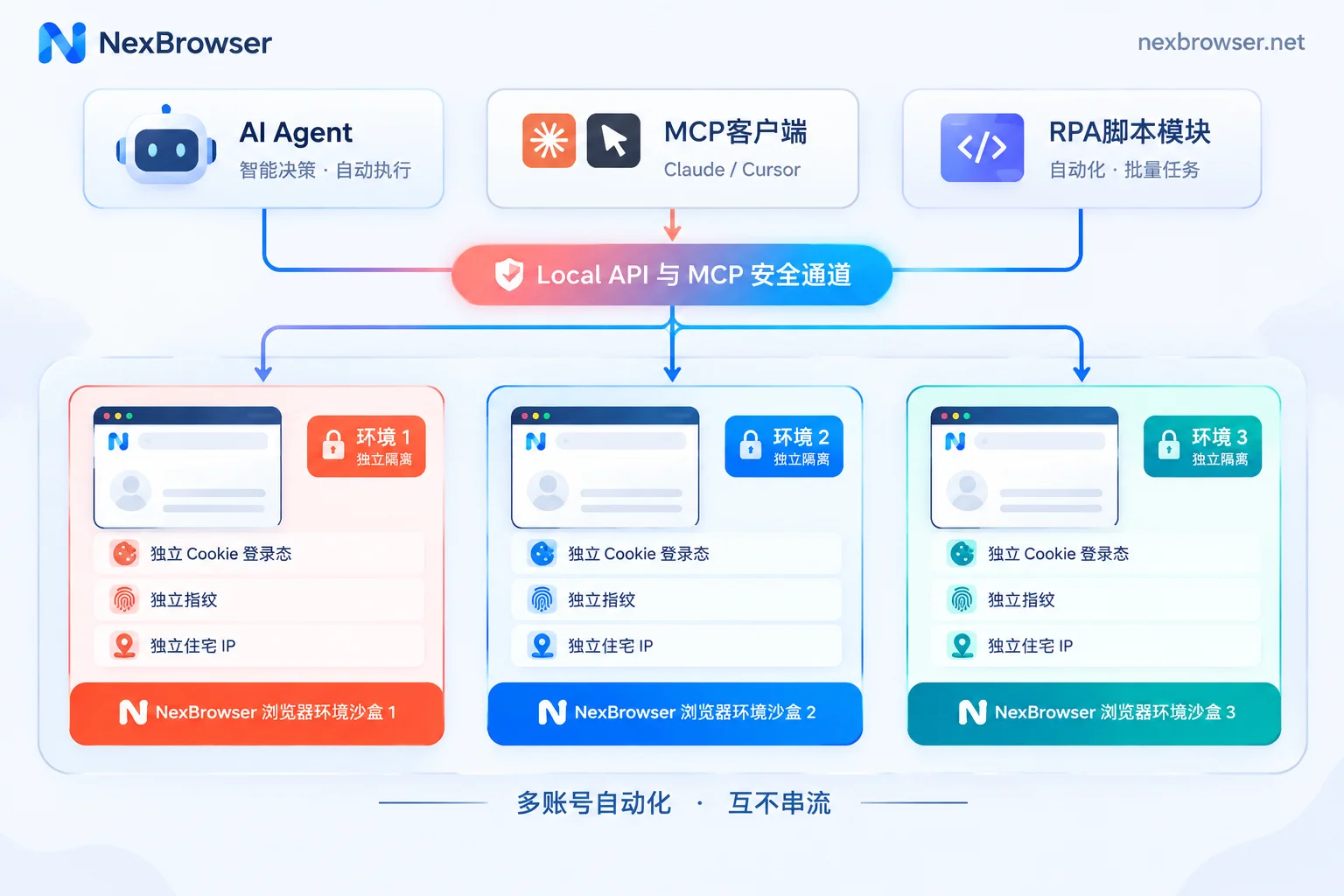
- Built-in AI Agent (Nex Agent) Parallel Sandbox
The client has a built-in Nex Agent. Simply describe the task in natural language, and the Agent will open web pages, operate pages, fill forms, or take screenshots in the specified isolated environment. It can also split tasks into multiple independent windows for parallel execution. The login state of each environment is saved separately and can be resumed directly next time; when encountering high-risk actions, you can set request human approval before executing irreversible operations, and the entire process can be reviewed. - Local API and MCP Protocol Direct Connection (Developer Preferred)
For technical teams, NexBrowser provides completely free and unlimited calls (also available in the free tier) Local API and MCP support. After enabling the local OpenAPI, you can use the access key to call interfaces to create, open, close environments and read CDP connection information, easily using Selenium, Puppeteer, Playwright, orbrowser-useto take over specified environments; at the same time, through the NexBrowser MCP Server, clients such as Claude Code, Codex, and Cursor can directly list and operate isolated environments. For specific integration details, see the OpenAPI interface documentation, MCP integration guide, and "How to Use Fingerprint Browser API Without Pitfalls: A Practical Guide from Local API plus CDP Takeover to MCP Direct Connection". - No-Code RPA Scripts (Beta) for Batch Process Execution
For fixed repetitive daily actions, you can drag and drop to orchestrate variables, conditional judgments, loops, and failure retries on the no-code canvas of RPA scripts. When a script is bound to a batch of environments for batch execution, each environment still strictly uses its own cookies, fingerprints, and proxies, and execution logs are recorded per environment and per step, allowing precise error localization. - Multi-Window Synchronization (Manual Judgment Batch Operations)
When encountering temporary batch tasks that require real-time human judgment, enable window synchronization to synchronize clicks, inputs, scrolls, and jumps from the main window to multiple slave windows. You can set operation intervals and throttling, while each slave window still maintains its own independent underlying fingerprint and proxy isolation.
4. From Solo to Team Matrix: Scalable Isolation Management and Concurrency Conflict Prevention
When the number of environments expands from a few to hundreds and requires collaboration among multiple operators, "human operational errors" are often more likely to break environment isolation than technical vulnerabilities. For example, two people opening the same store environment on different computers at the same time will cause local caches to overwrite each other and abnormal concurrent requests from different locations (see "What Happens When Multiple People Log into the Same Browser Environment Simultaneously: Data Overwrite, Account Concurrency Anomalies, and How Teams Should Handover and Divide Work").
To safeguard isolation boundaries in team collaboration, NexBrowser has built-in rigorous engineering mechanisms in multi-account management and team collaboration:
- Single-Environment Single-Person Mutual Exclusion Lock: The same browser environment can only be opened by one team member at a time, fundamentally preventing cookie conflicts and cache overwrites caused by concurrent operations.
- Passwordless Sharing and Auto-Fill: After binding platform accounts to environments, members will automatically fill in login when starting the environment, and members never have access to plaintext account passwords; combined with custom roles and permission matrices (see Roles and Permissions documentation), administrators can precisely control what each member can see and modify, and all permission changes and operations are traceable.
- Template-Based Batch Expansion and Sidebar Code Retrieval: Tag by platform, store, or responsible person, support batch environment creation, batch proxy binding, and batch start/stop; save tuned standard environments as templates, and new fingerprint parameters are automatically generated when copied. When a platform triggers SMS verification, you can directly use the built-in cloud phone number (NexSMS number center) in the environment sidebar to obtain numbers by country and target platform, receive SMS, and fill in verification codes without leaving the current isolated window.
5. Get Started Building Your Isolated Environment Workbench Now
True browser environment isolation has never been as simple as "changing a UA" or "using a proxy plugin"; it is a complete closed loop from local databases (IndexedDB / Cookie), hardware rendering fingerprints, network exit verification, to AI automation takeover and team permission mutual exclusion.
NexBrowser adopts a transparent strategy of no feature tiers—whether you are an individual operator managing a few accounts or a developer writing automation scripts, the free tier gives you access to all core features including Local API, MCP, RPA, and window synchronization, with no credit card required and quotas that do not expire (specific window and member quotas are subject to the current terms on the limited-time free activity page); as your business expands, you can simply purchase additional window and member capacity on the pricing page.
Go to the NexBrowser client download page now to get the Windows 10 / 11 (64-bit) client and build a truly independent and clean operating space for each of your business accounts.


Comments(0)