 NexBrowser指纹浏览器-官方博客Blog
In the circles of cross-border e-commerce, social media matrices, and overseas ad placements, "one store, one environment; one account, one IP" has become basic common sense. But many sellers and operations teams encounter a puzzling phenomenon in practice: they have already abandoned the wild practice of "incognito mode + plugin IP switching" and purchased dedicated anti-detect browsers. So why do their accounts still suddenly trigger secondary verification, rate limiting, or even linked bans before major promotions or during daily logins?
After investigating numerous failure cases, we find that when the underlying tool already has environment isolation capabilities, over 90% of association and risk control incidents actually stem from human operational errors in daily operations. The platform's global composite risk control model not only compares static hardware parameters but also tracks dynamic anomalies throughout the environment lifecycle.
If you also suffer from the "used the tool but still live in fear" problem, check the following 5 high-frequency operational blind spots one by one to see where your anti-detect defense line was breached by your own team.
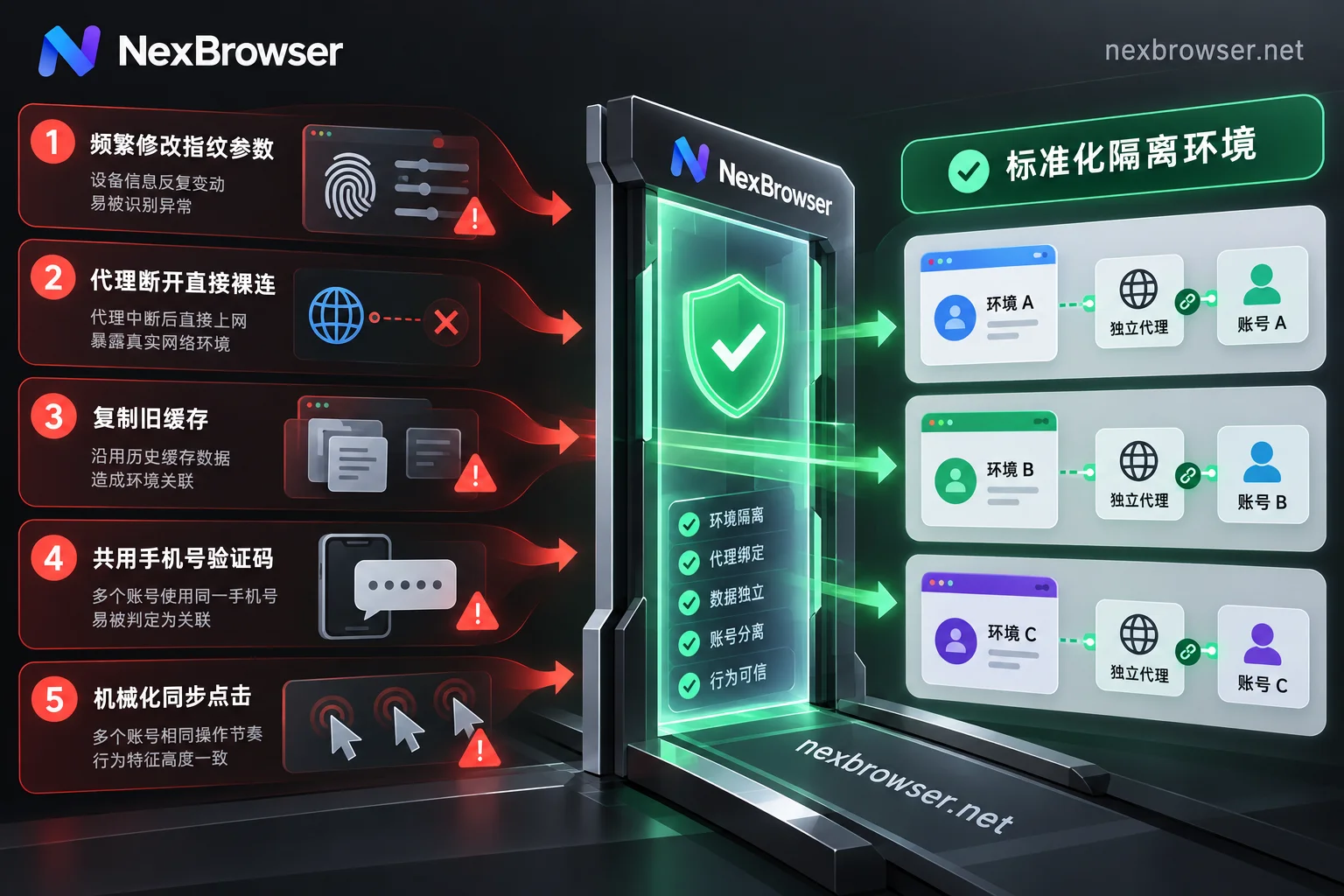
Mistake 1: Treating "Fingerprint Tuning" as Routine, Frequently Modifying Core Parameters After Environment Setup
Many novice operators have excessive anxiety about browser fingerprints, thinking that changing the User-Agent, screen resolution, or resetting Canvas noise every few days will make the account "more hidden."
Why it fails:
The core logic of anti-detect is "isolation and realism," not "frequent face-changing." In the real world, a normal user's computer graphics card (WebGL), sound card characteristics (Audio), system font list, and OS version remain fixed for months or even years. If you frequently manually change the underlying hardware fingerprint in an environment where a store or social media account is already logged in, the platform's risk control will immediately detect a dramatic mutation in device characteristics—the same login session is a Windows desktop today, and suddenly the underlying hardware becomes another graphics card tomorrow. This is tantamount to raising your hand to report to the risk control system: "I am using a virtual spoofing environment."
Correct anti-ban strategy:
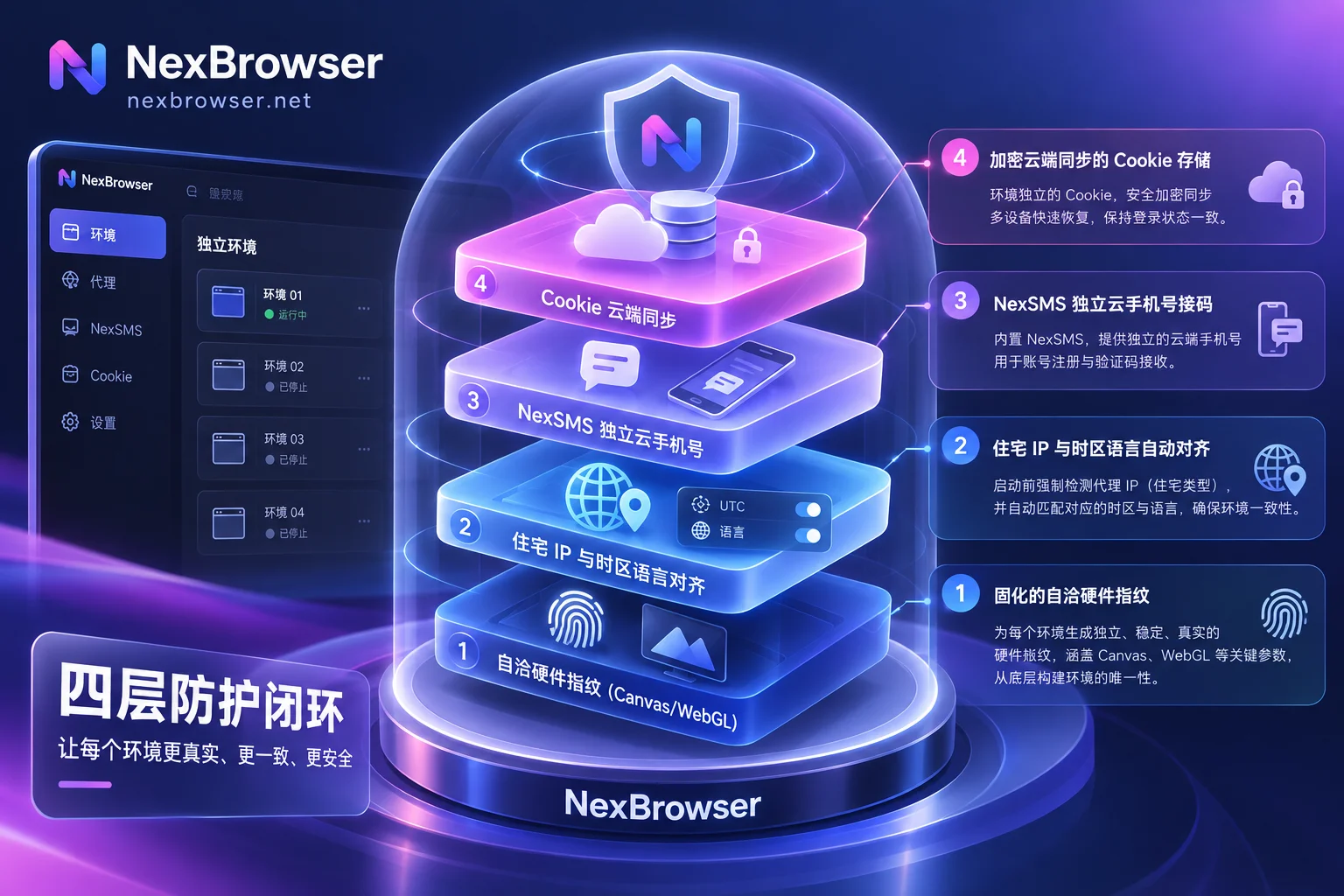
Environment parameters should be generated and locked once before the environment is first created and before any account is logged in. In NexBrowser's fingerprint parameter management, the system includes built-in parameter templates for Windows, macOS, Android, iOS, and other platforms, and these templates are kept updated in the cloud with the Chrome kernel version. After generating self-consistent Canvas, WebGL, Audio, and hardware parameters with one click when creating a new environment, do not arbitrarily change them throughout the account's lifecycle. For teams worried about choosing the wrong basic settings and causing platform interception, you can first refer to our "Anti-Detect Browser Selection Guide: Responding to Platform 'Linked Bans' with 4 Lines of Defense from Parameter Consistency to Daily Circulation" to lay a solid foundation at the initial account creation stage.
Mistake 2: Starting "Naked" When Proxy Fails, or Forgetting to Align Time Zone and Language After Changing IP
Network-level incidents often occur in the most inadvertent moments: the bound proxy IP suddenly expires, the node goes down for maintenance, or when changing to a new proxy for an environment, the operator only changes the IP address but forgets to check the time zone and language in the environment.
Why it fails:
If the anti-detect browser does not have a strict startup interception mechanism, when the proxy channel unexpectedly disconnects or is misconfigured, the browser can easily fall back to the local real network (or the office intranet's public exit) and directly connect to the platform server. Even if the request leaks for only a few seconds, your real local IP or the shared exit of other stores in the same office will be directly exposed. In addition, changing an environment originally bound to a US IP to a UK IP while still using New York time zone and American location information—this contradiction between "network exit and environment parameters" is also a classic trigger for risk control (for specific troubleshooting methods, see "IP and Browser Time Zone/Language Mismatch Triggers Risk Control: First Find Which Layer the Contradiction Is In, Then Align in the Environment").
Correct anti-ban strategy:
Leave network verification to the system's enforcement mechanism rather than relying on manual checks by operators. In NexBrowser's proxy and residential IP module, the system blocks such mistakes from two aspects:
- Mandatory interception before startup: Before opening each browser environment, the client automatically detects the bound proxy exit (supporting HTTP/HTTPS/SOCKS5 and residential IPs bound with one click via NexIP). Once the detection fails, the environment directly refuses to start, fundamentally eliminating the tragedy of "proxy disconnection leading to real IP exposure."
- Dynamic matching of exit parameters: The proxy is bound to a single environment, and the environment's WebRTC, time zone, language, and geolocation automatically match and align with the proxy exit IP. Even if the account needs to change proxies mid-way for business reasons (further reading: "Can an Account Change Proxies Midway: Yes, Provided It Looks Like a Normal Network Change"), NexBrowser will automatically keep the environment characteristics in sync with the new network exit without clearing original cookies and local storage.
Mistake 3: "Lazy Copying" When Batch Creating Environments, Accidentally Cloning Residual State or Fingerprints
When business expands from a few accounts to dozens or hundreds, manually configuring each environment is time-consuming. To save effort, some operators configure a "standard environment," test it by opening web pages, and then directly export and clone it along with cache data, or use the wrong copying method to distribute the same set of underlying fingerprints to a dozen new accounts.
Why it fails:
The moment a browser visits a platform page (even before entering username and password), the platform has already written device identifiers locally (saved in cookies, LocalStorage, or even IndexedDB). If you clone an environment containing residual test data as-is to other accounts, or if the copied environments share the same canvas hash, the platform can instantly group all these new accounts under the same entity.
Correct anti-ban strategy:
Distinguish "environment configuration templates" from "running instances," and replace manual copying with standard batch workflows. In NexBrowser's multi-account environment isolation workspace, tuned environment configurations can be saved as environment templates. When you batch create or copy new environments using a template, the system automatically generates brand-new independent fingerprint parameters for each new environment, while ensuring that each environment's cookies, cache, and local storage (including IndexedDB) are completely independent and mutually inaccessible. With batch proxy binding and grouping/tagging by platform or store, you can safely spin up dozens of clean, independent new environments in minutes.
Mistake 4: When Facing CAPTCHA Secondary Verification, Casually Using the Same Physical Phone for SMS Verification
Anti-detect browsers manage fingerprints and IPs on the computer side, but many sellers stumble at the "mobile verification code" step. When multiple stores or social media accounts successively pop up security verifications requiring a bound phone number to receive SMS, operators casually pull out their own physical SIM card or mix numbers on the same cheap SMS receiving website to verify multiple high-value accounts.
Why it fails:
Phone numbers, like payment cards, are hard indicators with strong identity pointing. Even if your anti-detect browser disguises two accounts as two independent devices thousands of miles apart, as long as they fill in the same phone number (or a highly correlated number segment) to receive verification codes, the previous investment in fingerprint isolation and independent residential IPs instantly becomes zero.
Correct anti-ban strategy:
Give each independent environment an exclusive, matching SMS receiving channel, and complete verification within the environment in a closed loop. NexBrowser has a built-in NexSMS cloud phone number center directly in the environment sidebar. When an account in an environment triggers SMS verification, operators don't need to switch windows to find an external SMS receiving platform; they can directly get a number by target country/region and platform in the current environment's sidebar, receive the SMS, and fill in the verification code. For main stores or ad accounts that need long-term maintenance, the number can be directly converted to long-term rental, ensuring strict correspondence of "one environment, one independent proxy, one dedicated number."
Mistake 5: Multi-Device Switching or Mechanical Group Control, Disrupting Login State and Behavioral Naturalness
The last disaster area appears in team collaboration and batch efficiency improvement:
- Scenario A: An operator logs into an account from home on their own computer, then returns to the office, switches to another computer, and logs in again with username and password, causing the same account to frequently cross different local caches in a short period and trigger remote re-login verification.
- Scenario B: To synchronize posting or account nurturing for dozens of social media accounts, extremely rigid scripts are used, with dozens of windows clicking the same coordinate at the same millisecond, immediately detected by the platform's anti-automation behavior model.
Why it fails:
Today's platform risk control places great emphasis on "environment continuity" and "operational behavior naturalness." Frequently losing cookies and re-entering passwords, or multiple windows showing identical mechanical click frequencies, will rapidly raise the account's risk score.
Correct anti-ban strategy:
- Encrypted cloud sync maintains login state continuity: When closing an environment in NexBrowser, cookies, local storage, and other data are encrypted and synced to the cloud according to the selected scope. When logging in on another computer or sharing the environment password-free with team members (see "What Happens When Multiple People Log into the Same Browser Environment Simultaneously: Data Overwrite, Abnormal Account Concurrency, and How Teams Should Hand Over and Divide Work" for details), the system automatically restores the cloud state and restricts only one person to open it at a time, eliminating the need to repeatedly enter passwords and re-login.
- Use automation with interval throttling instead of rigid group control: For multi-account efficiency, NexBrowser provides three flexible tools—for temporary batch operations requiring human judgment, use Window Sync with operation interval and throttling settings enabled to avoid all slave windows triggering clicks at the same millisecond; for fixed repetitive processes, use no-code RPA scripts that support conditional judgment and random waits; and for complex page interactions and form-filling tasks, wake up the built-in Nex Agent (AI Agent) to decompose and execute in parallel using natural language. For how these three work together, refer to "How AI Browser Automation Lands Multi-Account Business: Practical Division of Labor Among Built-in AI Agent, RPA, and Window Sync."
Summary: Make Anti-Detect a Set of "Foolproof" Standard Actions
Looking back at these 5 high-frequency mistakes, you'll find that truly secure account anti-detect cannot rely solely on emphasizing "be careful" to operators. Instead, you need to choose an anti-detect browser that internalizes risk control rules into a system foolproof mechanism—automatically intercepting abnormal proxies before startup, forcing fingerprint refresh when copying templates, solving independent SMS verification right in the sidebar, and seamlessly continuing encrypted cache when switching computers.
If you are building or upgrading your multi-account workspace, you can now visit the NexBrowser download page to get the Windows client. NexBrowser adopts a feature-unified design, and through the free tier campaign page you can experience all core features including multi-account isolation, window sync, RPA, built-in AI Agent, and free Local API and MCP interfaces without a credit card, protecting your cross-border business with a more solid underlying environment.


Comments(0)