 NexBrowser指纹浏览器-官方博客Blog
Entering 2026, AI browser automation is no longer a concept demo in the lab. Whether using natural language to drive built-in agents to complete cross-page form filling and competitor research, or connecting Claude Code and Cursor to local browsers via protocols like browser-use and Playwright MCP, using large models to take over web operations has become a daily tool for many technical and operations teams.
However, when teams try to apply AI browser automation directly to real business scenarios such as cross-border e-commerce store operations, overseas social media matrix maintenance, ad placement, or large-scale data collection, they often hit two walls:
The first wall is underlying environment and session issues: ordinary automation tools start with a blank session each time, or multiple tasks share the default browser on the same machine. Not only do they have to go through login verification every time, but they are also highly prone to triggering platform risk control due to consistent fingerprint features and mismatched IP, timezone, and language, leading to mass account bans.
The second wall is mismatch between efficiency and cost: some teams try to replace all operations with natural language AI agents, only to find that letting large models perform routine actions that require hundreds of fixed clicks every day not only waits for model inference at each step but also consumes a large number of tokens; and once the model misinterprets a critical page, it may even perform irreversible erroneous operations.
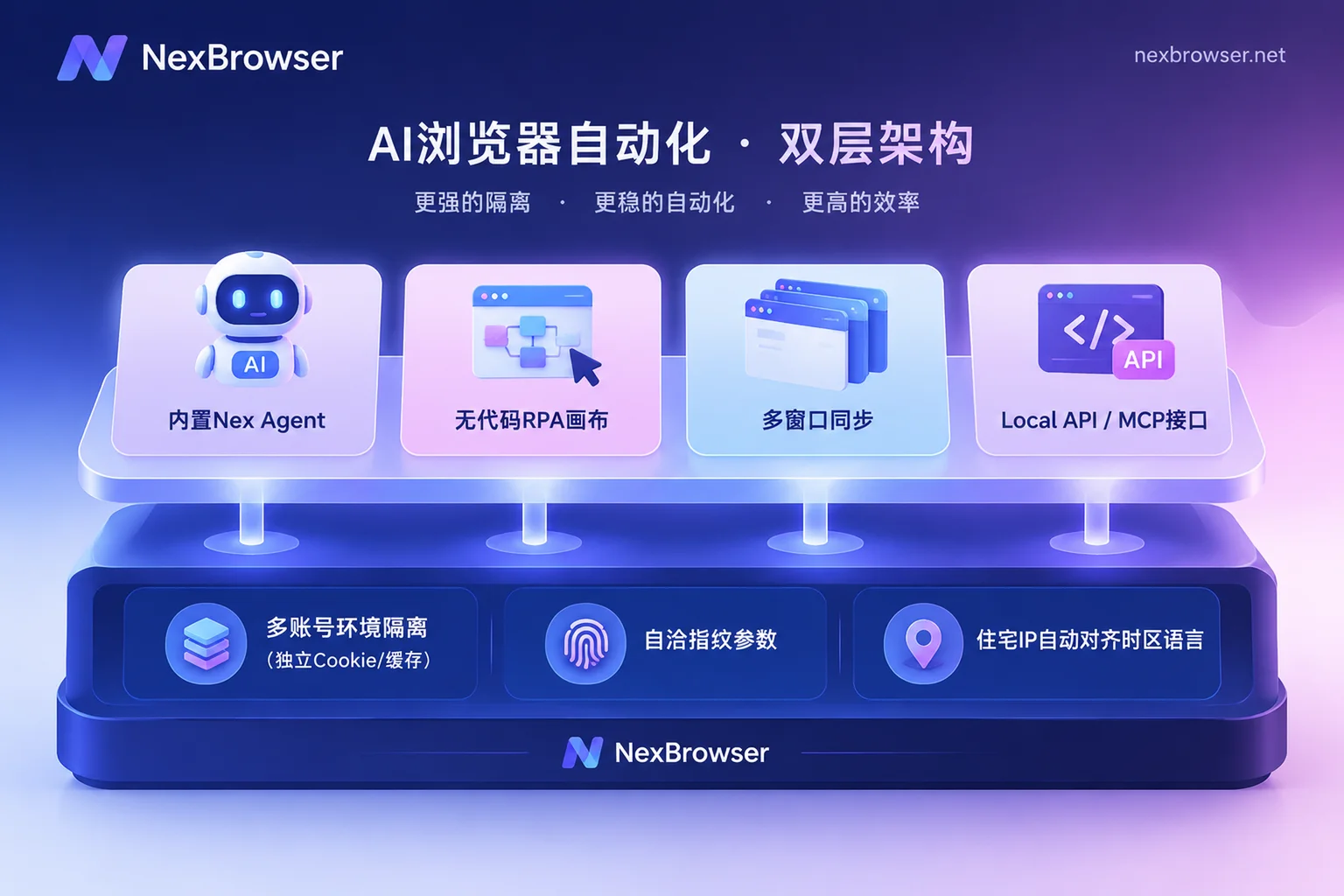
To make AI browser automation run stably in production, the key is not to find an "all-powerful model" but to first build a solid foundation of isolated, persistent browser environments, and then place AI agents, no-code RPA, window synchronization, and external development interfaces into the areas where they excel.
Why does running AI automation directly on ordinary browsers easily fail?
Many lightweight AI browser plugins or cloud headless browsers on the market are designed for "personal daily office assistants" or "one-time public web scraping". In multi-account operations and high-frequency business scenarios, AI agents face commercial platforms with strict risk control. Without a professional environment foundation, three棘手 problems usually arise:
1. Login state cannot be persisted; every start requires redoing from scratch
If the automation tool spins up a temporary container each time or loses context after clearing cache, the AI has to re-enter account credentials and handle two-factor authentication before every task. Frequent logins from different locations or new devices are themselves high-risk signals that major platforms focus on intercepting.
Under the NexBrowser multi-account environment isolation mechanism, each account has an independent browser environment, with cookies, cache, and local storage (including IndexedDB) completely isolated from each other. When the environment is closed, cookies and local storage data are encrypted and synced to the cloud according to the selected scope. Next time, whether waking up the AI on the same machine to continue execution or restoring after logging in on another machine, the login state is fully preserved per environment, and tasks can be directly resumed.
2. Hardware fingerprints and network egress exposed; intercepted before AI finishes
When you open multiple windows on the same computer for AI to work in parallel, if the underlying Canvas, WebGL, fonts, Audio, or hardware parameters are identical, or if an overseas proxy IP is used but the browser's timezone, language, and WebRTC policy remain domestic, the platform's risk control will directly pop up a captcha or even ban the account at the page load stage (for troubleshooting methods on environment alignment, see "IP and browser timezone/language mismatch triggers risk control: first find out which layer the contradiction is at, then align in the environment").
Through NexBrowser privacy and fingerprint protection and proxy and residential IP management, each environment can independently generate self-consistent fingerprint parameters and automatically align WebRTC, timezone, and language with the proxy egress. Before the environment starts, the proxy egress is checked; if the check fails, it will not start, fundamentally avoiding "naked" access caused by proxy failure.
3. Lack of Human-in-the-Loop guardrails; high risk of irreversible operations
In 2026 AI automation practices, "observability" and "Human-in-the-Loop" have become standard in production environments. When it comes to ad budget modifications, product price adjustments, bulk publishing, or financial operations, an AI running completely as a black box is worrisome.
NexBrowser's built-in AI Agent (Nex Agent) was designed with safety guardrails from the start: it can be set to request human approval before executing irreversible operations, and the entire execution process can be reviewed. When encountering complex platform rule changes or extreme verification situations, operators can take over at any time in the real window and hand it back to the automation flow after handling.
2026 production-grade automation strategy: don't force AI to handle everything; learn the "four-way division of labor"
During last year's exploratory phase, many teams understood "AI browser automation" as "use prompts for everything". By this year, mature teams have a very clear consensus: structured, high-concurrency, highly regular tasks go to deterministic tools; only unstructured, cross-page tasks requiring semantic understanding go to AI.
In the NexBrowser workbench, you can flexibly combine the following four approaches based on task determinism and frequency:
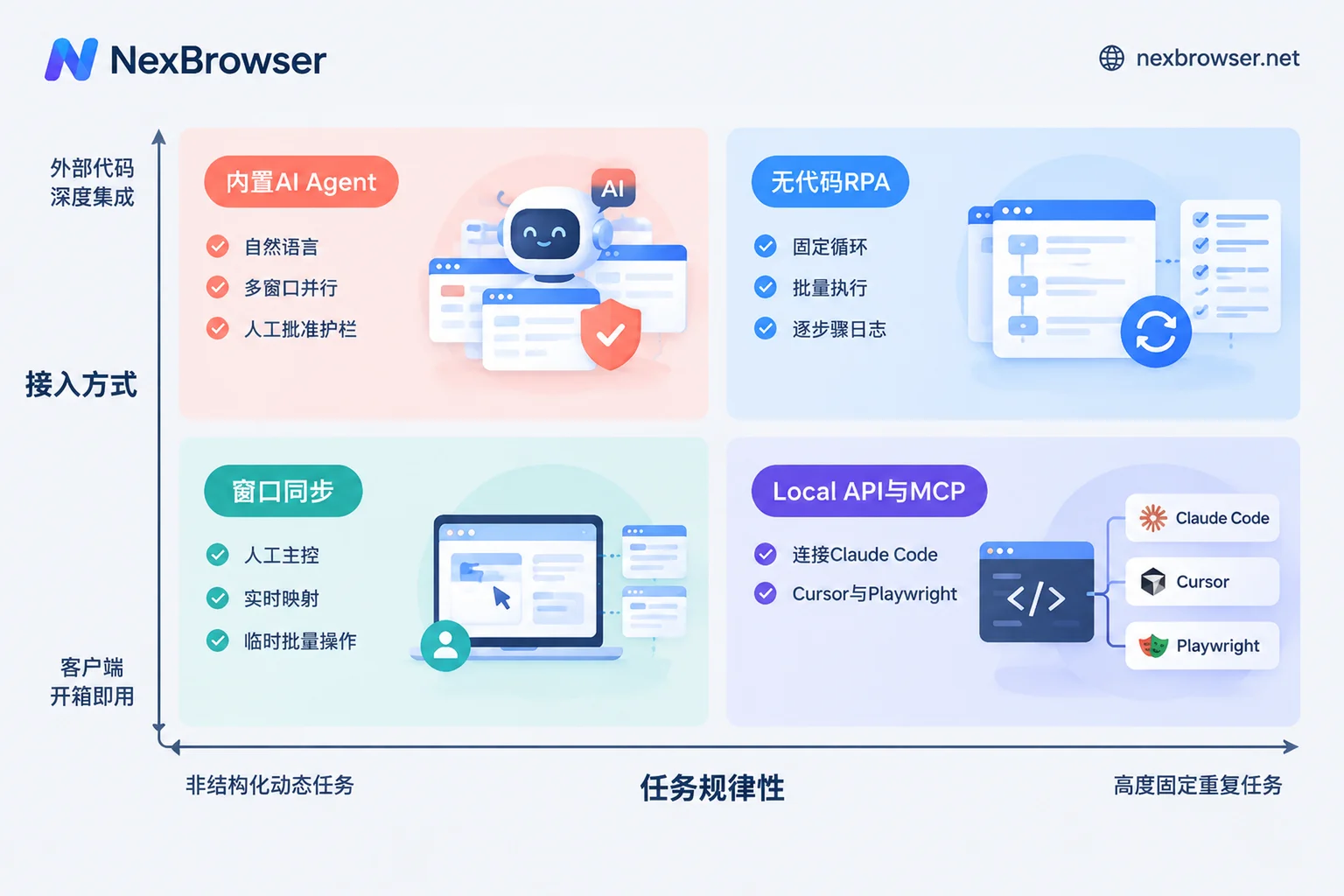
| Automation method | Core driving logic | Example use cases | Cost and stability characteristics |
|---|---|---|---|
| Built-in AI Agent (Nex Agent) | Natural language describes the goal; the model autonomously understands pages, fills forms, takes screenshots, and can split tasks into parallel windows | Cross-site information gathering and price comparison, dynamic form filling where page structure changes frequently, profile completion on long-tail non-standard platforms | Billed by model token usage (purchased with account balance); strong adaptability, supports approval before irreversible operations |
| No-code RPA script (Beta) | Canvas drag-and-drop orchestration with variables, conditional judgments, loops, waits, and per-step failure retries | Daily fixed-path backend data export, periodic account routine interactions, standardized product listing processes | Zero token consumption; high determinism; one script can be bound to a batch of environments for batch execution, with logs recorded per environment and per step |
| Window synchronization | Manually operate one master window; clicks, inputs, scrolls, and navigations are synchronized in real time to multiple slave windows | Temporary bulk event registrations, matrix configurations requiring real-time human visual judgment, centralized handling of sudden captchas | Zero code and zero configuration; synchronizable items can be toggled individually, operation intervals and throttling can be set, start/stop at any time |
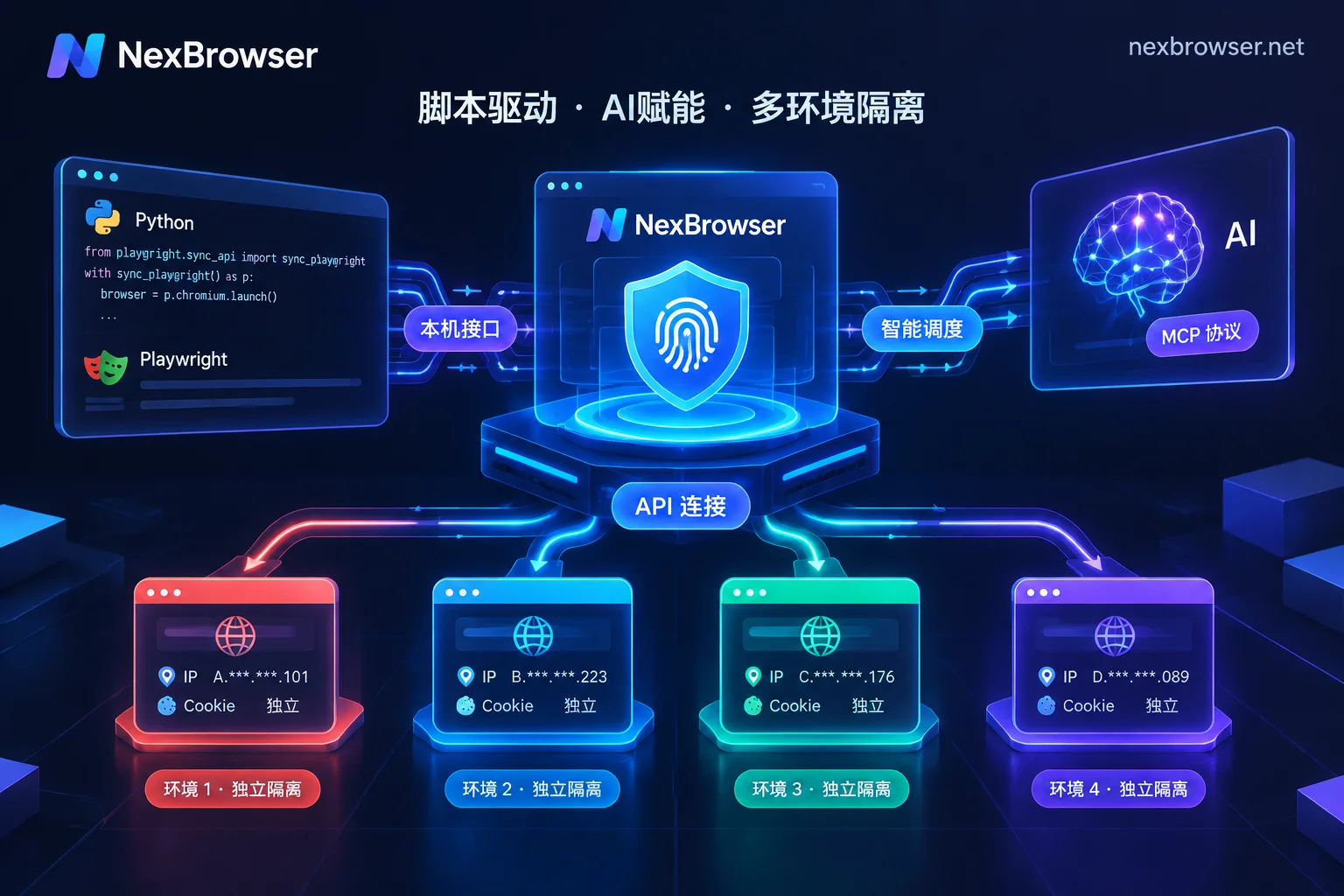
| Local API and MCP access | Local HTTP interface reads CDP information, or connects to external AI clients via MCP Server | Development teams integrating browser-use, Playwright, or using Claude Code / Cursor to directly schedule local fingerprint environments | Free API with unlimited calls (available in free tier); combines flexibility of external open-source ecosystem with fingerprint environment isolation |
When should you use the built-in Nex Agent?
When you face tasks where "you know the desired result, but the DOM structure of each page may differ, or you need to make next-step judgments based on page text content", directly waking up the built-in Nex Agent is the most hassle-free. You only need to issue instructions in natural language, and the Agent will find buttons, fill forms, take screenshots for records in the currently logged-in isolated environment, and can also split tasks into multiple windows for parallel execution.
When should you switch back to RPA or window synchronization?
If an action needs to be repeated on 50 accounts every day and the web page button positions remain unchanged year-round, there is no need to consume large model tokens to "think" about where the button is each time (for RPA implementation details, see further "How to choose RPA browser: don't just look at auto-clicking, first solve multi-account isolation and frequent script errors"). Use NexBrowser's no-code RPA canvas to drag out the process, set conditional judgments and failure retries, and bind these 50 environments for batch execution with one click. For temporary one-time bulk settings, turn on window synchronization and manually click a few times to get it done.
How can developers extend capabilities with MCP and Local API?
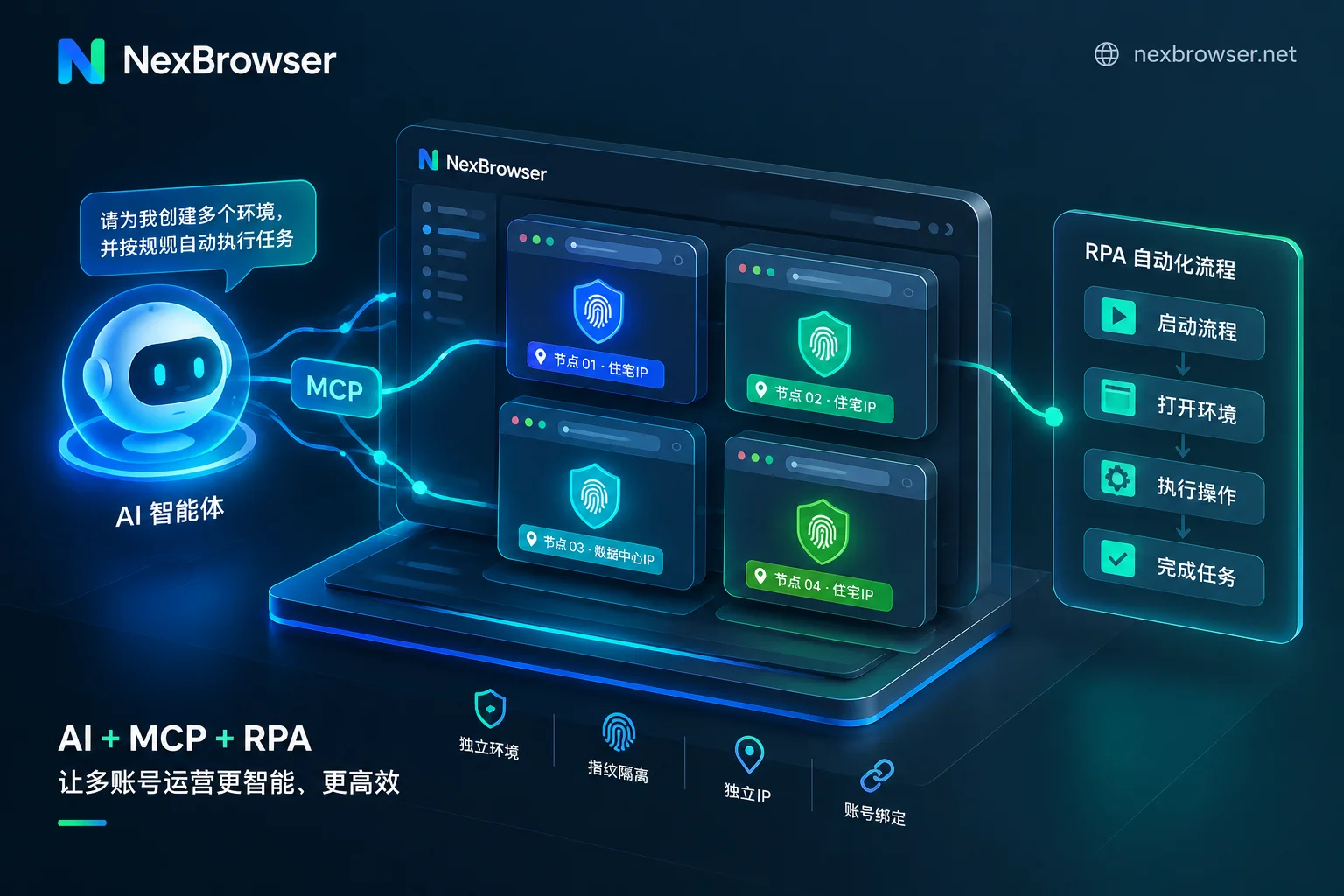
If your technical team is already using browser-use, Playwright, Puppeteer, or is accustomed to writing code and running workflows in clients supporting the MCP protocol such as Claude Code, Codex, Cursor, you don't need to abandon your existing tech stack. By enabling the client's Local API and NexBrowser MCP Server (see details in "How to use fingerprint browser API without pitfalls: a practical guide from Local API plus CDP takeover to MCP direct connection" and MCP access documentation), external AI frameworks can directly list, open local fingerprint environments and take over pages—letting external code handle business logic and NexBrowser handle underlying fingerprint isolation and proxy binding.
Practical integration: what does a complete multi-account AI automation workflow look like?
To see how these modules mesh in real business, let's take a typical "cross-border multi-store/social media matrix daily operations and competitor monitoring" scenario as an example and break down the four steps from environment preparation to automation running:
Step 1: Batch create isolated environments and align networks (foundation preparation)
The operations manager first saves tuned fingerprint parameters as templates in NexBrowser, groups and tags them by platform or store, batch creates environments, and batch binds proxies (if a NexIP account is linked, residential IPs can be bound by country/region with one click). The system automatically matches the corresponding timezone, language, and geolocation based on the proxy egress, ensuring each window is a highly self-consistent independent terminal.
Step 2: Complete account initialization and password-free hosting with in-environment SMS reception
When logging in for the first time or encountering platform security spot checks requiring phone verification, there is no need to copy and paste back and forth between an external SMS platform and the browser. Directly open the built-in cloud phone number (NexSMS number center) in the environment sidebar, obtain a number for the target country and platform, receive SMS, and fill in the verification code (for operational details, see "How to operate number acquisition and verification code reception within the browser environment: first align the attribution, then obtain number and fill in"). After successful login, the account credentials and cookies are bound to the environment, and subsequent starts automatically fill in the login.
Step 3: AI Agent and RPA collaborate to execute daily business
- Non-standard exploration tasks go to AI: When you need to research the latest bestseller lists on various sites, extract competitor detail page summaries in different formats, or draft form replies based on different buyer messages, use Nex Agent to issue tasks in natural language, execute parallel scraping and form filling across multiple windows, and trigger a human approval request before clicking the final "Submit/Publish".
- Fixed daily update tasks go to RPA: For scheduled backend report downloads and routine inspection clicks every day, directly bind the orchestrated RPA script to run them in batches. If an environment errors due to network fluctuations, you can quickly locate and retry via per-environment, per-step execution logs.
Step 4: Team permission isolation and secure handover
When automation workflows need to be handed over to multiple operations specialists for collaborative supervision, the team founder can customize roles in the permission matrix (see Roles and permissions description) and share environments password-free with corresponding members. Members can open the environment and directly start automation tasks or perform manual review without ever touching plaintext account passwords; at the same time, the same environment can only be opened by one member at a time, completely eliminating the risk of concurrent operations causing account conflicts or data overwrites.
Conclusion: Start validating your AI workflow with a free full-featured environment
The true value of AI browser automation is not replacing a few mouse clicks with flashy large model demos, but freeing manpower from tedious web interactions while ensuring multi-account security without association, long-term stable login states, and clear team collaboration responsibilities.
If you are planning to introduce AI agents, MCP tools, or RPA into your existing multi-account business, it's advisable to first conduct small-scale validation in an environment with complete fingerprint isolation capabilities. NexBrowser adopts a no feature tiering strategy; the free tier lets you experience all core features including multi-account isolation, window synchronization, RPA scripts, built-in AI Agent (tokens purchased separately on demand), and free unlimited Local API / MCP interfaces, with no credit card required. You can now go to the client download page to get the Windows client and build your own multi-account AI automation workbench.


Comments(0)