 NexBrowser指纹浏览器-官方博客Blog
When operating cross-border stores, social media matrices, or executing data collection tasks at scale, manual clicking quickly hits a productivity ceiling. More and more technical and operations teams are writing automation scripts with Playwright, Puppeteer, Selenium, or introducing AI tools like browser-use, Claude Code, Cursor to control web pages.
But many developers stumble at the first step: the script directly launches a clean default Chromium browser, which not only loses the original account login state but also exposes the real local IP and native fingerprint features, causing the account to trigger two-step verification or even get banned.
To make automation code and AI Agents run in a secure environment, the core bridge is the fingerprint browser API. This article will break down the underlying working logic of fingerprint browser APIs, two mainstream integration paths, and four technical pitfalls that most easily cause environment failure in practice.
1. Why can't automation scripts directly launch a browser, but must go through a fingerprint browser API?
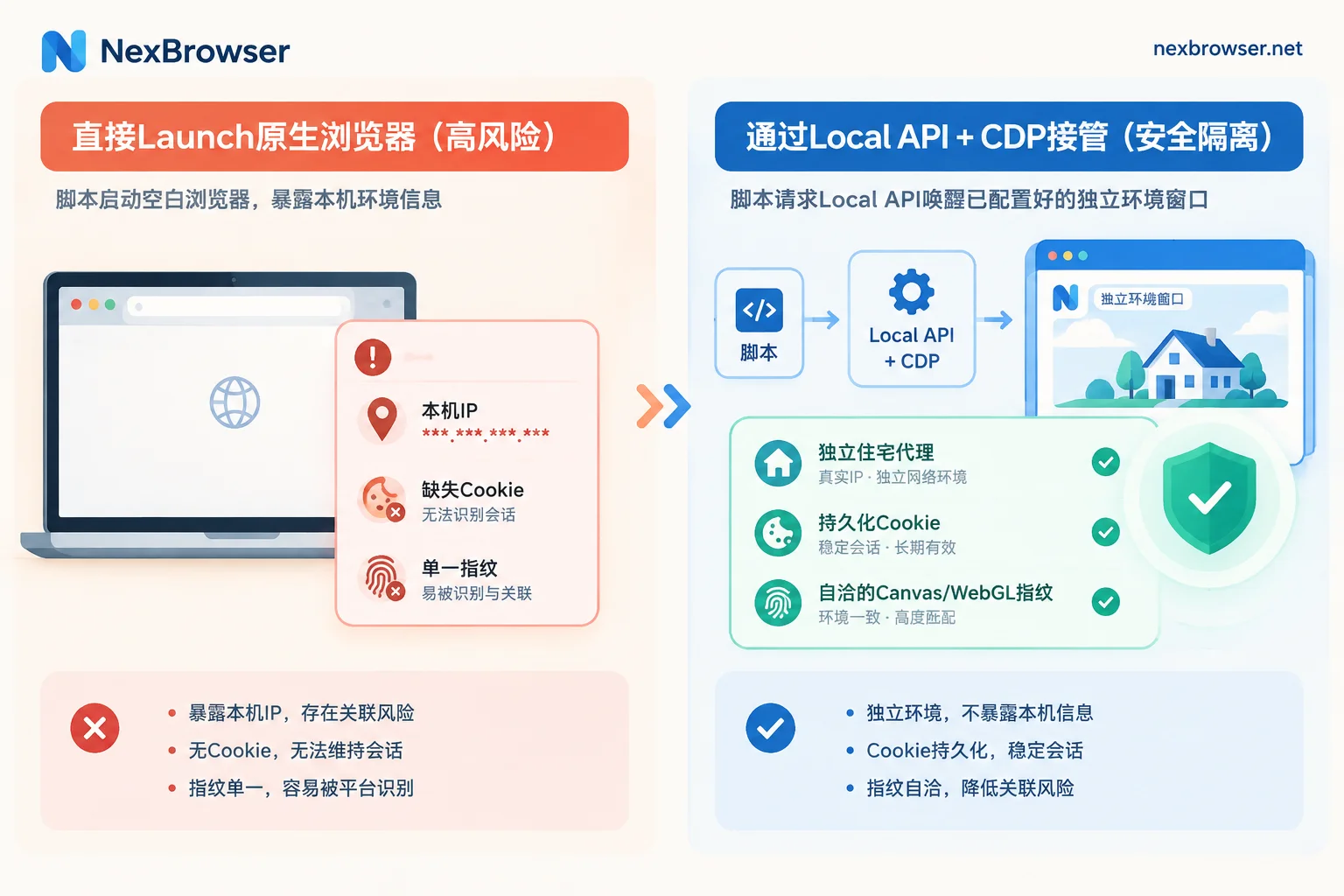
Whether it's Playwright or Puppeteer, the most common writing in default sample code is browser.launch(). The essence of this approach is that the automation framework temporarily creates a new browser process locally.
For single tests or scraping public pages without login, this is fine; but in multi-account operations or data collection on strict risk-control sites, directly creating a new process brings three fatal problems:
- Missing or contradictory fingerprint parameters: Native headless or default headed browsers carry obvious automation features. Even if you hardcode a modified User-Agent in the script, the underlying Canvas, WebGL, Audio, hardware concurrency, and font list remain the real local parameters, easily identified as spoofing by risk control.
- Login state and cache are difficult to persist across devices: Manually managing dozens of accounts'
userDataDiror exporting/importing Cookie JSON files in code is not only high maintenance, but once IndexedDB and complex LocalStorage states are involved, scripts often experience "Cookie imported but still logged out" situations. - Proxy chain disconnected from environment features: Configuring proxies at the code level often only covers regular HTTP requests. If WebRTC policy, DNS resolution, or system timezone and language are not automatically aligned with the proxy exit IP, real location leakage still occurs (for troubleshooting, see Alignment methods for IP, browser timezone, and language mismatches that trigger risk control).
Therefore, the correct approach is never to let the script "start a new browser itself", but to wake up a window with an already configured independent environment through the fingerprint browser API, and then "connect" the automation tool to it.
2. Two core integration paths for fingerprint browser APIs
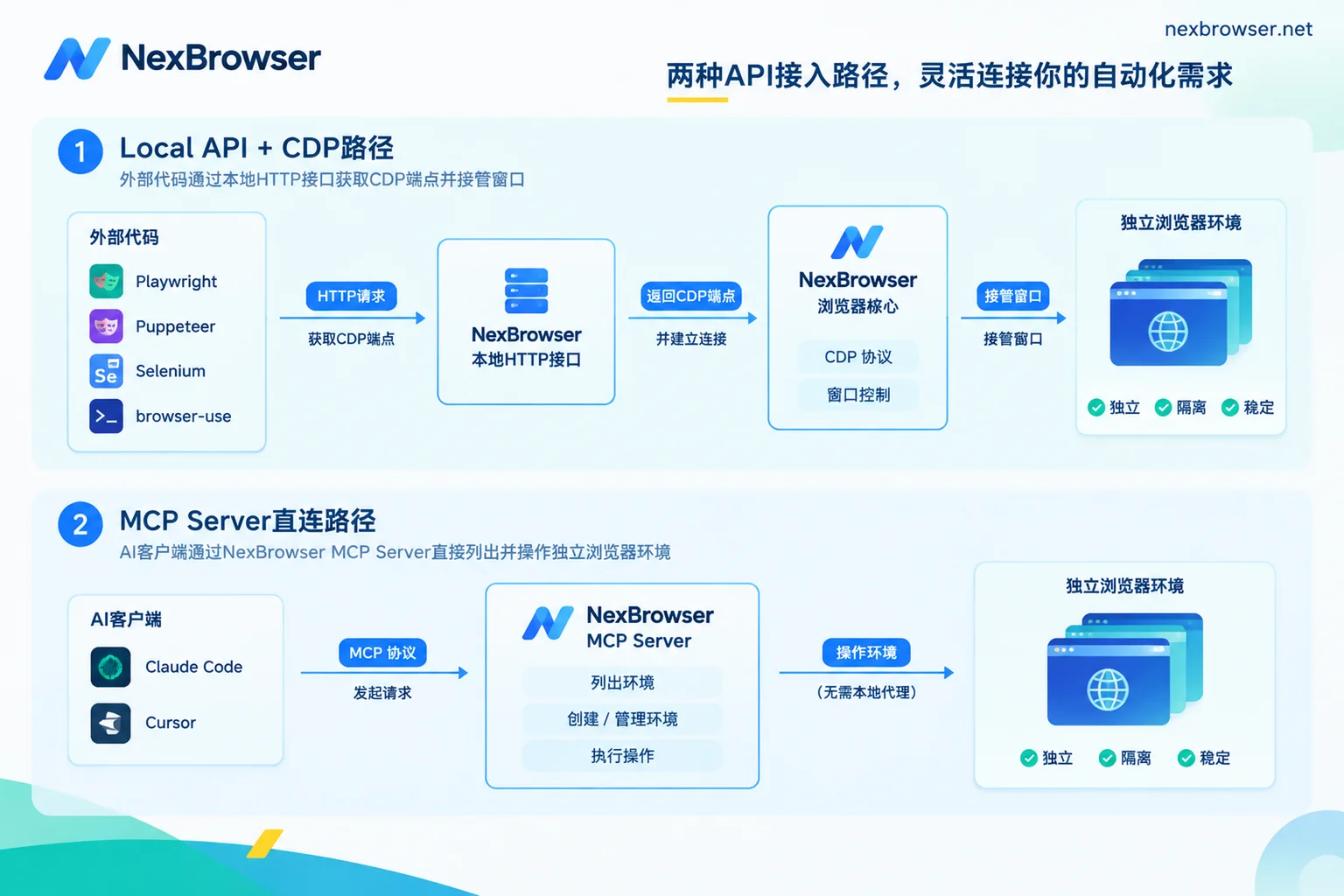
With the evolution of automation tool stacks, there are currently two main standard paths to drive fingerprint browsers via API: Local API + CDP takeover for traditional code frameworks, and MCP protocol direct connection for large model clients.
Path 1: Local API + CDP port takeover (suitable for Playwright / Puppeteer / Selenium / browser-use)
This is the most commonly used solution by developers with the finest control granularity. Under the NexBrowser Local API system, the entire control loop is divided into three steps:
- Step 1: Enable the interface and authenticate. Enable the OpenAPI feature in the Windows client, obtain the local HTTP interface address and exclusive Access Key.
- Step 2: Schedule environment lifecycle with HTTP requests. Your external program (Python, Node.js, or Go script) sends requests to the local HTTP interface to complete management actions such as batch creating environments, binding or changing proxies, and opening specified environment windows.
- Step 3: Read CDP information and transfer control. After calling the "open environment" interface, the API returns the CDP (Chrome DevTools Protocol) debugging address (e.g.,
wsEndpointor debug port) and WebDriver path for that environment window. Then, Playwright (usingconnect_over_cdp), Puppeteer, Selenium, or Python-based AI automation frameworks browser-use and Playwright MCP can directly connect to this CDP address to take over page operations.
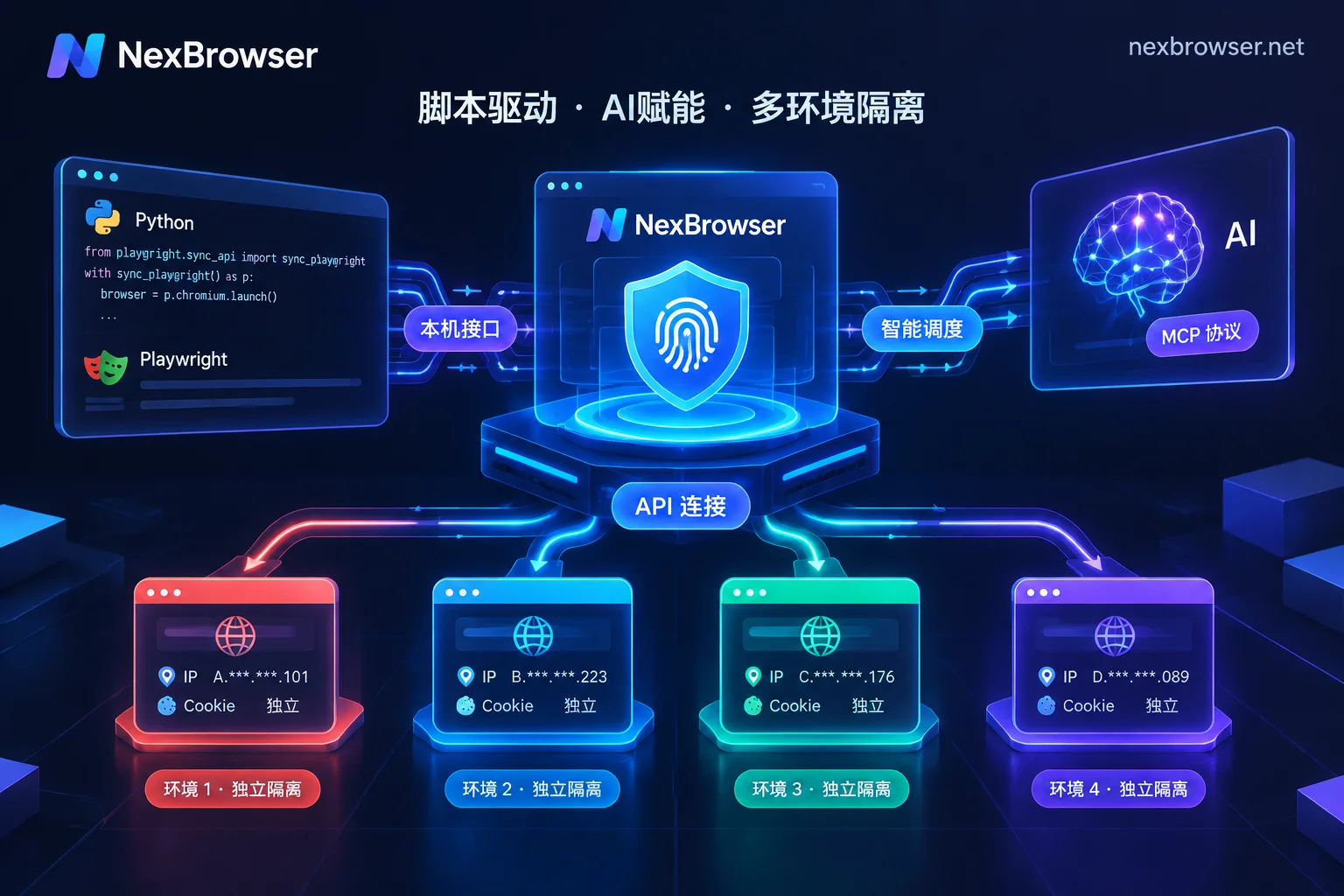
In this mode, all page clicks, form fills, and network requests run in the Chrome kernel process already isolated by NexBrowser. The environment's built-in Cookies, IndexedDB, proxy chain, and self-consistent multi-dimensional fingerprint parameters naturally take effect, and no spoofing or proxy plugin code needs to be written in the script. For specific interface fields and return formats, you can directly refer to the NexBrowser OpenAPI documentation.
Path 2: MCP Server protocol direct connection (suitable for Claude Code / Cursor / Codex)
If you don't want to write and maintain complex DOM selector code from scratch, but hope to directly schedule browsers with natural language in your daily AI programming tools or agent clients, you can choose the MCP (Model Context Protocol) path.
In addition to supporting external Playwright MCP via CDP, NexBrowser also provides a native NexBrowser MCP Server. After configuration (see MCP integration documentation), MCP-compatible clients such as Claude Code, Codex, and Cursor can directly discover and call browser tools: from listing environments under the current account group, opening specified windows, to executing navigation, interaction, and information extraction within the page, all can be chained through conversational commands.
Additional suggestion: When do you not even need to write API code?
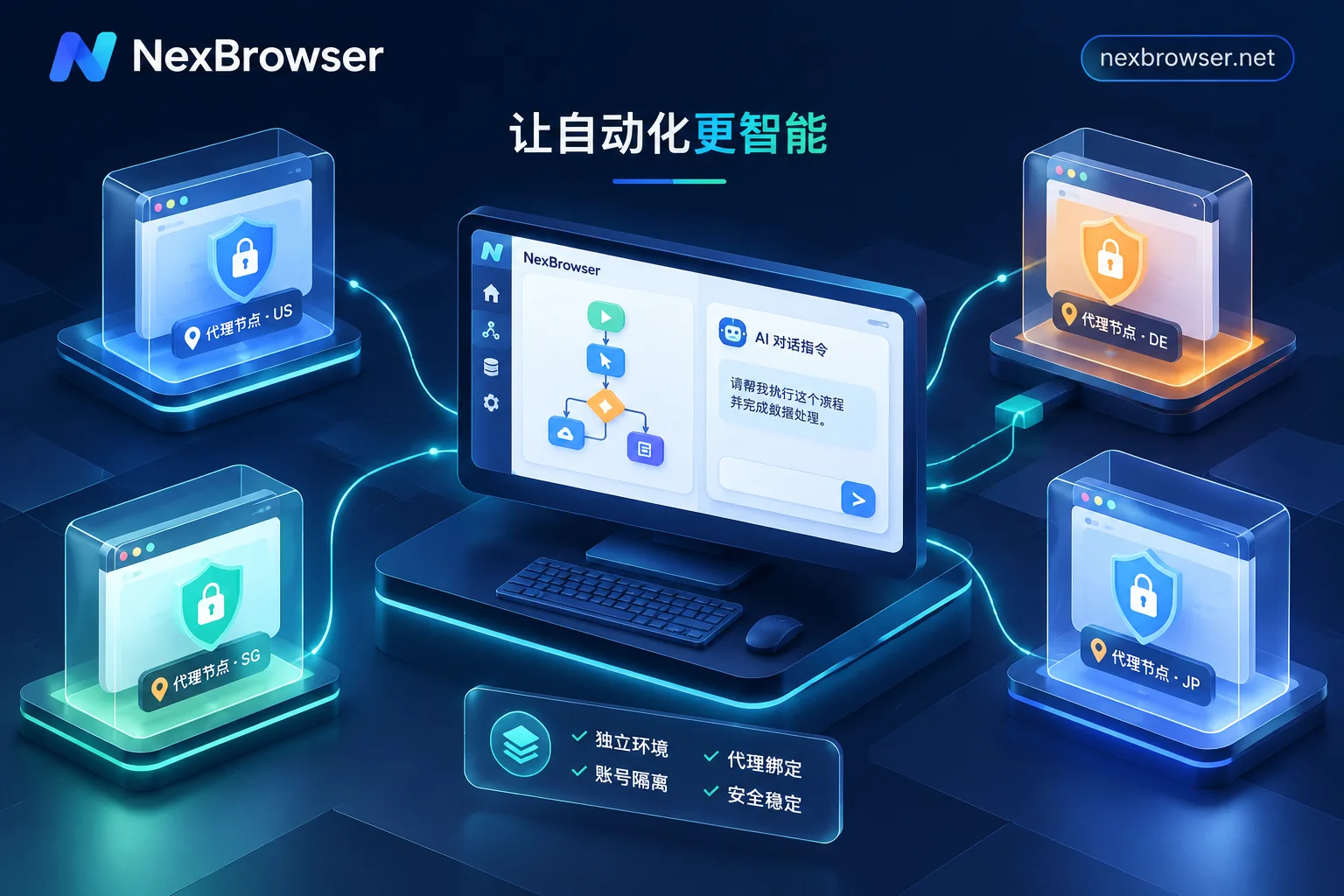
Not all automation needs require external development. For periodic web operations with fixed processes, you can directly use the client's built-in no-code RPA script (Beta) to drag and drop on the canvas (for details on RPA and environment coordination, see "How to choose an RPA browser: first solve multi-account isolation and frequent script errors"); for temporary natural language task decomposition and multi-window parallel operations, the client's built-in Nex Agent (AI Agent) is ready out of the box; and for temporary batch actions that require human judgment while watching, window synchronization can directly handle it. Leave the Local API for scenarios that require deep coupling with your internal ERP, data collection pipelines, or self-developed systems—this offers the best development cost-effectiveness.
3. Practical pitfalls: 4 details most likely to cause failures when running automation with APIs
Many teams get the API working, and running a single window is fine, but once deployed to production with dozens of accounts, errors occur frequently. The following engineering details need to be avoided when writing code:
1. Script overdoes it and overrides the environment's original proxy or UA
Some developers habitually copy code from previous ordinary crawlers and, after connecting to CDP, inject an extra layer of proxy or custom headers through page interception or command-line arguments. This easily causes the browser's real network exit to misalign with the environment's preset timezone and language.
Correct approach: Proxy binding and switching should be done uniformly through the fingerprint browser's environment configuration or the Local API's proxy interface. In NexBrowser, the proxy is bound to a single environment; timezone, language, geolocation, and WebRTC automatically align with the proxy exit, and changing proxies mid-session does not clear existing Cookies and local storage (for how to choose suitable proxy types, see "What proxy is suitable for collection tasks").
2. Proxy exit is offline, but the script forcibly starts the environment
When unattended scripts run batch tasks at night, if a residential IP node happens to fail, a browser lacking protection mechanisms may fall back to direct connection or get stuck on a blank error page consuming a lot of retry time.
Correct approach: Rely on the environment's pre-start validation. Before starting an environment, NexBrowser first checks the proxy exit's connectivity, latency, and geolocation. If the check fails, the window will not start, fundamentally preventing the script from mistakenly operating accounts in a bare connection or disconnected state.
3. Forcefully killing processes causes cloud sync data truncation
After a task finishes, if the external script directly uses the operating system's kill -9 or force-destroys the process to close the browser, the new Cookies and LocalStorage generated by the environment may not have time to be written back and trigger encrypted sync. The next time the task starts on another machine or in the next round, the latest state will be lost.
Correct approach: At the end of the task, be sure to call the Local API's "close environment" interface to properly exit the window. This way, the system can encrypt and sync the latest Cookies, local storage, and other data to the cloud according to the selected scope upon closing, ensuring complete login state continuation on the next restore.
4. Automation scripts and manual operations compete for the same environment simultaneously
In team collaboration scenarios, the backend server is controlling a store environment via API to automatically list products, while the front-end operations staff, unaware, manually opens the same environment on their own computer, causing session conflicts, interrupted operations, and even triggering platform cross-location concurrent risk control.
Correct approach: Implement permission isolation and concurrency mutual exclusion. We have analyzed this risk in detail in "What happens when multiple people log into the same browser environment simultaneously". In NexBrowser's multi-account and team management mechanism, the same environment can only be opened by one member at a time, and administrators can use the role permission matrix to separate "environment groups dedicated to API automation" from "groups for manual daily follow-up", avoiding human errors.
4. Checklist for evaluating fingerprint browser API capabilities
Many fingerprint browsers on the market advertise automation support, but there are often hidden thresholds in actual integration: some lock the API behind expensive enterprise tiers, some charge extra based on daily API call counts or window open counts, and some only expose window switch interfaces without full configuration management and MCP ecosystem support.
When selecting or migrating an automation foundation for your team, it is recommended to test and score based on the following four dimensions:
| Evaluation dimension | Common pain points and hidden restrictions | NexBrowser implementation |
|---|---|---|
| API access threshold and billing | Free version does not open API, requires purchasing a high-tier plan to get a key; or limits daily call frequency. | Features are not tiered; API is free and unlimited calls. Available with the Windows client; free tier can directly enable and test. |
| Ecosystem protocol compatibility | Only supports old Selenium drivers, cannot integrate with new-generation AI programming and agent tools. | Provides both standard HTTP Local API (returning CDP and WebDriver info) and native NexBrowser MCP Server, seamlessly connecting with Playwright, Puppeteer, browser-use, Claude Code, and Cursor. |
| Environment and template management capabilities | Can only open/close existing windows, cannot quickly scale new environments via API or templates. | Supports creating, opening, and closing environments via API and binding proxies; tuned environments can be saved as templates, and copying automatically generates self-consistent new fingerprint parameters. |
| Supporting verification loop | Lacks a verification code receiving step when automating registration or triggering two-step verification. | The environment sidebar has a built-in NexSMS cloud phone number center, which can obtain numbers, receive SMS, and fill in verification codes by country/region and target platform (billed separately by usage). |
5. How to run your first API automation pipeline at zero cost?
The most direct way to verify whether a fingerprint browser API is stable is not to look at the parameter table, but to actually connect your existing Playwright script or MCP client and run a test round.
NexBrowser adopts a no-tiered features strategy. The free tier has all features available, no credit card required, and quotas never expire. Later, if your business scales, the paid plans only charge based on the actual number of windows and member capacity you need.
You can quickly complete verification in three steps:
- Go to the NexBrowser download page to get the Windows 10/11 (64-bit) client and register/login.
- First manually create 1-2 test environments, configure proxies, and confirm exit detection passes.
- Enable OpenAPI in the client to get the access key, and refer to the OpenAPI documentation or MCP integration guide to use a few lines of code to launch the environment and take over the page. Test the automation execution efficiency under complete fingerprint protection and environment isolation firsthand.


Comments(0)