 NexBrowser指纹浏览器-官方博客Blog
In cross-border e-commerce, social media matrix, or ad placement teams, when two or three people manage twenty accounts, they can barely cope by recording passwords in spreadsheets and manually creating windows. But once the team expands to five or six people, accounts exceed a hundred, or remote part-timers and outsourced staff are introduced, management costs multiply: newbies misconfigure browser parameters and cause account bans, login states are lost when switching computers, operations staff can't use automation workflows written by tech, and even during tool selection, teams fall into pricing traps like "basic seats don't include permission auditing, and adding features requires upgrading to the top-tier package."
To keep the team working steadily on their own tasks while minimizing account risks, verbal reminders are not enough. Instead, fingerprint browser team collaboration must be solidified into a standard operating procedure (SOP). Below, we break down a directly implementable team collaboration workflow from infrastructure standardization, cross-role handover, human-machine collaboration to cost accounting.
I. Why Do Original Collaboration Methods Fail After Team Expansion?
Many teams experience a period of chaos during business expansion. They have already adopted multi-account tools, so why do problems still occur frequently? The core pain points usually lie in three gaps:
- Inconsistent environment configuration standards: If each operator creates environments and configures proxies themselves, someone forgets to align time zones, someone picks the wrong OS parameter template, and the account is riddled with association or anomaly risks from the moment it's created.
- Cross-device and remote handover breakdowns: In shift rotations, work-from-home, or outsourced collaboration scenarios, how can login states and local caches on computer A be securely synced to computer B? If every switch requires re-entering account passwords and receiving SMS codes, it's not only time-consuming but also highly likely to trigger platform risk controls for remote logins.
- Hidden costs of bundled seats and features: Many teams only look at unit price when comparing tools, only to find after purchase that core collaboration capabilities like operation logs, batch import, and role permission matrices are locked in higher-tier packages, making it difficult to temporarily add people or test new projects.
The key to solving these problems is to break down "configuring environments, managing permissions, daily operations, and running batch tasks" into pipelines for different roles and solidify them at the tool level.
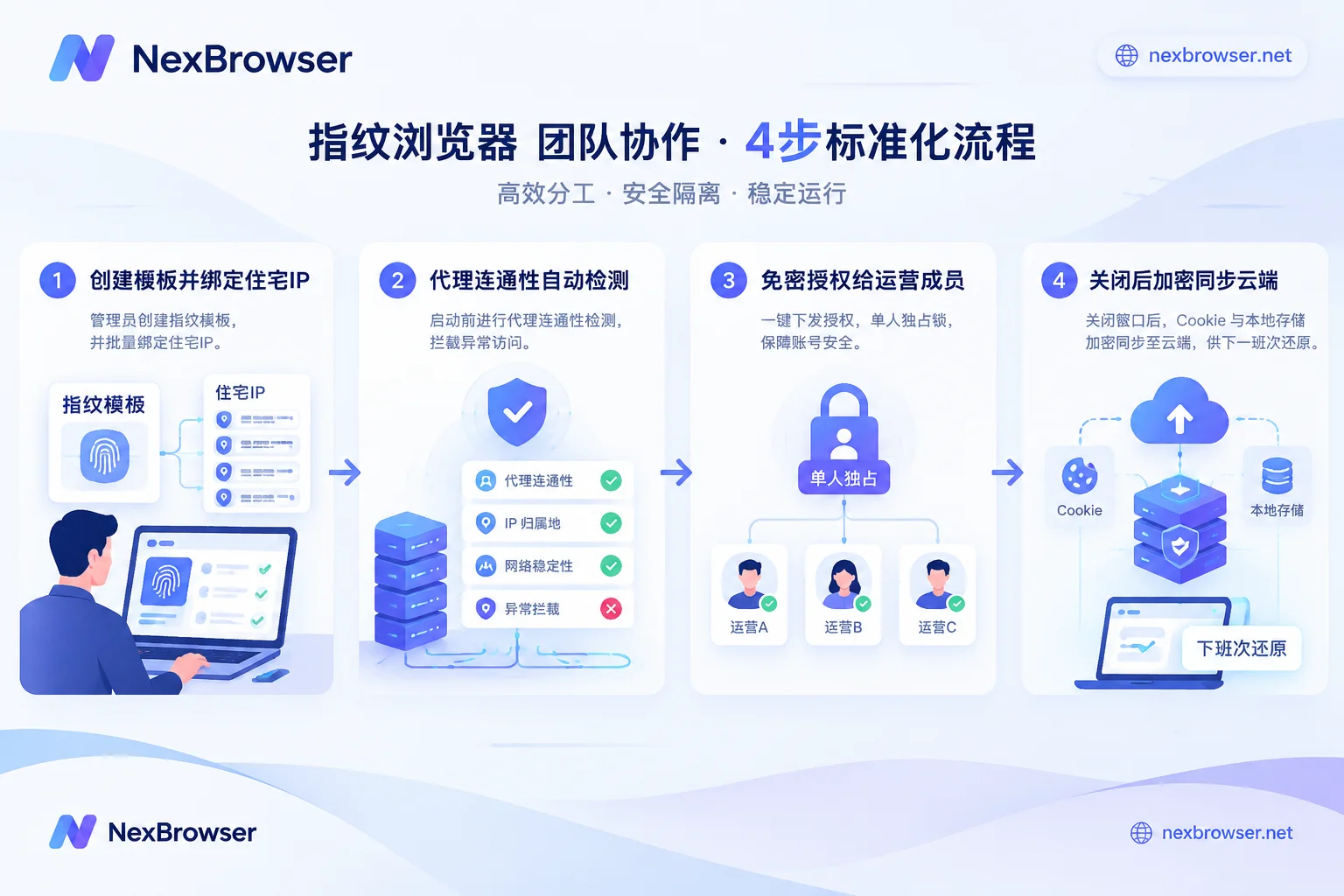
II. Step 1: Centralize Infrastructure, Unify Environment Standards with Templates and Pre-checks
In a mature team SOP, frontline operators or part-timers should not spend time tweaking low-level parameters. Environment infrastructure should be centralized by team admins or infrastructure roles.
1. Solidify Environment Templates and Batch Initialization
In the NexBrowser multi-account management workbench, admins can first adjust a standard set of browser fingerprint parameters for target platforms (e.g., TikTok, Amazon, Facebook)—including OS templates (built-in Windows, macOS, Android, iOS parameter templates, updated in the cloud with Chrome kernel), Canvas, WebGL, hardware concurrency, etc. After confirmation, directly save as an environment template.
When the business needs to open 50 new accounts, the admin only needs to batch create environments based on the template, batch import and bind HTTP/HTTPS/SOCKS5 proxies (or associate NexIP for one-click binding of residential IPs in corresponding countries). When copying to generate new environments, the system automatically generates independent and self-consistent fingerprint parameters for each, ensuring underlying configuration compliance and saving the hassle of clicking through settings one by one.
2. Intercept Proxy Anomalies Before Startup
In team collaboration, the biggest fear is operators rushing to work without noticing that the proxy has failed or the exit has drifted, and directly opening high-value stores without protection. In NexBrowser, the environment's WebRTC, time zone, language, and geolocation automatically align with the proxy exit; more importantly, the proxy exit is checked before environment startup, and startup is blocked if connectivity detection fails. This automatic gate helps the team prevent most misoperations caused by network flickers.
III. Step 2: Divide Actions by Role, Achieve Seamless Cross-Region Handover
Once environments are created, how to distribute them to members with different functions? For how to create roles and set groups, refer to previous articles "How to Allocate Sub-Account Permissions in Fingerprint Browsers: Group First, Then Define Roles, Sensitive Items Off by Default" and "How to Share Account Passwords Securely Within a Team". At the daily execution level, the team needs to run through the following four-step handover loop:
1. Password-Free Distribution and Single-User Exclusive Lock
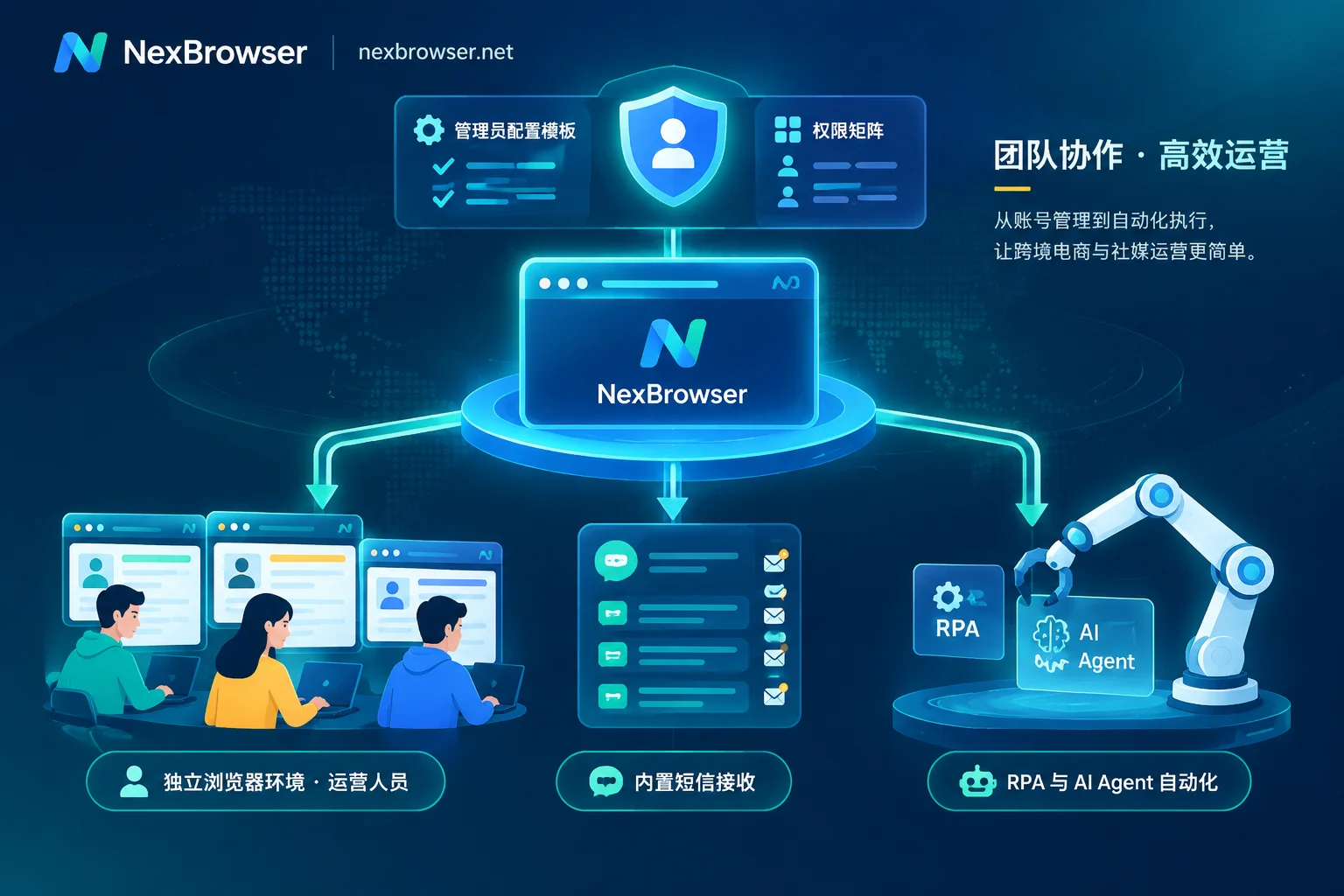
After binding platform accounts to environments, admins tag them by platform, store, or responsible person and assign to groups, then authorize specific operators via the role and permission matrix. When operators open the environment, the system automatically fills in the login, and they never see plaintext passwords. Meanwhile, the system strictly enforces the same environment can only be opened by one member at a time, fundamentally eliminating "remote account takeover" and data overwrites during shift handovers or primary-secondary operator collaboration (see "What Happens When Multiple People Log Into the Same Browser Environment Simultaneously").
2. In-Environment Collaborative Code Reception
When platforms require two-factor authentication or new account registration, operators don't need to ask admins for SMS codes in WeChat groups. Through the built-in NexSMS cloud phone number center in the environment sidebar, authorized members can directly obtain numbers by country/region and target platform, receive SMS, and fill in verification codes within the current environment. Stores requiring long-term maintenance can be switched to long-term rental, keeping the code reception process entirely within the workbench.
3. Cross-Machine Encrypted Sync and Local Password Isolation
When members close the environment after work, key data such as cookies and local storage (including IndexedDB) are encrypted and synced to the cloud according to the selected scope. The next day, whether switching to another computer or handing over to a remote night-shift colleague, opening the environment after login directly restores the previous shift's login state.
To balance security boundaries, personal passwords temporarily saved by members in browser windows remain only on the local machine and are not migrated with cloud sync; transmission and storage are fully encrypted, combined with admin backend permission changes and member operation trace logs, achieving empowerment without loss of control.
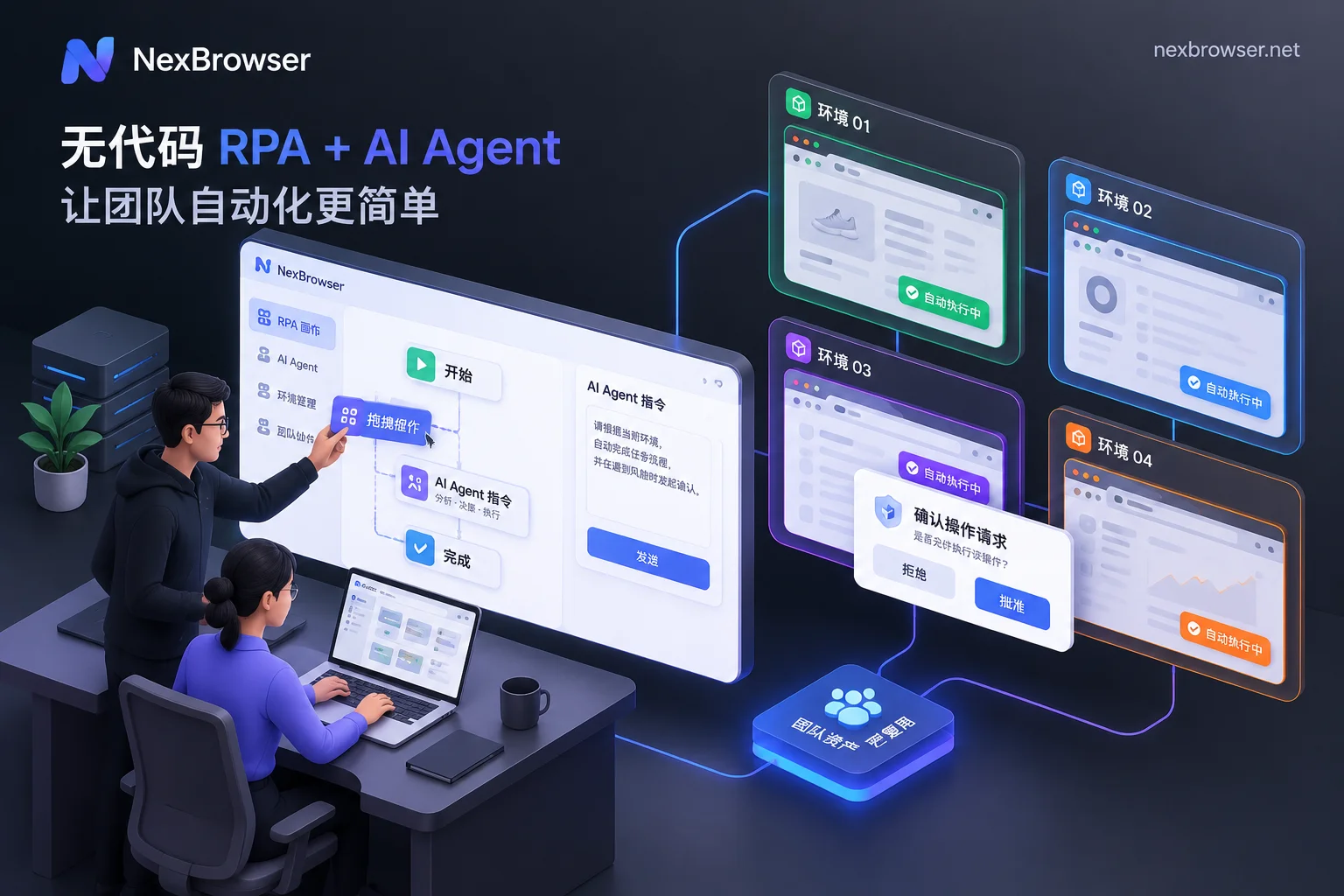
IV. Step 3: Tech and Operations Link Up, Turn Individual Experience into Team Assets
When a team manages hundreds of environments, pure manual clicking is not only inefficient but also prone to affecting account stability due to varying operating habits. In NexBrowser's collaboration system, tech roles (or senior operators) can encapsulate mature actions and hand them to regular members for batch reuse:
| Collaboration Scenario | Applicable Tool Module | Team Division and Implementation |
|---|---|---|
| Fixed repetitive daily tasks (e.g., batch account nurturing, scheduled inspections, form filling) | RPA scripts (Beta) | Experienced users drag and drop on the no-code canvas to orchestrate processes with variables, conditional judgments, and failure retries, then export the script and send to team members; after import, members bind their own batch of environments for batch execution, with execution logs recorded per environment and per step, enabling precise error location. |
| Temporary batch operations requiring manual judgment (e.g., centralized price changes during promotions, multi-account synchronized interactions) | Window synchronization | Operators select a master window, and clicks, inputs, scrolls, and navigations are synchronized in real-time to automatically arranged slave windows; supports setting operation intervals and throttling, and each slave window still uses its own independent fingerprint, cookies, and proxy. |
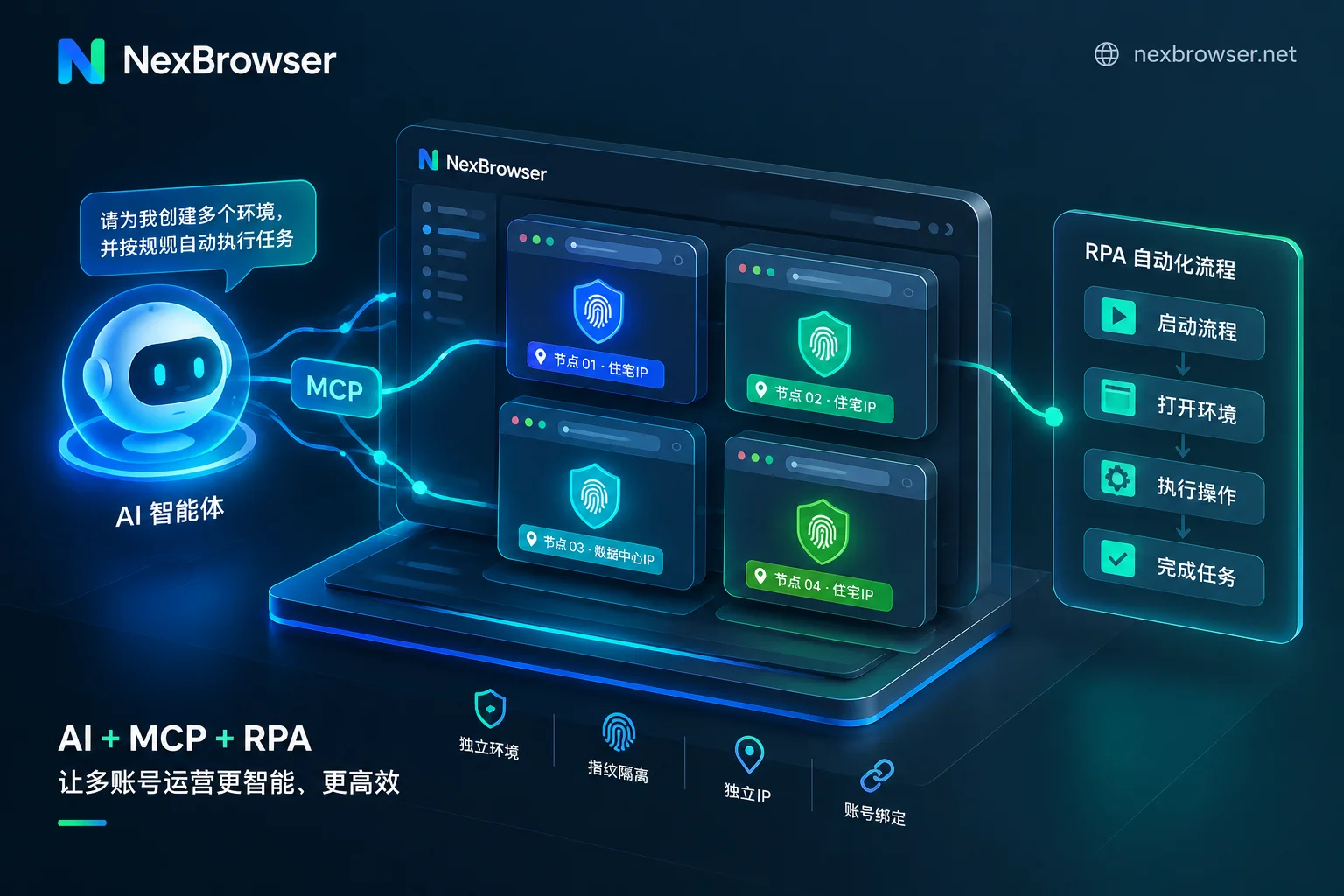
| Flexible dynamic multi-window tasks (e.g., form filling, screenshots, cross-page processing by natural language instructions) | Built-in AI Agent (Nex Agent) | Operators directly describe tasks in natural language, and the Agent automatically opens environments and can split into multiple windows for parallel execution; the team can uniformly set request human approval before irreversible operations, and the execution process is fully reviewable. |
| Deeply customized engineering automation (e.g., integration with internal ERP, self-developed collection and ad placement systems) | Local API and MCP | Developers can read CDP connection information via local HTTP interface, take over with Playwright, Selenium, or let Claude Code, Cursor directly operate environments via MCP Server; the interface is completely free with unlimited calls. |
Through this division of labor, tech-savvy people build scripts and interfaces, business-savvy people review key nodes and handle exceptions, and team efficiency can truly double.
V. Calculate the Team Account: How to Avoid the "Pricing Trap" of Collaboration Software?
When selecting fingerprint browsers, many teams fear the trick of "low-price attraction, then layer-by-layer upcharging for collaboration features." To avoid turning tool budgets into murky accounts, it's recommended to focus on two points during evaluation: first, whether features are locked by tiers, and second, whether expansion billing is flexible.
In NexBrowser's pricing system, complex package feature barriers are deliberately removed:
- No feature tiers, all features available in the free tier: Whether it's role permission matrix, password-free environment sharing, operation traceability, or window synchronization, RPA scripts, Local API and MCP interfaces, all are fully available in the free tier (no credit card required, quota never expires, specific free window and member quotas subject to the official website activity page at the time). Teams can first use the free quota to fully run the above SOP, then expand after verifying compatibility.
- Buy capacity on demand, no bundled consumption: When paying, only purchase the required "number of windows" and "team member capacity", with a 30-day billing cycle. If the team expands mid-cycle, the first activation only charges for the added capacity, and renewal is calculated based on the total current capacity; cloud phone numbers, residential IP traffic, and built-in AI Agent tokens are billed independently based on usage.
VI. Team Collaboration Implementation Checklist
If you are preparing to migrate or build a multi-account workbench with your team, consider the following checklist and spend half a day establishing standards:
- Centralize account creation rights: Admins uniformly configure proxies and fingerprint templates, enable "proxy detection before startup", and revoke ordinary members' permission to modify underlying fingerprints at will.
- Divide groups and roles: Create environment groups by business line, configure roles in the permission matrix following the "least privilege principle", and prepare for onboarding distribution and offboarding environment handover.
- Verify cross-machine sync: Test the cloud encrypted sync speed after closing environments, ensuring cookies and local storage are fully restored during shift handovers.
- Accumulate automation assets: Write high-frequency repetitive actions into RPA scripts or organize into AI Agent prompt templates, and share and reuse within the team.
Now you can visit the NexBrowser download page to get the Windows client (supports Windows 10/11 64-bit systems), and use the free tier to run the first multi-account collaboration pipeline with core members.


Comments(0)