 NexBrowser指纹浏览器-官方博客Blog
For teams engaged in overseas advertising, cross-border independent site traffic generation, and social media marketing, Facebook's asset structure has always been interlocking: at the bottom is the personal profile, in the middle hangs the Page, and at the top are associated the Business Manager (BM) and ad accounts.
This tree structure facilitates business authorization but also amplifies the destructive power of risk control. Many media buyers and operators have experienced such a collapse: a durable account just got locked due to abnormal verification, and within a few hours, other admin profiles bound to the same BM, and even ad accounts running campaigns, received restriction notices one after another, instantly halting the hard-built advertising matrix.
Under the platform risk control mechanisms in 2026, Facebook multi-account anti-association can no longer be handled by "Chrome profiles plus proxy switcher extensions." To protect profile weight and BM asset security, a rigorous layered isolation system must be established from underlying hardware fingerprints, network exit verification, two-step verification code reception, to daily account warming and team handover.
I. Why is Facebook's "chain ban" always hard to prevent?
When reviewing ban reasons, many teams only focus on whether ad creatives violate policies, ignoring hidden cross-contamination at the environment level. Besides similar account information, the core vulnerabilities that lead Facebook to determine multi-account association are mainly in the following three aspects:
- High overlap of browser hardware fingerprints: Incognito mode or multi-user profiles in ordinary browsers only clear surface caches and cannot isolate underlying Canvas drawing features, WebGL graphics card parameters, AudioContext audio sampling, and system font lists. When multiple Facebook accounts exhibit highly consistent underlying hardware characteristics, the risk control system directly flags them as a matrix controlled by the same operator.
- Network environment and device parameters "exposed": Many operators assign different proxy IPs to different accounts but neglect WebRTC real IP leaks, or have parameter inconsistencies like "proxy IP in New York, USA, but browser timezone and system language showing UTC+8 Chinese." Such logically inconsistent environments easily trigger Facebook's machine review and identity verification (Checkpoint).
- Chaotic BM authorization and team cross-device logins: When media buyers, page operators, and admins collaborate, if everyone directly enters the password to log into the same high-privilege profile on their own computers, or logs in once via local direct connection when the proxy drops, solid evidence of multi-account crossover is left on the platform side.
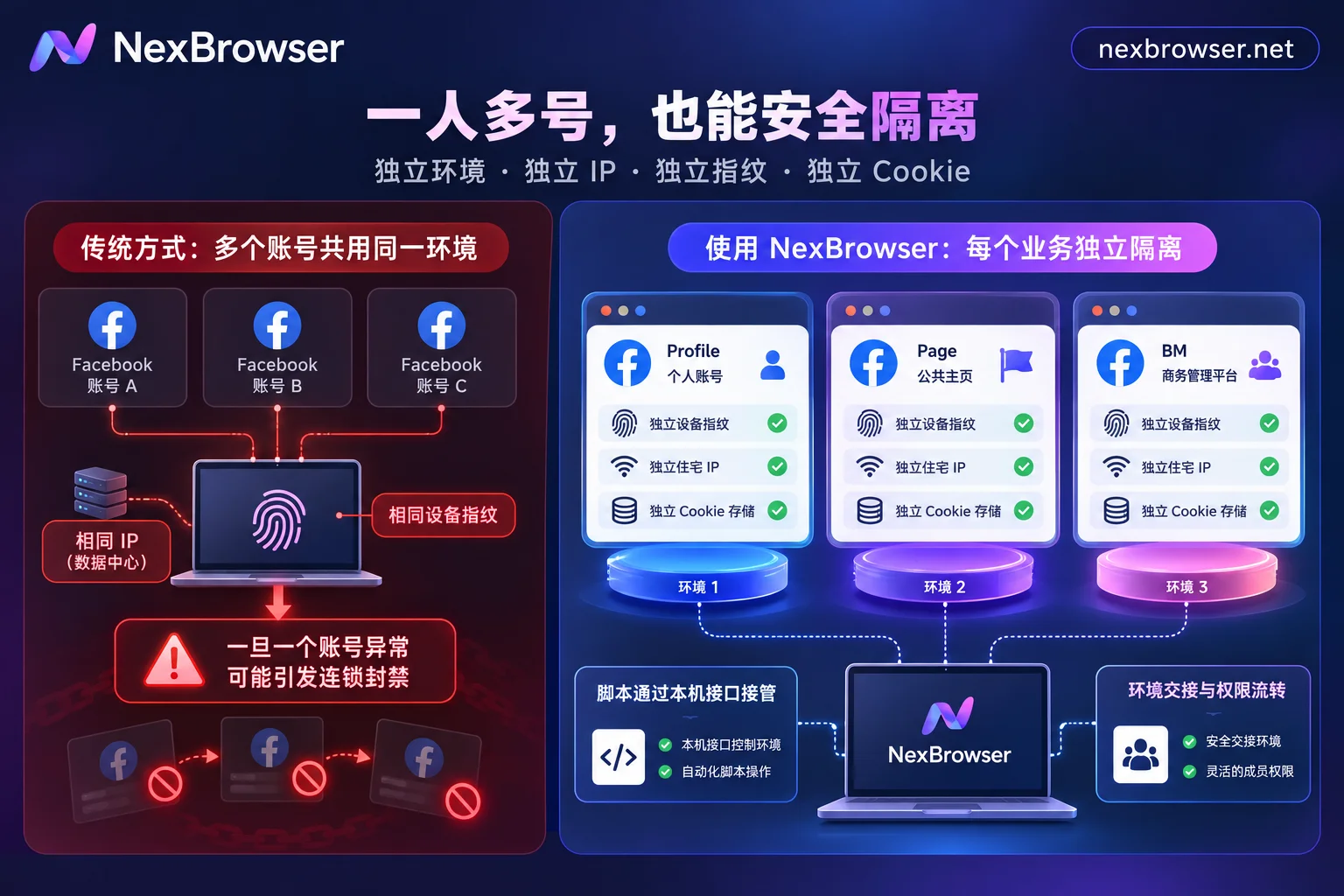
If you want to systematically understand how the platform tracks device characteristics, you can first refer to the official guide's in-depth breakdown on why accounts get associated. Below we go directly to building practical defense lines for Facebook's business architecture.
II. First Line of Defense: Underlying Fingerprint Consistency and Pure Residential IP Strong Verification
To safely fit dozens of Facebook profiles and BM admin accounts into one computer, the primary task is to make each account run in a completely isolated and logically consistent virtual device.
1. Independent Storage and Consistent Fingerprint Templates
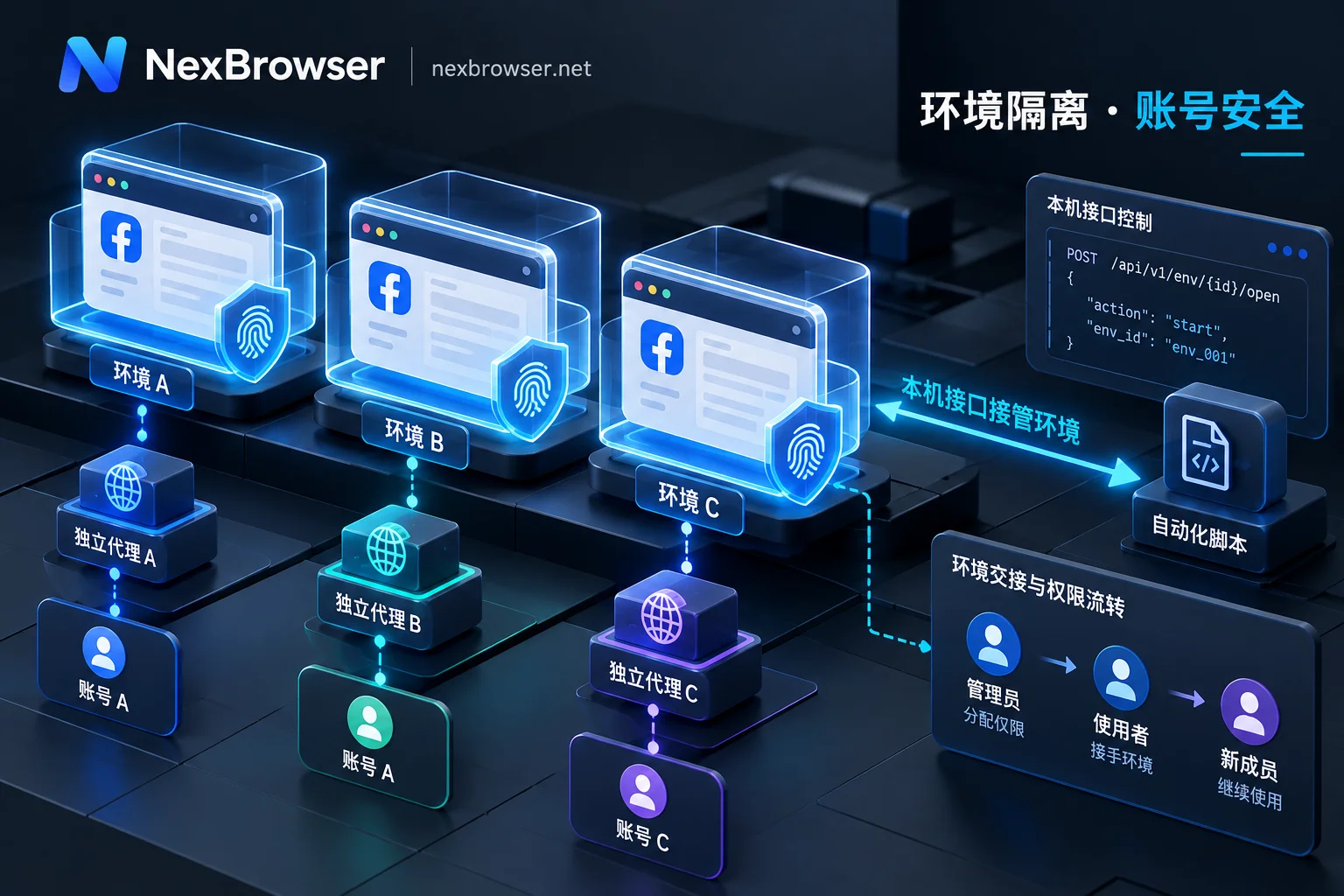
Under the NexBrowser multi-account environment isolation architecture, each browser environment has completely independent cookies, local storage (including IndexedDB), and cache space, with no cross-reading between environments. Even if you open a dozen windows simultaneously to handle private messages for different Pages, login states and business data will never mix.
When generating browser fingerprint parameters, never randomly piece together hardware information (e.g., forcing a macOS User-Agent with a Windows-exclusive graphics card parameter). NexBrowser has built-in Windows, macOS, Android, and iOS parameter templates updated in the cloud with Chrome kernel versions, supporting one-click generation of mutually consistent Canvas, WebGL, fonts, screen resolution, and hardware parameters. Meanwhile, the environment's WebRTC policy, timezone, and language automatically align with the proxy exit, eliminating low-level mistakes like "using a US IP but exposing a domestic timezone" from the source.
2. Residential IP Binding and "Detect Before Launch" Mechanism
Facebook has extremely low tolerance for data center IPs. Especially for new account cold starts and BM card binding stages, it is recommended to use static residential proxies with higher purity (for details on proxy selection, you can read "Static Residential IP vs Dynamic IP for Account Warming: Static for Long-term Login, Dynamic for Scraping Tasks").
When configuring proxies and residential IPs, NexBrowser provides two protection mechanisms highly suitable for Facebook's high-risk scenarios:
- One-click binding and automatic alignment: Supports batch import of HTTP/HTTPS/SOCKS5 proxies; after linking a NexIP account, you can also bind residential IPs by target country/region with one click. Changing proxies does not clear existing cookies and local storage, ensuring login continuity for aged accounts.
- Mandatory interception before launch: Before each environment launch, the system checks proxy exit connectivity, latency, and geolocation; if the check fails, the environment will not start. This effectively prevents accounts from "running naked" on the local network due to sudden proxy failure.
3. Two-Step Verification and Code Reception Directly in the Sidebar
Facebook new account registration, enabling two-factor authentication (2FA), or risk control unlock all require stable overseas phone number verification. Through the built-in cloud phone numbers (NexSMS number center) in the environment sidebar, operators can directly obtain numbers by target country/region and platform, receive SMS, and fill in verification codes; for main accounts carrying core BM assets, numbers can be converted to long-term rental to handle platform secondary verification spot checks at any time.
III. Second Line of Defense: Say Goodbye to Mechanical Operations, Use Automation to Steadily Increase Profile Weight
After the environment is set up, why do some accounts die as soon as they create a Page or pull a BM? Because the account lacks social history accumulation that matches real human habits. Typically, new Facebook accounts or newly purchased durable accounts need a 7 to 14-day warming period. But if you have 50 accounts, manually opening feeds, liking, and watching videos every day is not only time-consuming but also prone to triggering risk control due to mechanical repetitive click rhythms.
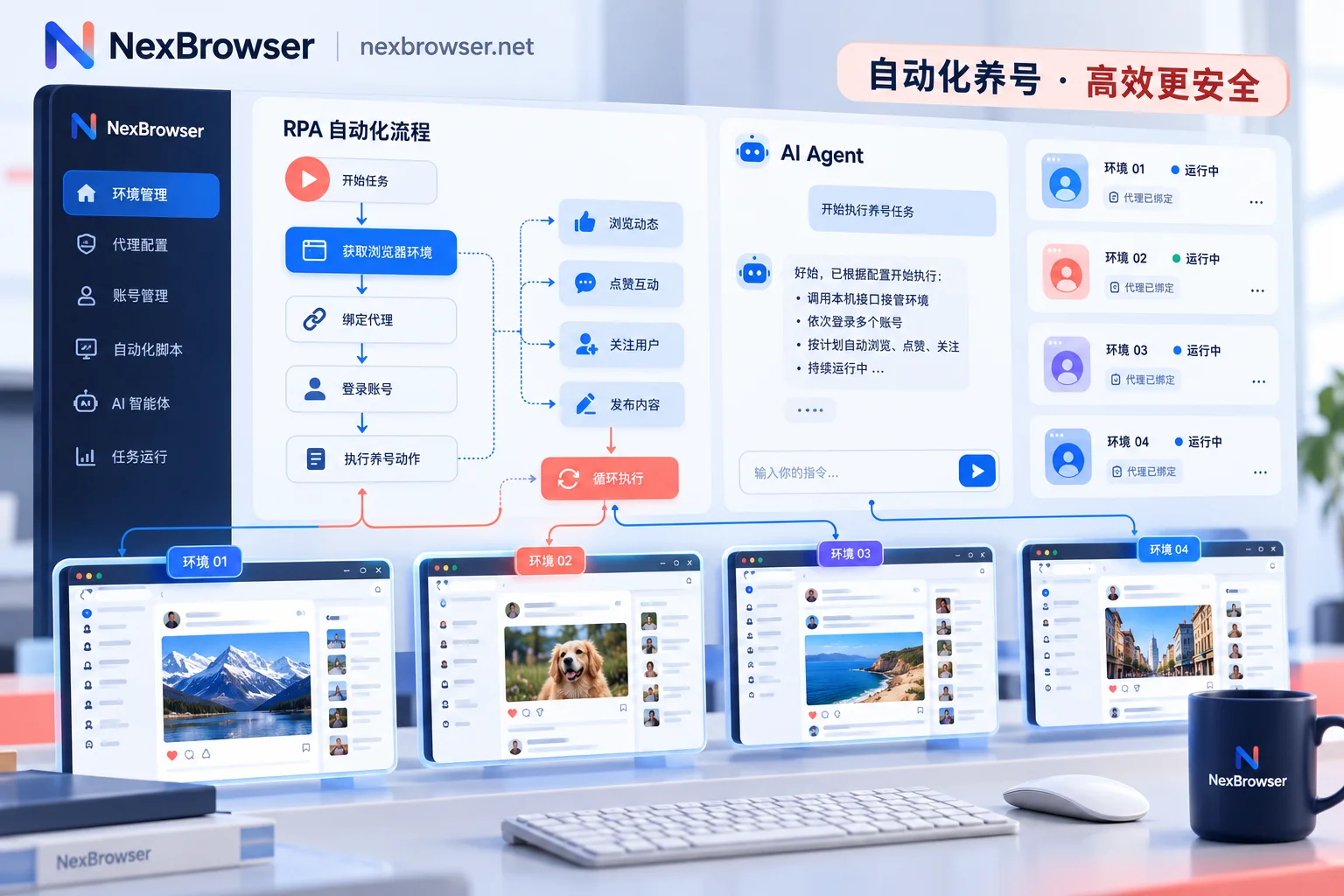
For batch account warming and daily maintenance needs at different stages, you can flexibly combine NexBrowser's three efficiency tools (for specific division of labor, also refer to "How AI Browser Automation Lands Multi-Account Business: Practical Division of Built-in AI Agent, RPA, and Window Synchronization"):
- Fixed processes go to RPA scripts: For standardized cold start actions like daily fixed-duration feed browsing, watching Reels videos, and random stays, you can drag and drop to orchestrate RPA scripts on the no-code canvas. By adding variables, condition judgments, loops, and random wait times, a batch of environments each with independent cookies, fingerprints, and proxies can execute in batches. Even if a popup blocks steps for one account midway, execution logs recorded per environment and per step help you pinpoint the cause.
- Flexible interactions go to the built-in AI Agent: In the mid-to-late warming stage, natural interactions based on post content or completing differentiated personal bios are needed. With the client's built-in AI Agent (Nex Agent), you only need to describe the task in natural language (e.g., browse current group posts and screenshot for archiving), and the Agent will automatically open the corresponding environment operation page, even split tasks across multiple windows in parallel; before critical irreversible operations like publishing or modifying, you can set it to request manual approval first, saving effort and ensuring safety.
- Operations requiring human judgment use window synchronization: When you need to uniformly modify a privacy setting for a batch of warmed-up profiles, or synchronously inspect multiple ad backend statuses, enable window synchronization. After selecting a master window, clicks, inputs, and scrolls are mapped to slave windows; you can also set operation intervals and throttling separately to avoid all accounts sending requests in the same millisecond.
Bonus for technical teams: If your team has already written custom Facebook account warming or ad data scraping scripts using Playwright, Puppeteer, or Selenium, you can directly enable the client's Local API and MCP. The interface is completely free with unlimited calls, and even supports clients like Claude Code and Cursor to directly take over environments via NexBrowser MCP Server, greatly reducing automation development costs.
IV. Third Line of Defense: BM Matrix Grouping and Team Password-Free Collaboration SOP
When single-person operation expands to team work involving "account warmers, page operators, and media buyers," human operational errors often replace technical vulnerabilities as the number one killer causing association bans (recommended reading "Still Triggering Risk Control After Using Anti-Association Browser? Check These 5 High-Frequency Operational Mistakes and Anti-Ban Strategies").
To prevent core BMs and high-weight profiles from being contaminated during handovers, it is recommended to configure team collaboration and multi-account management in NexBrowser according to the following specifications:
- Group and tag environments by business role: Do not mix all Facebook accounts together. Use grouping and tagging to strictly divide accounts into "high-privilege BM admin accounts (no daily login unless necessary)," "advertising operation accounts," and "peripheral traffic generation warming pool." Tuned security configurations can be saved as templates, automatically generating new independent fingerprint parameters based on the template when batch creating environments.
- Password-free account sharing and permission matrix isolation: Team founders can create custom roles and finely divide the environment scope that media buyers and operators can see and operate in the permission matrix. After binding Facebook account passwords to environments, launching the window automatically fills in the login, team members never touch plaintext passwords throughout the process, preventing association and ensuring asset security.
- Single-person mutex lock and cloud encrypted sync: If two media buyers open the same Facebook environment on different computers simultaneously, it causes cookie conflicts and remote concurrent anomalies (see "What Happens When Multiple People Log into the Same Browser Environment Simultaneously: Data Overwriting, Account Concurrent Anomalies, and How Teams Should Handover and Divide Work"). In NexBrowser, the same environment can only be opened by one member at a time; when the environment is closed, cookies and local storage are encrypted and synced to the cloud according to the selected scope, allowing the next member or a different machine to seamlessly restore the login state and continue environment continuity.
V. Summary and Getting Started Suggestions
Facebook multi-account operations and ad delivery are essentially about competing with the platform's risk control algorithms on details. Only by linking underlying fingerprint parameter consistency, pre-launch strong verification of residential proxies, human-like automated account warming, and team password-free mutex collaboration into a closed loop can you truly cut off the violation contagion chain among profiles, Pages, and BMs.
If you are looking for a stable anti-association workbench without hidden tricks, or want to understand its differences from other tools on the market (see the official fingerprint browser comparison), you can now directly visit the NexBrowser download page to get the client supporting Windows 10/11 (64-bit). NexBrowser insists on no feature tiers; the free tier already includes all core capabilities such as RPA, window synchronization, Local API, and team collaboration, helping you build a solid Facebook matrix defense line with zero threshold.


Comments(0)