 NexBrowser指纹浏览器-官方博客Blog
Entering late October, cross-border e-commerce officially ushers in the annual Q4 peak season sprint. As mainstream sites like TikTok Shop US gradually extend the Black Friday & Cyber Monday (BFCM) promotion period to the entire November, sellers have long entered the stage of intensive stocking, event registration, price adjustments, and influencer outreach.
However, the eve of every major promotion is also a high-incidence period for account risk control, secondary verification (second review), and even fund freezes. Today's sellers rarely focus on a single platform; they often run multiple platforms and multiple stores in parallel, such as Amazon, TikTok Shop, Temu, and Shopee. During peak season, operation frequency surges, temporary staff are added, and weekend remote monitoring from home becomes common. Any minor environmental oversight can cause a carefully prepared months-long sales plan to get stuck on "account abnormality."
Facing increasingly stringent full-link environment verification by platforms, cross-border e-commerce anti-detect browsers are no longer simple "multi-instance tools" but the underlying workbench that ensures multi-store asset security and peak-season efficiency. This article combines the high-frequency pain points of the Q4 peak season to break down how to build a browser environment solution that both prevents risk control and withstands high-concurrency operational pressure.
I. Why is "environment risk control" and secondary verification more likely to be triggered before major promotions?
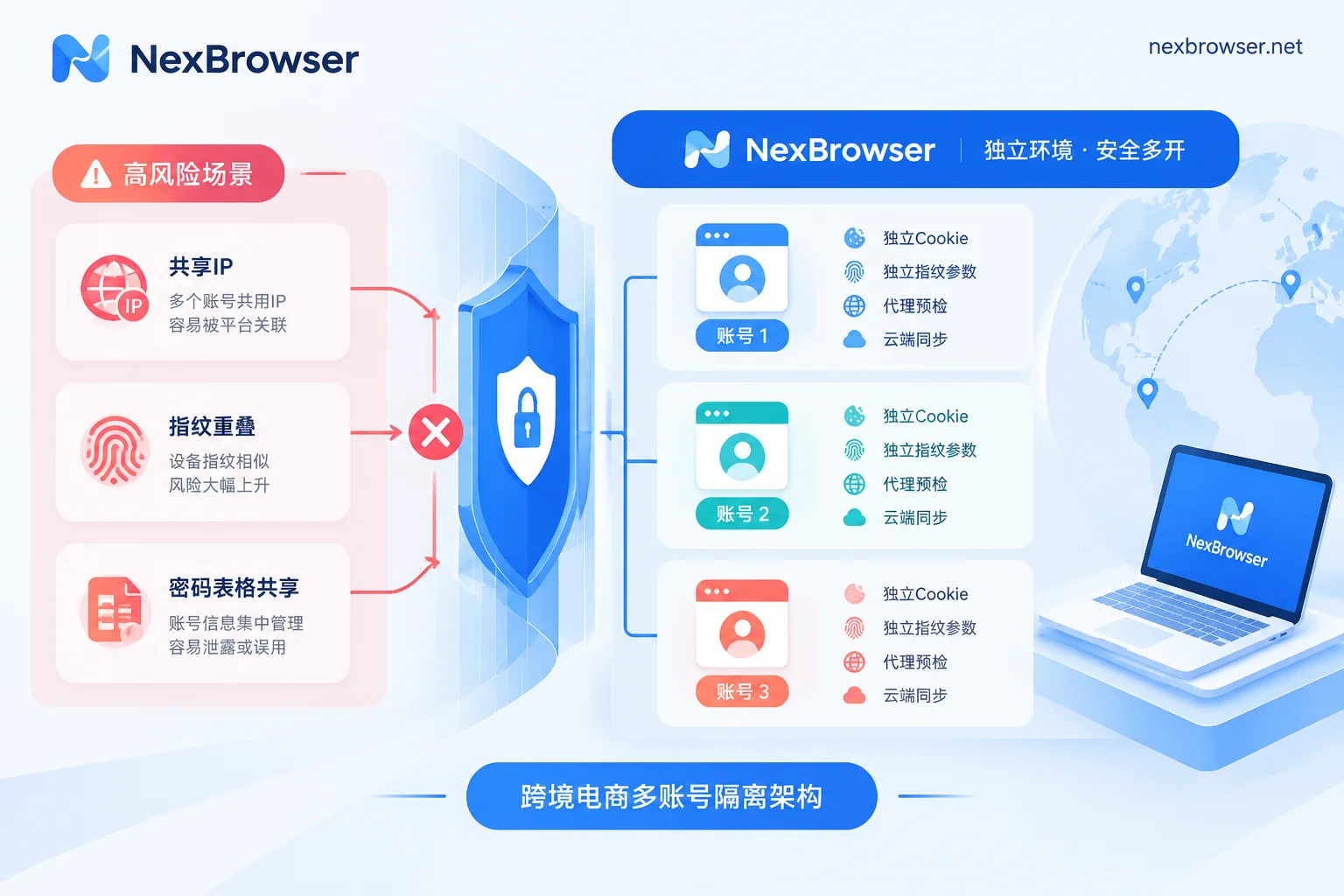
During normal sales periods, many teams may get away with rough operations; but during the October-November promotion preparation period, platform risk control models become significantly more sensitive to abnormal signals. The following typical scenarios are prone to pitfalls:
- High-frequency logins and cross-regional remote shifts
During promotions, to capture traffic or respond to flash sales, operations staff adjust ads and inventory on company computers during the day, then log in to the backend from home computers at night or on weekends. If there is no cloud environment synchronization mechanism, the underlying hardware parameters (Canvas, WebGL, font lists, etc.) and login cache break continuity, which in the eyes of platform risk control is a typical "account theft" or "abnormal login from another location." This may lead to frequent pop-ups requiring two-step verification, or even direct secondary review and account lock. - Proxy network fluctuations causing "bare connections" or feature misalignment
During peak network periods, some proxy lines may experience latency spikes or even dropouts. If the browser lacks a pre-blocking mechanism, the moment the proxy fails or WebRTC leaks, the real local IP is directly exposed; or temporarily switching to a backup proxy node clears the original login state (Cookie), forcing the account to re-enter the password under an unfamiliar IP, which is extremely risky. - Temporary hiring and cross-role operations
To handle the surge in customer complaints and orders during Black Friday, many teams temporarily assign part-time customer service or ask designers to assist with listings. Sharing passwords via spreadsheets and having multiple people simultaneously squeeze into the same store backend not only easily causes operational data to overwrite each other but also triggers system judgments of violations due to abnormal concurrent behavior.
If your store has recently encountered frequent pop-up verification or abnormal warnings, you can first check against: Still triggering risk control despite using an anti-association browser? Check these 5 high-frequency operational mistakes and anti-ban strategies.
II. Fortifying the Peak Season Defense: 4 Underlying Configurations of Cross-Border E-Commerce Anti-Detect Browsers
To stabilize dozens of cross-platform stores under Q4 high pressure, the key is to ensure "absolute isolation" and "consistency before and after" for each store environment. In NexBrowser, we can strengthen the defense through the following four steps:
1. Thorough storage isolation and cross-device encrypted synchronization
Each store should be assigned an independent browser environment. In NexBrowser, the Cookie, cache, local storage (including IndexedDB), and proxy of each environment are completely independent, and environments do not read from each other. Operations staff can group and tag environments by "platform (e.g., Amazon/TikTok) - site - responsible person." A set of compliant configurations can be saved as a template, and when creating new environments in bulk, new fingerprint parameters are automatically generated.
More importantly for "remote shifts": when you close an environment in the office, data such as Cookie and local storage are encrypted and synchronized to the cloud according to the selected scope; when you log in to the client on another computer at night, opening the environment directly restores the previous login state (passwords stored within the window remain only on the local machine and are not migrated with synchronization), eliminating the need to re-enter credentials and ensuring continuity of environmental characteristics.
2. Self-consistent fingerprint parameters and continuous kernel updates
Platform anti-detection algorithms not only check whether your fingerprint is unique but also value whether the parameters are logically consistent. If the User-Agent shows the latest system version but the underlying WebGL rendering features are from old hardware years ago, it will instead expose camouflage traces.
NexBrowser supports independently generated and mutually consistent fingerprint parameters per environment (covering Canvas, WebGL, Audio, screen, hardware, fonts, etc.), with built-in parameter templates for Windows, macOS, Android, and iOS, and templates are continuously updated in the cloud with Chrome kernel versions. At the same time, the environment's WebRTC policy, time zone, and language automatically align with the proxy exit, avoiding exposure due to mismatches between system time and IP location.
3. Pre-proxy detection and "changing IP without losing cookies"
To address the hidden risk of unstable networks during peak season, NexBrowser's proxy and residential IP management provides two key safeguards:
- Strong verification before launch: Supports single or batch import of HTTP / HTTPS / SOCKS5 proxies (you can also link NexIP accounts to bind residential IPs by country/region with one click). Before each environment launch, the system checks the connectivity, latency, and location of the proxy exit. If the check fails, the environment will not launch, fundamentally preventing the tragedy of "proxy failure causing local IP exposure."
- Smooth network switching: If the original proxy node fails and needs to be replaced with a new IP, rebinding the proxy on the environment will not clear the original Cookie and local storage, making the platform believe it is just a normal home network switch, not a new device.
4. Handle SMS two-step verification directly in the environment sidebar
During promotions, when changing payment methods, adjusting high budgets, or logging in from different locations, platforms are highly likely to trigger SMS verification code checks. Searching for physical SIM cards not only delays opportunities but also easily times out. NexBrowser has a built-in NexSMS cloud phone number center in the environment sidebar. Operations staff can directly obtain numbers, receive SMS, and fill in verification codes by country/region and target platform in the current window. For main stores, numbers can be converted to long-term rentals with pay-per-use billing, ready to handle sudden secondary reviews.
III. Sprint for Peak Season Efficiency: Practical Combinations of Multi-User Collaboration and Batch Automation
Safely protecting accounts is only the bottom line. During the tens of hours of Black Friday Cyber Monday traffic explosion, whoever responds faster and can flawlessly complete hundreds or thousands of product adjustments and influencer outreach will capture more orders.
1. Team password-free sharing and single-user exclusive lock
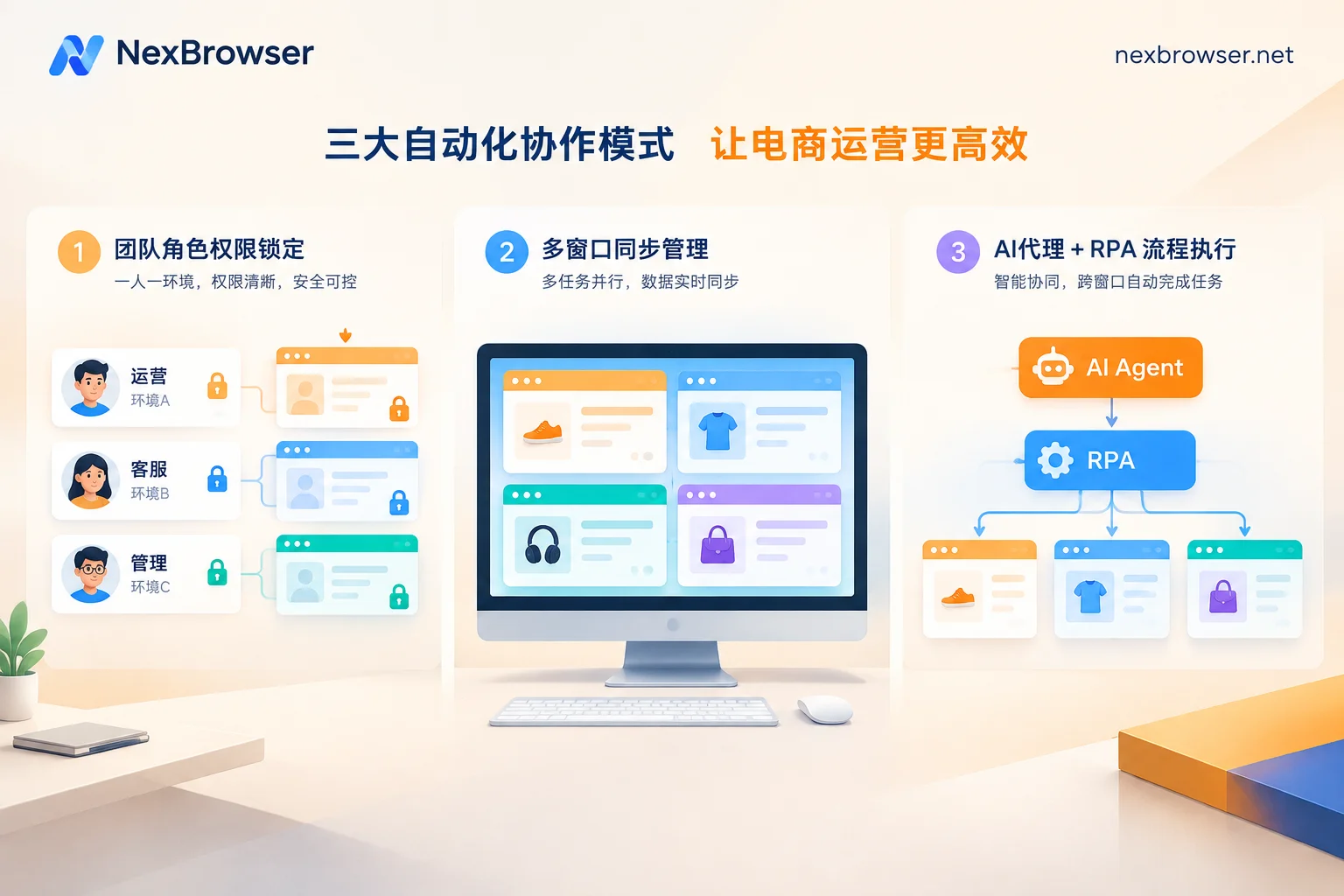
Avoid using shared documents to distribute passwords during peak season. In NexBrowser's team collaboration system, the team founder can create custom roles and finely allocate the scope of visibility and operations for operations, media buyers, and customer service in the permission matrix.
After binding platform accounts to environments and sharing them with members, login is automatically filled upon launch, and members never see plaintext passwords. At the same time, the system follows a strict exclusivity mechanism—the same environment can only be opened by one member at a time. This completely solves the problem of operations and customer service making mistakes during peak season, simultaneously squeezing into the same backend from different locations causing data overwrites or concurrent risk control (see: What happens when multiple people log into the same browser environment simultaneously).
2. Window synchronization + RPA + AI Agent: Liberate manpower from mechanical labor
Facing synchronized adjustments for a dozen stores during promotions, manually clicking through windows one by one is slow and error-prone. You can combine three efficiency tools in the workbench according to the nature of the task:
- Window synchronization (suitable for temporary batch operations requiring human judgment): For example, simultaneously checking promotion event registration status in multiple store backends on the same site, or synchronously browsing backend notifications. After enabling window synchronization, select a master window, and your clicks, inputs, scrolls, and jumps are synchronized in real-time to automatically arranged slave windows; operation intervals and throttling can be set, and each slave window still runs under its own independent fingerprint, Cookie, and proxy.
- RPA scripts (suitable for fixed, repetitive standardized tasks): For fixed processes like scheduled inspection of competitors' Black Friday discount prices or batch listing of basic product information, you can drag and drop on the no-code RPA canvas (Beta), add variables, conditional judgments, and loops, and bind a batch of environments for batch execution. Each step supports failure retry, execution logs are recorded per environment and per step, and errors can be precisely located.
- Built-in AI Agent (suitable for complex natural language tasks across multiple windows): If you need to batch filter influencer homepages, fill out complex event registration forms, or organize after-sales screenshots, you can directly wake up the built-in Nex Agent. Simply describe the task in natural language, and the Agent will automatically open environments and operate pages, even splitting tasks across multiple windows for parallel execution. To ensure the safety of promotion funds and settings, you can set it to "request human approval before executing irreversible operations," and the entire execution process can be reviewed.
If your team has technical developers, you can also enable the free Local API and MCP interface, and use tools like Playwright, Selenium, Claude Code, or Cursor to directly control environments and build deeper enterprise-level automation workflows (reference: How AI browser automation lands in multi-account business).
IV. Conclusion: Start Light, Scale on Demand for Peak Season
Preparing for the Q4 peak season, tool selection should not only consider whether the anti-association foundation is solid but also calculate the cost. Many sellers need to temporarily expand dozens of environment windows and several part-time seats before peak season, but are often deterred by software packages on the market that tier features by level and force annual bundles.
NexBrowser adopts a transparent mechanism of "no feature tiers": the free tier allows you to experience full features (including window synchronization, RPA, Local API, etc., no credit card required, quota never expires); when peak season business expansion requires more capacity, the paid plans only charge for the actual number of "environment windows" and "team members" needed (billed in 30-day cycles, first activation only charges for new capacity).
Before the Black Friday Cyber Monday traffic peak arrives, why not download the NexBrowser Windows client and migrate your core stores and backup accounts one by one into standardized isolated environments. Leave anti-association risk control to the underlying technology, and let the operations team fully focus on product selection and sales sprint.


Comments(0)