NexBrowser指纹浏览器-官方博客Blog
Conclusion first: If you only manage 1–3 purely manual single-platform e-commerce stores (e.g., only Amazon Seller Central), don't want to research proxy configuration yourself, and often need to handle orders temporarily on your phone when out, buying a 'cloud host + bundled IP' cross-border dedicated browser will be more worry-free. However, as soon as you involve multi-platform expansion (Amazon + TikTok Shop + Shopee/independent site), need to manage social media matrices and ad placements, care about residential IP purity and desktop smoothness, or hope to improve efficiency through batch synchronization, RPA, and AI automation, choosing the 'Chrome standalone-kernel fingerprint browser + independent proxy/residential IP' solution has advantages in both security boundaries and long-term costs.
Many sellers searching for 'cross-border e-commerce fingerprint browser' are often confused not about 'what a fingerprint browser is for', but about which product form to pay for when facing two completely different types on the market:
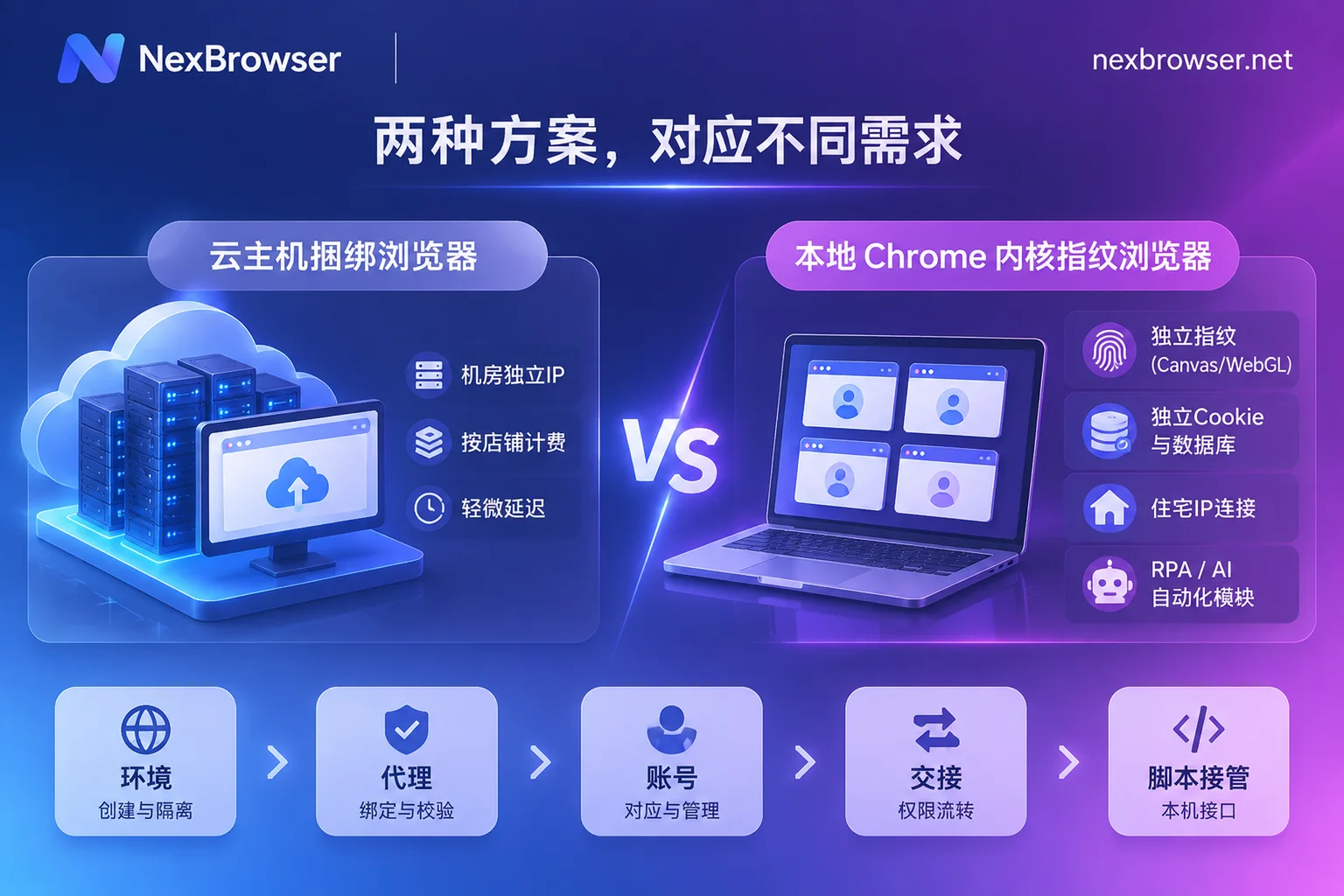
One type is the cloud-host-based store browser that bundles 'cloud virtual computer + fixed IP' and charges monthly rent per store; the other is the standalone-kernel fingerprint browser (e.g., NexBrowser) that runs an isolated browser kernel locally, binds each environment to a separate proxy or residential IP, and encrypts and syncs data to the cloud.
Below, we break down the underlying differences, applicable scenarios, and practical configurations of the two solutions so you can decide right after reading.
I. What's the difference between the two solutions? See the underlying logic in one table
Platform risk control never determines whether multiple stores are associated by merely checking 'whether the resolution was changed' or 'whether the IP was changed'. Instead, it cross-compares network exit (IP location and ASN type), browser hardware and rendering fingerprints (Canvas, WebGL, fonts, Audio, WebRTC), local storage (Cookie, LocalStorage, IndexedDB), and daily account behavior.
Although both tools are called anti-association or cross-border browsers, they are completely different paths in implementation and subsequent bills:
| Evaluation Dimension | Cloud Host + Fixed IP Bundle Mode | Standalone-Kernel Fingerprint Browser + Independent Proxy Mode |
|---|---|---|
| Operating Architecture | Runs the browser in a remote cloud host or unified relay channel, delivered as a 'cloud device' | Runs an independent modified Chrome kernel on the local computer, with environment parameters isolated per window |
| IP Type and Controllability | Mostly fixed data center/cloud provider IPs bundled by the platform; high-purity static residential usually requires extra payment | Supports self-provided HTTP/HTTPS/SOCKS5, or binds real residential IPs as needed; ASN and purity are autonomously controllable |
| Operational Smoothness | Remote rendering tends to cause image compression or latency when uploading high-resolution main images or editing/uploading videos | Uses local machine performance for rendering; switching pages, uploading product videos, and image editing load just like daily Chrome |
| Cross-Platform Applicability | Focuses on traditional shelf e-commerce backend logins | Adapts to Amazon/Shopee/independent sites and high-risk social media and ad accounts like TikTok/Facebook/Instagram |
| Automation and Scalability | Most only satisfy manual login; batch scripts and external AI access are limited or have high barriers | Usually includes window synchronization, RPA, AI Agent, and Local API/MCP open interfaces |
| Cost Structure | Each additional environment (including backup accounts, buyer accounts, social media accounts) requires paying a cloud device + IP monthly rent | Browser environment capacity is decoupled from network traffic; idle environments or self-provided lines incur no extra host rent |
From an architectural perspective, if you are no longer just guarding one or two backend pages but want to put stores, payment, independent sites, social media traffic, and ad accounts into the same workspace, the standalone-kernel cross-border e-commerce fingerprint browser will clearly stand out in scalability and cost-effectiveness (for a breakdown of pure environment and IP costs, you can also refer to our detailed analysis on whether anti-association browsers come with IPs and real cost calculation).
II. Match Your Type: How Should Three Types of Cross-Border Sellers Choose?
1. Start-up Individual Sellers (1–3 Stores, Low-Frequency Operations)
- Core Demand: Completely separate accounts with minimal cost, get orders and payments running first, and avoid account mixing due to local misoperations.
- Recommended Path: First use a free tier that supports full isolation to validate the process; don't rush to pay for cloud host monthly rent you don't need. For example, NexBrowser's free tier plan does not cut features, requires no credit card, and quotas do not expire (specific available windows and member counts are subject to the current terms on the free activity page); it is enough for beginners to first isolate multiple stores or 'main store + product testing accounts' in independent environments.
2. Multi-Platform Store Groups / Local Stores + Social Media and Ad Matrix Sellers
- Core Demand: The same operations staff must manage Amazon, TikTok Shop, Shopee, or independent sites, while also running Facebook ad accounts and TikTok content accounts for off-site traffic; they are extremely sensitive to whether IPs are in residential ranges and whether environment time zones and languages match local settings.
- Recommended Path: Do not use bundled data center cloud hosts to tough out social media and local store risk control. TikTok Shop local stores and overseas social media platforms are very sensitive to data center ASNs. Once one environment triggers risk control, it can easily affect other associated channels (for specific isolation strategies, see practical guide on how cross-border e-commerce prevents 'cross-platform contagion'). At this point, it is more suitable to use a standalone-kernel fingerprint browser paired with static residential IPs from the corresponding country.
3. Multi-Person Collaboration Studios / Agencies and Outsourcing Teams
- Core Demand: Customer service, operations, designers, and media buyers need different permissions to access different stores; when someone leaves or a part-timer changes, they must not take account passwords with them, and two people must not log into the same environment simultaneously and overwrite each other's cookies.
- Recommended Path: Focus on passwordless credential hosting, role permission matrix, single-environment concurrency lock, and operation traceability, and avoid using remote desktop sharing or sending compressed packages for handover (for detailed outsourcing collaboration practices, see how to manage outsourcing and remote part-timers in fingerprint browser team collaboration).
III. Ready to Implement: 4 Steps to Run Secure Multi-Store Operations with NexBrowser
If you decide to adopt the 'standalone kernel + independent proxy/residential IP' solution, here is the standard workflow of NexBrowser as an example; configure these 4 steps and you can start daily operations:
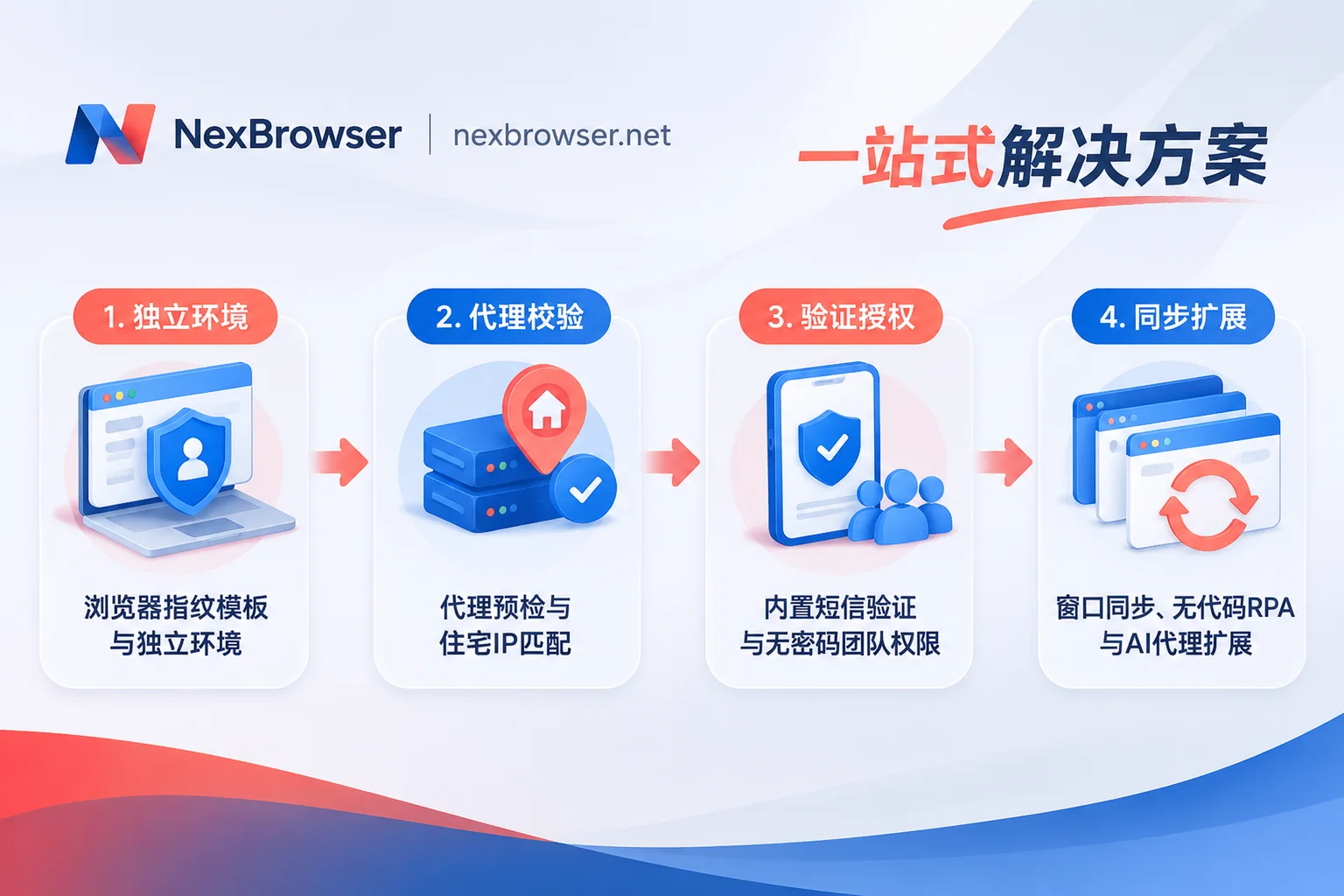
Step 1: Create independent environments by 'platform + store', and save a tuned set as a template
In the NexBrowser multi-account environment isolation workspace, create a separate environment for each store or social media account, and tag them by platform, site, or person in charge:
- Full underlying data isolation: Cookies, cache, and local storage (including IndexedDB) of each environment are completely independent, and environments do not read each other.
- Self-consistent fingerprint parameter generation: In fingerprint parameter configuration, Canvas, WebGL, fonts, Audio, screen, hardware, WebRTC policy, and User-Agent are independently generated per environment and remain logically consistent (built-in Windows / macOS / Android / iOS parameter templates, updated in the cloud with Chrome kernel versions), avoiding low-level inconsistencies like 'UA says macOS but exposes a Windows graphics card model'.
- Template reuse: After tuning the parameters for the first batch of stores, you can save them as a template. When copying new environments later, a new set of fingerprint parameters will be automatically regenerated, saving configuration time while preventing two stores from having 'twin fingerprints'.
- Cross-computer handover: When closing an environment, cookies and local storage are encrypted and synced to the cloud according to the selected scope, and restored directly after logging in on another machine; meanwhile, passwords stored within the window remain only on the local machine and are not migrated with synchronization, reducing the exposure of credentials.
Step 2: Bind an independent proxy to each environment, and use 'pre-launch pre-check' to block local IP leaks
Many veteran sellers think buying a fingerprint browser prevents association, but then a proxy goes offline and the browser falls back to the local broadband, stringing 5 stores on the same domestic IP.
- Protocol compatibility and one-click residential IP: NexBrowser supports HTTP / HTTPS / SOCKS5 single addition or batch import, with one-click testing of connectivity, latency, and exit attribution; if you don't want to search for proxy providers, after linking a NexIP account, you can bind residential IPs by country/region with one click in the residential IP module (residential IP traffic is purchased separately on demand on the NexIP side).
- Parameters aligned with exit: After binding a proxy, the environment's WebRTC, time zone, language, and geolocation automatically align with the exit IP; if you later only need to change to a line in the same region, changing the proxy will not clear cookies and local storage.
- Hard block before launch: NexBrowser checks the proxy exit before starting an environment, and directly refuses to launch the window if the check fails—this is the most practical safeguard against operators 'logging in naked' the moment a proxy fails.
Step 3: Receive verification codes + team passwordless permission allocation
Cross-border stores and social media accounts often encounter two-step verification or SMS verification; during team operations, if you still have to ask the boss for SMS codes and login passwords every day, efficiency will halve.
- Sidebar code reception: Through the built-in NexSMS cloud phone number center, operators can directly get numbers by country/region and target platform, receive SMS, and fill in verification codes in the current environment sidebar; long-term maintenance numbers for core stores can also be converted to long-term rental (number fees are billed separately from browser plans based on usage).
- Members never touch original passwords: Team founders can create roles and divide visible groups and operable permissions in the permission matrix; after binding platform accounts into environments, members can click the environment to auto-fill login without ever accessing the real account password. At the same time, the system locks the same environment can only be opened by one member at a time, preventing two people from operating simultaneously and kicking the session offline; all permission changes and operations are logged and auditable.
Step 4: As stores scale, use window synchronization, RPA, or AI to eliminate repetitive manual work
When you expand from 3 stores to dozens of stores and social media matrices, doing everything manually will quickly hit a bottleneck; you can improve efficiency in layers based on task certainty:
- Semi-automatic manual linkage: For batch price changes, checking notifications, coupon claims, or social media interactions that require human review, use the window synchronization feature—select a master window, and clicks, inputs, scrolls, and navigations sync to multiple slave windows, with configurable operation intervals and throttling; each slave window still maintains its own fingerprint, cookies, and proxy.
- Fixed-process automation: For daily scheduled backend metric inspections, batch report exports, or standardized form submissions, hand them to the no-code canvas RPA script (Beta), drag-and-drop orchestration of condition judgments, loops, and failure retries; errors can be directly located to a specific step in a specific environment.
- Non-standard tasks and developer takeover: For complex cross-page information aggregation or temporary searches, use the built-in Nex Agent (AI Agent) to issue tasks in natural language, with human approval set before irreversible operations; if your team has developers, the Windows client directly opens the Local API and NexBrowser MCP Server with unlimited calls for free, seamlessly taking over Playwright, Puppeteer, Selenium, browser-use, or Claude Code, Cursor.
IV. Four Practical Boundaries to Watch Before Selection and Implementation
- Don't be fooled by 'all-green' fingerprint detection websites: Many tools show all green on detection pages, but in real environments they are still flagged by risk control because Canvas/WebGL contradicts the declared operating system, or WebRTC leaks LAN information. Before launching core stores, it is recommended to run through the browser fingerprint authenticity and spoofing leak self-check list.
- Calculate the 'hidden price increase traps' before signing an annual fee: When comparing solutions, don't just look at the base monthly fee; check whether adding a team seat costs extra, whether RPA/API/synchronizer are locked in high-priced plans, and renewal rules (for pricing traps, see breakdown of hidden pricing traps when choosing fingerprint browsers for cross-border e-commerce). NexBrowser adopts a model with all features open and charges only by window and member capacity (30-day cycle, supports Alipay and USDT; cloud phone numbers, residential IP traffic, and built-in AI Agent tokens are billed separately on demand); specific tiers can be compared horizontally on the pricing page and mainstream product comparison page.
- Check your computer system and terminal requirements: Currently, NexBrowser provides a Windows 10 / 11 (64-bit) client in the download center (Windows 7 and 32-bit systems are not supported); the same code-signed installer is downloaded for both Chinese and overseas networks; the macOS client is still under development and not yet available for download. If you mainly work on a Mac and urgently need to go live today, you need to deploy on a Windows machine for now, or wait for the Mac version to be released before migrating.
- A fingerprint browser only governs 'access environment security', not 'entity and operational compliance': No matter how clean the browser environment and residential IPs are, they cannot replace a real business license, compliant tax number, independent payment accounts, and platform product policies. Only by solidifying the underlying environment isolation, combined with compliant materials and a stable operational rhythm, can a multi-store business run steadily in the long term.