NexBrowser指纹浏览器-官方博客Blog
People who search for "multi-account browser" often already know such tools exist, but are stuck on a few very practical questions: Can an environment only log into one account, or can it log into multiple? Can't I just use Chrome multi-user or incognito mode? Why do accounts still get mixed up and trigger verification even after splitting windows?
Here's the direct answer:
- For multiple accounts on the same platform, you must strictly follow "one account per environment". As long as two accounts are on the same platform, even if you log out and log in within the same window, local storage and historical session traces will still link them together.
- Whether cross-platform accounts can be placed in the same environment depends on whether they belong to the same "independent entity/operational persona". For example, a dedicated email and a single social media account under the same overseas persona can be placed together in one environment; but high-risk e-commerce store backends, advertiser accounts, payment backends, and buyer accounts must be separated, and your daily personal browser must not be mixed with business environments.
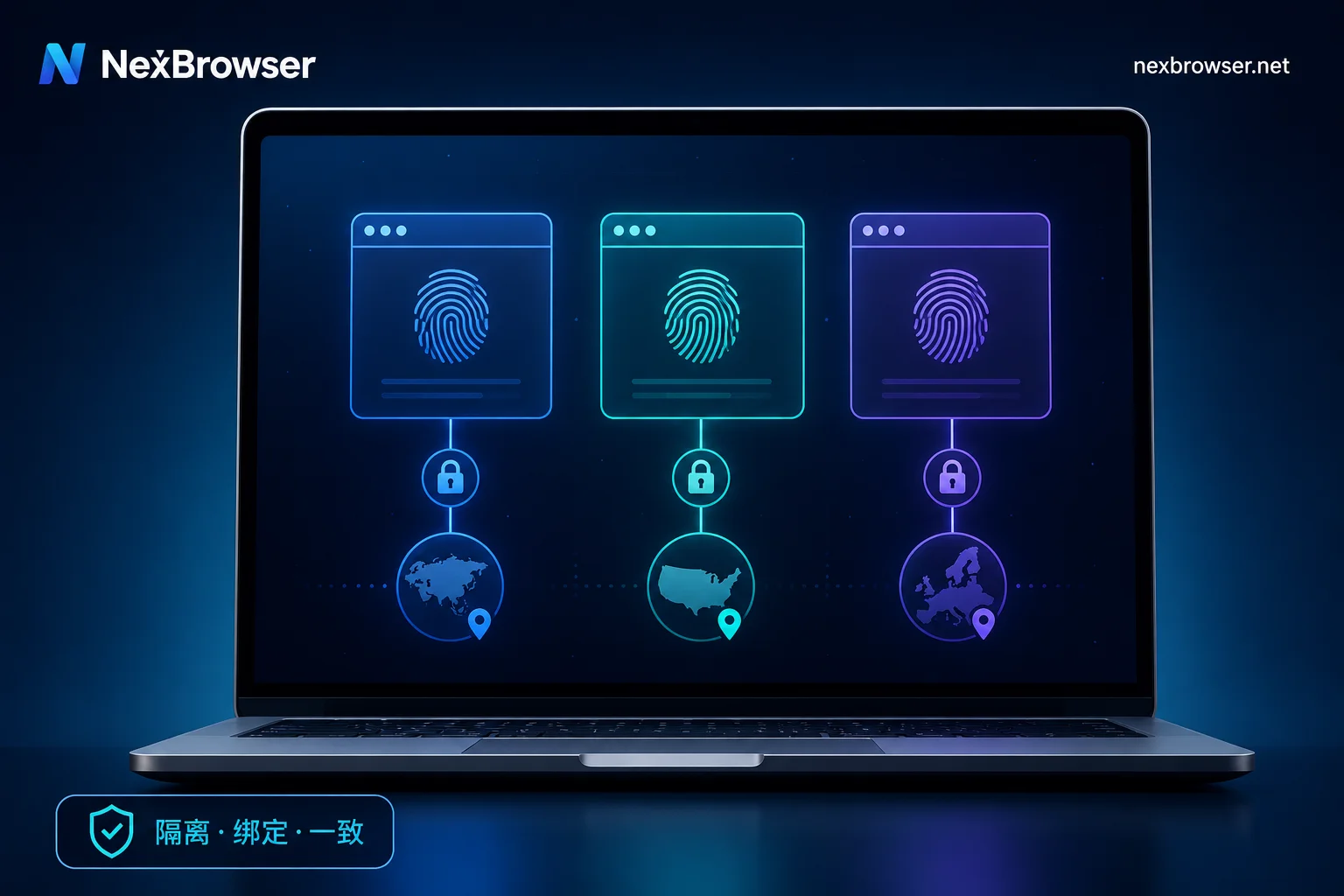
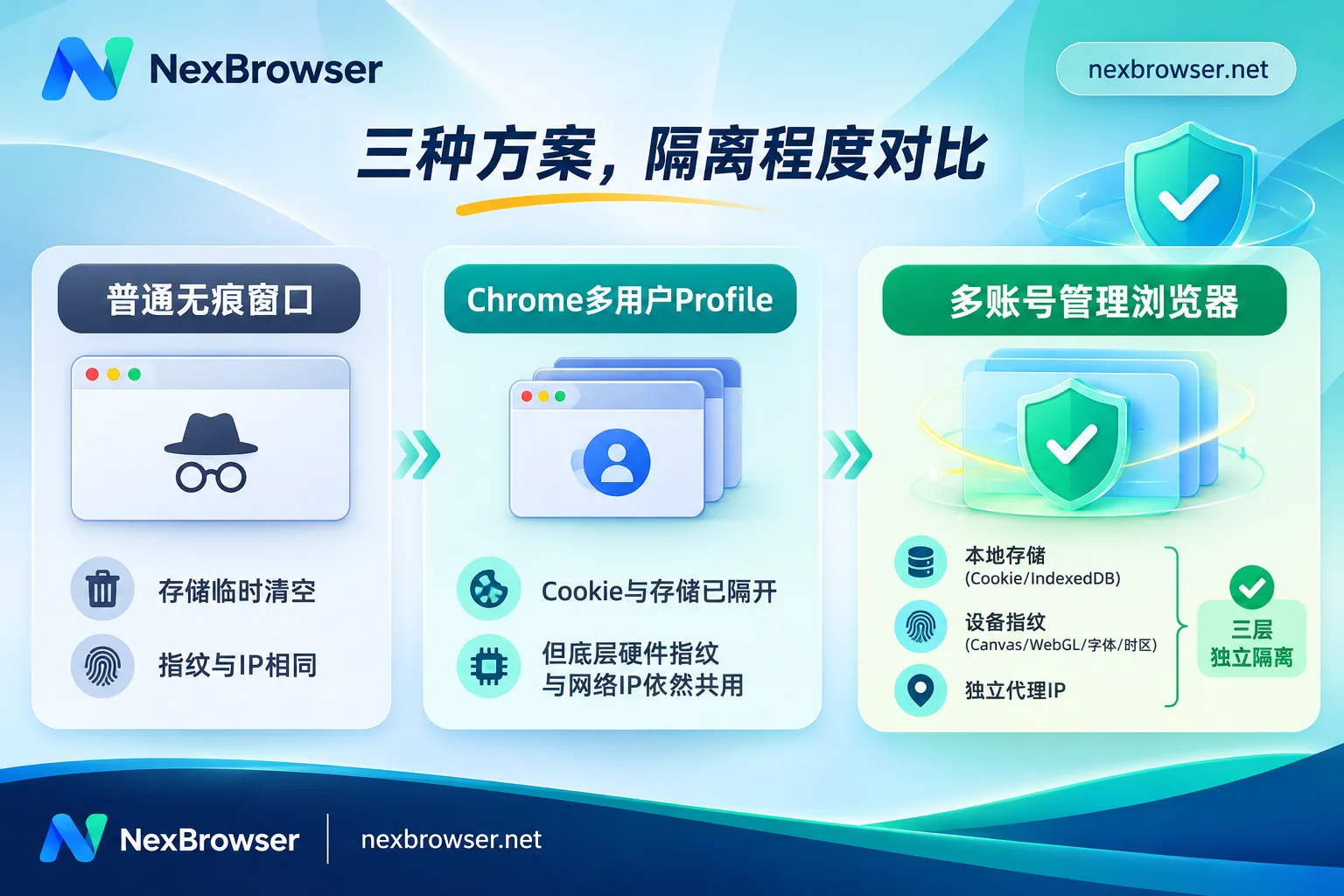
- Chrome multi-user only isolates cookies and local storage, not hardware fingerprints and network exit points; a true multi-account browser isolates all three layers: storage, fingerprint, and proxy network.
Below, we'll explain the boundaries between regular multi-profiles and professional tools, specific environment splitting rules, and how to avoid misoperations and login drops after setting up environments.
1. Why can't Chrome multi-profile and incognito mode manage multiple business accounts well?
Many beginners create several "user profiles" in Chrome or open multiple incognito windows to log into different accounts. This does prevent login conflicts, but as the number of accounts grows or platform risk control tightens, verification prompts become common.
The reason is that platforms identify the operating terminal behind an account by looking at three layers of signals simultaneously:
- Storage layer: Cookies, LocalStorage, IndexedDB, Cache, and Service Worker caches.
- Fingerprint layer: Canvas rendering, WebGL graphics card info, Audio fingerprint, system font list, screen resolution, CPU core count, User-Agent, Client Hints, and timezone/language.
- Network layer: HTTP exit IP, DNS resolution, and internal/public connection information exposed by WebRTC.
Chrome multi-user profiles assign a separate user data directory to each profile, which does isolate the storage layer; incognito windows clear temporary storage upon closing. But no matter how many Chrome windows or incognito windows you open, they all run the same browser program on the same computer—graphics card, fonts, screen, system version, and default network exit are completely identical. Early tests by the Electronic Frontier Foundation's Panopticlick project showed that 83.6% of browsers can form a unique trackable fingerprint based solely on software and hardware characteristics.
So the selection boundary is clear:
- If you just need to log into one or two ordinary website accounts locally that don't mind being identified as the same device, Chrome multi-user profiles are sufficient;
- If you are doing cross-border e-commerce multi-store, overseas social media matrix, multi-ad account advertising, AI tool multi-account, or need to hand over account security to team members, you must switch to a multi-account browser that isolates all three layers of signals.
2. Practical core: How many accounts can one environment hold? What's the logic for splitting?
The biggest fear when creating environments is two extremes: one is cramming multiple accounts on the same platform into one window and switching between them to save environment count; the other is creating separate environments for every auxiliary webpage without distinguishing primary from secondary, eventually losing track of which is which.
Follow these three rules to split, and you basically won't go wrong:
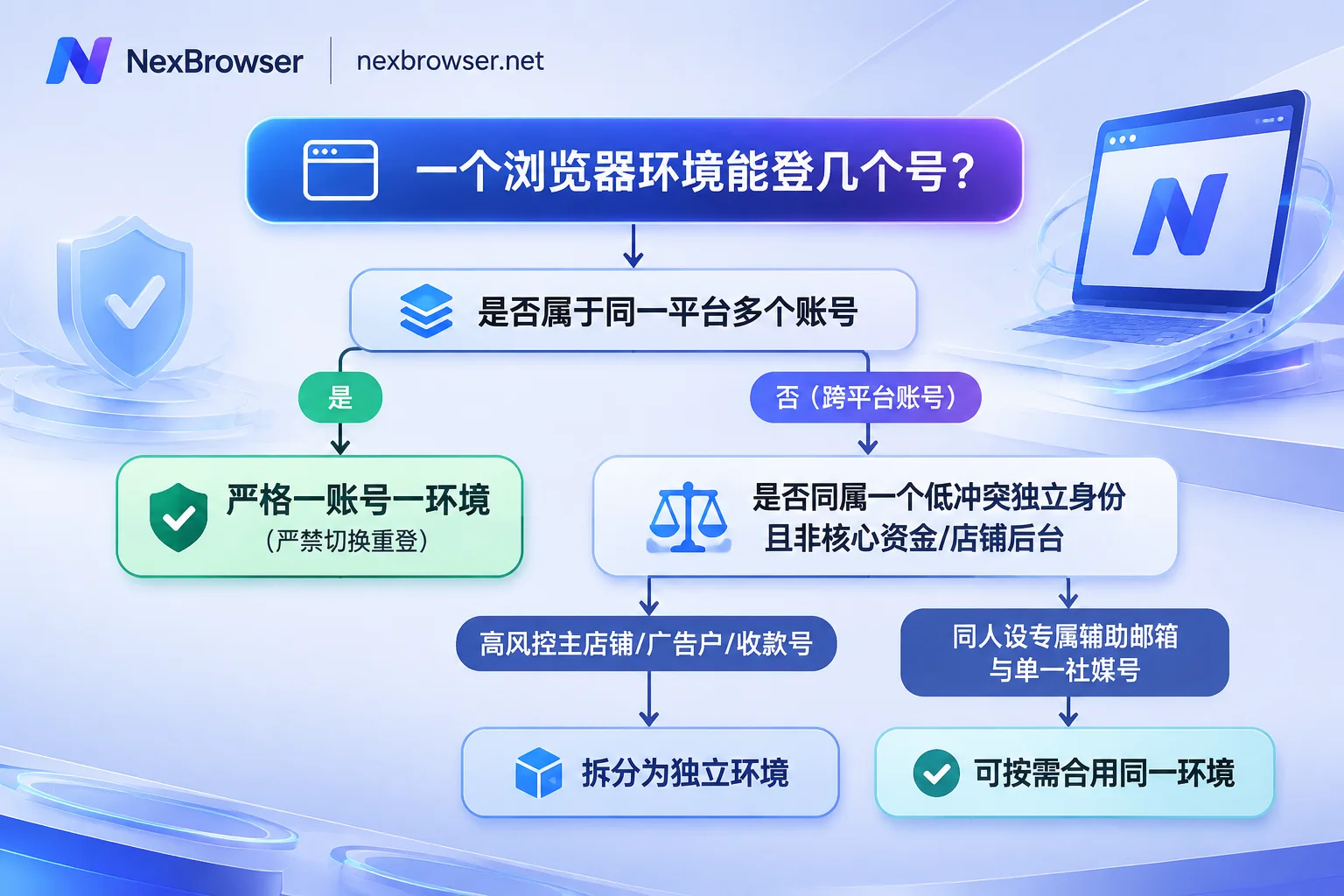
1. Multiple accounts on the same platform: 1 account = 1 independent environment
As long as multiple accounts belong to the same platform (e.g., 5 Amazon stores, 10 TikTok accounts, 8 Facebook ad accounts), never log out and log back in within the same environment. Even if you clear cookies, LocalStorage, IndexedDB, and cache files often retain device markers from the previous account. The correct approach is to create 5 environments for 5 accounts, with long-term one-to-one correspondence.
2. Cross-platform accounts: "Same identity can share, high risk must separate"
A single business project often involves more than one platform. You can decide whether to combine or separate based on "business risk isolation":
- Cases where they can be placed in the same environment: a dedicated email for a specific persona or single store (used to receive registration/security verification emails for that account) + a single social media account under that persona; or accounts of the same entity that have been verified for cross-platform resource reuse logic (for IP and entity attribution, refer to Static Residential IP Cross-Platform Reuse Principles).
- Cases that must be separated into independent environments: e-commerce main store backend vs. buyer-side accounts, ad delivery accounts vs. daily browsing accounts, core payment/fund backend vs. regular operational accounts. After separating accounts with different responsibilities, even if a test account or buyer account triggers an anomaly, it won't drag down the main store backend and payment entrance.
3. Physical isolation between personal daily environment and business environment
Do not casually log into your personal WeChat Web, common personal email, or install unknown personal plugins in business environments. Keep personal habits in your daily browser, and only keep "pure business environments" in the multi-account browser.
If your team is calculating how many environments to create, remember to separate "member seats" and "environment count": member seats determine "how many people can log into the workbench", and environment count determines "how many isolated identities there are". 3 operators managing 20 stores in shifts correspond to 3 member seats and 20 environments; you don't need to buy environments per person.
3. Environments are split, but why do anomalies still occur? Check these 4 configuration steps
Once you've clarified "how many accounts per environment", the most common pitfall in implementation is misaligned configurations within environments. Taking NexBrowser, a Chrome-based multi-account workbench, as an example, a reliable environment implementation process can follow these 4 steps:
1. Bind proxy first and do pre-launch checks to prevent real IP leaks
Many beginners bind a proxy and directly open a website to log in, only to find that the proxy is disconnected or routing through the local network, causing association from the first second of login.
- Configuration approach: Bind HTTP/HTTPS/SOCKS5 proxies separately in the environment (supports single addition or batch import), and first run a one-click test for connectivity, latency, and exit attribution.
- Workbench defense: In NexBrowser, the proxy exit is automatically checked before the environment starts, and if the check fails, startup is prohibited, mechanically preventing the low-level mistake of "starting with a bare connection after proxy failure". Meanwhile, WebRTC policy, timezone, and language within the environment automatically align with the proxy exit (e.g., if the exit is in New York, timezone and system language match US Eastern), avoiding the flaw of "IP in the US but browser clock showing Beijing time". When you need to configure dedicated residential IPs by region, you can link a NexIP account for one-click binding by country/region (residential IP traffic is purchased separately on the NexIP side as needed).
2. Use templates for batch environment creation to ensure "self-consistent and non-duplicate parameters"
When creating more than a dozen environments, never copy and rename a local directory that has already logged into an account; that would cause high similarity in Canvas, WebGL, and other hardware fingerprints across multiple environments. In NexBrowser, you can first adjust proxy rules, system platform templates (built-in Windows/macOS/Android/iOS parameter templates, updated in the cloud with Chrome kernel versions), and general settings, save them as a template, and when batch copying, the system automatically regenerates self-consistent fingerprint parameters for each new environment, saving effort and avoiding "look-alikes". For details on template copying, you can also refer to Three Ways to Save Environments as Templates for Batch Copying.
3. Receive codes directly within the environment for registration and 2FA, avoid switching webpages
Many new accounts require SMS verification upon registration or login from a new device. Operators often open a code-receiving webpage in another regular browser and copy the code, which easily leads to pasting the wrong code or disrupting environment records. NexBrowser has a built-in NexSMS Number Center in the environment sidebar, where you can directly get numbers by country/region and target platform, receive SMS, and automatically fill in verification codes. Accounts that need long-term 2FA channels can also be converted to long-term rental (number fees are separate from browser plans, charged per use), and the entire registration and verification process is completed within the same independent window.
4. Team collaboration: "password-free sharing + concurrency lock" to keep login state across devices
When handing accounts to colleagues or outsourced help, two things are most feared: one is writing account passwords in spreadsheets and sending them around, causing leaks; the other is two people opening the same environment simultaneously, causing cookie overwrites or concurrent anomalies on the same IP fingerprint (for specific consequences, see Impact of Multiple People Logging into the Same Environment Simultaneously).
In NexBrowser, administrators can first bind platform account passwords to the corresponding environment; when operations members open the environment, the login state is automatically filled, and they never have access to the real account passwords. Meanwhile, by default, the same environment can only be opened by one member at a time, fundamentally preventing concurrency conflicts. When you travel or change your main computer, as long as you properly close the environment, cookies, cache, and local storage (including IndexedDB) will be encrypted and synced to the cloud according to the selected scope, and you can restore all environment states by logging into the workbench on a new computer (for security, passwords saved by the browser within the window remain only on the local machine and are not migrated with sync).
4. How to manage and improve efficiency when you have more than 10 environments?
When the number of environments in your workbench grows from a few to dozens or even hundreds, relying on names alone quickly becomes chaotic. It's advisable to establish a management structure and efficiency division early on:
- Unified grouping and tag naming: Create groups in the workbench by "platform, store, or person in charge", apply status tags (e.g., "warming up / normal delivery / pending review"), and use a uniform naming format like
平台-地区-编号-负责人, so that batch start/stop, batch proxy binding, or role-based member permission authorization are clear at a glance. Choose automation methods based on operation nature, don't rely entirely on manual clicks:
- Temporary batch operations requiring human judgment (e.g., checking notification pop-ups across 10 stores before a big sale): enable NexBrowser's Window Sync; clicks, inputs, or scrolls in one master window are automatically arranged and synchronized across selected windows, while each slave window retains its own fingerprint, cookies, and proxy.
- Fixed repetitive daily actions (daily check-in, status inspection, fixed form entry): use no-code RPA scripts (currently in Beta) to drag-and-drop variables, loops, and failure retries, and run them in batches across a set of environments.
- Natural language commands or developer takeover needs: directly let the built-in Nex Agent decompose multi-window parallel tasks (critical irreversible operations can be set to require manual approval first), or enable the completely free, unlimited Local API and NexBrowser MCP Server to let Playwright, Puppeteer, Selenium, or Claude Code, Cursor directly take over isolated independent environments.
- Finally, a compliance bottom line: multi-account browsers can thoroughly solve technical association at the "device fingerprint, local storage, and network exit" level, but they cannot replace independence at the business entity and operational behavior level—if different stores share the same company's payment account, identical product images, and customer service scripts, platforms can still link them based on entity and content layers. After environment isolation is working, if you still encounter risk control, you can check item by item according to Four-Layer Troubleshooting Sequence After Environment Isolation.
If you are about to build your first multi-account environment from scratch, NexBrowser currently offers Windows 10/Windows 11 (64-bit) clients (macOS version is still in development and not yet available for download). Software features are not tiered; the free tier includes all features, requires no credit card, and quotas never expire (for specific window and member quotas, refer to the Limited-Time Free Page). We recommend first using free environments to run 1 to 3 core accounts stably and test them thoroughly, then expand windows and team seats according to actual business volume.