NexBrowser指纹浏览器-官方博客Blog
When it comes to social media matrix multi-account management, many people immediately struggle with: should I buy a bunch of real devices, rent cloud phones, use one-click distribution tools, or adopt fingerprint browsers?
Here's the conclusion first: no single type of tool can cover all matrices. The key depends on whether your accounts run on the "web" or "pure app" side, and whether you're nurturing multiple accounts on the same platform for long-term weight.
- For web-based and cross-border social media matrices (Facebook, Instagram, LinkedIn, X, TikTok web/Shop backend, Xiaohongshu professional accounts, etc.): fingerprint browsers paired with independent static residential IPs are the first choice. Isolation is thorough, one computer can manage dozens of accounts in batches, and it's most convenient for team password-free collaboration and automation.
- Scenarios heavily reliant on mobile apps (TikTok App live streaming, WhatsApp mobile high-frequency interaction): for fewer than 10 accounts, use real devices + independent data SIM cards; for scale, use cloud phones, or adopt a combined architecture of "fingerprint browsers for backend and daily operations + cloud phones for mobile app interactions".
- Cross-platform one-click content distribution SaaS: only suitable for scheduling and aggregating data when "one piece of content is posted to different platforms," it cannot solve the anti-association problem of multiple accounts on the same platform. Forcing the same content onto ten accounts is more likely to trigger the platform's governance rules against matrix content scraping.
Below, we'll explain the platform risk control logic, a hardcore comparison of the four solutions, and a directly implementable operations workbench setup.
Why do matrix accounts easily get "wiped out together"? First understand what platforms are checking
Many operators blame account throttling, verification, or bans on "recent content being too marketing-oriented," but matrix collateral damage often happens at the moment of login. Today's mainstream social media platforms have generally deployed deep device fingerprint recognition, no longer just looking at cookies or account passwords, but comprehensively collecting hardware parameters, font lists, WebGL rendering features, IP location, and continuous operation behavior to generate device profiles.
The two most common pitfalls are:
- Using incognito mode or multi-account plugins in regular browsers to switch accounts: The underlying hardware and browser rendering features are completely identical; incognito windows only don't retain local cookies, but risk control systems can still recognize that the same device is switching accounts in batches.
- Treating "homogeneous mass posting" as matrix operation: Take domestic platforms as an example; officials have long issued the "Management Standards for Improper Behavior of Matrix Accounts" and "Governance Standards on 'Malicious Marketing Accounts'," explicitly cracking down on matrix accounts that engage in industrialized production and batch publishing of homogeneous content; overseas platforms similarly set a 7 to 14-day cold start observation period for new accounts, and high-frequency mass posting or identical operations right after registration can easily trigger risk control. A true matrix means accounts have different roles, environments are thoroughly isolated, and content is distributed with differentiation.
Comparison of Four Mainstream Solutions: Don't Pay for Features You Won't Use
There are many tools marketed to matrix teams, but each actually solves problems at different levels. Before choosing, refer to the table below to identify your main track:
| Comparison Dimension | Multiple Real Devices + Data SIMs | Cloud Phones | Cross-Platform Distribution SaaS | Fingerprint Browser Workbench |
|---|---|---|---|---|
| Core problem solved | Native hardware isolation for mobile | Batch running Android apps in the cloud | Multi-platform image/video scheduling and data aggregation | Web anti-association isolation + batch automation + team collaboration |
| Device and fingerprint isolation | High (but still risky when connected to the same WiFi) | High (independent virtual Android devices) | No independent fingerprint isolation capability | High (independent fingerprints, cookies, and local storage per environment) |
| Daily carrying capacity per person | About 10-20 (limited by physical tapping) | About 50-100 (depending on bandwidth and configuration) | Mainly depends on content production capacity | A computer can easily handle 30-50+ web accounts |
| Hardware and ongoing costs | Device depreciation + monthly data SIM fees, heavy assets | Monthly subscription per instance, costs climb with scale | Subscription by number of accounts or version | Only needs an ordinary computer, tiered payment by environment capacity |
| Team collaboration and handover | Phones require physical handover, easy to lose devices or miss verification codes | Remote authorization possible, but batch entry on mobile is cumbersome | Focuses on content review and account authorization | Role-based permissions + password-free shared environments, direct revocation upon employee departure |
| Main shortcomings | Charging, moving materials, multi-device coordination extremely tiring | Network latency in operation, not suitable for heavy backend management | Cannot prevent association of multiple accounts on the same platform | Cannot replace pure mobile app side (e.g., mobile live streaming) |
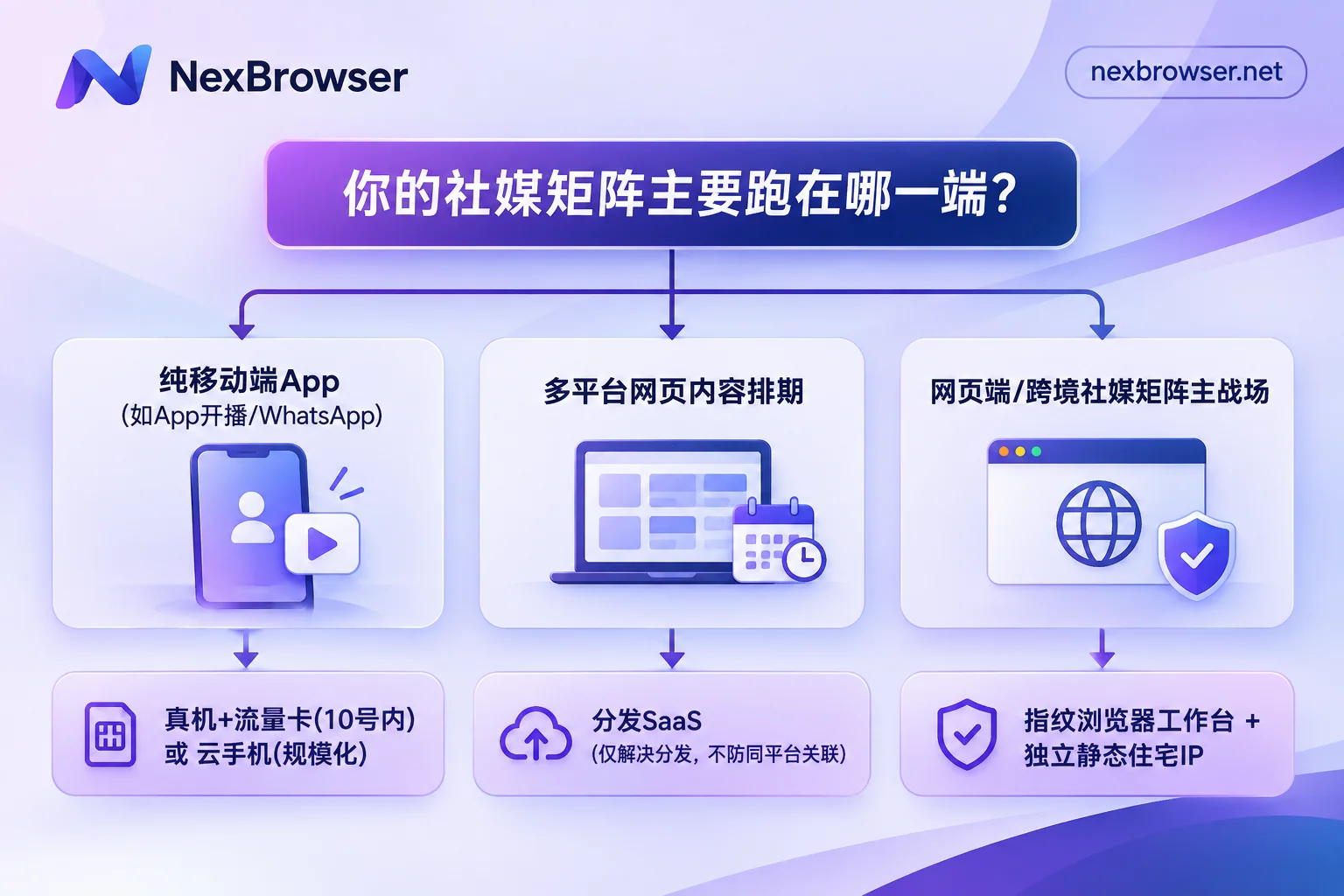
One-sentence selection advice: If your business focus is on web backend, ad投放, B2B lead generation, or overseas social media operable via web, prioritize fingerprint browsers as the core foundation; only actions that must be completed within mobile apps should be handled by a small number of real devices or cloud phones, avoiding spending all budget on heavy hardware or redundant tools.
After Choosing the Right Solution, How to Build? 4 Steps to a "Anti-Association and Labor-Saving" Matrix Workbench
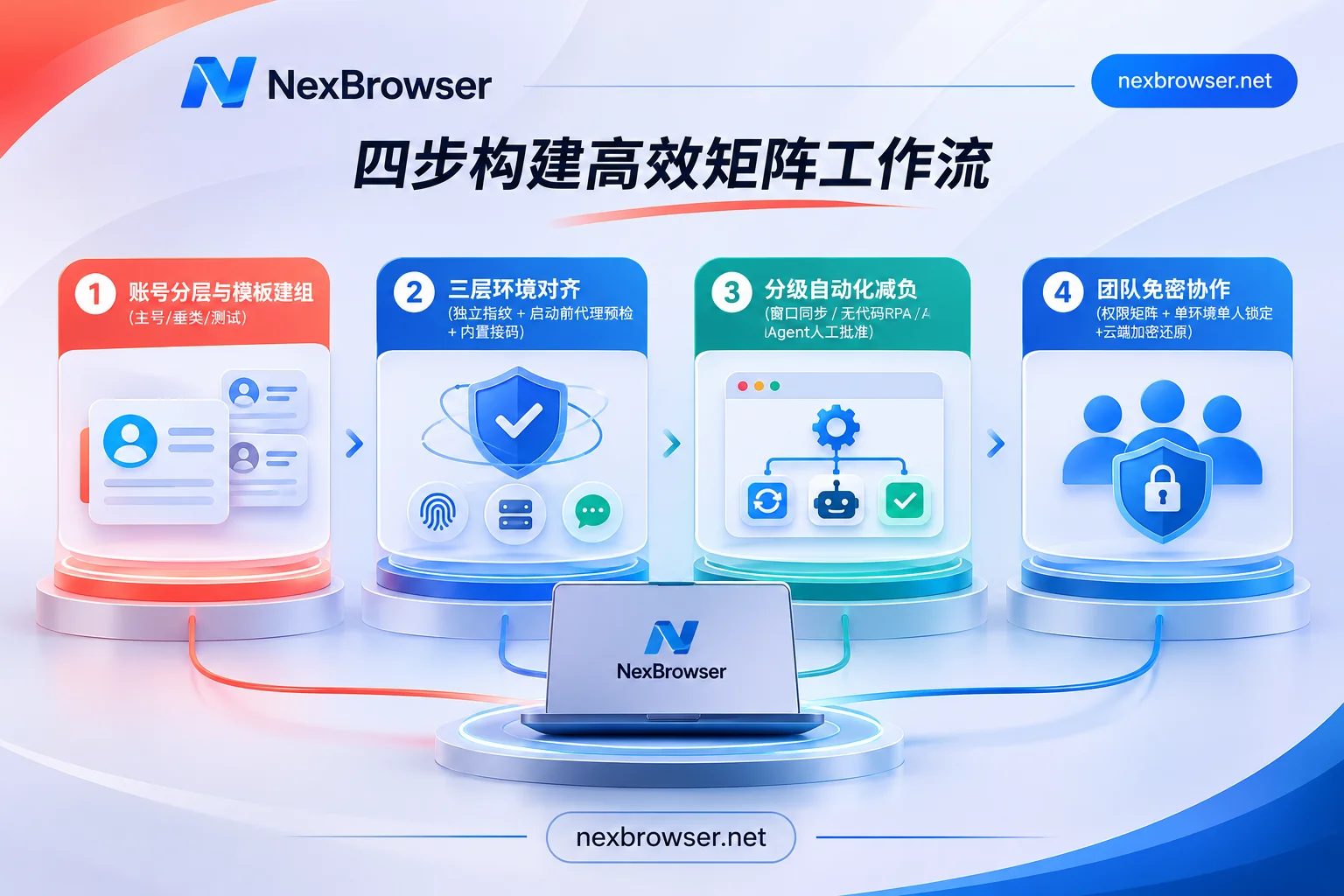
Once you've decided to use fingerprint browsers as the main tool, just logging in accounts is not enough. To manage dozens of accounts without chaos or bans, you need to break the process into four standard steps. Here, we use NexBrowser, a Chrome-based workbench designed for multi-account operations, as an example to break down a reusable implementation approach (for a framework from scratch, you can also refer to our site's Fine-grained Matrix Workbench Guide).
Step 1: First tier accounts, then create groups and environment templates
Many beginners managing 20 accounts spread their energy evenly across each account, resulting in core accounts not growing and small accounts constantly needing rescue. In practice, it's usually recommended to divide the matrix into three tiers: 2-3 core main accounts responsible for branding and conversion, about 10 vertical sub-accounts covering niche audiences, and several traffic test accounts for testing topics.
When using NexBrowser for social media matrix multi-account management, first map this tiered structure directly into groups and tags in the workbench (e.g., tag by "platform-account tier-person in charge"). After configuring the first standard environment, don't manually fill in parameters from scratch each time—save it as an environment template. When subsequently batch copying and creating, the system retains the basic configuration and regenerates independent fingerprint parameters for each new environment at the moment of copying, saving repetitive debugging and avoiding the amateur mistake of "all copied environments having identical fingerprints."
Step 2: Align "fingerprint, independent IP, and SMS verification" within the same environment
The biggest fear in matrix anti-association is three layers being disconnected: the browser disguises as a US device, but the IP is in Germany, and the phone numbers are still sequential from the same card vendor. In NexBrowser, these three layers can be calibrated at once within a single environment:
- Deep environment isolation and parameter coherence: Each environment has completely independent cookies, cache, local storage (including IndexedDB), and proxy channels, with no cross-reading between environments. Parameters such as Canvas, WebGL, fonts, Audio, screen, hardware, WebRTC policy, and User-Agent are independently generated per environment and logically coherent with each other. Parameter templates are also updated in the cloud with Chrome kernel versions, avoiding the flaw of declaring "latest system but configured with old kernel."
- Independent proxy and pre-launch circuit breaker: Supports HTTP/HTTPS/SOCKS5 single addition or batch import. Proxies are bound to specific environments, and changing proxies won't clear local cookies and login states. The key is that the environment automatically detects the proxy exit before launch and won't start if detection fails, directly blocking the risk of "proxy disconnection causing real local IP to be exposed during login"; WebRTC, time zone, language, and geolocation also automatically align with the exit IP. If a NexIP account is linked, residential IPs can be bound by target country/region with one click (IP traffic is purchased separately on the NexIP side). For main accounts, it's recommended to stick to one account per static residential IP; for specific allocation principles, refer to Static Residential IP Reuse Boundary Explanation.
- Built-in cloud phone number retrieval and SMS verification: Avoid using the same phone number to batch register accounts on the same platform. The environment sidebar has a built-in NexSMS Number Center, where you can directly retrieve numbers by country/region and target platform, receive SMS, and fill in verification codes. Core main accounts that require long-term secondary verification can also be converted to long-term rental (numbers are charged per use, separate from browser subscription fees). For specific alignment logic, see In-Environment Number Retrieval and SMS Verification Practice.
Step 3: Use tiered automation to reduce workload, don't rely on "mindless mass control"
In the first few days of cold start for new accounts, restraint is needed: establish a normal user profile with low-frequency browsing and light interaction, then gradually enter daily stable updates. Once accounts enter regular operation, what really consumes manpower each day are mechanical actions like switching accounts for inspection, replying to basic interactions, and filling forms and uploading materials. Don't use the same automation for all actions; it's recommended to divide into three layers of collaboration by task nature (for detailed division, see AI Agent, RPA, and Window Synchronization Practical Breakdown):
- Temporary operations requiring human judgment → Window Synchronization: For example, simultaneously checking backend notifications or modifying profiles for 6 accounts. In NexBrowser, select a master window; clicks, input, scrolling, and address jumps will synchronize to selected slave windows. Each synchronization item can be toggled individually, and operation intervals and throttling can be set to prevent actions from completely overlapping at millisecond level; each slave window still uses its own independent fingerprint, cookies, and proxy.
- Fixed repetitive inspections and data entry → RPA scripts (currently Beta): Drag and drop on a no-code canvas, supporting variables, conditionals, loops, and waits, with failure retry per step. One script can be bound to a batch of environments for batch execution, with execution logs recorded per environment and per step, so errors can be directly located to which step.
- Tasks requiring understanding the page before acting → Built-in Nex Agent or custom scripts: Give tasks to the built-in Nex Agent in natural language; it will automatically open environments, view pages, fill forms, take screenshots, support parallel multi-window execution, and can be set to request human approval before irreversible operations like publishing, deleting, or modifying (built-in model calls are billed by Token, purchased with account balance). If the team has development capabilities, you can also enable the free and unlimited Local API in the client or use NexBrowser MCP Server, allowing Playwright, Puppeteer, Selenium, Claude Code, or Cursor to directly take over isolated browser environments.
Step 4: Team collaboration and device switching—distribute only "session environments," not passwords
As the matrix grows and you bring in part-timers, ad buyers, or agencies, the most risky part is the "account password list" passed around on WeChat—easy to leak assets, and often two people opening the same account simultaneously kicks out the login state. In NexBrowser, team administrators can create roles and configure permission matrices, sharing environments password-free with members: platform accounts are bound to environments and auto-fill login upon launch, so members never see plaintext passwords; simultaneously, the system enforces that only one member can open the same environment at a time, avoiding session conflicts and overwrites; when an employee leaves, simply revoke environment permissions. For specific practices of secure outsourcing, refer to Password-Free Team Collaboration Practice Solution.
Additionally, when closing an environment, cookies and local storage are encrypted and synchronized to the cloud according to the selected scope. Even if an operator switches to another computer and logs in again, the environment state can be fully restored (passwords saved by the browser within the environment remain only on the local machine and are not migrated with cloud sync, balancing portability and security).
Avoid These 3 High-Frequency Misconceptions Before Starting
- Thinking that isolating environments allows posting identical content: Browser anti-association solves "devices and networks not being judged as the same operator," but if different accounts post completely identical titles, images, and links at the same minute, content risk control will still judge it as homogeneous scraping. It's recommended to break down different angles and persona expressions under the same topic.
- Frequently switching exit IPs across different countries: Although changing proxies won't clear cookies, a main account being in the US today and switching to Japan two hours later violates the physical movement patterns of normal users. For important account nurturing, be sure to bind stable static residential IPs in a consistent region.
- Buying hundreds of seats before running a minimal closed loop: The safest rhythm in the early matrix stage is to first use 3-5 accounts to run through the process of "template environment creation → proxy pre-check → account nurturing → synchronization/automation workload reduction." NexBrowser currently offers a Windows 10, 11 (64-bit) client, and the free tier supports full-feature experience, no credit card required, and quotas don't expire (window and member quotas are subject to the current terms on the official limited-time free activity page), which is enough for individuals or small teams to validate the workflow smoothly in practice; note that the macOS client is still under development and not yet available for download, so Apple computer users should pay attention to system compatibility when choosing, and after confirming the solution works, expand capacity on demand based on new windows and member capacity.