NexBrowser指纹浏览器-官方博客Blog
For those new to multi-account operations, after typing "fingerprint browser" into the search box, the first things they want to clarify are often not how to adjust parameters, but three bottom-line questions: Is this legal? Will putting my store and social media accounts in it lead to account theft? Will passwords and cookies leak?
Let's put the conclusion upfront: A legitimate fingerprint browser is a legal, neutral software tool that does not actively "steal accounts"; but it is not absolutely safe just by installing it. In the industry, account theft or mass bans are rarely caused by the act of "modifying fingerprints" itself, but almost always occur in four areas: tampered installers from unknown sources, poisoned third-party plugins, plaintext upload of account passwords to the cloud, and exposed credentials during team sharing.
Once you understand these three points, you can judge for yourself whether a tool is safe and worth migrating your real business into.
1. First, Distinguish "Legal Compliance" from "Platform Rules"—Don't Scare Yourself
Many people instinctively think that "anti-detection" and "parameter spoofing" are gray tools. Actually, this should be viewed on two completely different levels:
- Legal level (the tool itself is legal): In technical and legal definitions, fingerprint browsers are browser privacy protection and multi-environment isolation tools, similar to virtual machines and independent workspaces. Currently, neither in China nor in mainstream Western jurisdictions are such software banned per se. As long as your use is for legitimate cross-border e-commerce multi-store operations, corporate brand social media matrices, compliant ad placement, web compatibility testing, or authorized data collection, it is a normal technical application; only when used for online fraud, malicious registration, stealing others' accounts, or unauthorized system intrusion does the behavior itself cross the legal red line.
- Platform rules level ("violation" does not equal "illegal"): E-commerce and social media platforms typically restrict disorderly multiple accounts or traffic manipulation by the same entity, so "violating platform agreements" and "breaking the law" are two different things. Under the premise of business compliance, fingerprint browsers serve to separate normal business environments of different stores and regions, avoiding false risk control flags and associated bans due to sharing one computer or network.
2. Do Fingerprint Browsers Really "Steal Accounts"? The 4 Most Common Vulnerabilities in the Industry
A neutral tool does not mean all products are safe. According to an industry security audit analysis released by SlowMist in early 2026, fingerprint browsers, precisely because they centrally host high-value login states and business assets, are prone to becoming attack targets. The most common risks are concentrated in the following four areas:
| Risk Source | Common Trigger Scenarios | Actual Consequences | Key Checkpoints |
|---|---|---|---|
| Unofficial/Unsigned Installers | Obtaining "cracked" or "localized" versions from cloud drives, group files, or third-party download sites | Installers bundled with Trojans or remote control programs | Verify official download source and code signature |
| Third-Party Plugin Supply Chain Poisoning | Installing or updating extensions via built-in unofficial plugin marketplaces | Malicious plugins silently steal cookies, forms, or wallet private keys | Install only from trusted official sources, minimize plugin count |
| Plaintext Cloud-Synced Password Credentials | Indiscriminately syncing browser-saved passwords to the cloud | Cloud anomalies or team privilege abuse lead to mass password leaks | Distinguish between "session data" and "local passwords" boundaries |
| Team Password Sharing and Concurrent Misoperations | Sending account passwords via WeChat groups, multiple people opening the same environment simultaneously | Difficulty revoking access after employee departure, or session overwrites triggering risk control | Use passwordless autofill and single-point exclusive locks |
The most alarming is plugin and software supply chain risk: in early 2025, a real security incident shocked the industry—a third-party cloud storage app store of a fingerprint browser was breached, attackers tampered with wallet extensions, causing asset damage to about 30,000 users who installed or updated plugins within about 72 hours, with stolen funds exceeding $4.1 million.
Additionally, in 2026, many operations teams have fallen into the trap of "open-source free tools": some long-unmaintained open-source projects or free shell browsers of unknown origin not only have outdated kernel versions leading to contradictory fingerprint parameters, but some even inject abnormal data back during parameter injection. Saving a few dozen dollars on tool costs but losing a batch of accounts cultivated for months is not worth it.
3. Before Putting Your Main Accounts In, You Must Verify These 4 Security Defenses
To judge whether a fingerprint browser is reliable, don't just look at how many "encryption" and "anti-detection" slogans are on the page; check whether it has engineering mechanisms to plug the four holes above.
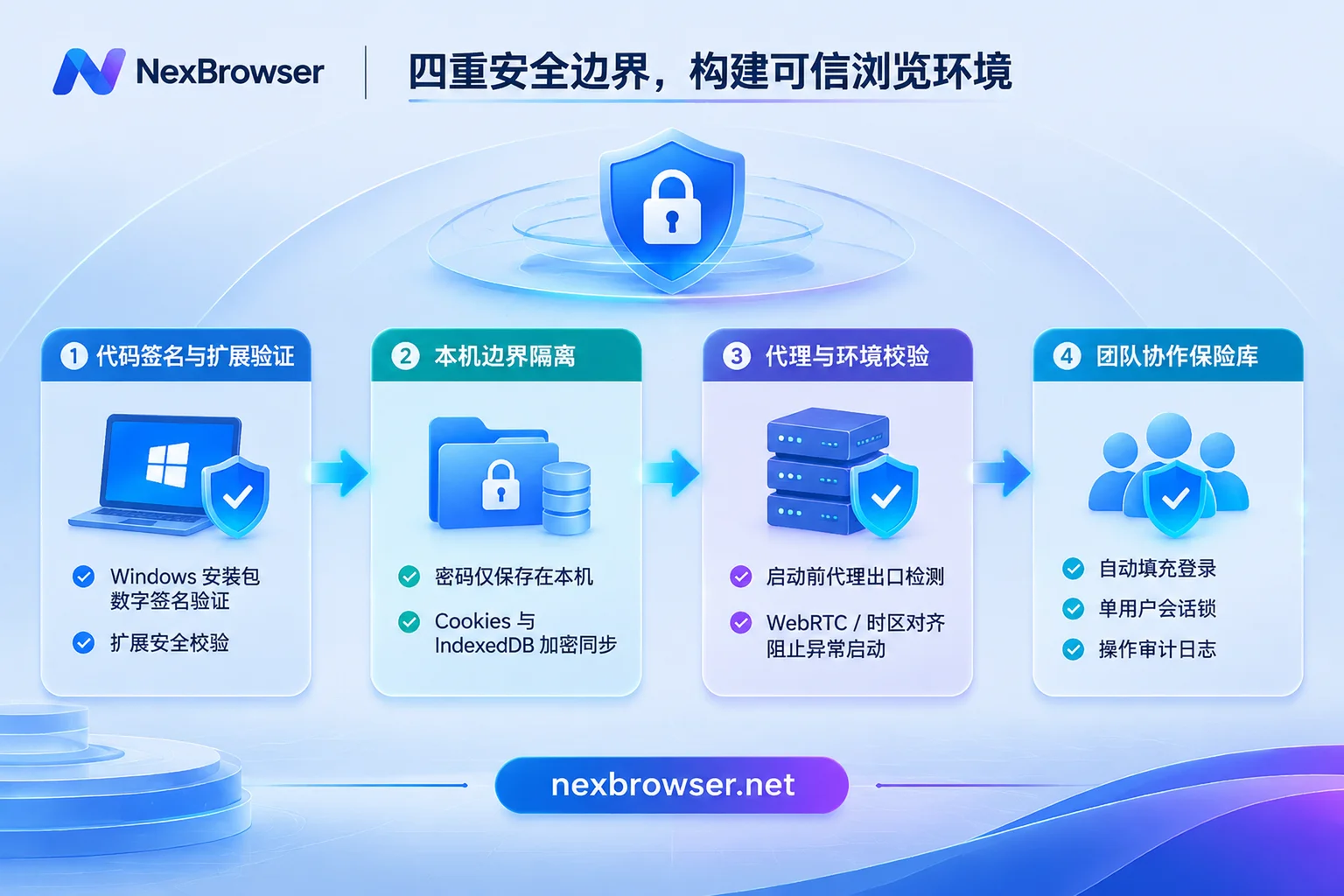
Taking NexBrowser's workspace architecture as an example, a verifiable security isolation system must implement at least these four layers:
1. Single Installer Source with Code Signing
The first step is to ensure the client itself has not been tampered with. NexBrowser provides Windows 10 and Windows 11 (64-bit) clients; whether on domestic or overseas network routes, you download the same code-signed installer, and it supports automatic update detection within the software, fundamentally avoiding tampered third-party distribution packages (currently macOS client is still in development, and Windows 7 and 32-bit systems are not supported; avoid any channel claiming to offer unofficial ports).
2. Distinguish "Sync Session" and "Local Password" Boundaries
When switching computers or handing over to team members, what really needs to be carried across devices is the login state (cookies, cache, and local storage), not uploading all plaintext passwords to the cloud. For the isolation logic of session assets, you can refer to this in-depth breakdown on browser environment isolation is not just anti-detection.
In NexBrowser, each environment's cookies, cache, and local storage (including IndexedDB) are independent and not readable by others. When closing an environment, cookies and local storage are encrypted and synced to the cloud according to the scope you select, making it easy to restore after switching machines; but passwords you save in the browser window are kept only on the local machine and will not migrate with cloud sync. Even for cross-device collaboration, the original password does not have an extra copy in the cloud.
3. Team Collaboration: "Give Environment, Not Password" + Single-Point Exclusive Lock
Many team account incidents are not due to software vulnerabilities, but because account passwords are directly handed to part-timers or outsourcers. A safer approach can be found in how to share account passwords securely within a team: distribute environment sessions, not credentials.
- Passwordless Autofill: After binding platform accounts to a specified environment in NexBrowser, the environment will automatically fill in the login when started; members can normally open the backend to work, but never have access to the original account password.
- Single-Point Exclusive to Prevent Conflicts: Only one member is allowed to open the same environment at a time, avoiding cookie overwrites or abnormal concurrent logins from different locations.
- Role Permissions and Operation Traceability: Team founders can create custom roles and finely restrict which groups members can see and whether they can perform export or delete actions in the permission matrix; all data is encrypted in transit and storage, and permission changes and member operations are traceable.
- Automated Human Approval Gate: If using the built-in AI Agent (Nex Agent) to assist with web tasks, you can enable "request approval before executing irreversible operations" and keep a full review record of operations to prevent the Agent from accidentally submitting or deleting settings.
4. Pre-Launch Proxy Self-Check to Prevent Real Network Exposure
Another common "false security" is: the proxy is actually down or misconfigured, but the browser directly uses the local broadband to open the store backend. NexBrowser checks the proxy exit before each environment starts, and if the check fails, the environment will not start; meanwhile, WebRTC policy, timezone, and language are aligned with the proxy exit. Even if the proxy is changed later, existing cookies and local storage are not cleared, preserving environment continuity and avoiding secondary verification triggered by network exposure or parameter contradictions.
4. A 4-Step Low-Risk Onboarding Checklist for Beginners
If you are about to choose a fingerprint browser, follow these four steps to minimize early risks:
- Only download from the official website and verify signatures: Go to the NexBrowser official download page to get the code-signed installer, and do not install any forum-packed versions or activation patches.
- First use the free tier with test accounts: Don't import all your main high-value accounts right away. You can refer to this what to test during a fingerprint browser trial checklist and run the process directly on the free tier—NexBrowser's free tier offers full features without a credit card (specific window quotas are subject to the current rules on the limited-time free event page), enough to test proxy pre-check, fingerprint alignment, and machine-switch restoration.
- Minimize plugins and credential retention: Only install necessary plugins from official trusted stores; do not save high-risk core passwords, payment PINs, or mnemonic phrases in plaintext in browser extensions or notes.
- Lock down permissions before onboarding the team: Create groups and read-only/operation roles before inviting members, and confirm members cannot see the password export entry; when staff leave, directly adjust or revoke environment seats without hastily changing passwords on each platform.
In one sentence: A fingerprint browser itself is legal and a mature multi-account productivity tool. What really determines "safety" is whether the installer is clean, whether password and sync boundaries are isolated, whether team permissions are controllable, and whether the proxy is checked before launch. Verify these four points in a test environment first, then migrate core accounts—this is more effective than blindly comparing dozens of parameter tables.