NexBrowser指纹浏览器-官方博客Blog
For teams doing cross-border e-commerce, social media matrices, or ad placements, there is an almost fixed ritual before launching a new account: open an online browser fingerprint detection tool and glance at the "disguise score" or "anonymity percentage" at the top of the page. Only after seeing a screen full of green checks and a score of 95% or even 100% do operators feel safe enough to enter the account credentials.
But a growing confusion is: Why does the environment get a perfect score on detection sites, yet the account triggers secondary verification or even association bans just days after being put into use?
The problem is not that fingerprint detection tools have failed, but that many operators equate "a single snapshot of static parameters passing" with "dynamic anti-association passing in real business scenarios." Combining the latest 2026 risk control industry data and the evolution of detection mechanisms, let's break down what browser fingerprint detection actually measures, which hidden flaws ordinary detection pages won't directly alert on, and how to build a multi-account workbench that truly withstands platform verification.
I. 2026 Risk Control Trends: Why Is "All Green on Detection Page" No Longer a Get-Out-of-Jail Card?
Device intelligence and anti-fraud agency Fingerprint released the "2026 Device Intelligence Report" in early 2026 (analyzing over 23 billion real device identification events worldwide), disclosing a set of data that multi-account operators should be highly vigilant about:
- Desktop parameter tampering detection rate doubled: In desktop browser traffic, the proportion of risk control systems catching "artificial tampering features (Browser Tampering, i.e., attempts to confuse fingerprints with inferior methods)" soared from 2.6% to 4.4%, and in Chromium-based desktop browsers this proportion reached 4.8%.
- Abnormal environment features highly concentrated: Among desktop identification events, 13% exposed virtual machine features, and 6% of sessions were in a developer tools (DevTools) open state.
This data reveals the core logic shift in current platform risk control: Risk control systems no longer just look at whether you "changed fingerprints," but focus on investigating whether you "left traces of deliberately forging fingerprints."
Many operators rely on free plugins, inferior device modification tools, or software that hasn't updated its kernel for a long time to run scores. These tools, by crudely intercepting JavaScript interfaces or injecting random noise, can indeed fool simple rule-based online detection pages and get a "high uniqueness" green badge; but in the eyes of platforms like Amazon, TikTok, and Meta, which have tens of billions of real device baseline libraries, this "stiffly patchworked uniqueness" itself is the most glaring red flag.
II. What 4 Layers of Signals Do Online Browser Fingerprint Detection Tools Actually Check?
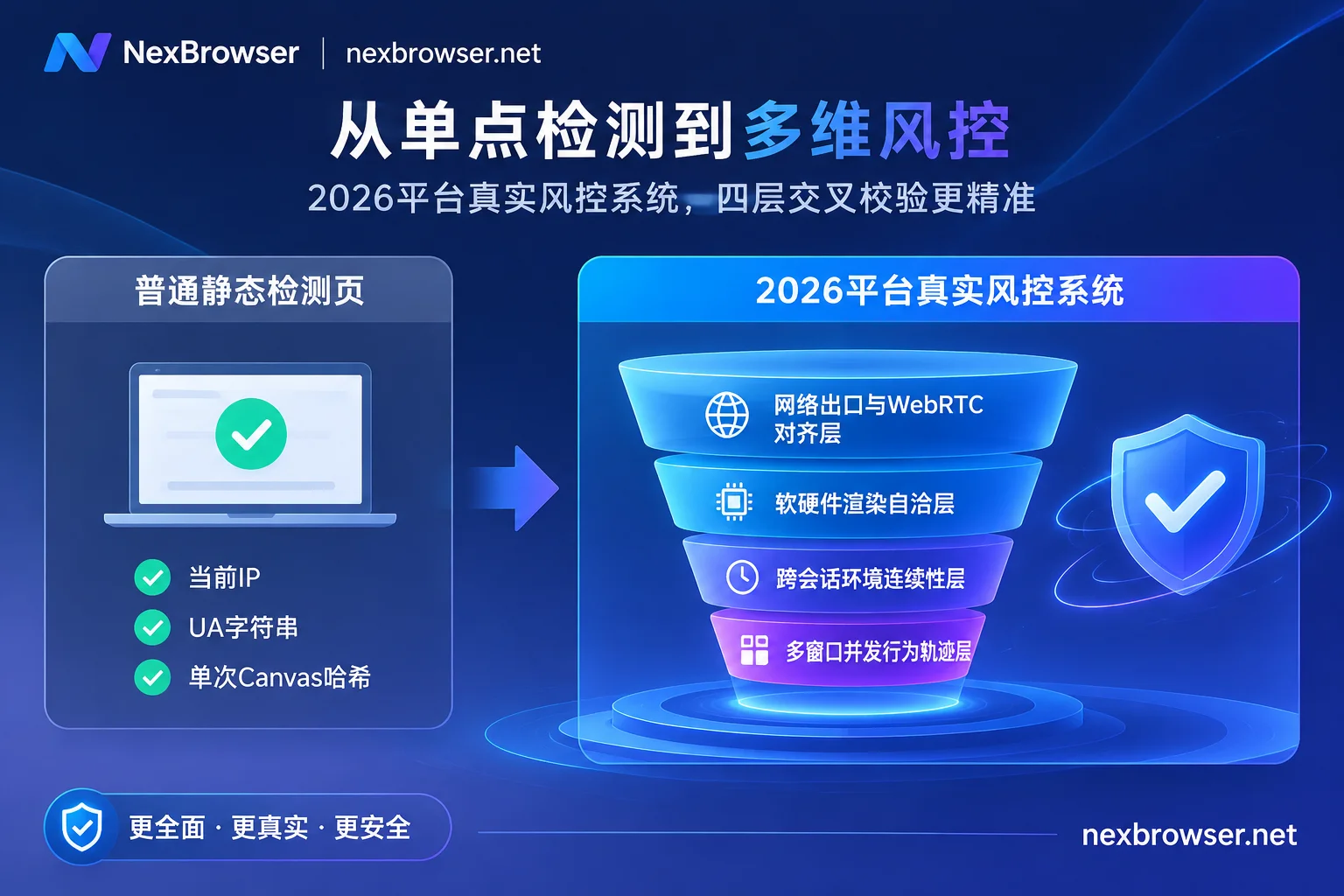
To understand detection reports, you first need to understand how modern risk control and advanced detection tools (such as BrowserScan, CreepJS, BrowserLeaks, etc.) perform a "full-body scan" of the browser. A complete browser fingerprint detection is actually a cross-examination of the following four dimensions:
1. Network and Proxy Exit Layer (IP, WebRTC, Timezone, and Language)
This is the first checkpoint for all detections. The system not only reads the country, ASN (network service provider type), and blacklist records of your current public exit IP, but also initiates WebRTC probing through the STUN protocol, attempting to bypass the proxy and resolve your local LAN IP or even your real public IP. At the same time, the system compares the Accept-Language in HTTP request headers with the system timezone (Timezone) read by JavaScript to see if they match the geographic region of the IP.
2. Software and Hardware Rendering Layer (Canvas, WebGL, Audio, and Fonts)
Even if two computers look identical, due to subtle differences in graphics card models, underlying drivers, operating system anti-aliasing algorithms, and locally installed fonts, the hash values they generate when drawing hidden graphics on web canvas (Canvas), rendering 3D scenes (WebGL), or processing audio signals (AudioContext) are completely different. Detection tools read these features to determine whether you are using the same physical computer to switch identities.
3. Parameter Consistency (Cross-Layer Consistency)
This is the watershed that currently distinguishes "qualified fingerprint environments" from "inferior disguises." Advanced detection scripts put signals from different layers together for reconciliation:
- Your
User-Agentclaims to bemacOS, but theWebGLrenderer exposes a Windows-exclusive Direct3D driver; - Your UA shows Chrome 130+, but the client hints or specific API features exposed by the browser底层 still remain at Chrome 105;
- You click "randomly generate new fingerprint" every time you open the environment, causing the graphics card and sound card features of the same logged-in account to change daily.
For specific interpretations of common detection indicators, you can refer to the Browser Fingerprint Self-Check Guide compiled on the official website.
4. Storage Residue and Automation Interfaces (Storage & CDP)
Besides checking "whether you look like a real computer," platforms also check "whether there is anything left in your house from the previous account" and "whether a robot is operating." In addition to regular cookies, modern websites commonly use LocalStorage and large-capacity local databases IndexedDB to write device tracking identifiers. We have deeply analyzed the investigation of underlying storage streaming in the article "How to Achieve Thorough Browser Environment Isolation? From IndexedDB Anti-Streaming to AI Agent Multi-Account Sandbox Practice".
III. Common Operational Pitfalls: 4 Hidden Flaws That Detection Pages Don't Flag but Platforms Will Ban For
When actually troubleshooting ban reasons, we found that the vast majority of teams stumble because they ignore the following four blind spots that "static score running cannot reveal" (for more daily operational mistakes, you can also refer to "Still Triggering Risk Control with Anti-Association Browsers? Check These 5 High-Frequency Operational Mistakes and Anti-Ban Strategies"):
| Hidden Flaw Type | Common Wrong Practice | Why Might Online Detection Pages Not Alert? | How Does Platform Risk Control Determine Abnormality? |
|---|---|---|---|
| 1. Parameter "Over-Randomization" Causing Cross-Session Mutations | When starting the environment or clearing cache, casually re-randomize fingerprint parameters | When opening the detection page once, the current set of parameters itself is compliant | A real user's computer hardware doesn't change daily. When an account with login state accesses across days, the underlying hardware hash frequently jumps, directly triggering geolocation theft or script risk control |
| 2. Outdated Kernel Version with Forced UA Upgrade | Only change the surface User-Agent to the latest version number, while the underlying browser kernel hasn't been updated for a year | Basic detection tools only perform string regex matching and do not verify underlying engine features | Platforms detect new Chrome-exclusive JS APIs and protocol handshake features, seeing through the tampering of "old kernel in new shell" at a glance |
| 3. "Naked Connection Rush" at the Moment of Proxy Disconnection | First open the browser environment to automatically load the last unclosed platform page, and when finding it can't connect, then change the proxy | When you test the fingerprint, the proxy is working, but you didn't test "what happens in the second the proxy fails" | If the proxy fails at the moment the environment starts and is not blocked, direct traffic or old node requests have already reached the platform server, causing the real IP to be exposed instantly |
| 4. Mechanical Synchronized Trajectories During Batch Operations | Use crude scripts to click the same coordinate at the same millisecond, type text at the same speed across dozens of windows | Static fingerprint detection pages do not count concurrent behavioral correlations between multiple windows | Multiple independent accounts exhibit zero-latency copy-level mouse trajectories and request frequencies within the same time window, and are packaged and judged as matrix manipulation by behavioral models |
IV. How to Build a Multi-Account Defense Line with NexBrowser That Withstands Real-Time Inspection?
To ensure that each account not only passes browser fingerprint detection tools but also maintains a stable "digital identity reputation" over business cycles lasting months or even years, full-chain control is needed from the kernel foundation, network alignment, storage isolation, to automation throttling. This is also the core design logic of NexBrowser as a Chrome-based multi-account fingerprint browser workbench.
1. Cloud-Synced Parameter Templates Ensure Underlying Feature Consistency
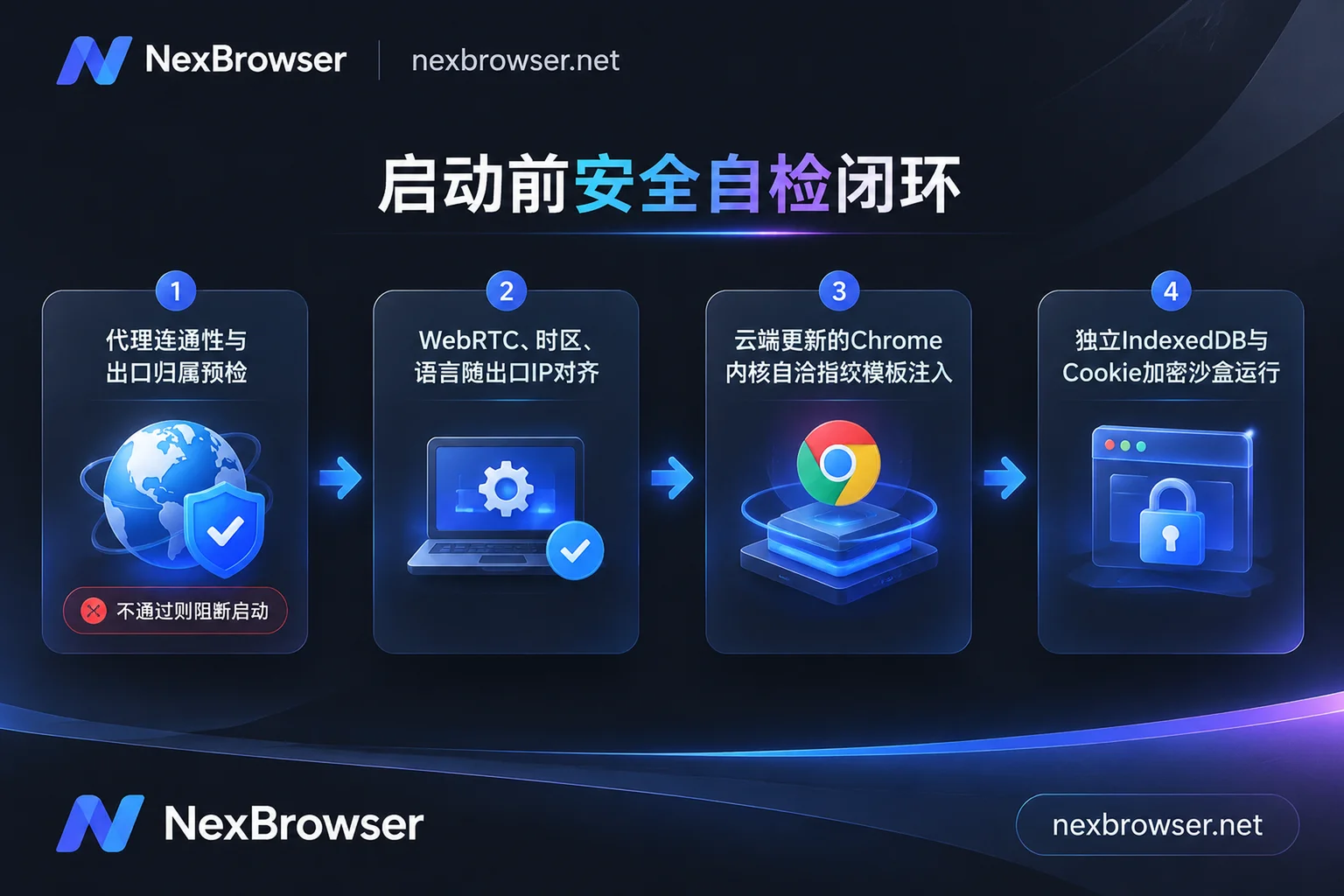
To avoid software and hardware logic conflicts caused by "manually messing with parameters," NexBrowser's Fingerprint Parameters and Privacy Protection module includes built-in parameter templates for Windows, macOS, Android, and iOS. Parameters such as Canvas, WebGL, fonts, Audio, screen resolution, hardware concurrency, WebRTC policy, and User-Agent for each environment are independently generated and mutually consistent. More importantly, these templates are updated in the cloud with Chrome kernel versions, allowing you to generate compliant configurations with one click or manually specify each item according to special business needs, fundamentally eliminating the disconnect flaw of "old kernel with new UA."
2. Pre-Launch Proxy Pre-Check and Automatic Exit Alignment Block "Naked Connection Leaks"
Regarding network layer detection items (timezone, language, WebRTC not matching IP location), if you have encountered abnormal detection page displays, you can first read "Proxy Connected but Detection Page Shows IP Mismatch: First See Which Column, Then Troubleshoot by Cause".
In daily protection, NexBrowser's Proxy and Residential IP Management provides two hard safeguards:
- Exit Linkage Matching: Supports single or batch import of HTTP / HTTPS / SOCKS5 proxies (after linking a NexIP account, you can also bind residential IPs by country and region with one click). Once a proxy is bound to a single environment, the environment's WebRTC, timezone, language, and geolocation automatically align with the proxy exit IP, eliminating manual time difference calculations.
- Check-Before-Start Mechanism: Supports one-click detection of connectivity, latency, and exit attribution; before the environment starts, it checks the proxy exit first, and if the check fails, the environment will not start. This mechanism directly cuts off the risk of local network naked connection rushing when the proxy fails. Moreover, changing proxies midway will not clear cookies and local storage within the environment.
3. Fixed Environment and Cloud Encrypted Sync Reject "Device Fingerprint Drift"
True anti-association emphasizes "a thousand accounts, a thousand faces, but one account, one face." Through the Multi-Account Environment Isolation feature, each environment's cookies, cache, local storage (including IndexedDB), and proxy are completely independent and do not read each other. Configurations that have been tuned and verified can be saved as templates; when copying a new environment, new fingerprint parameters are automatically generated. When an old environment is closed, data such as cookies and local storage are encrypted and synced to the cloud according to the selected scope, and directly restored when logging in from a different location or during team handover, ensuring that the same account always runs in a fixed, continuous fingerprint and session environment.
If the team needs multiple people to collaboratively manage, the founder can assign roles in the permission matrix and share configured environments with members without passwords (auto-fill login on start, members cannot access passwords), and the same environment can only be opened by one member at a time, preventing multiple people from concurrent operations in different locations from messing up session features (see "What Happens When Multiple People Log into the Same Browser Environment Simultaneously: Data Overwrite, Abnormal Account Concurrency, and How Teams Should Handover and Divide Work" for details).
4. Window Synchronization with Throttling and Multi-Mode Automation to Avoid Behavioral Risk Control
When business scale expands and automation tools are needed for efficiency, how to prevent exposure at the behavioral detection layer? (For the complete chain of automation anti-ban, we recommend reading "How to Avoid "Batch Bans" in Fingerprint Browser Automation? A Practical Guide from Anti-Signal Drift to Multi-Link Collaboration"). NexBrowser provides solutions tailored to different scenarios:
- Manual Judgment Batch Operations: Use the Window Synchronization feature; when clicks, inputs, scrolls, and jumps from the main window are synchronized to slave windows, each slave window still strictly uses its own fingerprint, cookies, and proxy; at the same time, supports setting operation intervals and throttling, and each sync item can be individually toggled, breaking the mechanical feel of all windows responding at the same millisecond.
- Processed and Intelligent Execution: Fixed repetitive tasks can be handled by no-code drag-and-drop orchestrated RPA scripts (supporting variables, loops, waits, and failure retries, with step-by-step logging); complex and variable web tasks can awaken the client's built-in AI Agent (Nex Agent) to drive parallel operations with natural language, and support requesting human approval before executing irreversible operations; if you have an in-house technical team, you can also directly integrate Playwright, Puppeteer, or clients like Claude Code and Cursor through the free, unlimited-call Local API and MCP interfaces to securely run scripts on top of real isolated environments.
- New Account Verification Loop: When platform risk control occasionally triggers SMS secondary verification, there is no need to switch out of the browser and search for SMS receiving platforms everywhere. Directly use the built-in Cloud Phone Number (NexSMS Number Center) in the environment sidebar to get numbers by country and target platform, receive SMS, and fill in verification codes. Important accounts can also be transferred to long-term rental.
V. Practical SOP: 3-Step Self-Check List Before Launching a New Account Environment
Don't wait until you've batch-created hundreds of windows and bought accounts to put them up before taking remedial action. It is recommended to incorporate the following "3-step self-check method" into the team's standard operating procedure (SOP):
- Step 1: Verify the Network Foundation Before Launch
After batch importing proxies in the NexBrowser client, first run the built-in detection function for connectivity, latency, and exit location. Confirm that the "WebRTC, timezone, language align with proxy exit" option is enabled. Step 2: Perform Cross-Detection on 1-2 Sample Environments
Create a sample environment using the built-in template and open it, then visit 1-2 mainstream browser fingerprint detection sites. Focus not on the inflated total score, but on three things:- Whether the public IP, DNS country, and WebRTC IP are consistent and there is no local LAN leak;
- Whether the system timezone and browser language completely match the region of the exit IP;
- Whether the operating system declaration in the User-Agent is consistent with the WebGL hardware renderer, with no tampering warnings.
- Step 3: Save as Standard Template and Scale by Business Group
After the sample environment passes verification, save it as an environment template. When subsequently batch-creating environments by platform, store, or responsible person, directly derive new fingerprints from this template, bind respective independent residential IPs, and after first login to the platform, rely on cloud sync to fix the environment's fingerprint and cookie state, no longer resetting arbitrarily.
Conclusion
Browser fingerprint detection is a mirror; its true value is to help us discover network configuration disconnects or parameter conflicts before entering the platform's risk control radar. Rather than pursuing the elusive "100% uniqueness" on detection websites, it is better to return to the device patterns of real users—using consistent kernel templates, strictly aligned proxy exits, and thoroughly isolated fixed environments, so that every business account looks like an ordinary, long-term stable real personal computer.
Currently, NexBrowser follows the principle of "no feature tiers," and the free tier allows you to experience all core features (including multi-account isolation, window synchronization, RPA, Local API, and MCP, etc.) without binding a credit card; you can also directly go to the client download page to get the Windows 10/11 (64-bit) installer, and follow the 3-step checklist above to personally conduct a thorough environmental checkup for your account matrix.