NexBrowser指纹浏览器-官方博客Blog
When you open fingerprint detection websites and see Canvas, WebGL, and User-Agent all reporting normal, yet the target site still repeatedly asks for Turnstile verification, the problem often isn't in the layer you're staring at. Cloudflare's official Bot Management documentation (developers.cloudflare.com, 2026-07-01) now lists the cf.bot_management.ja4 rule variable—it converts the information in the TLS ClientHello into a JA4 fingerprint, assessing client identity before the browser even sends an HTTP request. Most fingerprint detection pages only cover the JavaScript rendering layer and can't see the handshake fingerprint, so 'all green' and 'blocked' can coexist.
All-green fingerprint detection pages but repeated human verification on the site: where's the contradiction?
This contradiction points to a fact: browser fingerprint authenticity detection can't just rely on Canvas, WebGL, and UA. Cloudflare's Bot Management observes three layers: network egress IP, TLS/protocol stack, and JS rendering layer. The first two occur during the TLS handshake, where scripts on ordinary detection pages never get a chance to execute, so they can't report back to the tester. When TLS handshake characteristics conflict with the User-Agent declared in HTTP requests, the risk engine may trigger Turnstile verification loops or direct blocks with high probability, even if the IP comes from a clean residential network.
To understand why, you need to break down how these layers work.
First, distinguish the three layers: network egress IP, TLS and protocol stack, JS rendering layer
The first layer is the network egress IP, determined by the proxy chain or local network. The risk system checks whether the IP is from a known data center, whether it jumps frequently, i.e., IP reputation.
The second layer is TLS and protocol stack, occurring during the encrypted handshake after the TCP connection is established, produced jointly by the browser kernel and underlying network libraries. Cloudflare reads the JA4 fingerprint from this layer via the cf.bot_management.ja4 rule variable, and scores it along with HTTP/2 and HTTP/3 behavioral characteristics. Not just Cloudflare—CDN/WAF systems like Bunny.net have also publicly provided similar JA4 variables.
The third layer is the JS rendering layer, where page scripts read Canvas, WebGL, fonts, User-Agent, and Client Hints (device and version headers actively reported by the browser). This layer can only be passively collected after the page loads.
The three layers aren't judged in isolation. The risk engine cross-matches them: whether the egress IP is trustworthy, whether the TLS signature looks like a real browser, and whether the page rendering layer shows anomalies. The three scores combine into a final rating. Cloudflare's heuristic engine (including detection rules like ID 50331649) combines JA4 fingerprints, HTTP/2 behavior, and IP reputation into a score (source: Cloudflare official Bot Management docs).
What does JA4 actually look at: how ClientHello, cipher suite ordering, and ALPN form the signature
To understand what JA4 TLS fingerprint is, look at ClientHello first. It's the first packet the client sends during the TLS handshake, containing the TLS version, the list of cipher suites, ALPN (the extension negotiating upper-layer protocols like HTTP/2 during the handshake) protocols, and other extensions. JA4 fingerprint normalizes these fields—for example, sorting cipher suites and combining them with ALPN and other extensions—to produce a short signature.
According to Cloudflare's official Bot Management documentation (developers.cloudflare.com), the cf.bot_management.ja4 rule variable returns this JA4 signature, which can be directly used for WAF rule matching. This means the server can determine—without executing any JavaScript—whether the TLS stack looks more like a real Chrome browser or more like a network library such as OpenSSL or Python requests. 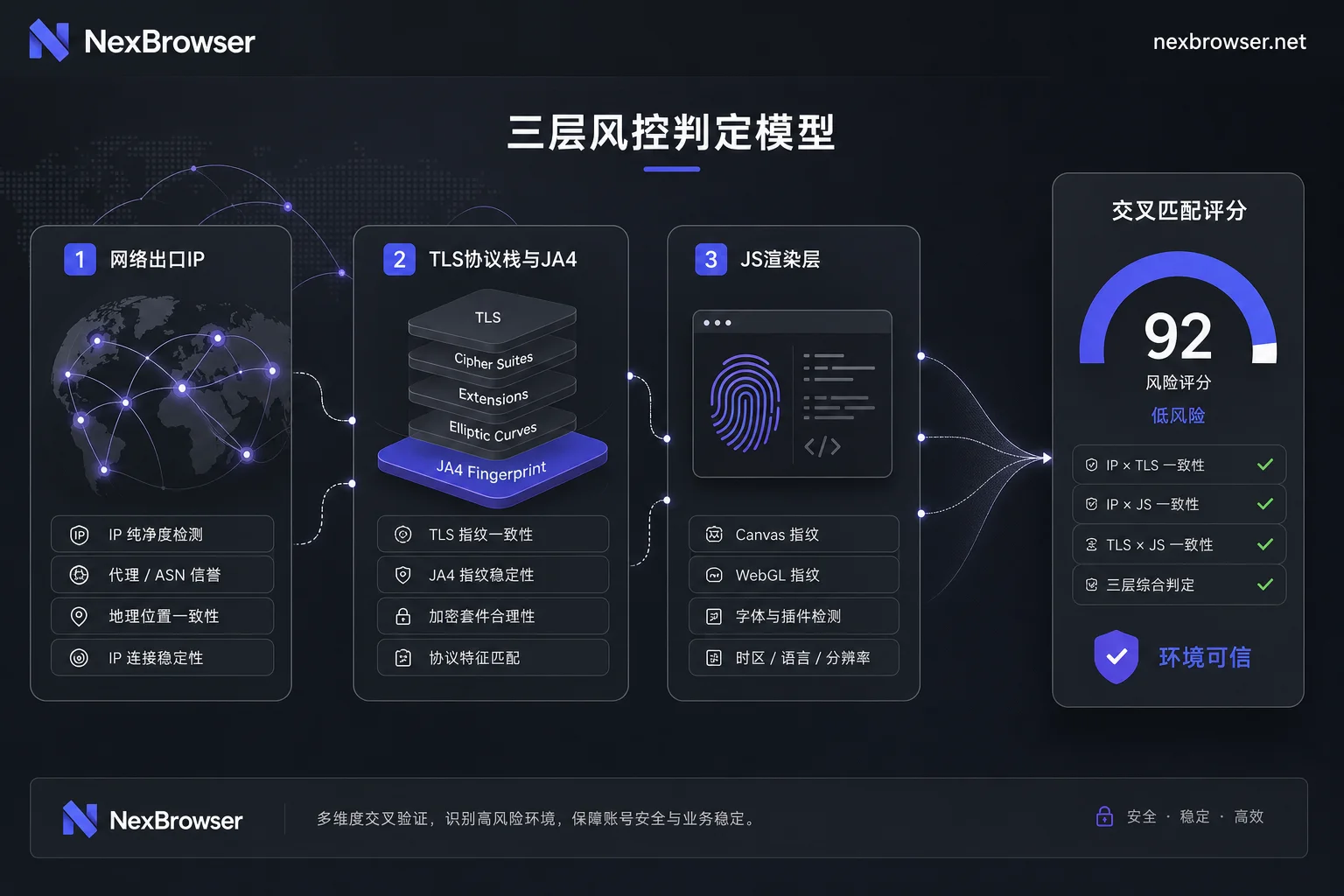
Why mismatched UA and handshake characteristics are flagged separately: TLS-to-HTTP cross-validation
Modern anti-crawler and risk control systems commonly use TLS-to-HTTP cross-validation; Cloudflare Bot Management is a typical implementation. When the HTTP layer declares a User-Agent or Client Hints pointing to a specific Chrome version, the server expects the underlying TLS stack to exhibit corresponding version characteristics. If the cipher suite ordering, ALPN negotiation, or extension order in ClientHello look more like older kernels or non-browser network libraries, the TLS signature and UA create an obvious conflict.
This conflict itself is a strong automation signal. Many automated tools borrow high-version UAs to disguise, but the underlying network libraries aren't updated, so 'UA and TLS fingerprint inconsistency' gets flagged separately. Turnstile repeatedly verifying or direct blocking therefore often occurs, and it's not directly related to whether the proxy IP is clean. When operators investigate repeated Turnstile verification, the first thing to rule out isn't the IP but whether the UA matches the underlying TLS fingerprint.
Three most commonly misjudged cases: switching IP doesn't work, changing UA makes it more suspicious, extensions rewriting request headers
Three common operations most easily create contradictions:
- Only switching to residential proxies without checking the protocol stack: Residential IPs only improve first-layer reputation. If the JA4 fingerprint mismatches the UA version, switching to an even more expensive IP may still get flagged as an automated bot.
- Manually changing UA, amplifying conflicts: Manually changing the UA to a higher Chrome version without changing the kernel and network libraries makes the ClientHello characteristics diverge even further from the request header claims, raising the risk score rather than lowering it.
- Extensions rewriting request headers: Some browser extensions modify Sec-Ch-Ua, Accept, and other headers, but TLS handshake layer characteristics cannot be modified at the application layer, so request headers and handshake layer become inconsistent, creating new suspicion points.
All three cases intensify the contradictions in TLS-to-HTTP cross-validation rather than solving them.
Layer-by-layer troubleshooting order: first identify which layer is inconsistent, then adjust configurations
How to detect browser fingerprint consistency? Not by opening a detection page and glancing at a score, but by recording layer by layer and cross-comparing. Recommended order:
- Confirm the stability and type of network egress IP, and record the current egress attribution.
- Check whether the UA and Client Hints declarations match the actual browser kernel version.
- If you can read
cf.bot_management.ja4in your own logs or test sites, record the current JA4 value and compare it with real browser fingerprint databases; if you don't have logs, infer from verification results of the same environment under different egresses. - Finally, observe anomalies in the JS rendering layer, such as frequent Canvas fingerprint changes or missing WebGL.
Change only one variable per round. For example, replace just the proxy egress, or upgrade only the browser kernel, then visit the same target domain to see if verification behavior changes. This way you can tell whether the anomaly stems from the network egress, TLS protocol stack, or JS rendering layer.
Cross-checking proxy egress and fingerprint parameters in the NexBrowser environment
Under multi-layer verification, fixing fingerprint parameters in a controlled environment for troubleshooting is more efficient than repeatedly trial-and-error in a variable browser. NexBrowser's isolated browser environment isolates fingerprints, cookies, and cache per environment, which corresponds exactly to the cleanliness of the JS rendering layer; Chrome fingerprint simulation keeps UA and rendering parameters consistent; HTTP/HTTPS/SOCKS5 proxy management covers the network egress layer.
But it's important to clarify: TLS handshake layer characteristics are determined by the kernel and network stack, and are not among the adjustable items in NexBrowser's public capability list. Therefore, the correct usage is to take the same proxy egress, access the target in both a native browser and NexBrowser, and compare verification behavior differences, or use Local API scripts to fix different egress and fingerprint parameter combinations for batch retesting. If you want to do a residential proxy fingerprint browser configuration check, the simplest way is to put the same proxy egress in two different kernel environments and compare verification results on the same target site. That way, you can pinpoint whether the problem lies in the underlying protocol stack or in environment isolation and parameter configuration.
Common exaggerated claims comparison table: which claims don't hold up in existing public materials
Some vendors claim 'high-anonymity residential IPs solve all blocking,' while others claim they can 'permanently bypass Turnstile.' These claims don't stand up against Cloudflare's public mechanisms.
| Claim | Why it doesn't hold |
|---|---|
| Switching to high-anonymity residential IP makes all verification disappear | Cloudflare combines JA4 fingerprints, HTTP/2 behavior, and IP reputation into a score. IP is just one input; when protocol stack and UA are inconsistent, verification is still highly likely. |
| All-green fingerprint detection page means the environment is safe | Detection pages usually cover only the JS rendering layer and cannot reflect the handshake-layer JA4 signature. All-green only indicates no obvious anomaly in the third layer. |
| A tool can permanently bypass Turnstile | Cloudflare rule variables and heuristic engine are continuously updated. Any 'permanent bypass' claim lacks official basis and doesn't align with the public cross-validation mechanism. |
Instead of chasing a universal switch, start with a three-layer self-check record to confirm which layer the anomaly is in, then adjust configurations. If you need to repeat the same verification process in multiple environments, you can use NexBrowser's isolated environments and proxy management to fix egress and fingerprint parameters for one-by-one comparison. Keep in mind: no configuration can guarantee eliminating all blocking. Layer-by-layer diagnosis is the reliable starting point for solving 'all-green detection pages but repeated verification.'