 NexBrowser指纹浏览器-官方博客Blog
Many teams assume that RPA directly drives the browser, but in the context of fingerprint browsers, the correct order is "start the environment first, then let the script take over." The boundary is simple: the environment manages identity, and RPA only handles actions. Since 2026, fingerprint browser clients have commonly integrated no-code RPA and AI agents into their products, while Local API has solidified the takeover process of "start the environment first, then hand over the debugging port."
Conclusion First: How Many Steps Does an RPA Robot and Fingerprint Browser Collaborative Workflow Involve, and Where Are the Boundaries?
The RPA robot and fingerprint browser collaborative workflow consists of five steps: environment startup, takeover ownership, task orchestration, export and login state verification, and exception handling. What criteria should you watch at each stage? Environment startup: check whether the environment manager launches instances and completes proxy and fingerprint loading. Takeover ownership: check whether the script is connected only after obtaining the debugging port. Task orchestration: check whether a process corresponds to a batch of environments or is bound to one. Export and login state verification: check whether export IP and login state are sampled before running. Exception handling: check whether the system stops or retries when the proxy goes offline. The boundary is simple: the environment manages identity, and RPA manages actions.
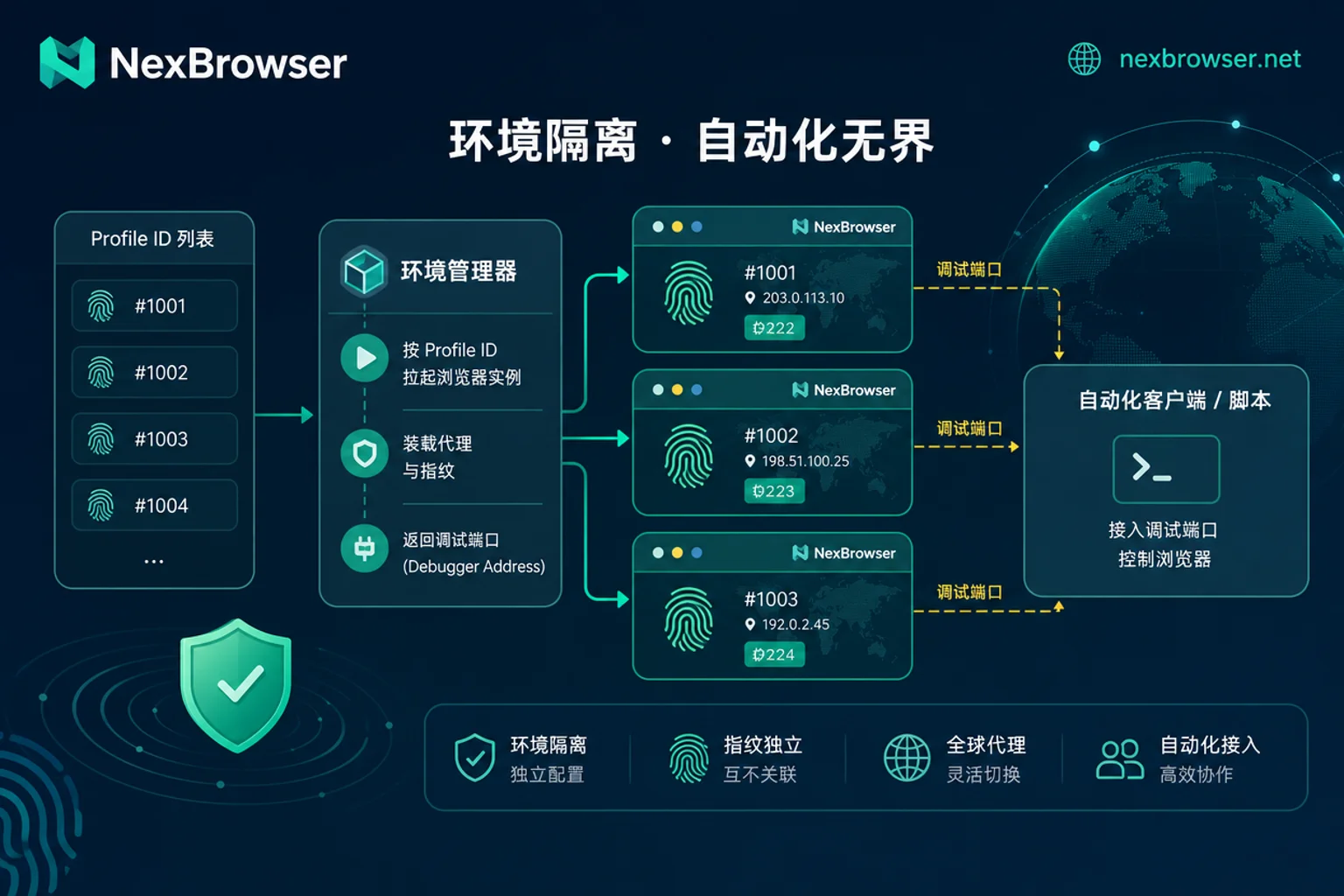
Step 1: Start the Environment First and Then Hand Over to RPA, or Let the Script Launch the Browser Itself?
The standard practice is to have the script call the environment manager's local interface first, obtain the debugging port, and then take over, rather than having the RPA directly open the browser with WebDriver. Why? Because the key to a fingerprint browser lies in the underlying layer—proxy binding, fingerprint isolation, and cookie injection are all handled by the environment's kernel. If the script launches the browser itself, it bypasses identity loading, turning the environment into an ordinary browser. So to answer "does RPA change the fingerprint parameters of the browser environment?": No, as long as you follow the standard takeover process, the script runs only on the loaded environment and does not overwrite fingerprints; conversely, if the script forcibly rewrites startup parameters, it may mess up the environment.
Step 2: Binding Relationship Between Tasks and Environments—How Many Environments Does One Process Correspond To?
The most important decision at the task orchestration layer is whether a process template corresponds to a batch of environments or is tightly bound to one. A safer approach: one RPA process template corresponds to a batch of environments, with accounts, cookies, and proxy ownership all determined by the environment side, and RPA only reuses the "action sequence." The benefit is that you can change environments without changing scripts, but be careful not to let hardcoded variables in the process (like an account name) leak into other environments. Checkable items: Are all process variables externalized as environment parameters? Are account names/emails hardcoded into action nodes? Before batch deployment of the same template, do you test-run it in a single environment first?
Step 3: Multi-Environment Concurrent Scheduling—What to Control When Running Simultaneously
The question "how many windows should be opened when running RPA in multiple environments simultaneously" is essentially a resource quota issue. The specific numbers vary with machine configuration and page weight, so there is no fixed answer. It is recommended to use self-checkable criteria: single-instance memory usage × concurrency should not exceed 60% of available memory, and CPU sustained usage should not exceed 80%. First, test a small batch to measure actual usage per environment, then deduce the concurrency. Also keep the recommendation of batch startup and leaving a verification window between batches: start with 3–5 environments to observe resource usage, then gradually increase. Do not continuously push dozens of environments, because if export IP and login state are mismatched, it will be amplified by automation.
Step 4: Export and Login State Verification Before Running—Don't Let Automation Amplify Mismatches
Before starting automation, do a round of sampling: Is the export IP's geographic location consistent with the browser timezone and language? Is the login state still valid? Have there been any captchas? Making proxy detection a pre-process node is already an industry-wide configuration. Because fingerprint browsers bind the proxy at environment startup, but the proxy itself may go offline or be restricted by target sites. If the script doesn't care about this, it will run a bad export 100 times. You can also refer to the tutorial on our site: Proxy IP Binding to Browser.
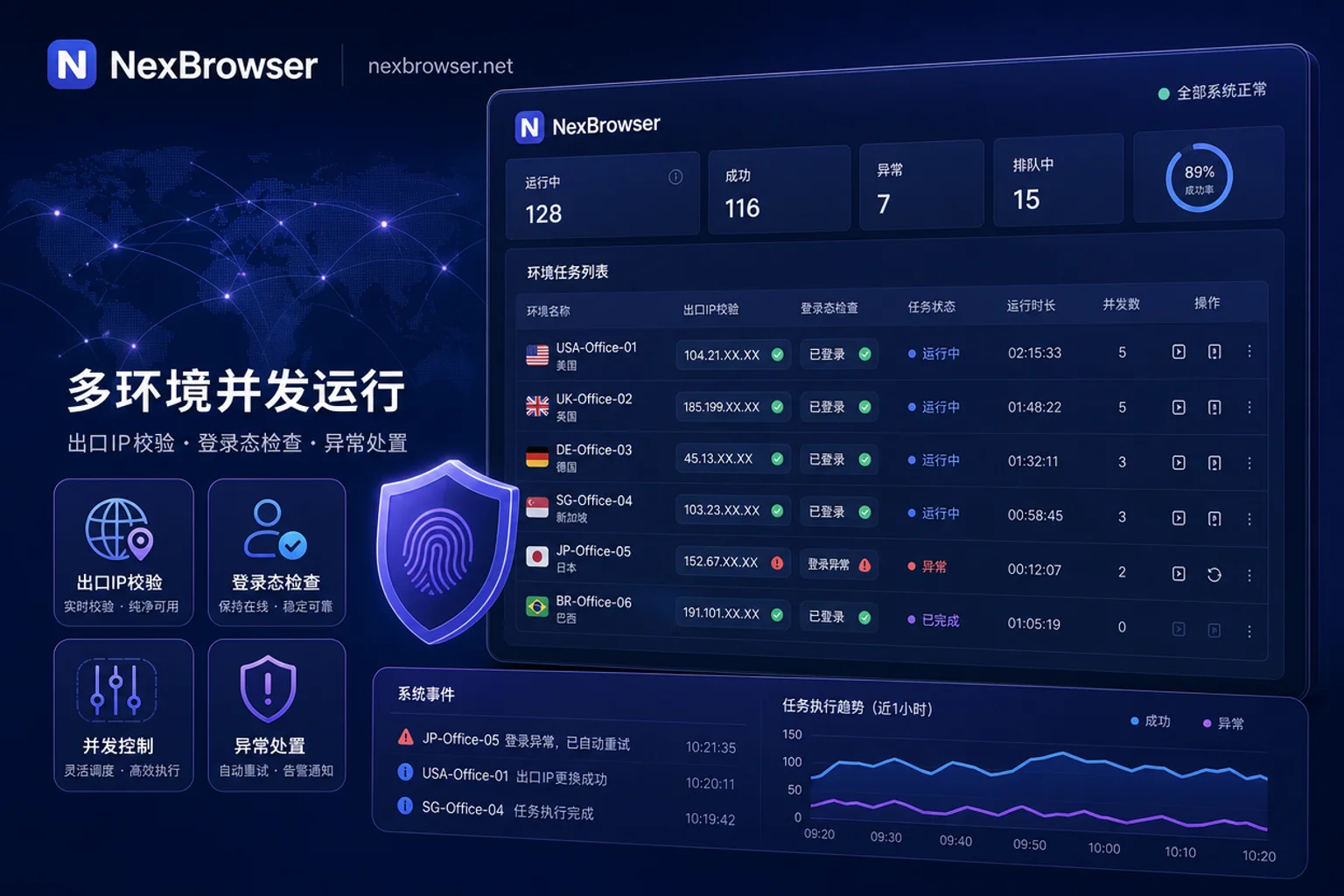
Step 5: Interruption and Retry—How to Handle Proxy Offline, Verification Pop-ups, and Page Structure Changes
"What to do when the proxy goes offline during RPA runtime?": The standard handling principle is "stop rather than retry." Once the proxy goes offline, the environment's export has changed, and continuing to retry will only execute actions on the wrong IP, which is more dangerous. Configure exception policies well: on proxy errors, interrupt the task directly and preserve the current tab state for manual review. For complex 2FA verification pop-ups, the industry currently lacks public success rate benchmarks, so manual intervention is usually required.
No-Code Orchestration vs. Script Takeover: Which Is Suitable for Which Type of Task?
The question "which is more suitable for operations, RPA scripts or no-code workflows?" needs to be looked at hierarchically. No-code RPA (like RoxyBrowser's AI Agent 2.0) solves action orchestration for operations without writing code, suitable for fixed, repetitive UI operations. Script takeover (via CDP/WebDriver) solves high-concurrency, cross-system, and complex judgment processes. The two are not substitutes but tools at different levels: no-code allows operations to get started quickly, while scripts allow technical teams to go deeper. Note: regardless of the path, collaboration only improves efficiency and isolation; it does not promise to evade risk control. For details, refer to Cross-border Account Risk Control.
What You Need to Know at the Protocol Level: CDP and WebDriver BiDi
CDP (Chrome DevTools Protocol) and W3C WebDriver BiDi are the two core protocols for current automation scripts to take over browser environments. BiDi enables bidirectional communication and event listening via WebSocket, allowing scripts to "hear" page changes instead of waiting blindly. However, communication link characteristics and event dispatch latency may still be detected by modern WAFs and risk control systems. So "rewriting navigator.webdriver to hide automation" is a misconception; underlying socket communication and Runtime event listening leave side-channel traces.
Implementation in NexBrowser: No-Code RPA and Local API/WebDriver Two Paths
Map the five steps of the RPA robot and fingerprint browser collaborative workflow to NexBrowser's public capabilities: No-code RPA can orchestrate repeated actions within the environment; Local API/WebDriver allows external scripts to take over already-started environments. Before running, use window synchronization and batch environment startup features to sample-check export and login state. Proxy management and fingerprint/Cookie isolation ensure that the identity layer is loaded uniformly by the environment side. For teams wanting to dive into script takeover, refer to the tutorials on our site: Playwright Multi-Environment Automation Script Development Guide and Selenium Connection to Anti-Association Browser Interface Configuration Tutorial.
A One-Page Checklist for Collaborative Workflow and Capability Boundaries
Condense the RPA robot and fingerprint browser collaborative workflow into a one-page checklist:
| Step | Check Item | Common Mistakes |
|---|---|---|
| Environment Startup | Confirm the environment manager launches instances, and proxy and fingerprint are loaded | Letting the script open the browser directly, bypassing the identity layer |
| Takeover Ownership | Connect the script only after obtaining the debugging port, do not override startup parameters | Script forcibly changes proxy/fingerprint |
| Task Orchestration | One process corresponds to a batch of environments, accounts and proxy are determined by the environment | Hardcoding accounts in the process, causing environment cross-contamination |
| Export Verification | Sample-check export IP, timezone, and login state before running | Continuing to run even when the proxy is offline |
| Exception Handling | Stop immediately on proxy offline, leave captchas for manual support | Blind retries, amplifying errors |
Remember three boundaries: automation does not promise to evade platform detection; external scripts should not override environment startup parameters; captcha handling still requires manual intervention.
FAQ
How to use RPA with fingerprint browsers? Do I need to write code?
You can drag and drop actions in the built-in no-code RPA within the client, or write Python scripts after obtaining the debugging port via the local interface. Operations should prioritize no-code, while technical teams use scripts.
What if the proxy goes offline during RPA runtime?
Stop the task for that environment immediately, do not retry. After fixing the proxy, restart the environment, perform an export check, and then continue.
How many windows should be opened when running RPA in multiple environments simultaneously?
It depends on the machine's memory and CPU. Generally, start with 3–5 environments to observe resource usage, then gradually increase. Do not blindly run concurrently; leave a verification window.
Does RPA change the fingerprint parameters of the browser environment?
As long as you follow the standard takeover process, RPA will not change the proxy and fingerprint loaded by the environment; if the script forcibly overrides startup parameters, it may break fingerprint isolation.
Can fingerprint browsers batch auto-login to social media accounts?
Yes, provided each environment has a valid login state or can pass verification. Complex 2FA captchas currently have no public success rate, so manual intervention is often required.
Which is more suitable for operations, RPA scripts or no-code workflows?
No-code is suitable for rapid orchestration of fixed actions, while scripts are suitable for high concurrency and complex judgment. Operations should first run through with no-code, then let technical teams integrate scripts.


Comments(0)