NexBrowser指纹浏览器-官方博客Blog
A common scenario: Operations staff enable AudioContext masking in a fingerprint browser, and the detection page shows different values on every refresh, yet the account still triggers verification. Where's the problem? This phenomenon exactly exposes the most misunderstood point in AudioContext audio fingerprint spoofing and detection mechanisms: the layer where masking applies. FingerprintJS published an analysis of the AudioContext rendering chain in August 2026, which can be used to locate this layer issue.
A Common Confusion: Masking is On, Detection Page Values Change Every Time, but Platform Still Requires Verification
Consider a typical phenomenon: The team enabled audio randomization in the environment template and installed an independent browser kernel, but every time they check in a detection tool, the audio hash is different, and every few days they still encounter an "abnormal account environment" notification. Why doesn't "different" mean "passed"? Based on FingerprintJS's latest analysis from August 2026: The risk control logic no longer only looks at whether a single value changes, but whether the audio output is consistent with the UA, operating system, and hardware declarations. In other words, even if the rendering layer values differ each time, as long as they don't match the system declarations, it looks like a sign saying "I'm spoofing."
First Look at Public Facts: Latest Analysis of AudioContext Rendering Mechanism and Spoofing Boundaries in August 2026
In a technical article published on August 3, 2026, FingerprintJS detailed the floating-point rendering principles of the OfflineAudioContext and DynamicsCompressor processing chain, and clearly pointed out that common spoofing techniques (such as Brave's Farbling mechanism and fingerprint browser masking) mainly add random noise or offset to the rendered audio sample values, but this can only change the rendered layer values, not cover the underlying processing graph construction, and cannot modify the UA, OS kernel, or hardware declarations.
Meanwhile, according to Yundun's official update notes on July 24, 2026, Yundun fingerprint browser's official updates from May to July 2026 focused on AI Agent workbench and hardware-level masking capabilities for Canvas, WebGL, and AudioContext. This marketing led many operators to believe that enabling hardware-level masking can completely hide. But combining FingerprintJS's analysis with W3C standards, it's clear that masking has boundaries in which layers it can affect.
Layer 1: How the Audio Processing Graph is Built – OfflineAudioContext, Oscillator, and Compressor Nodes
First, consider the collection layer. According to MDN's OfflineAudioContext documentation and FingerprintJS's August 2026 analysis, the first step of audio fingerprinting is: The site script creates an OfflineAudioContext, an off-screen audio environment that can render without a real speaker (MDN OfflineAudioContext docs). It builds a silent audio processing graph:
- OscillatorNode generates sine wave or triangle wave signals;
- DynamicsCompressorNode applies dynamic compression to the signal;
- The entire processing graph is rendered off-screen.
This layer has a key feature: The construction of the processing graph is determined by W3C standards and browser implementation, and is an API actively called by the site-side script. Masking or noise cannot change the existence of the API, the call order, or the structure of the processing graph – what can be done is to manipulate the result, but "how the graph is built" cannot be changed.
Layer 2: Where Do Floating-Point Rendering Results Come From – How FPU and DSP Differences Form Comparable Values
Next is the rendering layer. After the processing graph is rendered, the site extracts Float32Array floating-point arrays via AudioBuffer (FingerprintJS August 2026 article). These 32-bit floating-point numbers are affected by the underlying hardware FPU's floating-point precision and the operating system's DSP algorithms, producing small but stable differences – this is the source of "device characteristic values."
Brave's Farbling mechanism, fingerprint browser audio masking, or noise plugins almost all work at this layer: Take the rendered Float32Array values and add random noise or shift them. But the problem is that this noise is "added on top of the result," not changing the FPU or DSP itself. What is called "hardware-level masking" in fingerprint browsers essentially causes random deviations in each rendering result, but the underlying processing chain still exists.
Text version structure list:
- Collection layer: The processing graph is built by the site script; masking cannot reach it.
- Rendering layer: Floating-point values come from hardware computation; this is where masking lands.
- Comparison layer: The site cross-checks various declarations; masking cannot touch it.
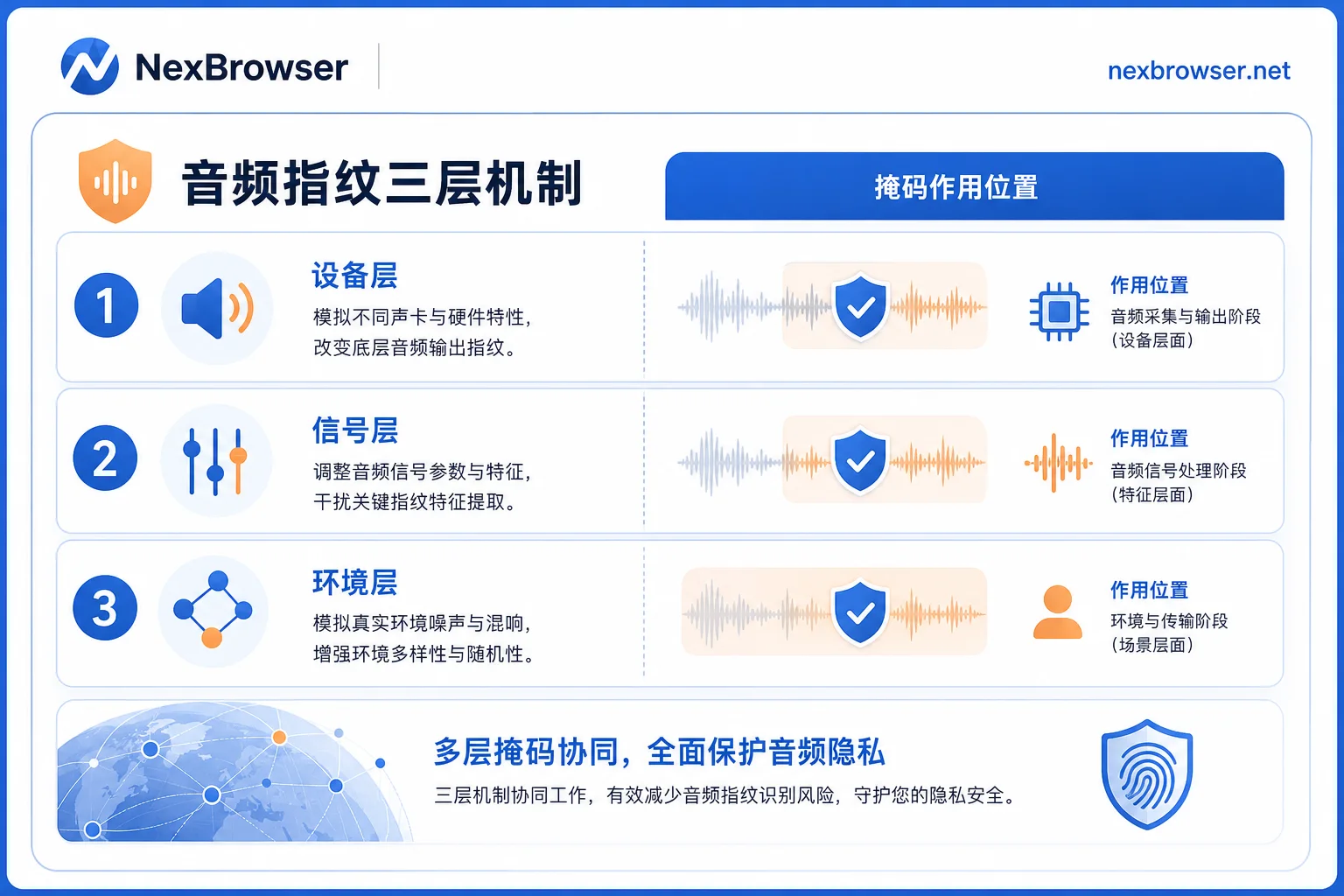
Layer 3: How the Site Uses It – What Stable Values, Random Values, and "Different Every Time" Mean Respectively
Finally, there is the comparison layer. After the site obtains the floating-point array, it usually generates a short identifier using a hash algorithm and then cross-references it with the visitor's UA, operating system, WebGL/Canvas, and other hardware declarations. FingerprintJS mentioned in the aforementioned public research that such verification has evolved from "single-point hash comparison" to "cross-layer self-consistency checks."
Specifically, according to public descriptions, the site may interpret three types of behavior:
- If the audio hash is stable over time and consistent with UA/system declarations, it is usually understood as a common ordinary device performance;
- If randomization is enabled, each value changes and does not conflict with any declaration, it may be considered as "some protective measures enabled";
- If each change clearly contradicts UA, operating system, or hardware declarations (e.g., a Windows system showing macOS-specific audio features), it is considered in public sources to be "more obvious signs of spoofing."
Note that this article does not describe any platform's weights or thresholds; the above is only a conceptual interpretation based on public research.
What Masking and Noise Change and What They Cannot Change: Boundary Explanation
Comparing the two layers, the boundary of masking is clear:
- Can change: Floating-point values at the rendering layer (adding noise, shifting);
- Cannot change: The construction of the processing graph, UA, OS kernel, WebGL/Canvas hardware declarations.
This is the technical logic behind "masking enabled but still required verification": Masking makes the rendering layer values different each time, but the site checks multi-dimensional consistency. If the audio feature doesn't match system declarations, it's easier to be recognized. FingerprintJS also emphasized in that article that simply adding noise at the rendering layer can easily disconnect audio features from UA and OS DSP stacks.
The Key Criterion Is Not Noise Strength, but Whether Audio Output is Consistent with UA, System, and Hardware Declarations
So, to judge whether an environment "looks normal," the key is not whether noise is strong or values change, but whether audio output is consistent with UA, system, and hardware declarations.
Just like a visitor with Windows 11, UA declaring a certain stable Chrome version, WebGL reporting a certain discrete GPU, the audio processing chain performance is likely to fall within a certain range. If the audio result completely doesn't match these declarations, no matter how the values change, it is easily classified into a "further verification" bucket.
Typical Issue in Team Batch Templates: Reusing the Same Audio Configuration Across Environments with Different System Declarations
Applying the mechanism to operations scenarios: Many teams copy templates when batch-creating environments. If the audio-related spoofing settings in the template are a fixed configuration while the OS declarations in the environments vary, it is easy to have "audio performance and system declarations mismatched."
For example, the same audio masking configuration might be relatively consistent in a Windows 11 environment, but when used under a macOS environment's UA, it could cause conflicts due to audio feature differences. This kind of problem is not because "the platform is strict" but an engineering issue caused by configuration and declaration mismatch, which can be discovered through self-check.
Layer-by-Layer Self-Check Sequence: First Determine Whether the Difference Lies in Collection, Rendering, or Declaration Layer
If you want to troubleshoot issues where audio-related parameters are inconsistent with hardware declarations, you can refer to the following sequence:
Step 1: Confirm Which Processing Chain the Detection Page Calls
- What to look at: Whether OfflineAudioContext is actually triggered and rendering is completed.
- Judgment criteria: If you can get the floating-point array or hash, it means it was triggered; if not, it may not have gone through.
- Next action: Check browser kernel version.
Step 2: Observe the Stability of Rendering Values
- What to look at: Take 5 consecutive hashes.
- Judgment criteria: All identical = stable; all different = randomization active; partial identical: usually indicates noise only affects some call paths, which can be understood as masking config not covering the entire processing chain, suggesting returning to the browser/plugin configuration and checking item by item.
- Next action: Check masking or noise parameters.
The above are empirical engineering self-check summaries; public sources do not provide corresponding judgment standards.
Step 3: Verify UA/System/Hardware Declarations
- What to look at: Compare audio results with UA, OS kernel, WebGL/Canvas output.
- Judgment criteria: Whether they are consistent; if contradictory, it indicates spoofing and declarations don't match.
- Next action: Adjust system declaration or audio-related settings in the environment template.
Centralized Audio-Related Parameter Checks and Batch Sampling Across Multiple Environments in NexBrowser
When a team has many environments, manual item-by-item checking can be time-consuming. NexBrowser's independent browser environments and Chrome fingerprint simulation capabilities allow a configuration perspective where audio-related performance and system declarations remain consistent – for example, uniformly setting UA, OS, and hardware parameters when creating environments, making it convenient to centrally view and maintain these declarations in one place, reducing template-reuse mismatches.
Additionally, NexBrowser supports Local API and WebDriver, allowing batch sampling across multiple environments: Use scripts to read audio-related parameters for each environment and compare them with system declarations for consistency. This way, the third-layer check in the "troubleshooting sequence for audio fingerprint and hardware declaration inconsistency" can be institutionalized as a routine process.
It should be noted that NexBrowser's positioning is to help teams self-check and maintain consistency, not to claim it can evade platform risk control.
Common Claims vs. Public Data: Which Conclusions Don't Hold Up
Finally, compare several common industry claims with public data:
- "Enabling hardware-level masking provides 100% anti-ban" – No public source supports this. FingerprintJS's analysis clearly states that audio fingerprinting is just one of many multi-dimensional device features, and masking may break cross-layer self-consistency. "100% anti-ban" is marketing hype and shouldn't be taken seriously.
- "Masking making values different each time means safe" – This is also unfounded. The site's verification logic has evolved to multi-layer self-consistency comparison; value changes are not a safety signal.
- "Modifying AudioContext can bypass detection" – There is no basis in existing public sources. Audio fingerprinting is just one dimension of browser fingerprinting; platforms synthesize multiple signals for judgment.
The factual boundary of this article is: The cited sources are Web Audio API official documentation (MDN 2024), FingerprintJS's August 2026 technical article, and Yundun's official update notes from July 2026. Regarding platform-specific determination mechanisms, no public data is held.
Conclusion: Change "Anti-Spoofing" to "Maintain Consistency"
For operations and technical teams, understanding the three-layer structure of AudioContext audio fingerprint spoofing and detection can turn the anxiety of "is masking on" into a self-check action of "is the configuration consistent." Next time an environment is asked for verification, try running through the above sequence first.
If the team has a large number of environments, use NexBrowser's batch environment and Local API to make consistency sampling a routine check.
Reference links:
- FingerprintJS: Audio Fingerprinting blog 2026-08-03 (https://fingerprint.com/blog/audio-fingerprinting/)
- MDN: OfflineAudioContext (https://developer.mozilla.org/en-US/docs/Web/API/OfflineAudioContext)
- Yundun Fingerprint Browser Technical Blog and Feature Update Notes 2026-07-24 (https://www.yunlogin.com/blog)