 NexBrowser指纹浏览器-官方博客Blog
Environment isolation is done, yet accounts are still being flagged as associated. Usually, this is not because the isolation is “failing,” but because the troubleshooting scope hasn't covered areas beyond the isolation capabilities. Fingerprint browsers isolate the runtime container—cookies, cache, local storage, and fingerprint parameters—but the platform's association determination is a multi-dimensional clustering: network egress characteristics, hardware fingerprint signatures, environment metadata, and business information with operational behavior. If any layer shares commonalities, it can bring several “seemingly independent” environments back together as the same entity.
So troubleshooting should proceed in an order of low to high cost, high to low hit rate: first check the network layer, then proxy quality, then fingerprint logic consistency and metadata, and finally business information and team operations. In most cases where “isolation is done but still associated,” the problem stops at the first two layers.
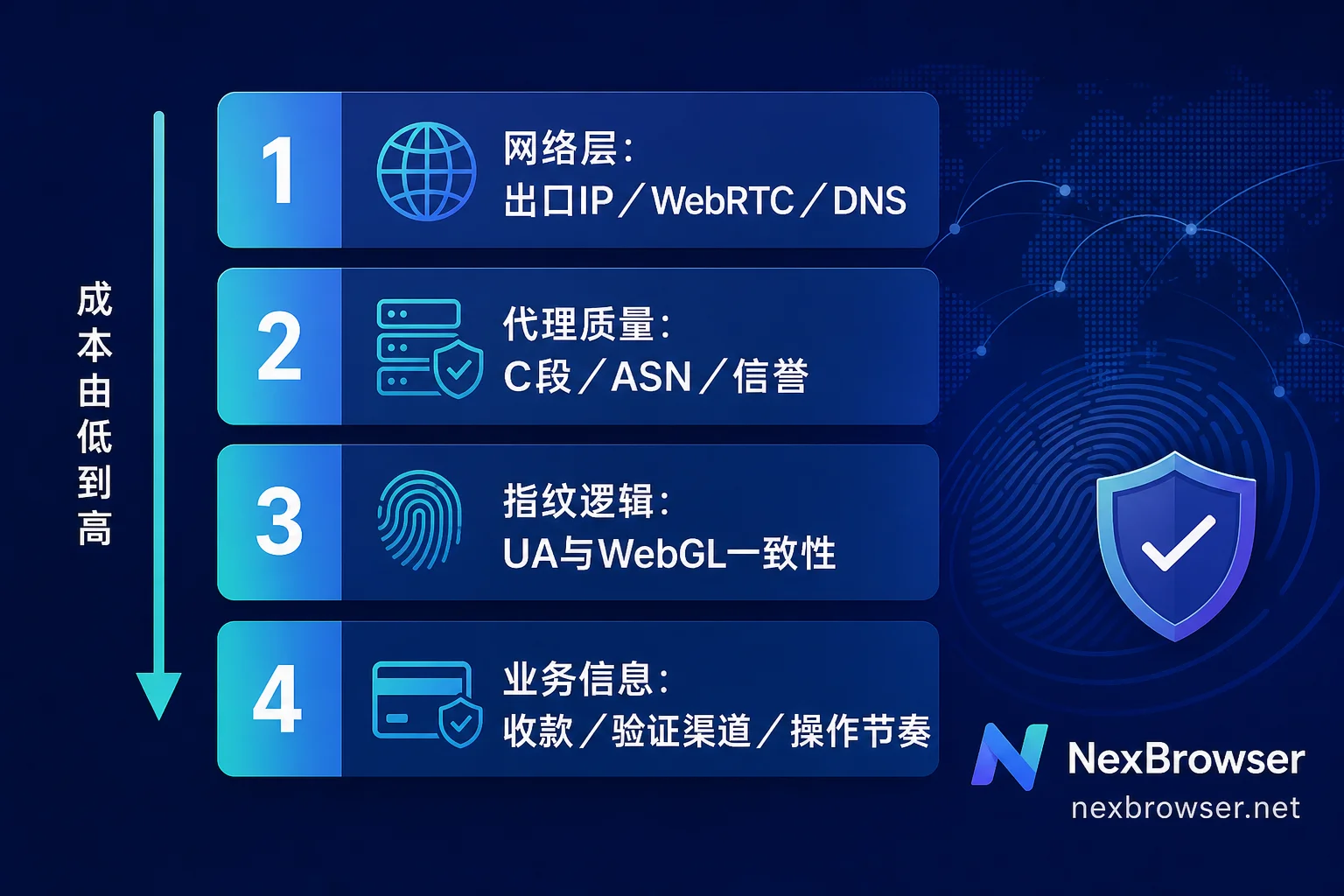
Step 0: Pin Down the Facts First
Before tweaking configurations, record three things; otherwise, you won't be able to tell which adjustment takes effect later:
- Which accounts are associated: Were they created in the same batch or across batches? What are the commonalities (opened the same day, same agent, same employee using them).
- Trigger time point: Was it blocked during login, posting, or when binding a payment method? The trigger point often directly indicates the leak dimension.
- The platform's original message: Different messages correspond to different determination links; account security messages and business policy messages lead to completely different troubleshooting directions.
List these three into a table before proceeding further.
Step 1: Network Layer—Is the Egress IP Truly Fully Taken Over?
This layer has the highest hit rate. Using a proxy does not mean all traffic goes through the proxy.
WebRTC Leaks
WebRTC in the browser obtains local addresses and physical public IPs via STUN/TURN/ICE interactions, using UDP channels that can completely bypass your configured HTTP proxy. Without targeted handling, platform scripts can directly read your real egress IP, linking together all environments under the same broadband.
Check method: In each environment, open a public WebRTC detection page, compare whether the displayed public IP matches the proxy egress IP, and note any additional exposure of private IP ranges.
Here's a commonly overlooked side effect: Completely disabling WebRTC is not a safe solution. The absence of this standard Web API is itself an anomaly feature, potentially flagging your setup as automated or tampered with. A more robust approach is to have WebRTC traffic go through the proxy forwarding, presenting an address consistent with the egress IP. NexBrowser provides WebRTC forwarding/replacement strategies in its environment configuration; after configuring, test each environment individually, don't just trust the settings page toggle.
For more detailed troubleshooting of UDP channels, refer to What to do when the egress IP is still your local IP after binding a proxy? A guide to troubleshooting WebRTC and UDP channels.
DNS Leaks
Many configurations only take over HTTP/HTTPS traffic, while domain resolution still goes through your local ISP. The result: the egress IP appears to be overseas, but the DNS resolver points to your local ISP, causing a severe mismatch in geographic attribution. This contradictory combination is more likely to be flagged as network spoofing than a pure datacenter IP.
Check method: Inside the environment, visit a DNS leak detection site and check the resolver's country and ASN. Ideally, the resolution egress should be in the same country and network tier as the proxy egress.
IPv6 Bypass
If IPv6 is enabled on the local machine and the proxy only proxies IPv4, some websites may prioritize IPv6 direct connections, effectively bypassing the entire isolation. When troubleshooting, check if IPv6 addresses are exposed in the environment; if necessary, unify traffic to IPv4 at the system or environment level.
Step 2: Proxy Quality—Different IPs ≠ Different Network Identities
Even if each environment has a distinct IP, they can still be associated, often due to these issues:
| Check Item | Risk Manifestation | How to Check |
|---|---|---|
| Subnet segment | Multiple environment IPs fall into the same /24 C-class subnet | Compare the first three octets of each environment's IP |
| ASN type | All belong to the same datacenter ASN | Use IP lookup tools to check ASN and type |
| Historical reputation | IP has been used by other flagged accounts or blacklisted | Check risk scores, proxy/VPN flags |
| Session stability | Frequent location changes or IP hopping for the same account | Observe egress drift during long sessions |
Ten IPs in the same C-class subnet often look like “one network” to platforms. Low-reputation datacenter IPs are weighted entirely differently from residential IPs. For selection and pairing trade-offs, refer to Using Static Residential IPs and Dynamic Proxies in Fingerprint Browsers and Proxy IP Contamination Causing Account Risk Control: Causes and Detection.
Practical advice: Bind long-term login accounts to fixed static egress IPs, and use dynamic pools only for short-term collection or price comparison tasks; don't mix the same IP pool across different types.
Step 3: Fingerprint Logic Consistency—More Important Than “Randomness”
Platforms generate device signatures based on Canvas, WebGL, WebGPU, AudioContext, and system font rendering results. Many think the more random the fingerprint, the safer, but the actual risk lies in logical contradictions:
- User-Agent declares Windows + Chrome, but the WebGL renderer exposes macOS or Linux GPU characteristics;
- UA and User-Agent Client Hints (sec-ch-ua family) declare platform versions that don't match;
- The declared screen resolution and device pixel ratio combination doesn't exist in real devices;
- Font lists contain fonts that are exclusive to both Windows and macOS.
Such “untrustworthy virtual fingerprints” are themselves strong signals, making multiple environments more likely to be clustered and associated than duplicate fingerprints.
Check method: In each environment, open a fingerprint detection page and verify that the UA, platform, Client Hints, and WebGL Vendor/Renderer are all from the same device model. Refresh a few times to see if Canvas/Audio hashes are changing each time or stable but different across environments. The former is also anomalous—real devices' fingerprints should remain stable in the short term.
NexBrowser uses a Chrome-kernel-based fingerprint simulation approach. When configuring, prefer selecting complete device templates rather than manually piecing together parameters one by one, to reduce cross-contradictions.
Step 4: Environment Metadata—Timezone, Language, and Coordinates Trio
These three must align with the proxy IP's GeoIP results:
- Timezone:
Intl.DateTimeFormat().resolvedOptions().timeZoneandgetTimezoneOffset()must match the IP's timezone, especially during DST transitions where errors are common; - Language:
navigator.languagesshould match common combinations in the target market, not left as Chinese defaults for running European/American accounts; - Geolocation: If the site requests location permission, the returned coordinates should be near the IP's city, or uniformly deny permission.
This layer alone won't get you banned, but it will persistently lower your environment's authenticity score, amplifying risks when combined with other signals. For scenarios involving cross-region offices and account handovers, Cross-border Account Login and Risk Control: Three Layers of Consistent Environment Sync provides a more complete alignment sequence.
Step 5: Business Information and Operational Behavior—Areas Isolation Cannot Control
If the first four layers are clean and association still occurs, the answer is likely here. Environment isolation solves container independence, not commonalities in the business chain:
- Multiple accounts bound to the same payment account, same credit card, same PayPal;
- Shared same phone number for verification codes or same auxiliary recovery email;
- Duplicate homepage links, store addresses, customer service emails, image file hashes;
- Highly similar operation rhythms: batch logins in the same minute, similar page navigation paths, nearly identical input pauses.
This information can be directly attributed at the account data layer by the platform, regardless of your browser. The troubleshooting method is to create a comparison table of all accounts' binding information and look for duplicated values column by column. For assets, check if images have been differentiated, rather than uploading the same files repeatedly.
For team collaboration scenarios, confirm whether someone opened the environment on an isolated device—for example, a temporary login with a regular Chrome on a personal computer. Such operations are hard to trace from memory afterward; rely on the environment's operation logs for reliability. For ideas, see What Can the Log Audit Feature of a Multi-account Anti-detection Browser Reveal?.
Recheck and Solidify
After configuring changes, don't just test one environment and conclude. Suggested wrap-up actions:
- Run through each environment sequentially: egress IP check → WebRTC check → DNS check → fingerprint consistency check → timezone and language verification;
- Save screenshots and configuration snapshots for each environment as a baseline for future comparisons;
- Create new accounts from templates to avoid parameter drift from manual configuration;
- When using window sync or RPA for repetitive actions, preserve necessary variations in operation rhythm, so environments don't exhibit identical timing patterns;
- In teams, establish “one account, one environment, one egress IP” binding and keep records of changes.
One caveat: The association weights and thresholds of each platform are trade secrets; public information cannot provide a definitive determination formula. The order above is an empirical path based on leak frequency and troubleshooting cost. It's effective for identifying problem areas but cannot guarantee coverage of all signals on a given platform. For accounts already restricted, prioritize the platform's official appeal channels to explain actual business operations, rather than repeatedly changing environments to test.
Ultimately, remember: Environment isolation is infrastructure for account security, not a liability shield. It ensures each account has an independent, authentic, and reproducible runtime context; the account's identity, content, and business compliance must still be addressed at the business level.


Comments(0)