 NexBrowser指纹浏览器-官方博客Blog
In cross-border e-commerce and overseas social media marketing, Facebook ad accounts and Pages are core assets for customer acquisition and conversion. However, many operations teams managing multiple Facebook business accounts often face the dilemma of "one account banned, all accounts implicated." Even if operators clear cookies or use incognito mode, the platform can still precisely detect subtle associations between accounts.
Facebook's risk control mechanism has fully shifted to comprehensive identification of device-level characteristics and behavioral patterns. To break out of the passive situation in multi-account management, teams must abandon traditional protection habits and establish a standardized environment isolation system based on underlying technical logic.
1. Three Underlying Dimensions Facebook Uses to Identify Multi-Account Associations
The platform algorithm extracts features and evaluates trust scores for accounts through the following three levels:
1.1 Device & Browser Fingerprints
When a webpage loads, APIs such as HTML5 Canvas, WebGL rendering, AudioContext, and system font lists extract underlying hardware response characteristics of the device. If multiple accounts generate identical renderings, audio signals, and hardware concurrency parameters, the platform will determine they come from the same physical device.
1.2 Network Node and Geographic Location Consistency
Network IP address is an intuitive indicator for account association. If a team frequently logs into different accounts under the same router or public proxy node, or if the IP geolocation severely mismatches the account's set operating country, it is very likely to trigger platform security verification and restrictions.
1.3 Session State and Local Data Cross-Contamination
When switching accounts using a regular browser, IndexedDB, Local Storage, and cookie remnants are often difficult to completely erase. This cross-contamination of local data directly leaks association traces between different accounts.
2. Practical Steps to Build a Facebook Anti-Association Isolation Environment
To ensure multiple accounts operate stably in their own independent environments, teams should follow this standardized configuration process:
Step 1: Configure Physical-Level Hardware Fingerprints
Avoid managing accounts within the same native browser via multiple tabs or simple multi-configuration folders. It is recommended to use professional fingerprint browser tools to generate unique underlying fingerprint parameters (including User-Agent, resolution, Canvas and WebGL configuration) for each account, simulating a completely independent device environment.
Step 2: Assign Dedicated Proxy Networks
Each Facebook account environment must be bound to an independent HTTP, HTTPS, or SOCKS5 proxy. Prioritize stable, geolocation-matched residential or datacenter proxies with native IPs to ensure IP addresses are not shared with others, blocking associations at the network transport layer.
Step 3: Standardize Cookie and Session Management
When migrating or logging into existing Facebook accounts, importing properly formatted cookies can effectively bypass sensitive login verification. Ensure that each environment's cookies and cache data are independently encrypted and stored locally to prevent cross-window contamination.
Step 4: Standardize Team Collaboration and Operational Procedures
When multiple operators collaborate, avoid directly sharing Facebook account passwords. Distribute operations through secure shared environment configuration files, and maintain relatively fixed login time zones and operational habits.
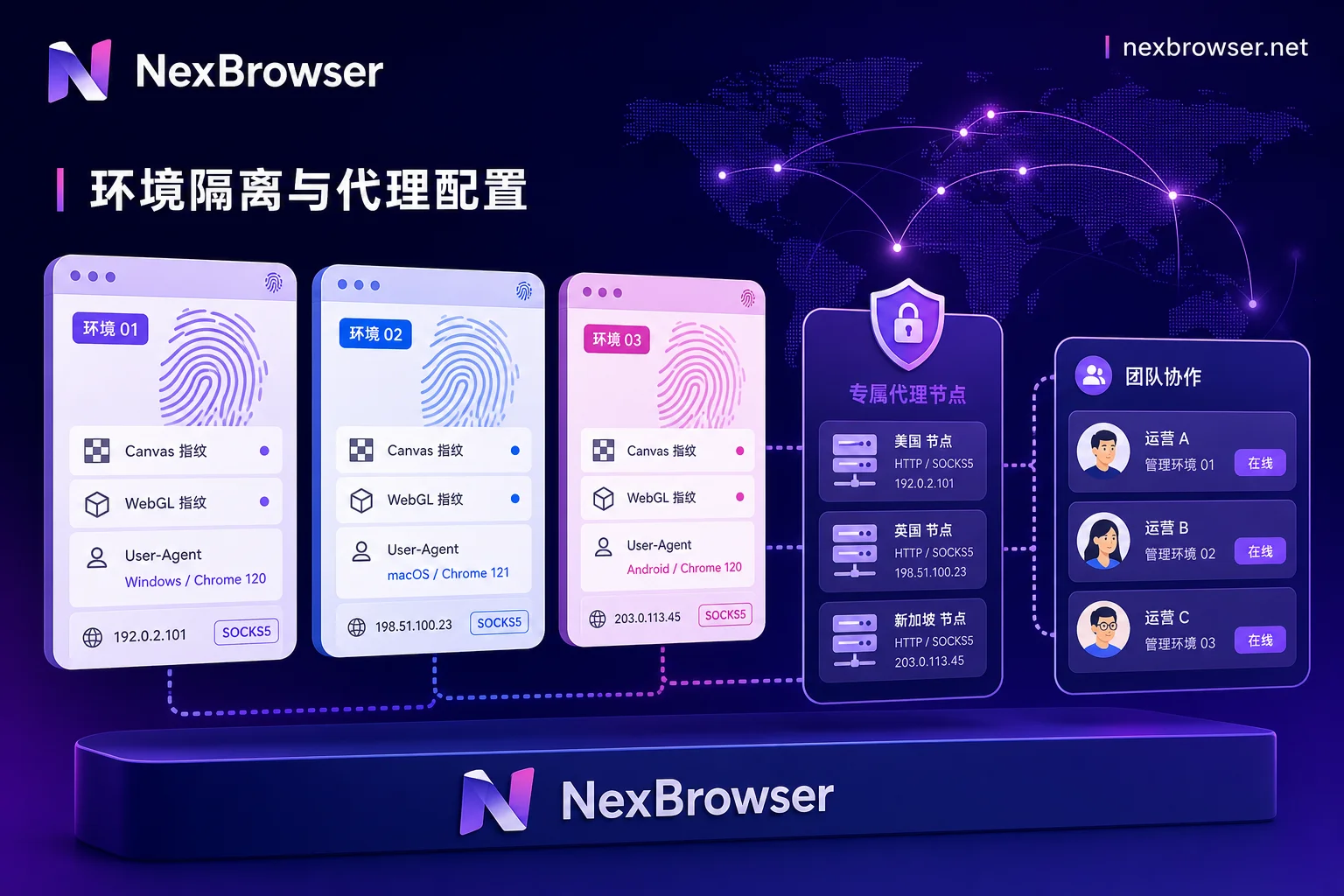
3. Using NexBrowser to Achieve Secure Isolation of Facebook Account Matrix
To meet the technical requirements of Facebook multi-account anti-association, NexBrowser offers an enterprise-level environment isolation and secure collaboration solution for cross-border teams.
- Chrome Fingerprint Simulation and Physical-Level Isolation: NexBrowser supports deep Chrome fingerprint simulation, enabling completely independent isolation and configuration of Canvas, WebGL, AudioContext, and hardware parameters, allowing each Facebook account to run in a virtual yet real independent browser environment.
- Multi-Protocol Proxy Management and Consistency Matching: NexBrowser natively supports mainstream proxy protocols including HTTP, HTTPS, and SOCKS5. Operations teams can easily bind dedicated proxies to each Facebook account and achieve automatic matching of IP, time zone, and language.
- Secure and Efficient Team Collaboration and Automation: With NexBrowser's team environment collaboration, window sync, Local API, and no-code RPA features, teams can assign configured isolation environments to different members without exposing sensitive credentials, greatly improving the efficiency and compliance of matrix operations.
In the face of increasingly strict platform risk control rules, deploying Facebook account assets in NexBrowser's isolated environments is a reliable guarantee to reduce risk control interference and extend the lifecycle of multiple accounts.
4. Common Misconceptions in Facebook Multi-Account Compliance Operations
- Misconception 1: Relying on Incognito Mode
Incognito mode only deletes local cookies when the window is closed; it cannot hide Canvas/WebGL fingerprints or real IP addresses. - Misconception 2: Frequently Changing Proxy IPs
Switching IP addresses across countries frequently in a short period for the same Facebook account can easily trigger platform mobility risk control. - Misconception 3: Multiple People Logging In Concurrently and Cross-Logging
Concurrent logins across devices without environment configuration lead to session state chaos. It is recommended to use professional fingerprint browsers' collaboration features to maintain consistent session fingerprints.
By understanding the underlying risk control mechanisms and employing scientific isolation tools, companies can effectively avoid chain account bans and build a stable defense for overseas business.



Comments(0)