 NexBrowser指纹浏览器-官方博客Blog
The multi-account permission tiered management plan for cross-border e-commerce teams can be broken down into four layers: environment visibility scope, in-environment operation permissions, credential and proxy ownership, and operation audit trails. Each layer has a checkable criterion. Many people think the core of multi-account permission management is "who gets the password," but the real risk factors are four other things: environment visibility scope, in-environment operation permissions, credential and proxy ownership, and operation audit trails. By setting clear rules for each of these four layers, a multi-account permission tiered management plan for cross-border e-commerce teams can actually be implemented; otherwise, revoking passwords is just superficial cleanup.
In August 2026, major fingerprint browsers intensified their focus on team roles and workspace isolation capabilities: AdsPower offers revocable environment sharing and real-time audit logs, Multilogin v12.10 divides roles into Owner, Manager, Operator, and Starter, and GoLogin has strengthened Workspace isolation and concurrent session locks. These changes signal that "permissions by person" is shifting from verbal agreement to system configuration, but no matter how powerful the tools are, the handover process still relies on human execution.
How to Allocate Account Permissions in Cross-border E-commerce Teams: Three Crude Approaches and Their Consequences
Common practice includes three methods: sharing a single password sheet with the whole team, letting the team share an admin account, or grouping by person without restricting visibility. All three have observable consequences:
- Shared password sheet: Members can see far more environments than they are responsible for, and passwords continue to circulate after someone leaves.
- Shared admin account: In case of abnormal operations, it's impossible to identify which member did it.
- No visibility restrictions: New members can see the full list of environments upon login, and browsing data they shouldn't see goes unnoticed.
Rather than fixing problems after they arise, it's better to clearly define permission boundaries from the start.
Layer 1: Environment Visibility Scope
The first boundary of permissions is which environments a member can see when logging into the backend. After authorizing environments by folder or group, operational members' login lists will only show environments assigned to them; all others are invisible in the interface. The criterion for this layer is simple: when a new member first logs in, does the number of environments in the list equal the number assigned to that member?
AdsPower, as of March 2026, supports authorizing members by function and provides revocable environment sharing; Multilogin v12.10 also authorizes visibility for Operator/Starter by folder; GoLogin's August 2026 update reinforced Workspace isolation. Visibility has become a configurable item, and teams should treat it as a default switch, not an additional requirement. Note that visibility only addresses "what can be seen," not "what can be done with the environments seen."
Layer 2: In-Environment Operation Permissions
Many people conflate "able to open an environment" with "able to modify an environment" and "able to export an environment," but the three have vastly different risks. Opening is just daily use; modifying proxy or environment configurations means tampering with egress ownership; exporting environment data means data can be copied and taken away. Export permission is the key gate for data exfiltration and must be controlled separately.
The criterion for this layer: Does the typical operational member have export capability? Is sharing revocable? AdsPower, in its March 2026 description, allows admins to set per-member permissions for creating, editing, launching environments, proxy configuration, exporting data, and supports revocable sharing; Multilogin v12.10 restricts account and environment export and subscription modifications to Owner only. These practices are worth directly adopting into your own permission tables.
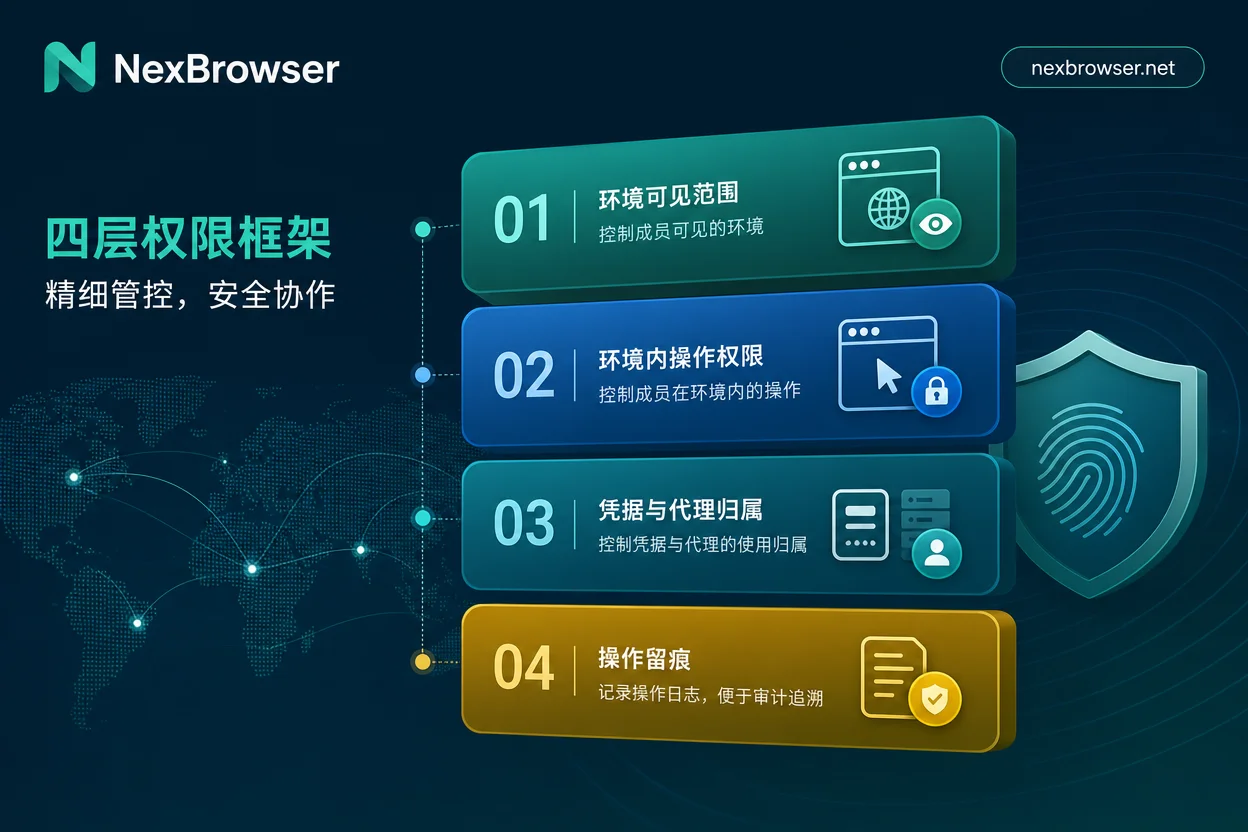
Layer 3: Credential and Proxy Ownership
"Should login passwords be shown to operations staff?" is a frequent question. The answer is simple: in daily operations, staff can work without seeing plaintext passwords. Mainstream tools support "environments holding credentials" rather than "people holding credentials," and secondary verification recipients and proxy configuration permissions should be managed separately. AdsPower's documentation indicates that proxy configuration is an individually authorizable function, meaning proxy ownership can be separated from operational permissions.
The criterion: Can staff complete daily operations without knowing plaintext passwords? Can proxies be modified by non-admins? If the answer is no, credential management still has gaps. For binding methods of egress IPs, refer to proxy IP binding to browsers.
Layer 4: Operation Audit Trails
No matter how fine-grained permission configuration is, logs are needed as a safety net. Logs should at least answer three questions: Who opened which environment at what time? Who modified proxy or environment configurations? Who performed exports? AdsPower's March 2026 documentation mentions providing real-time audit logs for login, environment opening, RPA, and proxy operations; GoLogin's August 2026 update added concurrent session locks to prevent multiple people from operating the same environment simultaneously. Audit trails and concurrency control are complementary—without logs, problems cannot be traced; without concurrency locks, confusion of multiple people fighting over the same environment can occur.
The criterion for this layer: In case of an anomaly, can you locate the specific member and timestamp within ten minutes? If logs are missing, the audit trail system is incomplete.
What the August 2026 Tool Changes Signify
In August 2026, fingerprint browser updates collectively reflected the trend of permission management shifting from manual agreements to configurable capabilities:
- Multilogin v12.10: Divides roles into Owner, Manager, Operator, and Starter, restricts account and environment export to Owner only, and controls visibility by folder.
- GoLogin August update: Strengthened Workspace isolation and concurrent session locks, monitoring proxy traffic per workspace.
- AdsPower (March 2026): Provides itemized authorization, revocable sharing, and real-time audit logs.
If you are comparing permission models of similar products, you may also read AdsPower alternatives and how to choose a fingerprint browser. This means the multi-account permission tiered management plan for cross-border e-commerce teams can be written into system configuration, no longer relying on verbal agreements. But tool capabilities do not equate to complete processes; offboarding actions still require human execution.
Offboarding Is Not Just Revoking Account Passwords
This is the most important point of this article: Revoking account passwords does not reduce risk to zero. Local browser data (cookies, cache), logged-in sessions (session tokens), and proxy bindings are three independent lines that need separate handling. Changing passwords only addresses the "credential" line: sessions that have not been revoked may still be valid before the password change, locally stored data may be reused, and if proxy configurations are not reclaimed, egress ownership remains unclear.
There is a claim that "with read-only permissions, no cleanup is needed after departure." This claim lacks support. Public facts show that if cookies and logged-in sessions are not actively cleared, reset, or environment authorizations revoked, departing employees can still reuse them. Therefore, the offboarding handover should execute at least the following six steps.
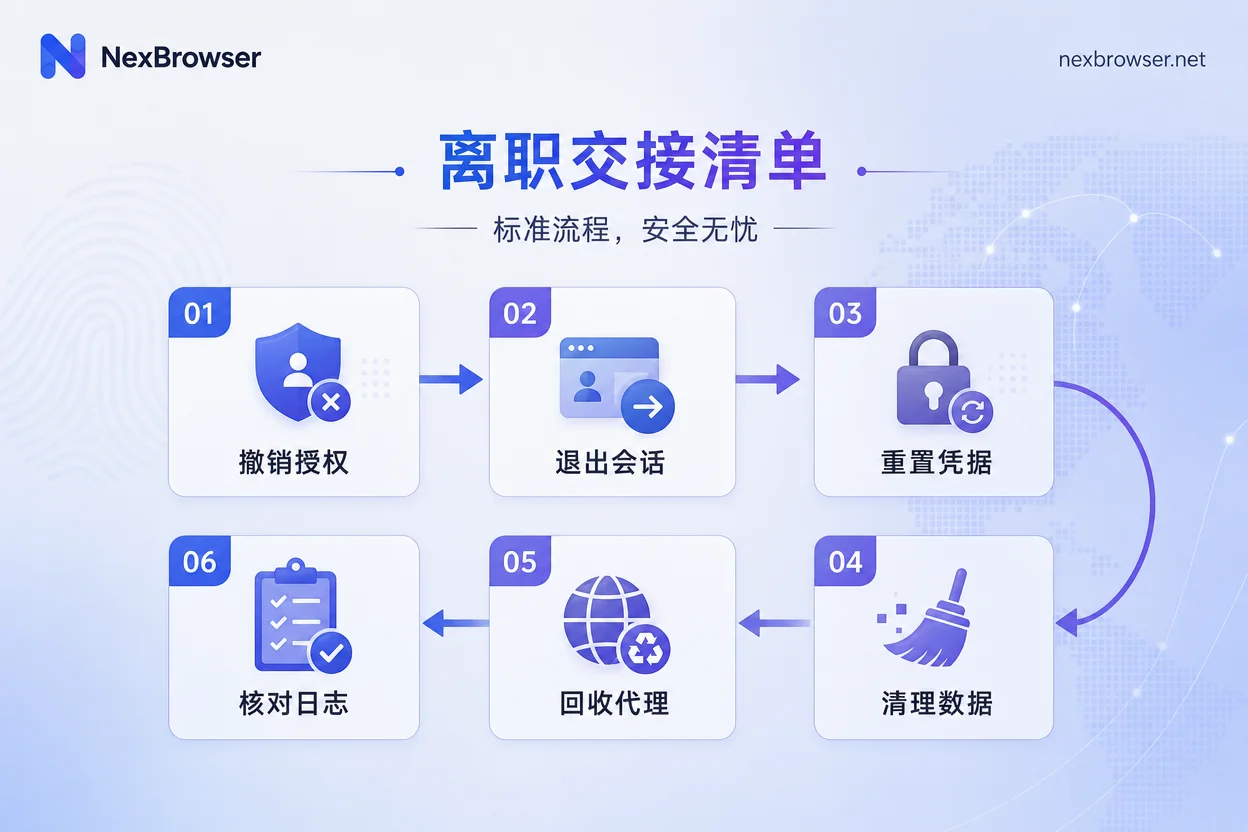
- Revoke all environment sharing and authorizations for the member.
- Force logout of all their logged-in sessions.
- Reset related account passwords and secondary verification methods.
- Transfer or clear the environment's local data (cookies, cache, etc.).
- Change or reclaim their proxy configuration.
- Check audit logs to confirm no new login records.
After each step, verify with "can old credentials log in again" to ensure it's clean.
How to Allocate Environments to Employees with Fingerprint Browsers: Implementing the Four Layers in NexBrowser
NexBrowser's public capabilities map to the four-layer framework: team environment collaboration supports distributing specific environments to members, corresponding to Layer 1 visibility; isolated browser environments with fingerprint, cookie, and cache isolation align permission boundaries with data boundaries, and determine how local data is handled upon departure; proxy management allows egress ownership verification; Local API supports batch export of environment ownership for periodic audits, corresponding to Layer 4 audit trails.
Here, we only describe checkable management actions and do not promise any anti-ban or anti-association effects. If you are evaluating tools that support environment distribution and proxy ownership verification, you can use this framework for validation.
A One-Page Permission Matrix and Offboarding Checklist
Below is the operational version of this multi-account permission tiered management plan for cross-border e-commerce teams, adjustable for team size.
Four-Layer Permission Matrix (Admin/Group Leader/Operator)
| Permission Dimension | Admin | Group Leader | Operator |
|---|---|---|---|
| Environment Visibility | All environments | Group environments | Only assigned environments |
| In-Environment Operations | Create, edit, export, delete | Edit (no export) | Start, stop |
| Credentials & Proxies | Holds all credentials and proxy configs | Can view group proxies | Cannot see plaintext passwords |
| Operation Audit | View full logs | View group logs | No log access |
Offboarding Six-Step Checklist
| Step | Action | Completion Criterion |
|---|---|---|
| 1 | Revoke sharing & authorization | Member account cannot access any environment |
| 2 | Force logout sessions | Audit log shows all sessions invalidated |
| 3 | Reset credentials | Old password cannot log in, secondary verification recipient changed |
| 4 | Transfer or clear local data | Cookies and cache in environments cleared or transferred |
| 5 | Change or reclaim proxy | Proxy config has no member's associated info |
| 6 | Check logs | Confirm no new login records |
FAQ
Should account passwords be shown to operators?
It is not recommended to directly provide plaintext passwords to operators. A more robust approach is to let the environment hold credentials; operators use them through authorization without knowing the password. This way, even if a member leaves, the risk of password leakage is significantly reduced.
Should browser environments be deleted after an employee leaves?
Not necessarily deleted, but they must be handled. If the environment needs to be transferred to someone else, it can be transferred to an admin or new member, while clearing cookies and sessions; if no longer used, direct deletion is recommended. The key is to revoke authorization and ensure local data cannot be reused.
How can I check which accounts team members have logged into?
Through audit logs. Mainstream fingerprint browsers typically provide real-time logs recording members opening environments, modifying configurations, exporting data, etc. You can filter by member or environment with a time range in the backend to see specific login records.
How do I allocate environments to employees with a fingerprint browser?
In the tool's backend, authorize by member or group and specify which environments they can see. For example, in Multilogin, authorize by folder; in AdsPower, assign specific environments to members. After allocation, members see only the authorized content upon login.
Can multiple people use the same environment simultaneously?
It is not recommended. Concurrent session locks (such as GoLogin's Active Session Lock) can prevent multiple people from operating the same environment at the same time, but having multiple people use the same environment inherently leads to operation conflicts and data confusion, so it should be avoided. A better approach is each person uses a separate environment, or use sharing features to control that only one person operates at a time.
Scope Note: What Are Public Facts vs. Operational Management Experience
The vendor capabilities cited in this article (AdsPower, Multilogin, GoLogin's role models, logs, and workspace isolation) come from their public update notes from March and August 2026, which are verifiable facts; the four-layer division framework, permission matrix, and offboarding checklist are operational management experience proposed by this article, requiring adjustment based on team size. This article does not involve any platform official regulations or penalty cases, nor does it make any promises regarding ban evasion or account association.


Comments(0)