 NexBrowser指纹浏览器-官方博客Blog
A Common Scenario: Detection Page Shows .local for WebRTC, But Egress IP Doesn't Match
Operations staff open the environment detection page, see the WebRTC column displaying xxx.local or "Not Leaked," yet still feel uneasy: can the real egress IP actually be read? If WebRTC is truly secure, why do some environments show an address on the detection page that doesn't match the HTTP request's egress IP?
The confusion stems from the cognitive shift brought by the W3C's updated WebRTC specification draft in July 2026—it emphasizes privacy protection for ICE candidate addresses, but the mDNS (.local) mask only solves the first layer. What truly determines whether the public egress IP is exposed is whether STUN requests go through the proxy along with the browser.
First, Public Facts: What the W3C's July 2026 WebRTC Spec Draft Says
In July 2026, W3C updated the WebRTC specification draft, highlighting address privacy protection for NAT traversal and ICE candidates. Note that in non-permission scenarios, the mDNS (.local) mask only applies to the host candidate layer, replacing local IPs with a .local hostname. It does not block STUN's UDP direct connection to the public internet through the proxy—meaning srflx candidates (server reflexive addresses) may expose the real public egress IP.
Simply put, this draft update focuses on "privacy of ICE candidate addresses," but mDNS is not a cure-all. It can manage internal IPs but cannot manage the public address obtained via STUN. This information comes from the W3C document "WebRTC: Real-Time Communication in Browsers" (July 2026 version).
Layer 1: Local Addresses—What mDNS Replacing Internal IPs with .local Actually Solves
To understand mDNS's scope, you first need to know what a host candidate is. Before establishing a connection, WebRTC collects all available network addresses on the local machine. The IPs directly bound to network interfaces are host candidates, including private addresses on the LAN, like 192.168.1.5.
In early WebRTC implementations, these internal IPs could be read by web pages, causing LAN information leaks. The mDNS mask works by replacing the internal IPs in host candidates with hostnames like random-id.local, so that web pages can't directly obtain your home router's internal address.
But note: handling this layer well only means that LAN addresses are no longer directly leaked; that's different from whether the public egress IP is exposed. mDNS only affects host candidates, while srflx candidates are the public addresses returned by STUN servers and are not covered by the .local mask.
Layer 2: ICE Candidates and STUN Routing—Where Does srflx's Public Address Come From, and Why Might It Bypass the Proxy?
ICE candidates typically fall into three types: host, srflx, and relay.
- Host candidates: IPs on the local network interface (internal or public direct connection addresses).
- srflx candidates: Public addresses reflected via STUN servers, representing the "egress IP" as seen by the browser.
- relay candidates: Addresses relayed through TURN servers, typically used when NAT traversal fails.
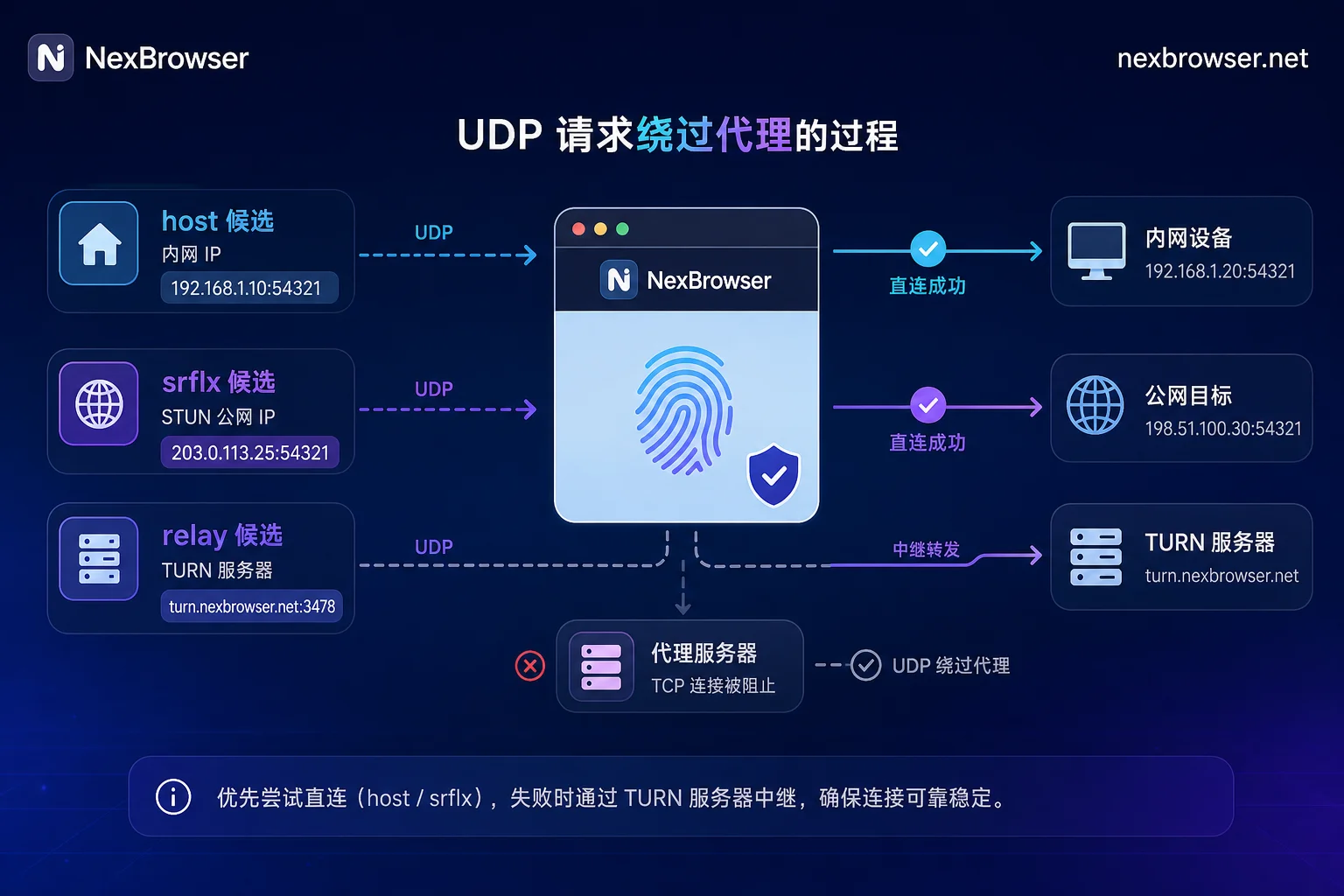
srflx candidates are crucial for WebRTC to establish a UDP channel with the peer. The browser sends a binding request to the STUN server, which replies with the "source address as seen from the public internet," resulting in the srflx. The entire process uses UDP.
The problem: if you've configured only TCP forwarding in your proxy client (e.g., SOCKS5/HTTP proxy), or the browser extension only intercepts HTTP traffic, UDP traffic won't be handled by the proxy. In such cases, STUN requests bypass the SOCKS5/HTTP proxy and are sent directly over the local network to the STUN server. The public address returned will be the real egress IP of your local broadband or mobile network.
So, mDNS being done well doesn't mean STUN goes through the proxy. Whether STUN's UDP requests are routed via the proxy is the key factor determining if srflx exposes the real IP. This mechanism description is based on a publicly released WebRTC leak prevention research document from January 2026 (see the source boundary at the end).
If you configure a SOCKS5 proxy, will WebRTC still leak? Yes. As long as the SOCKS5 link doesn't carry UDP (or the client doesn't enable UDP forwarding/forced routing), STUN's UDP requests will bypass the proxy and connect directly, so the srflx will still read your real public IP.
Layer 3: Egress Consistency—Is the Address WebRTC Reads the Same as the HTTP Egress?
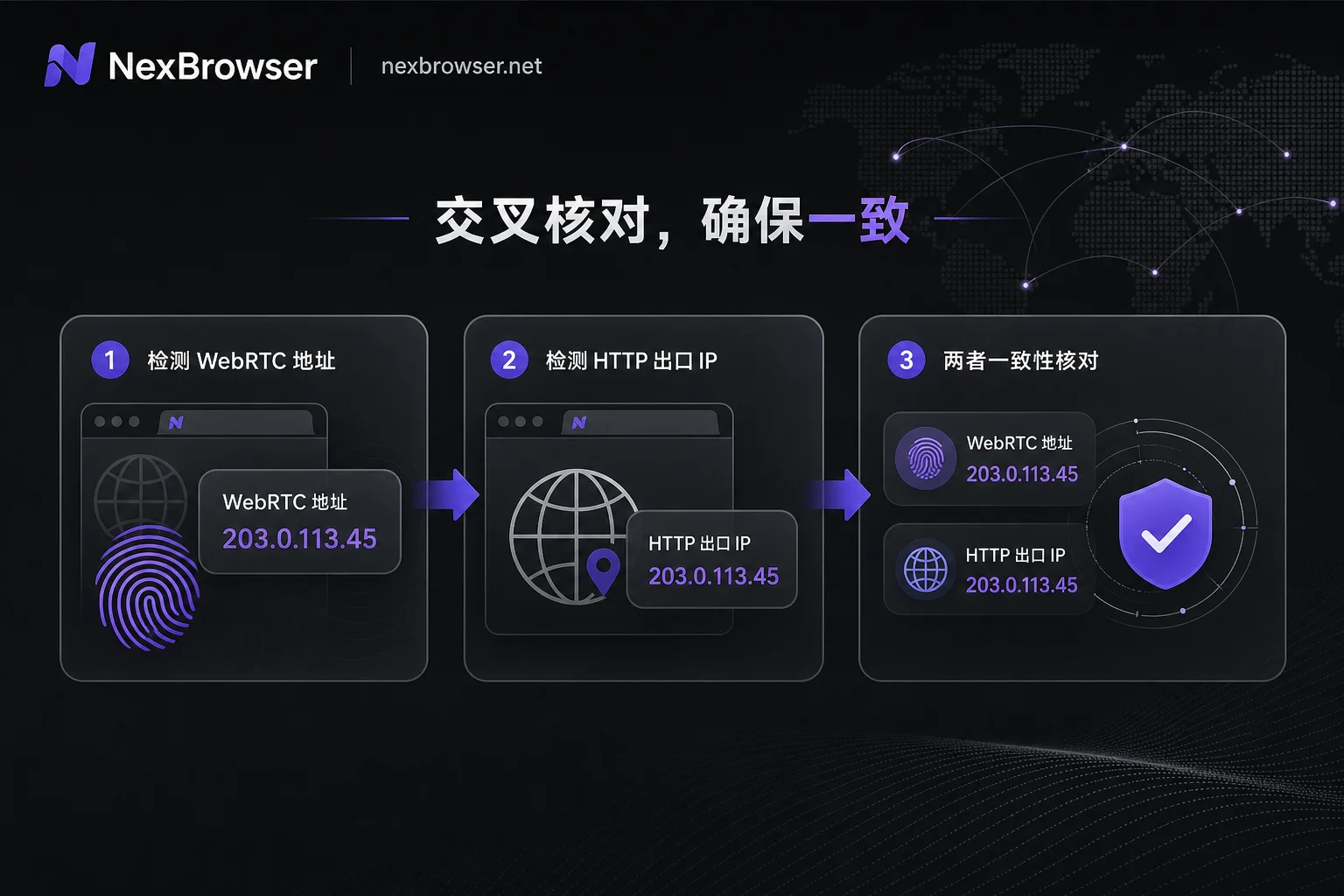
Since srflx represents the public address WebRTC sees, and HTTP requests go through a different egress (the proxy IP), the most reliable way to determine if WebRTC is truly leak-proof is not to rely on the detection page saying "Not Leaked," but to compare two values:
- The srflx public IP obtained via WebRTC on the current page.
- The public egress IP displayed by an HTTP request on the same page (e.g., visiting a what-is-my-ip service).
To know if WebRTC actually leaks the real IP, this side-by-side comparison is the only way, not the conclusion on the detection page. If the two IPs are exactly identical, TCP and UDP traffic are going through the same link, and this layer passes. If they differ, STUN requests bypassed the proxy, and the real IP is exposed.
This is the practical operation for how to detect real IP leakage via WebRTC. Don't just look at .local or "Not Leaked"—that's the result of the first layer. You need to actively check the third layer's egress consistency.
Is Disabling WebRTC Safer: Capability Boundaries and Side Effects
Many operations staff choose to disable WebRTC outright, thinking it eliminates all possible leaks. From the perspective of reducing API exposure, disabling it does help—pages can't obtain any WebRTC address information, so there's no srflx leak issue.
But disabling WebRTC means "providing no data," not "providing consistent data." After disabling, WebRTC-related interfaces return no data; this state itself can be read as a fingerprint, different from "providing consistent data." Additionally, disabling WebRTC may have side effects:
- Features relying on audio/video calls (e.g., customer service, live streaming interaction) won't work.
- Some pages may detect WebRTC unavailability and thus affect functionality.
Therefore, whether disabling WebRTC is worthwhile depends on whether your business needs audio/video capabilities. If you're only doing regular graphic and text operations, disabling might be an option. But if you need live streaming or voice communication, you have to weigh functional loss against security gains. As for how to set WebRTC in fingerprint browsers, instead of obsessing over the on/off switch, first confirm whether STUN's UDP traffic goes through the proxy.
Layer-by-Layer Self-Check Sequence: First Determine Whether the Problem Lies in the Mask, STUN Routing, or Egress Consistency
If you find the WebRTC reading doesn't match the HTTP egress, you can troubleshoot in three layers:
- Layer 1: Check if internal network addresses are still readable. If you can read IPs like
192.168.x.x, the mDNS mask hasn't taken effect. If it shows.local, host candidates are masked. - Layer 2: Observe whether srflx candidates appear and where they come from. If srflx shows a local broadband IP while the proxy egress is a different IP, STUN requests are bypassing the proxy.
- Layer 3: Compare the srflx egress to the HTTP egress. If they don't match, the issue is UDP routing.
For Layer 2 issues, what can you do when STUN requests don't go through the proxy? First, check if the proxy client has UDP forwarding or forced routing enabled. If the current proxy type doesn't support UDP, consider switching to a proxy type that supports UDP forwarding. Some proxy clients offer UDP forwarding or forced routing options, but whether they're enabled by default and how they're implemented varies widely among providers; you should test with your own link. Also, in most cases, browser extensions only proxy HTTP and don't handle UDP, so extension-based proxy modes are more prone to issues.
Layer 3 consistency is the ultimate criterion. If the srflx egress matches the HTTP egress, even if the detection page shows .local, you can consider that the environment doesn't directly expose the real IP at the WebRTC level.
Typical Multi-Environment Issues: System-Level VPN Overlay, Extension Proxies, Shared Egress Across Environments
In team operations, problems are often more complex. Common misconfigurations include three types:
- System-level VPN overlaid with browser proxy: The VPN takes over the entire system network, but the browser proxy specifies another egress, causing TCP and UDP to potentially go through different links. For example, the VPN's egress is IP A, while the HTTP proxy is IP B. WebRTC's STUN will go through the system VPN's UDP, so srflx shows IP A, inconsistent with HTTP egress IP B.
- Browser extension proxy: These extensions typically only handle HTTP/HTTPS traffic and are not capable of handling UDP, so STUN requests connect directly to the local network, exposing the broadband IP.
- Shared egress across environments: If one proxy IP is used by multiple environments, their WebRTC readings will converge—all environments' srflx will be the same IP. This could become a signal for environment correlation.
These situations are not necessarily WebRTC's fault but are caused by network link configuration. When troubleshooting, consider UDP as a factor, not just HTTP.
Proxy Binding and Egress Address Cross-Check in NexBrowser
NexBrowser supports binding HTTP/HTTPS/SOCKS5 proxies independently per environment, making "this environment's HTTP egress" and "this environment's WebRTC srflx reading" a set of cross-checkable data. The single-environment check involves two steps:
- Enter the environment, open the detection page, and record the WebRTC srflx public IP.
- Record the HTTP request egress IP for the same environment and compare whether the two are exactly identical.
If you have many environments, opening detection pages one by one is time-consuming and easy to miss. NexBrowser provides a Local API that can programmatically invoke and manage environments, turning manual spot checks into repeatable routine inspections. The specific comparison still needs to be done by your own script reading the WebRTC and HTTP egress results. NexBrowser does not provide leak determination or risk control conclusions; whether it leaks still depends on your actual comparison results.
Common Misunderstandings, a Copy-Paste Checklist, and Source Boundaries
Finally, let's correct two popular misconceptions with a table and provide a ready-to-use checklist.
| Misconception | Fact |
|---|---|
Showing .local is safe | It only means host candidates are masked; srflx can still expose the real IP |
| Disabling WebRTC is 100% leak-proof | It just reduces API exposure; HTTP egress is still exposed; and it may affect functionality |
Three-Layer Checklist:
- Layer 1 (host): Does the WebRTC section on the detection page show
.local? If there's an internal IP, mDNS is not effective. - Layer 2 (srflx): Does the source IP of the srflx candidate match the proxy egress? If not, check UDP forwarding or forced routing settings.
- Layer 3 (egress consistency): Is the WebRTC srflx public IP exactly identical to the HTTP request egress IP? Only if they match does this layer pass.
Source Boundaries: The technical conclusions in this article are based solely on the following two types of public materials and do not involve any platform's internal detection rules:
- W3C "WebRTC: Real-Time Communication in Browsers" specification document (2026-07-30)
- Public WebRTC leak prevention research materials (2026-01-15)
Proxy service providers differ in their UDP support; please test with your own link. This article does not cover specific platform detection details, account ban cases, or risk control thresholds. The applicability and side effects of practices like disabling WebRTC or mDNS should be judged based on your own business.




Comments(0)