NexBrowser指纹浏览器-官方博客Blog
To successfully implement Facebook multi-account anti-association and avoid "one account gets banned, the whole batch gets linked," simply opening incognito windows or changing IPs is no longer enough. You must simultaneously cut off four association lines: browser and network environment, Meta Accounts Center, SMS verification and two-factor authentication (2FA), and BM/payment cards/page assets. First, use independent fingerprint environments paired with independent static residential IPs to achieve "one account, one environment"; then ensure that operation accounts are not bound to the same Accounts Center, do not share phone numbers and payment cards, and lock team operations under the rule of single-environment single-person access. Only then can you confine the risk control fluctuations of a single account locally and prevent them from spreading to other accounts and business assets.
Many cross-border sellers and media buyers are puzzled: they have already used multi-login tools or even purchased independent proxies, so why do they still encounter situations where "a personal account or IG is mistakenly disabled, and then the same batch of Facebook personal accounts, pages, or even BMs get restricted together"? Because from the second half of 2025 to 2026, Meta's risk control focus has shifted from simply checking "whether a single login is abnormal" to AI automated identification + unified identity graph in Accounts Center + asset cluster linked evaluation.
1. Why Do Facebook Multi-Accounts Still Get Linked Even with Browser Isolation?
Before configuring the environment, first understand the logical changes in how Meta determines "multiple accounts belong to the same controlling entity" in 2026:
- Leaks in browser and network layers: Ordinary Chrome multi-user, incognito mode, or clearing cookies can only isolate login status, not Canvas, WebGL, fonts, time zone, and hardware parameters. If you use data center (VPS/IDC) IPs, shared proxies that have been abused, or the browser directly falls back to the local network when the proxy drops, overlapping traces will be left at the底层 (underlying) level.
- Accounts Center cross-platform integration: Meta has incorporated Facebook, Instagram, Threads, and WhatsApp into a unified Accounts Center system. As long as multiple operation accounts or cross-platform matrix accounts are conveniently bound under the same Accounts Center, once one end triggers rules or is mistakenly banned by AI, the system will directly cascade-disable associated accounts based on the same internal identity ID.
- Asset Cluster scoring model: Meta no longer looks at personal accounts in isolation but groups Business Manager (BM), ad accounts, public pages, Pixel, landing page domains, payment methods, login devices, and operation rhythms into the same "asset cluster" for overall scoring. As long as several nodes highly overlap, a violation by one account may trigger phased cleanup of the entire asset cluster.
- Emergency misoperations spreading risk: Many teams, when an account just pops up verification or restriction, hastily log into backup accounts or create new accounts on the same computer and same proxy line to "fill the gap," directly infecting the new account with risk tags.
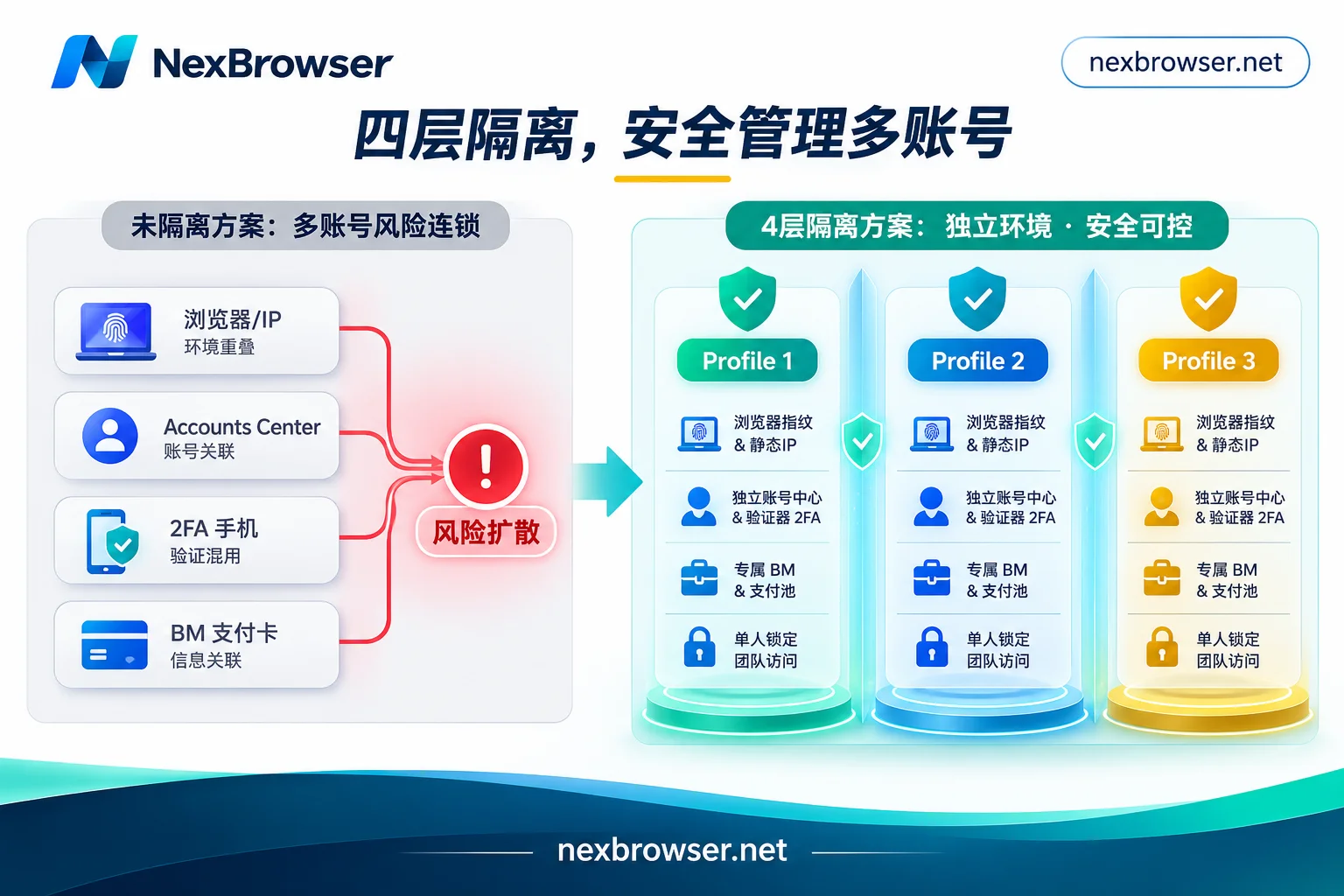
To break these four lines one by one, you can implement the following four-layer isolation plan in sequence.
2. Layer 1: Lock Down "Browser Environment + Proxy IP" as One Account One Environment
Physical isolation is the starting point for all anti-association. There is only one standard: one long-term operated Facebook personal account corresponds to one independent browser environment and one clean static residential IP, with no sharing and no account crossover.
In actual configuration, the three most common pitfalls are:
- Environment only isolates cookies, not underlying storage and fingerprints: Websites not only read cookies but also write session markers into local storage and IndexedDB. Meanwhile, if Canvas, WebGL, Audio, font lists, User-Agent, and system version contradict the real kernel or proxy region, they will still be flagged red by risk control systems.
- Proxy drops midway, and the local IP connects naked: Some browsers automatically fall back to the local network when the proxy fails. At the second the page opens, the real exit and WebRTC information are already exposed.
- Accidentally resetting the environment when changing IPs: If cookies and local cache are cleared during proxy switching, the account will instantly change from a "familiar device" to a "strange new device login," triggering security verification instead.
If you manage multiple Facebook matrix accounts or client assets simultaneously on one Windows computer, using the dedicated Facebook multi-account anti-association workstation NexBrowser for underlying isolation will save you a lot of trouble:
- Complete environment and storage independence: NexBrowser is based on the Chrome kernel. Cookies, cache, local storage (including IndexedDB), and proxies of each environment are completely isolated and cannot read each other. Configured environments can be saved as templates, and batch copying automatically generates a new set of independent fingerprint parameters, avoiding the problem of "the entire batch having identical fingerprints."
- Fingerprint and proxy exit consistency: Its fingerprint parameter isolation solution supports generating Canvas, WebGL, fonts, Audio, hardware, and screen parameters per environment, while automatically aligning WebRTC policy, time zone, and language with the proxy exit. Built-in Windows / macOS / Android / iOS parameter templates are also updated in the cloud with Chrome kernel versions, preventing outdated parameters from giving you away.
- Proxy pre-check before launch: In proxy and residential IP configuration, each environment individually binds HTTP / HTTPS / SOCKS5 proxies (or associates a NexIP account to bind residential IPs by country/region with one click). The environment automatically checks the proxy exit before launch, and if the check fails, it will not be allowed to start, directly plugging the hidden danger of naked local network connections when the proxy drops. Later, if you need to switch to a more stable static residential IP, rebinding the proxy will not clear cookies and local storage in the current environment.
Extended troubleshooting: If you are already using a fingerprint browser but feel the environment parameters don't match, you can refer to Four-layer troubleshooting sequence for account association still occurring after browser environment isolation and IP and browser time zone/language mismatch troubleshooting guide for item-by-item review.
3. Layer 2: Cut Off Meta Accounts Center and SMS/2FA Association
After the environment is cleanly separated, the second major linked-ban disaster area occurs in account security binding and cross-platform linkage.
1. Do Not Pull Matrix Accounts into the Same Accounts Center
In cross-platform operations in 2026, many people, for convenience of switching, bind multiple Facebook accounts or IG accounts used for bulk DM/testing to the same Meta Accounts Center in settings. Doing so is equivalent to actively telling the system "these accounts belong to the same person." The correct approach is: each independently positioned Facebook account maintains an independent security center and does not bind with unrelated IG, WhatsApp, or other FB accounts in Accounts Center; even if the same brand needs FB and IG linkage, only the core brand page and corresponding official IG account should be authorized as necessary, and high-risk test accounts must never be mixed in the same group.
2. Align Phone Numbers by Country, Avoid "One Card Multiple Accounts" or Disposable Numbers
Multiple Facebook accounts binding the same phone number is the most direct hard association; and using publicly shared SMS verification numbers often means the previous owner has already exhausted the number range, and you get flagged by risk control right after receiving the code. A more reliable approach is: the phone number's attribution should preferably match the residential IP country of the environment, long-term main accounts should use numbers that can be retained continuously, and avoid being unable to receive SMS when security verification pops up later.
When performing new account verification or daily maintenance in the NexBrowser environment, you can directly open the built-in NexSMS cloud phone number center from the environment sidebar, obtain numbers by target country/region and platform, receive SMS, and fill in verification codes. For durable numbers needed for long-term maintenance or core BM management accounts, it is recommended to switch directly to long-term rental, saving the trouble of switching phones or borrowing cards from multiple people. For details on SMS verification and attribution alignment, you can also refer to How to obtain numbers and receive verification codes in a browser environment.
3. Enable Authenticator App (2FA) and Back Up Recovery Codes Immediately After Account Stabilizes
Compared with pure SMS verification, binding an Authenticator-type app (TOTP dynamic passwords) is less likely to be locked out due to SMS interception during remote network fluctuations, and is also an important defense line for account security verification in 2026. Remember to put the generated secret key and 10 backup recovery codes into the team's encrypted password vault, not just on one operator's private phone.
4. Layer 3: "Separate Pools, No Linked Bans" Architecture for Personal Accounts, BMs, Payment Cards, and Pages
Many ad buyers often ask: "To manage BMs for multiple clients or stores, must one person have several Facebook personal accounts?" The answer depends on whether you are doing compliant agency collaboration or business risk isolation.
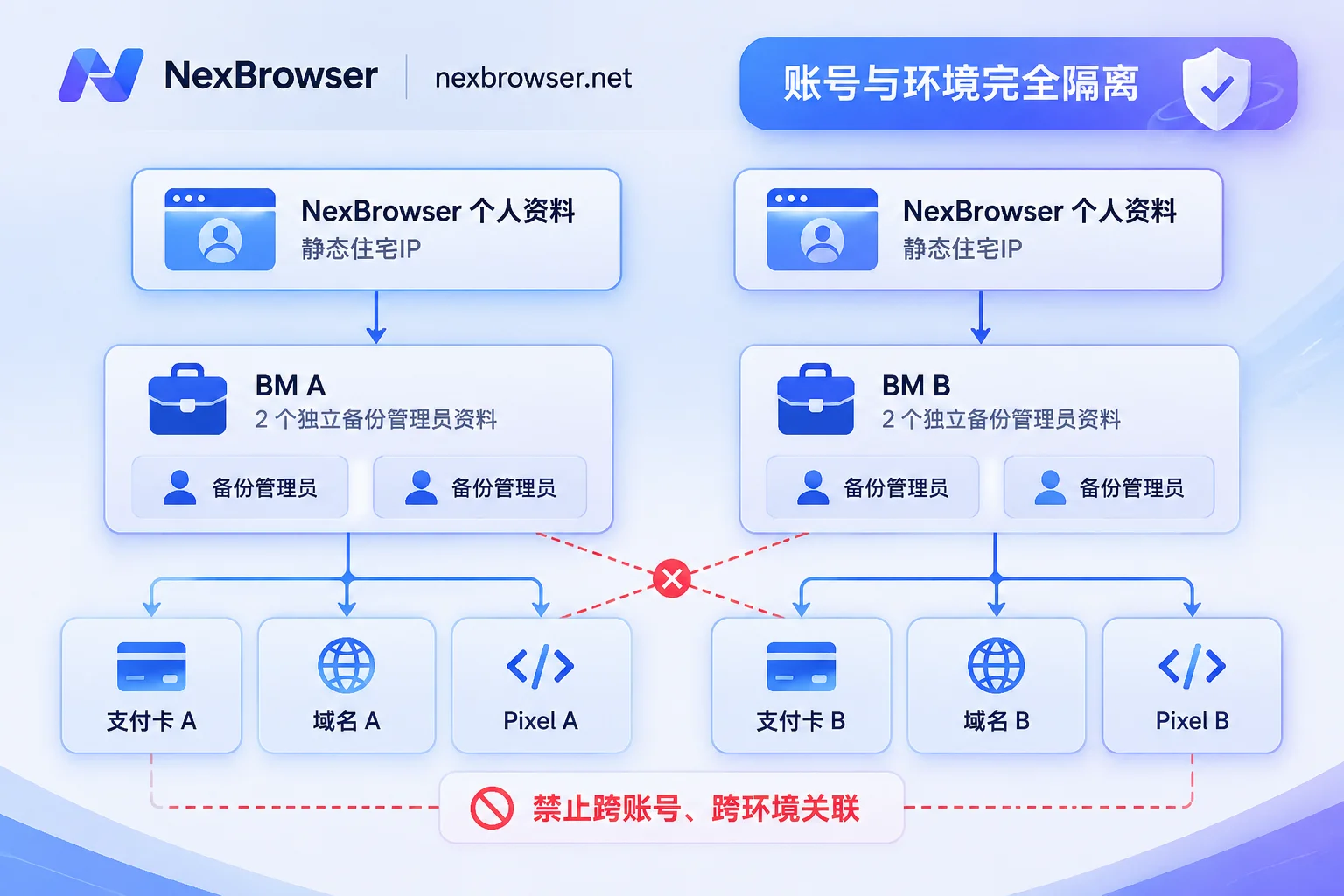
- Compliant agencies/internal multi-brand operations: Meta allows a real personal account to be invited to manage multiple clients' BMs; but the limit for BMs directly created by a verified personal account is usually 2. If you register multiple "alt/auxiliary accounts" in the same environment to bypass the limit, once the system identifies that the same operator controls multiple personal accounts, it will trigger full-chain linked bans instead.
- Multi-business line/high-sensitivity test pool separation: If your business itself needs to isolate risks for different stores, categories, or test-period assets, you must configure independent personal accounts + independent BMs + independent standalone site domains, Pixels, and payment cards for different business lines.
At the commercial asset level, the following 4 things most easily reconnect "already isolated browser environments" into one pot:
- Too aggressive operations during the first-login transition period: For personal accounts newly taken over or migrated to the NexBrowser environment, do not simultaneously "change password + rebind email + reset 2FA + pull into BM + bind credit card" in the first 24–48 hours. After getting the new environment, browse normally first and keep the session stable; after 24–48 hours, make fine adjustments one item at a time, with several hours between each.
- Cross-use of payment cards and entity information: Do not reuse the same credit card (or virtual card range already flagged for high chargeback rates) or the same set of business license information across multiple unrelated BMs. Frequent payment failures or entity information conflicts will directly trigger billing and system evasion determinations.
- Core BM has only one admin: Each BM officially running ads should have at least 2 admins (placed in two independent environments and independent IPs). Thus, even if one personal account is temporarily locked due to accidental security verification, the other admin can still take over ads and page assets, preventing the entire BM from being paralyzed.
- All personal accounts use the same set of violating creatives/landing pages: Under multimodal scanning in 2026, highly overlapping visual feature codes of creatives and landing page code will still classify different BMs as the same batch of black-hat characteristics.
For more complete steps on personal account warming, BM setup, and page authorization, you can read along with Facebook multi-account anti-association full process: from personal account warming to BM and page authorization ban prevention guide.
5. Layer 4: Operational Discipline for Team Collaboration, Device Switching, and Post-Ban Damage Control
Even if the previous three layers are all correctly configured, things often go wrong in "people" and "action rhythm."
1. Teams Do Not Share Passwords, and Two People Must Never Open the Same Account Simultaneously
Many teams' real accident scenes are: account passwords and 2FA keys are written in shared sheets and sent to media buyers or outsourced staff; A opens the account in Shenzhen, and B logs in again with their own computer in another city. The same account appearing concurrently from two different environments and IPs within a short time will almost certainly trigger abnormal activity verification.
When using NexBrowser for team collaboration, you can eliminate risk control risks from the process:
- Password-free authorization and role permissions: Administrators control which environments members can view and operate by group and role in the permission matrix. Account passwords are bound to environments and automatically filled at launch, members cannot access plaintext passwords. Even if personnel leave, revoking group or seat permissions is enough for handover (for more detailed division of labor, see How to manage outsourced and remote part-time staff in fingerprint browser team collaboration).
- Single-environment concurrency lock: In NexBrowser, the same environment can only be opened by one member at a time, mechanically preventing two people from logging into the same Facebook account simultaneously, which would cause cookie overwriting and cross-location concurrency.
- Maintain session continuity when switching devices: When closing an environment, cookies and local storage are encrypted and synced to the cloud according to the selected scope, and the session state is directly restored after logging in on another computer (passwords stored in the browser remain on the local machine and are not migrated with sync), reducing verification codes triggered by re-login on a new device.
2. Do Not Operate Matrix Accounts with "Mechanically Consistent" Rhythms
AI review in 2026 not only looks at static fingerprints but also closely monitors similarity in operation trajectories. If dozens of Facebook accounts log in at the same minute every day, post identical copy, and send cold-start DMs to strangers at the same intervals, even if each environment is cleanly isolated, they will be classified by behavioral models as batch automated operations.
If there are indeed repetitive operations requiring human judgment in daily work (such as uniformly opening the backend to check messages or setting basic pages), when using NexBrowser's window synchronization feature, remember to enable operation intervals and random throttling, and only use synchronization for routine backend maintenance. Do not use it for cross-account mass hard advertising or bulk friend requests.
3. If an Account Is Already Banned, How to Prevent Dragging Good Accounts Down?
If you suddenly receive a disable notice one day, the most critical action in the first 10 minutes is not "hurry up and create a new account to fill in," but first isolate and stop losses:
- Disable and isolate the involved environment: Mark this environment and the corresponding proxy IP, and do not log in or register any other Facebook account on this environment or the same IP line again.
- Distinguish the restriction level before appealing: First see whether it is the personal account (180-day appeal window), a single ad account (go to Account Quality to request review), or the entire BM. Submit materials using the stable environment and fixed IP you most frequently logged in with originally, do not repeatedly switch lines, and do not repeatedly submit tickets.
- If rebuilding is needed, cut cleanly: If two formal appeals are both rejected, rebuilding a new matrix must use new resources completely unrelated to the old entity, old payment cards, old domains, and old proxies, and start over in newly generated NexBrowser environments.
6. 60-Second Pre-Launch Self-Check List
Before putting any new Facebook account into正式 (official) advertising or long-term operation, it is recommended to spend 1 minute checking the following 6 items:
- [ ] Environment independence: Each FB personal account exclusively uses 1 independent browser environment (cookies, cache, and IndexedDB cannot read each other), and no incognito window or ordinary Chrome multi-user is used as a makeshift.
- [ ] Clean IP and effective pre-check: Each environment binds an independent static residential IP, and pre-launch exit verification is enabled to ensure that the local network is not connected naked when the proxy drops; time zone, language, WebRTC, and IP location are consistent.
- [ ] Accounts Center not randomly bound: Operation matrix accounts and unrelated test accounts are not hung under the same Meta Accounts Center.
- [ ] Independent verification chain: Phone number attribution matches and is not reused across accounts; Authenticator app (2FA) is bound and recovery codes are backed up.
- [ ] Commercial asset pool separation: BMs for high-sensitivity or different business lines use independent payment cards, domains, and Pixels, and core BMs have at least 2 admins with mutually isolated environments.
- [ ] Team single-person single-environment: Through permission groups and password-free sharing collaboration, only one member can open the same environment at a time, and plaintext passwords are not shared.
If you want to first run this isolation structure on a few common accounts, you can directly test multi-environment isolation, pre-launch proxy detection, and password-free collaboration on the NexBrowser free version (currently provides Windows 10/11 64-bit client, with all features open in the free tier and no feature tier restrictions). First use 2–3 test or main environments to verify the process, then gradually expand according to team window capacity.