 NexBrowser指纹浏览器-官方博客Blog
In a fingerprint browser environment, blindly switching proxy nodes often fails to resolve IP splitting because HTTP requests and underlying media streams traverse fundamentally different paths. The correct approach is to confirm that the proxy only handles application-layer traffic, while WebRTC probes still connect directly through the local network interface, requiring targeted adjustments to kernel policies or network routing.
What the Three Typical Readings on the Detection Page Represent
When running a detection script, users typically see two core types of data: HTTP/HTTPS exit IP and WebRTC local/public IP. These data come from different sources and carry vastly different meanings.
The first scenario is when the HTTP exit IP directly shows the local public IP, which usually means the proxy configuration is entirely ineffective—possibly due to wrong port, authentication failure, or protocol mismatch. The second scenario, which is the focus of this article, is the “dual address split”: the HTTP exit IP correctly shows the proxy server’s IP, but the WebRTC column exposes a different address. This address could be the user’s real public IP or an internal address starting with 192.168. The third scenario is when both addresses are not from the expected location, often involving complex network middlebox interference.
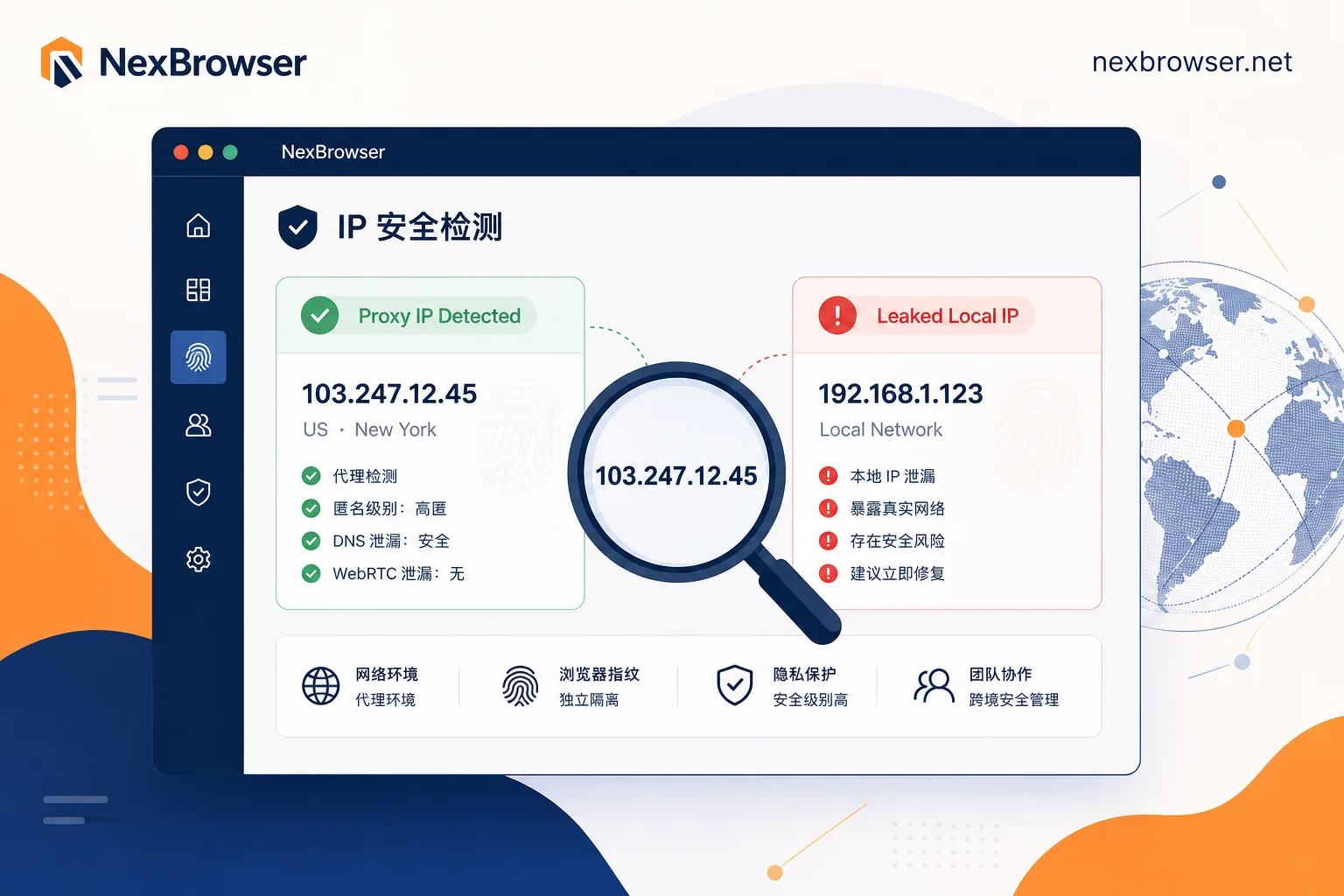
Note that while an internal IP (e.g., 192.168.x.x) displayed by WebRTC does not directly expose public identity, in certain high-risk scenarios, leaking an internal IP is itself an anomaly that might indicate a virtual machine or containerized deployment.
Why HTTP/HTTPS Requests Show the Proxy IP
When you configure an HTTP or SOCKS5 proxy in browser settings, you are essentially establishing a forwarding tunnel at the application layer. According to Chromium’s network stack design documents, its built-in SOCKS proxy configuration primarily handles forwarding application-layer URL requests. This means when you visit a webpage, the browser sends packets to the proxy server, which then makes the request to the target site on your behalf and returns the data.
Therefore, if the detection page shows the HTTP exit IP as your configured proxy IP, it is a clear indicator that basic configurations such as username, password, port, and protocol type are correct. In this case, there is no need to repeatedly switch proxy providers or re-enter credentials; the root cause is not in this layer.
Why WebRTC’s STUN/ICE Probes Bypass Application-Layer Proxies
Since HTTP goes through the proxy, why does WebRTC still leak? This arises from differences at the protocol level. According to IETF RFC 8828, WebRTC uses the ICE (Interactive Connectivity Establishment) framework for connectivity checks to enable point-to-point real-time communication. STUN (Session Traversal Utilities for NAT) servers are used to discover the client’s public mapped address.
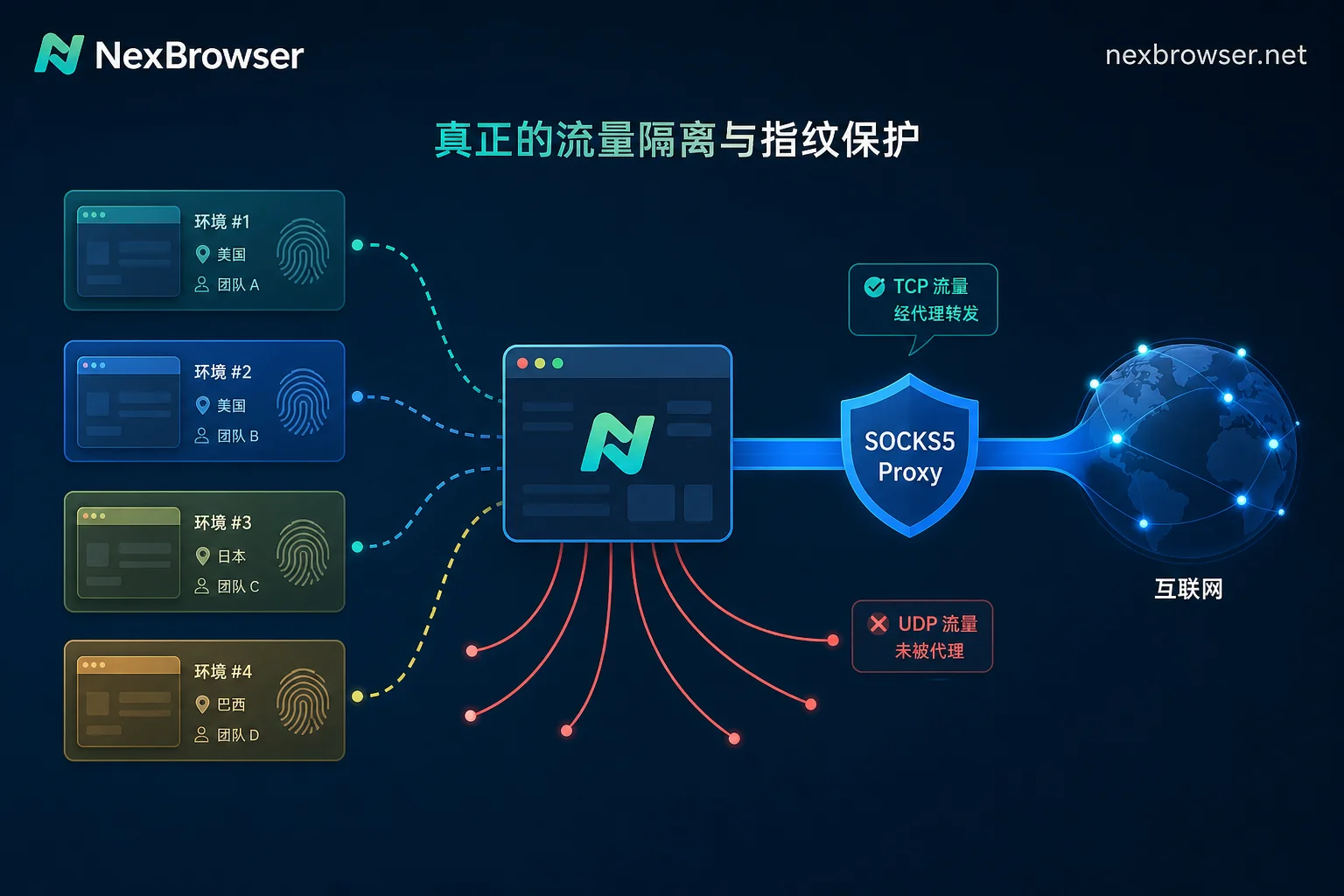
The key point is that when a client is configured with a classic application-layer proxy (such as HTTP/SOCKS5) but retains a direct path to the internet, WebRTC’s STUN connectivity checks often bypass these application-layer proxies and send UDP packets directly to external servers. This low-level traversal behavior causes detection tools to capture the client’s real public IP. This is a known protocol behavior, not a sign that the proxy provider has disappeared or the environment was accidentally reset—rather, two different network paths operate independently.
SOCKS5 Supports UDP Association: Why Media Traffic Still Might Not Be Intercepted
Many technical users wonder: RFC 1928’s SOCKS5 protocol clearly supports the UDP ASSOCIATE command, theoretically handling UDP traffic, so why is there still a leak? There is a common misconception here: support for a protocol standard does not mean automatic enablement by client implementations.
Chromium’s native network stack, when handling SOCKS proxies, by default focuses on forwarding controlled TCP traffic. For uncontrolled underlying UDP traffic—especially WebRTC media streams and control signaling—the browser kernel does not automatically encapsulate them into the SOCKS5 UDP association channel. This creates a split between the application-layer proxy and the underlying media communication channel’s network egress. The acceptance criterion is clear: just knowing the proxy protocol type (e.g., SOCKS5 vs HTTP) cannot infer whether WebRTC is controlled; you must actually read the WebRTC address on the detection page to verify.
The Four Modes of WebRTC IP Handling and What They Block
To resolve the above split, intervention at the browser kernel level is required. Google Chrome enterprise policies provide the WebRtcIPHandling option with four handling modes, each offering varying degrees of IP exposure control.
| Mode Name | Behavior Description | Applicable Scenarios and Risks |
|---|---|---|
| default | Use all available physical network interfaces for direct connection | Default state, extremely prone to leaking real public and internal IPs |
| default_public_and_private_interfaces | Allow use of public and private interfaces | Leak risk remains high; mainly for specific network debugging |
| default_public_interface_only | Allow only public interfaces | Hides internal IP but may still leak real public IP |
| disable_non_proxied_udp | Force only UDP traffic that goes through the proxy | If the proxy does not support UDP or is misconfigured, WebRTC may fail or fall back to TCP |
When set to disable_non_proxied_udp (i.e., Mode 4 forced proxy mode), WebRTC will only allow UDP traffic proxied through the UDP SOCKS proxy or be forced to fall back to TCP proxying. However, completely disabling WebRTC may not be optimal, as many modern platforms treat environments unable to invoke WebRTC APIs as automated crawlers or abnormal fingerprints. The industry trend is shifting from crude “disable” to more refined “replace,” “forward,” or “disable non-proxied UDP” strategies to balance leak prevention and business compatibility.
Local VPN and System Global Proxy Causing Routing Conflicts
Beyond browser-internal configurations, the host machine’s network environment is also a significant variable. If you run a global VPN or system proxy in TUN/TAP virtual NIC mode on the local host, while simultaneously using per-environment proxies in a fingerprint browser, routing conflicts are highly likely.
In such a topology, the host’s routing table may hijack the default gateway. When the browser sends packets intended for the proxy server, they may be re-encapsulated, leading to timeouts or loops. More critically, WebRTC probe packets might bypass the intended proxy path and leak directly through the VPN virtual interface or the real physical NIC. A simple diagnostic: disable your local VPN and system proxy, restart the browser environment, and re-read both addresses. If the readings change, you can confirm that the conflict stems from the host’s network routing overlay.
Orderly Troubleshooting: First HTTP Exit, Then WebRTC, Finally Local Network
To tackle complex IP splitting, follow this logical sequence to narrow down the problem.
First, read the HTTP exit IP on the detection page. If it shows the local IP, return to the proxy configuration and check credentials, port, and protocol type to ensure the application layer is functional. If the HTTP exit shows the proxy IP, proceed to step two.
Next, read the WebRTC address. If it matches the HTTP exit IP, the configuration is successful. If a different public address appears, non-proxied UDP is not restricted, requiring adjustment of browser kernel policy or the fingerprint browser’s WebRTC settings. If an internal address (like 192.168.x.x) appears, it is a local interface exposure that also needs policy adjustments to block.
Finally, repeat the test in a clean network state with the local VPN and system proxy disabled. This step aims to distinguish whether the issue lies in browser policy configuration or host routing interference.
For execution, in NexBrowser, use the per-environment HTTP/HTTPS/SOCKS5 proxy binding feature to precisely configure network parameters for each environment. After launching the environment, always perform an exit check first to confirm that HTTP and WebRTC readings match expectations before logging into accounts, avoiding risk triggers on unverified states.
Post-Fix Verification and Long-Term Signals to Monitor
After adjusting the configuration, verification is not complete. Upon restarting the environment, re-read the HTTP exit IP to confirm its geo-location matches expectations; on the same detection page, read the WebRTC address to confirm it is consistent with the HTTP exit IP or that no local address appears. For teams running multiple environments in parallel, cross-verify each window to ensure no cross-use of exits.
Additionally, several signals require long-term monitoring. If the proxy disconnects, the browser may fall back to direct connection, leaking the real IP instantly. If the host changes networks or restarts, system proxy states may change, affecting routing rules. After updating browser kernel versions, default WebRTC policy values may also differ. These dynamic changes require administrators to periodically re-run exit checks, not assume a one-time fix.
Common Questions
Bound SOCKS5 proxy but WebRTC still shows local IP—is that normal?
This is a common protocol behavior when kernel-level forced proxy mode is not enabled. Although SOCKS5 supports UDP association, Chromium by default does not automatically route WebRTC’s UDP packets through the proxy. Unless configured with disable_non_proxied_udp or using a fingerprint browser with replacement functionality, leaking the local IP via STUN probes is technically logical and requires policy adjustments to fix.
Fingerprint browser proxy connected but detection site shows real IP—how to troubleshoot?
Follow a layered approach along the traffic path. First, confirm whether the HTTP exit IP is the proxy IP. If yes, basic configuration errors are ruled out. Next, check the WebRTC reading; if it shows the local public IP, adjust the browser’s WebRTC policy to “disable non-proxied UDP” or “replace.” Finally, check if the host has a global VPN enabled; TUN/TAP mode often causes routing hijacks—disabling it and retrying can verify this factor.
Will running a VPN and binding a proxy in a fingerprint browser conflict?
It is highly likely to conflict. A global VPN running on the host modifies the routing table and may hijack the gateway, interfering with the fingerprint browser’s per-environment proxy. This can cause packets destined for the proxy server to be re-encapsulated, or make WebRTC probes bypass the proxy and leak directly through the VPN virtual NIC or physical NIC. It is recommended to disable the host’s global VPN when using a fingerprint browser, or ensure the two routing rules do not interfere.
How to detect whether a browser has a WebRTC leak?
The simplest method is to visit a professional IP detection website (e.g., browserleaks.com). Compare the displayed “IPv4 Address” (usually from HTTP requests) and “Local IP / Public IP” (from WebRTC probes). If the two differ, and the WebRTC column shows your real public IP or internal address, a leak is confirmed. Alternatively, you can use the browser console to run code that listens to RTCPeerConnection events for more low-level evidence.



Comments(0)